
That makes the new XPS 13 a credible answer to Apple’s $699 MacBook Neo only for narrowly defined buyers—students and home users who need Windows, spend most of their time in a browser and Office apps, and value a small metal laptop over raw performance. For anyone intending to use Photoshop, run heavier multitasking workloads, keep the machine for several years, or connect a collection of existing accessories, the base configuration’s price is less of a bargain than it first appears.
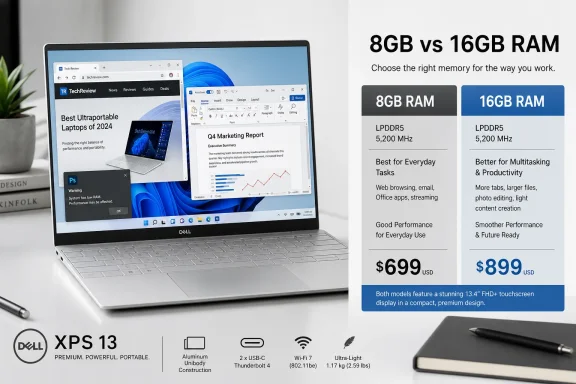
PCMag tested both memory tiers and found that the 8GB XPS 13 could not finish its Photoshop automation run or Cinebench rendering tests, while the 16GB version completed them. That is not a minor benchmark gap. It is evidence that Dell’s cheapest XPS is approaching the point where memory capacity dictates which tasks are reliably practical, rather than merely how quickly they finish.
 A $699 XPS Changes the Windows Budget-Laptop Conversation
The new XPS 13 is significant because Dell has put features normally reserved for its premium range into a laptop sold at a mainstream price. Dell’s own comparison page positions it directly against the MacBook Neo: both start at $699, while eligible students can buy either at $599. Dell lists a 13.4-inch 2.5K touch panel, backlit keyboard, Wi‑Fi 7, and 512GB SSD for the XPS 13, versus Apple’s 13-inch non-touch display and 256GB starting storage.
Those are useful advantages rather than cosmetic ones. A 512GB drive gives a Windows user more room for local files and applications before external storage or cleanup becomes necessary. The touch display and 120Hz variable refresh capability will appeal to people who prefer Windows’ touch-friendly interface, while the backlit keyboard closes an odd feature gap in Apple’s lower-cost notebook.
Tom’s Guide independently reached a similar conclusion about the core proposition, calling the XPS 13 a strong $699 budget Windows laptop and measuring 14 hours, 29 minutes in its web-surfing battery test. Its result also placed the Dell ahead of the MacBook Neo in that particular test, which ran for 13 hours, 26 minutes.
The physical package is therefore not Dell’s problem. The XPS 13 is thin at 0.5 inch, lighter than the 2.7-pound MacBook Neo, and built from aluminum rather than the plastic common in budget Windows systems. Gizmodo’s review likewise found that the XPS 13’s construction feels more expensive than its price suggests. Dell has accomplished the difficult part: reducing the entry price without making the laptop feel cheap in the hand.
The problem is that Dell’s aggressive price point has been achieved with a configuration that is too constrained for a laptop positioned as a long-term general-purpose PC.
The 8GB Model Is a Basic-Tasks Machine
The base XPS 13 uses Intel’s Core 5 320, a six-core Series 3 chip from the company’s entry-level Wildcat Lake platform. Intel’s own current performance material identifies the Core 5 320 as Wildcat Lake, while Dell lists the configuration with 8GB or 16GB of LPDDR5X memory and 512GB of SSD storage.
The processor is not designed to compete with higher-tier Core Ultra laptops in sustained creation workloads or gaming. That is expected at this price. The more consequential limit is memory. PCMag found the 8GB machine workable in low-demand use but less responsive in ordinary Windows navigation than the 16GB version, with pauses while launching applications and completing tasks.
More concerningly, PCMag reports that its automated Adobe Photoshop test would launch but could not complete because of insufficient memory. Cinebench also failed to finish on the 8GB model; the otherwise similar 16GB XPS 13 completed both. The two XPS machines also failed to run some more demanding 3DMark tests, reinforcing that this is not a system for 3D modeling, modern PC games, GPU-heavy creative workloads, or ray tracing.
Windows users should read those test failures as a buying boundary. The $699 machine should handle web research, email, streaming, note-taking, Microsoft 365 documents, video calls, and straightforward schoolwork. It should not be bought on the assumption that an XPS badge makes it a compact substitute for a creator laptop or a higher-end ultrabook.
The memory issue also carries more weight on a Windows PC than it did several years ago. Windows 11, a browser with many tabs, cloud-sync clients, endpoint protection, Teams or Slack, and a few background utilities can consume a meaningful portion of an 8GB system before a user deliberately opens a demanding application. A machine may remain usable, but the margin for switching tasks and handling occasional larger jobs shrinks quickly.
The $200 RAM Upgrade Changes the Competition
Dell’s configuration strategy is the XPS 13’s central weakness. The base unit costs $699.99, but moving from 8GB to 16GB brings the price to $899.99. Dell’s storefront currently lists a 16GB Core 5 320 system at that price. No CPU, storage, or display upgrade accompanies the memory increase.
At $700, the XPS 13 is a particularly attractive Windows option because it pairs a premium enclosure with a sharp screen and 512GB drive. At $900, it becomes harder to recommend on design alone. Buyers are no longer comparing it only with the MacBook Neo or lower-cost plastic notebooks; they can consider larger systems with more capable processors, more ports, and better capacity for sustained work.
PCMag makes this distinction plainly in its review. It found the 16GB XPS 13 more responsive than the 8GB model, but argued that the higher price puts Dell into competition with systems such as HP’s OmniBook 5 14, which provides stronger overall performance. Gizmodo reached a related conclusion, praising the $900 16GB configuration as an appealing everyday machine while also treating that higher price as the more meaningful comparison point.
This is where Dell’s marketing comparison with Apple needs qualification. Apple’s MacBook Neo begins with 8GB of unified memory, too, and Apple’s official store shows the same $699 starting price after the company raised it from the original $599 launch price. But matching a memory number does not make two computers interchangeable. Their operating systems, application stacks, storage options, and memory behavior are different, and the XPS 13’s Windows benchmark failures show that the base model has real limits under some common professional software.
For a buyer choosing on price alone, the comparison remains legitimate. For someone choosing a laptop expected to absorb unpredictable workloads over several years, it is safer to compare the 16GB XPS 13 against other $900 Windows machines, rather than treating the added memory as an optional luxury.
Premium Features Come With Everyday Trade-Offs
The XPS 13’s other compromises are more conventional, though still worth putting on a purchase checklist. It has two USB-C ports—one on each side—with 10Gbps data support, charging, power delivery, and DisplayPort 2.1 on the Core 5 version. Dell says future Core Ultra-based variants will add Thunderbolt 4 support.
There is no USB-A port, HDMI connector, SD card reader, or 3.5mm headphone jack. The absence of HDMI and USB-A is survivable on a laptop this thin, particularly for people who already use a USB-C dock. Removing the headphone jack is less defensible. Apple retained one on the MacBook Neo, and wired headsets remain common in offices, classrooms, audio work, and IT troubleshooting.
Dell includes a compact 65W power adapter, and the machine has a 1080p IR webcam for Windows Hello. The webcam is serviceable rather than exceptional, according to both PCMag and Tom’s Guide. Speakers are reportedly strong for the laptop’s size, another welcome departure from the thin, underpowered audio often found in budget notebooks.
The display is a more meaningful win. PCMag found its 1600p panel sharp and noted good color coverage, though it also judged the matte screen dim-looking in practical use despite respectable measured brightness. Buyers who work often outdoors or in brightly lit offices should see the panel in person if possible; a matte coating can reduce reflections but may also make a display appear less vivid.
Dell Has Built a Good Chassis Around a Risky Default
The 2026 XPS 13 is a much-needed proof that a Windows laptop priced below $700 can still be light, metal-clad, compact, and pleasant to use. It offers things the MacBook Neo does not: a touch display, a backlit keyboard, faster wireless connectivity, more starting SSD storage, Windows Hello face recognition, and a half-pound weight advantage.
But the PCMag review exposes the uncomfortable conclusion behind Dell’s entry price: 8GB is the configuration that makes the XPS 13 affordable, while 16GB is the configuration that makes it broadly dependable. Dell has not made the latter cheap enough to preserve the base model’s unusually strong value argument.
Buy the $699 XPS 13 only if its job is clear and light: browser work, documents, classes, streaming, remote meetings, and Windows compatibility in a very portable chassis. Buyers who expect to work in Adobe applications, multitask heavily, or keep the laptop through several Windows 11 feature cycles should treat the $899 16GB model as the real starting point—and compare it against the much wider field of $900 Windows laptops before deciding.