
Mashable’s test of MacBook alternatives lands on a persuasive answer for Windows buyers: the Dell XPS 14 (DA14260) with Intel Core Ultra X7 358H and the 2.8K tandem OLED is one of the few thin Windows laptops that can credibly sit beside a 14-inch MacBook Pro on build quality, display quality, portability, and everyday performance. But “beat Apple” is true only when the buyer’s priorities include Windows software, a touchscreen, and more serviceable storage—not when the comparison is reduced to raw CPU speed, battery life, ports, or price.
The distinction is important because the reviewed XPS 14 configuration is not Dell’s entry-level model with a faster screen bolted onto it. Dell separates the lineup sharply: the low-end Core Ultra 5 325 model has an eight-core CPU, standard Intel graphics, 16GB of memory and a 1920×1200 IPS panel, while the Core Ultra X7 358H moves to a 16-core processor, Intel Arc B390 graphics, 32GB or 64GB of LPDDR5x memory, and the 2880×1800 OLED touchscreen. Those are effectively two different performance classes sharing one aluminum chassis.
Mashable’s conclusion that the upgraded XPS is the better buy follows the wider test record. Tom’s Guide, Tom’s Hardware, and TechRadar all found Dell’s revived XPS design substantially better than the recent Dell 14 Premium generation. The physical function row is back, the haptic touchpad now has tactile boundary markers, and Dell removed the design decisions that made the earlier model look futuristic while making it harder to operate without looking down.
The catch is that Windows shoppers should not read “MacBook alternative” as shorthand for “MacBook replacement at any configuration.” The XPS 14 earns that comparison only at the high end, where it becomes expensive enough that Apple’s MacBook Pro is no longer the obvious premium-priced outlier.
Dell currently lists the XPS 14 with either the Core Ultra 5 325, Core Ultra 7 355, Core Ultra X7 358H, or Core Ultra X9 388H. Intel’s own specifications confirm the dividing line: the Ultra 5 325 and Ultra 7 355 are eight-core parts with standard Intel graphics, while the X7 358H has 16 cores and Intel Arc B390 integrated graphics. That B390 GPU has 12 Xe cores, not the four Xe cores found in the lower-tier graphics configuration.
That makes the base model a battery-first ultraportable and the X7 model a thin, integrated-graphics performance notebook. Buyers should not expect the lower-priced XPS 14 to behave like the premium configuration reviewed by Mashable. Dell’s configurator itself reflects this: choosing the X7 also changes memory, graphics, and display options rather than simply swapping in a faster processor.
Independent test results show why. Tom’s Guide measured the X7-equipped XPS 14 at 2,867 in Geekbench 6 single-core and 16,927 in multi-core testing, with a 4-minute, 32-second HandBrake video transcode. Tom’s Hardware found the Arc B390-equipped system scored 1,446 in 3DMark Steel Nomad, compared with 532 for the Core Ultra 7 355 configuration. That is a large enough graphics gap to affect photo work, GPU-accelerated creative applications, and game settings—not merely benchmark charts.
One reporting error is worth clearing up before anyone uses those numbers for a purchasing decision. Tom’s Hardware refers in portions of its XPS 14 review to an “Ultra X7 388H.” Intel does not list such a processor. Intel’s catalog has a Core Ultra X7 358H and a Core Ultra X9 388H. The tested Dell configuration elsewhere on the same review page is identified as the X7 358H, matching Dell’s product page and Tom’s Guide’s specification table. The “X7 388H” references are therefore a labeling mistake, not evidence of a secret higher-bin X7 processor.
That correction matters because Dell sells an actual X9 388H upgrade, which carries a higher 5.1GHz turbo specification. An XPS 14 buyer should confirm the processor in the order summary rather than assuming an article’s benchmark label identifies the exact SKU.
On comparable CPU and endurance measurements, however, the 14-inch MacBook Pro with Apple’s M5 remains ahead. Tom’s Hardware put the M5 MacBook Pro at 4,288 single-core and 17,926 multi-core in Geekbench 6, versus 2,867 and 16,927 for the X7 XPS 14. The Dell closes the multi-core gap remarkably well for an x86 Windows ultraportable, but Apple retains a decisive lead in single-threaded work and a smaller but real advantage in the multi-core result.
Battery testing tells a similarly qualified story. Mashable reported roughly 10 hours in its video rundown with the X7 OLED model. Other labs, using different workloads, landed closer to 12 hours: Tom’s Guide recorded 12 hours and 23 minutes of Wi-Fi web browsing at 150 nits, while TechRadar measured 12 hours and 19 minutes under moderate browsing and streaming loads. Those are respectable results for an Intel performance notebook with a high-resolution OLED touchscreen.
They are not MacBook Pro results. Tom’s Guide measured the M5 MacBook Pro at 18 hours in its test, while Tom’s Hardware recorded 18 hours and 14 minutes. The precise gap varies with test methodology, display brightness, browser workload, and the OLED panel’s refresh rate, but the direction does not: the XPS 14 has finally reached all-day Windows battery life; the MacBook Pro still provides substantially more unplugged headroom.
Dell’s display choices explain much of the split. The 2.8K OLED version has a 20Hz-to-120Hz variable refresh range and consumes more power. The non-touch 1920×1200 LCD can drop as low as 1Hz. Tom’s Hardware measured 20 hours and 41 minutes from that lower-resolution LCD model, versus 12 hours and 23 minutes from the OLED. The OLED is the machine to buy for image quality and the Arc B390 graphics configuration; the LCD is the machine to buy for endurance. Calling either result “XPS 14 battery life” without naming the panel masks a nearly eight-and-a-half-hour difference.
Dell also made one less obvious improvement: the USB-C ports are modular and screwed in rather than permanently tied to the main board. Its service documentation confirms that the storage drive can be removed, with support for either M.2 2230 or full-length M.2 2280 SSDs depending on configuration. The battery is removable as well, although reaching it requires removing the palm rest and keyboard assembly, and Dell still solders the Wi-Fi module and memory.
That is not a Framework-level repair design, but it is a material advantage over a MacBook Pro for a buyer who expects to replace a worn battery or expand storage later. It also means a damaged USB-C connector does not automatically imply a motherboard replacement.
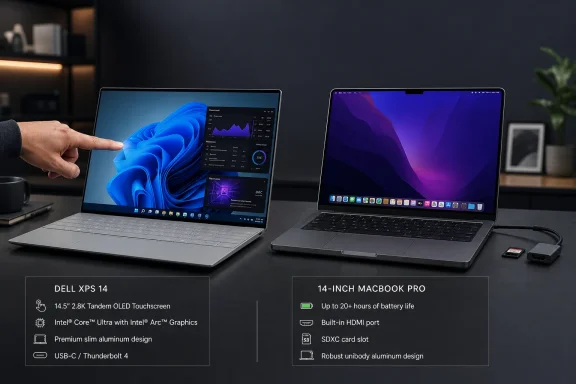
The price for thinness remains I/O. The XPS 14 offers three Thunderbolt 4/USB-C ports and a 3.5mm headphone jack. It lacks USB-A, HDMI, and an SD or microSD card reader. TechRadar correctly notes that this affects photographers, conference-room presenters, and users who routinely connect external media or displays: they will need a dock or adapter, and charging consumes one of the three USB-C ports.
Apple’s 14-inch MacBook Pro includes HDMI, an SDXC slot, and MagSafe alongside its USB-C ports. The XPS can absolutely drive displays and import media through Thunderbolt, but it does so less conveniently. Dell improved the controls and repair path; it did not make this a port-rich machine.
Apple’s current 14-inch MacBook Pro with M5 starts at $1,699 with 16GB of unified memory and 1TB of storage. The 14-inch M5 Pro model begins at $2,199. A fully configured XPS 14 may therefore cost more than the entry M5 MacBook Pro while delivering shorter battery life and lower CPU benchmark results, or it may compete directly with an M5 Pro model while offering a different software platform and a touchscreen.
For Windows professionals, that is not an indictment of Dell. A MacBook cannot substitute for Windows-specific enterprise tools, Microsoft’s desktop development stack, certain games, or specialized applications that expect x86 Windows drivers. But it does end the old assumption that choosing Windows means accepting a lower premium price in exchange for better flexibility.
The XPS 14 is the strongest evidence yet that Dell has learned from the Dell Premium detour. It looks and feels like a flagship again, its X7 configuration supplies credible CPU and integrated-GPU performance, and its OLED panel gives Windows buyers a screen worthy of the price. For buyers who need Windows, it can beat a MacBook Pro where it counts: running their actual work without compromises. For everyone else, the battery, ports, and price ledger still favors Apple.
Mashable’s conclusion that the upgraded XPS is the better buy follows the wider test record. Tom’s Guide, Tom’s Hardware, and TechRadar all found Dell’s revived XPS design substantially better than the recent Dell 14 Premium generation. The physical function row is back, the haptic touchpad now has tactile boundary markers, and Dell removed the design decisions that made the earlier model look futuristic while making it harder to operate without looking down.
The catch is that Windows shoppers should not read “MacBook alternative” as shorthand for “MacBook replacement at any configuration.” The XPS 14 earns that comparison only at the high end, where it becomes expensive enough that Apple’s MacBook Pro is no longer the obvious premium-priced outlier.
 The Core Ultra X7 model is the real XPS 14
Dell currently lists the XPS 14 with either the Core Ultra 5 325, Core Ultra 7 355, Core Ultra X7 358H, or Core Ultra X9 388H. Intel’s own specifications confirm the dividing line: the Ultra 5 325 and Ultra 7 355 are eight-core parts with standard Intel graphics, while the X7 358H has 16 cores and Intel Arc B390 integrated graphics. That B390 GPU has 12 Xe cores, not the four Xe cores found in the lower-tier graphics configuration.That makes the base model a battery-first ultraportable and the X7 model a thin, integrated-graphics performance notebook. Buyers should not expect the lower-priced XPS 14 to behave like the premium configuration reviewed by Mashable. Dell’s configurator itself reflects this: choosing the X7 also changes memory, graphics, and display options rather than simply swapping in a faster processor.
Independent test results show why. Tom’s Guide measured the X7-equipped XPS 14 at 2,867 in Geekbench 6 single-core and 16,927 in multi-core testing, with a 4-minute, 32-second HandBrake video transcode. Tom’s Hardware found the Arc B390-equipped system scored 1,446 in 3DMark Steel Nomad, compared with 532 for the Core Ultra 7 355 configuration. That is a large enough graphics gap to affect photo work, GPU-accelerated creative applications, and game settings—not merely benchmark charts.
One reporting error is worth clearing up before anyone uses those numbers for a purchasing decision. Tom’s Hardware refers in portions of its XPS 14 review to an “Ultra X7 388H.” Intel does not list such a processor. Intel’s catalog has a Core Ultra X7 358H and a Core Ultra X9 388H. The tested Dell configuration elsewhere on the same review page is identified as the X7 358H, matching Dell’s product page and Tom’s Guide’s specification table. The “X7 388H” references are therefore a labeling mistake, not evidence of a secret higher-bin X7 processor.
That correction matters because Dell sells an actual X9 388H upgrade, which carries a higher 5.1GHz turbo specification. An XPS 14 buyer should confirm the processor in the order summary rather than assuming an article’s benchmark label identifies the exact SKU.
Apple still wins the straightforward performance comparison
The XPS 14’s case against the MacBook Pro is strongest when Windows is mandatory. It runs the full Windows 11 desktop stack without translation layers, includes a touchscreen, supports Wi-Fi 7 and Bluetooth 6, and can play a broader catalogue of native PC games than macOS. For developers, engineers, enterprise users, and enthusiasts dependent on Windows-only tools, that is a practical advantage rather than an abstract platform preference.On comparable CPU and endurance measurements, however, the 14-inch MacBook Pro with Apple’s M5 remains ahead. Tom’s Hardware put the M5 MacBook Pro at 4,288 single-core and 17,926 multi-core in Geekbench 6, versus 2,867 and 16,927 for the X7 XPS 14. The Dell closes the multi-core gap remarkably well for an x86 Windows ultraportable, but Apple retains a decisive lead in single-threaded work and a smaller but real advantage in the multi-core result.
Battery testing tells a similarly qualified story. Mashable reported roughly 10 hours in its video rundown with the X7 OLED model. Other labs, using different workloads, landed closer to 12 hours: Tom’s Guide recorded 12 hours and 23 minutes of Wi-Fi web browsing at 150 nits, while TechRadar measured 12 hours and 19 minutes under moderate browsing and streaming loads. Those are respectable results for an Intel performance notebook with a high-resolution OLED touchscreen.
They are not MacBook Pro results. Tom’s Guide measured the M5 MacBook Pro at 18 hours in its test, while Tom’s Hardware recorded 18 hours and 14 minutes. The precise gap varies with test methodology, display brightness, browser workload, and the OLED panel’s refresh rate, but the direction does not: the XPS 14 has finally reached all-day Windows battery life; the MacBook Pro still provides substantially more unplugged headroom.
Dell’s display choices explain much of the split. The 2.8K OLED version has a 20Hz-to-120Hz variable refresh range and consumes more power. The non-touch 1920×1200 LCD can drop as low as 1Hz. Tom’s Hardware measured 20 hours and 41 minutes from that lower-resolution LCD model, versus 12 hours and 23 minutes from the OLED. The OLED is the machine to buy for image quality and the Arc B390 graphics configuration; the LCD is the machine to buy for endurance. Calling either result “XPS 14 battery life” without naming the panel masks a nearly eight-and-a-half-hour difference.
Dell fixed usability, but did not fix the port problem
The 2026 redesign corrects the most visible mistakes of Dell’s prior XPS experiment. Physical function keys return, including a proper Esc key. The laptop is about three pounds, uses a CNC-machined aluminum chassis, and retains a clean, premium exterior without requiring the user to operate a touch-sensitive function strip.Dell also made one less obvious improvement: the USB-C ports are modular and screwed in rather than permanently tied to the main board. Its service documentation confirms that the storage drive can be removed, with support for either M.2 2230 or full-length M.2 2280 SSDs depending on configuration. The battery is removable as well, although reaching it requires removing the palm rest and keyboard assembly, and Dell still solders the Wi-Fi module and memory.
That is not a Framework-level repair design, but it is a material advantage over a MacBook Pro for a buyer who expects to replace a worn battery or expand storage later. It also means a damaged USB-C connector does not automatically imply a motherboard replacement.
The price for thinness remains I/O. The XPS 14 offers three Thunderbolt 4/USB-C ports and a 3.5mm headphone jack. It lacks USB-A, HDMI, and an SD or microSD card reader. TechRadar correctly notes that this affects photographers, conference-room presenters, and users who routinely connect external media or displays: they will need a dock or adapter, and charging consumes one of the three USB-C ports.
Apple’s 14-inch MacBook Pro includes HDMI, an SDXC slot, and MagSafe alongside its USB-C ports. The XPS can absolutely drive displays and import media through Thunderbolt, but it does so less conveniently. Dell improved the controls and repair path; it did not make this a port-rich machine.
The pricing story is less flattering than the design story
Mashable tested a $2,000 base configuration and a roughly $2,900 upgraded OLED/X7 configuration. U.S. pricing varies substantially by configuration and promotion, but Dell’s listed entry point is $1,599.99, and independent reviews have placed a 32GB, 1TB, Core Ultra X7 OLED test unit around $2,199 to $2,700. The broad conclusion holds: once equipped with the hardware that makes it a serious MacBook Pro rival, the XPS 14 is no longer a value alternative.Apple’s current 14-inch MacBook Pro with M5 starts at $1,699 with 16GB of unified memory and 1TB of storage. The 14-inch M5 Pro model begins at $2,199. A fully configured XPS 14 may therefore cost more than the entry M5 MacBook Pro while delivering shorter battery life and lower CPU benchmark results, or it may compete directly with an M5 Pro model while offering a different software platform and a touchscreen.
For Windows professionals, that is not an indictment of Dell. A MacBook cannot substitute for Windows-specific enterprise tools, Microsoft’s desktop development stack, certain games, or specialized applications that expect x86 Windows drivers. But it does end the old assumption that choosing Windows means accepting a lower premium price in exchange for better flexibility.
The XPS 14 is the strongest evidence yet that Dell has learned from the Dell Premium detour. It looks and feels like a flagship again, its X7 configuration supplies credible CPU and integrated-GPU performance, and its OLED panel gives Windows buyers a screen worthy of the price. For buyers who need Windows, it can beat a MacBook Pro where it counts: running their actual work without compromises. For everyone else, the battery, ports, and price ledger still favors Apple.
References
- Primary source: Mashable SEA
Published: 2026-08-02T09:30:00+00:00
Loading…
sea.mashable.com - Related coverage: tomsguide.com
Loading…
www.tomsguide.com - Related coverage: techradar.com
I loved a lot of things about the Dell XPS 14 (2026), but it won't make me ditch my MacBook Pro... yet | TechRadar
Dell’s MacBook rival is backwww.techradar.com - Related coverage: techradar.com
Loading…
www.techradar.com - Related coverage: apple.com
Apple introduces MacBook Pro with all-new M5 Pro and M5 Max - Apple
Apple announced the latest 14- and 16-inch MacBook Pro with the all-new M5 Pro and M5 Max.www.apple.com - Related coverage: apple.com
Loading…
www.apple.com - Related coverage: support.apple.com
Loading…
support.apple.com - Related coverage: cdsassets.apple.com
Loading…
cdsassets.apple.com