
DoomPaint turns Microsoft Paint into a playable, clipboard-fed display for Doom—but the game is not running inside Paint, and that distinction is the whole technical achievement. The public project from Microsoft Azure CTO Mark Russinovich uses Paint as a deliberately inefficient front end: ViZDoom runs the game engine elsewhere, while each newly rendered frame is delivered through the Windows clipboard and pasted into Paint as an actual image edit. TechSpot first highlighted the project on August 3, and Russinovich’s GitHub repository provides the more revealing implementation details.
For Windows users, the point is less that another unlikely object can “run Doom” and more that DoomPaint demonstrates a surprisingly resilient path through several old Windows mechanisms: OLE clipboard data objects, synthetic input, UI Automation, a global low-level keyboard hook, and Paint’s ordinary paste and undo behavior. It is a novelty project, but a very specific one that exposes how much remains possible through Win32-era interoperability rather than direct app modification.
DoomPaint runs ViZDoom, the ZDoom-based environment widely used for visual AI and reinforcement-learning work, as the actual engine. ViZDoom renders without presenting its own game window; DoomPaint converts those frames into device-independent bitmaps and makes them available to Paint through the Windows clipboard.
Paint then receives a synthetic paste command, placing the current bitmap onto the canvas. Each incoming frame lands as a floating selection, and the next paste implicitly commits the previous one. That behavior is important: DoomPaint does not capture a video and replay it in a Paint window. The Paint document is genuinely accumulating a sequence of edits, one rendered game frame at a time.
Russinovich’s repository is unusually direct about the joke: Paint “renders the game but does not compute it.” No Paint code is altered, injected, or replaced. The application remains a passive consumer of a bitmap supplied by another process, which is why calling this a port would be misleading. It is better described as a display transport experiment built around Paint.
That still makes it more substantive than a prerecorded animation pasted into a drawing app. The game state, player controls, sound effects, simulation clock, and frame production all remain live. Paint is simply being coerced into behaving like a monitor whose refresh operation happens to be “paste image.”
Russinovich writes that repeatedly calling
The fix is what elevates DoomPaint above a simple keyboard macro. Instead of replacing the clipboard contents for every frame, the project places one OLE
Microsoft’s own Win32 documentation describes delayed clipboard rendering as a mechanism for providing data only when a consumer requests it. DoomPaint takes advantage of the same broader model, but uses the consumer’s request as a synchronization signal. When Paint calls
The result is a self-clocking loop rather than a guessed delay timer. The display rate becomes the lower of two limits:
That matters because the expensive stage is not ViZDoom’s rendering. The source code documentation identifies Paint’s per-frame pixel work as the dominant cost. At 320×200, DoomPaint can approach Doom’s native 35 Hz tick rate; at higher resolutions, the result depends heavily on the machine and can fall into the project’s intentionally unflattering “spreadsheet-tier” territory.
There is a visual compromise. Original Doom was designed around non-square pixels and a 4:3 CRT presentation, so raw 320×200 can look horizontally stretched. The 320×240 option produces the more familiar 4:3 framing, while Paint’s own fit-to-window zoom handles the on-screen scaling.
The project does not claim to turn Paint into a gaming-quality renderer, and it should not be treated as one. Paint is processing a full document edit stream, maintaining an undo history and a bitmap canvas while a second process supplies up to 35 new images per second. The surprising part is that it can remain playable at all without modifying Paint.
Instead, it rewinds only the visual document. The engine itself continues to run independently, so this is a Paint-history effect, not a real save-state system. It is still a perfect illustration of what the program is actually doing: the Paint canvas is a record of frames, not an accelerated game surface.
Likewise, using File > Save writes the currently displayed frame as a legitimate image file. There is no screenshot capture path required because Paint believes the user has been editing an image. When DoomPaint exits, it intentionally leaves the last frame as an uncommitted floating selection, avoiding an extra synthetic keystroke or click that could interfere with the focused application.
The input layer is similarly careful. Paint must stay foregrounded for pasting to work reliably, but ordinary Doom controls cannot be allowed to reach Paint. A
Russinovich also documents a practical collision with utilities such as PowerToys: some tools install their own hooks and can intercept a bare Ctrl key before the game receives it. DoomPaint captures Ctrl for firing and provides
That is a more limited arrangement than the phrase “real Doom in Paint” can imply. The original shareware episode and its Bobby Prince music are present, but the out-of-box experience does not become the full commercial Doom merely because a user owns it. Russinovich’s README says that dropping a commercial
There are other intentional limitations. ViZDoom starts directly inside a map, so DoomPaint has no title screen, attract-mode demos, or in-game menu flow. The project exposes command-line choices for map, skill, resolution, sound, music, and the Freedoom Phase 2 data set, but it remains an experimental wrapper around a headless engine, not a general-purpose Doom launcher.
The included music pipeline also shows how much custom work sits behind the visual gag. ViZDoom omits ZDoom music playback, so DoomPaint extracts MUS music lumps from the WAD, converts them to MIDI, and routes them through Windows’ MIDI facilities. Sound effects come from ViZDoom through OpenAL. The project even replaces ViZDoom’s bundled OpenAL build with a newer version to better follow default audio-device changes.
That makes DoomPaint a poor candidate for use during ordinary work, remote support, or any task where clipboard contents matter. Clipboard managers, synchronization services, Remote Desktop sessions, and tools that inspect or transform clipboard data all sit in the same shared pathway. The repository does not present DoomPaint as an enterprise-safe utility, and it should be treated as a source-available experiment to run in a disposable personal session rather than a tool to leave open on a production desktop.
The source is released under the MIT license, but it pulls together components with different terms: the Doom shareware WAD remains governed by id Software’s distribution terms, Freedoom is separately licensed, and OpenAL Soft has its own LGPL licensing. The project’s
DoomPaint’s lasting value is not that Paint has secretly become capable of running a 1993 shooter. It is that a modern Windows desktop app can still be driven at playable speed through the old clipboard and OLE plumbing it already exposes—provided the developer is willing to treat every pasted bitmap as both a frame of a game and a document edit waiting to be undone.
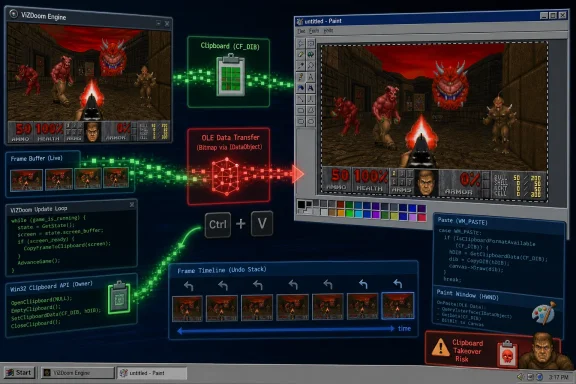 Paint Is the Screen, Not the Game Process
DoomPaint runs ViZDoom, the ZDoom-based environment widely used for visual AI and reinforcement-learning work, as the actual engine. ViZDoom renders without presenting its own game window; DoomPaint converts those frames into device-independent bitmaps and makes them available to Paint through the Windows clipboard.Paint then receives a synthetic paste command, placing the current bitmap onto the canvas. Each incoming frame lands as a floating selection, and the next paste implicitly commits the previous one. That behavior is important: DoomPaint does not capture a video and replay it in a Paint window. The Paint document is genuinely accumulating a sequence of edits, one rendered game frame at a time.
Russinovich’s repository is unusually direct about the joke: Paint “renders the game but does not compute it.” No Paint code is altered, injected, or replaced. The application remains a passive consumer of a bitmap supplied by another process, which is why calling this a port would be misleading. It is better described as a display transport experiment built around Paint.
That still makes it more substantive than a prerecorded animation pasted into a drawing app. The game state, player controls, sound effects, simulation clock, and frame production all remain live. Paint is simply being coerced into behaving like a monitor whose refresh operation happens to be “paste image.”
The Clipboard Race Was the Real Problem
The naïve implementation—put a fresh bitmap on the clipboard, send Ctrl+V, and immediately overwrite the clipboard with the next frame—failed for a reason that will be familiar to Windows developers who have dealt with asynchronous UI behavior. Paint does not necessarily finish reading clipboard data when the paste keystroke is sent.Russinovich writes that repeatedly calling
EmptyClipboard and SetClipboardData could free or replace the bitmap while Paint was still reading it. Paint’s response was not a harmless dropped frame. It could produce a modal “Can’t complete operation” dialog, stopping the chain of automated pastes and effectively ending the game session.The fix is what elevates DoomPaint above a simple keyboard macro. Instead of replacing the clipboard contents for every frame, the project places one OLE
IDataObject on the clipboard through OleSetClipboard. Paint retrieves image data from that long-lived object when it needs it; DoomPaint updates the underlying frame bytes that object supplies.Microsoft’s own Win32 documentation describes delayed clipboard rendering as a mechanism for providing data only when a consumer requests it. DoomPaint takes advantage of the same broader model, but uses the consumer’s request as a synchronization signal. When Paint calls
IDataObject::GetData, DoomPaint knows the current frame was consumed and can release the next one.The result is a self-clocking loop rather than a guessed delay timer. The display rate becomes the lower of two limits:
- Doom’s native 35 Hz simulation cadence.
- The rate at which the local PC can make Paint accept, composite, and display pasted bitmaps.
Resolution, Frame Rate, and Why 320×200 Is the Useful Setting
DoomPaint supports 320×200, 320×240, 640×400, and 640×480 rendering modes. The repository says 640×400 is its default, but the practical setting for smoothness is 320×200—the original Doom resolution—which contains one quarter as many pixels as 640×400.That matters because the expensive stage is not ViZDoom’s rendering. The source code documentation identifies Paint’s per-frame pixel work as the dominant cost. At 320×200, DoomPaint can approach Doom’s native 35 Hz tick rate; at higher resolutions, the result depends heavily on the machine and can fall into the project’s intentionally unflattering “spreadsheet-tier” territory.
There is a visual compromise. Original Doom was designed around non-square pixels and a 4:3 CRT presentation, so raw 320×200 can look horizontally stretched. The 320×240 option produces the more familiar 4:3 framing, while Paint’s own fit-to-window zoom handles the on-screen scaling.
The project does not claim to turn Paint into a gaming-quality renderer, and it should not be treated as one. Paint is processing a full document edit stream, maintaining an undo history and a bitmap canvas while a second process supplies up to 35 new images per second. The surprising part is that it can remain playable at all without modifying Paint.
Ctrl+Z Becomes a Frame-by-Frame Time Machine
The most visible side effect of treating every frame as a document operation is Paint’s undo stack. Since each pasted frame is an edit, Ctrl+Z walks backward through prior frames. In a conventional Doom engine, undoing a frame would require rewinding game state, input, world simulation, enemy AI, and random-number state. DoomPaint does none of that.Instead, it rewinds only the visual document. The engine itself continues to run independently, so this is a Paint-history effect, not a real save-state system. It is still a perfect illustration of what the program is actually doing: the Paint canvas is a record of frames, not an accelerated game surface.
Likewise, using File > Save writes the currently displayed frame as a legitimate image file. There is no screenshot capture path required because Paint believes the user has been editing an image. When DoomPaint exits, it intentionally leaves the last frame as an uncommitted floating selection, avoiding an extra synthetic keystroke or click that could interfere with the focused application.
The input layer is similarly careful. Paint must stay foregrounded for pasting to work reliably, but ordinary Doom controls cannot be allowed to reach Paint. A
WH_KEYBOARD_LL low-level keyboard hook captures movement, strafing, firing, opening doors, and related inputs while Paint is focused. Without it, arrow keys could move the selection, menu shortcuts could open commands, and synthetic-paste fallback menus could consume input.Russinovich also documents a practical collision with utilities such as PowerToys: some tools install their own hooks and can intercept a bare Ctrl key before the game receives it. DoomPaint captures Ctrl for firing and provides
F as an alternate fire key. Ctrl+Z remains available through a special re-injection path, so the project can retain its visual rewind gag without losing the normal fire control.The Shareware Boundary Is Narrower Than It First Appears
DoomPaint includes the freely redistributable sharewareDOOM1.WAD, which means the supplied game data covers only Episode One. For maps beyond that episode, the project falls back to the BSD-licensed Freedoom data included with ViZDoom.That is a more limited arrangement than the phrase “real Doom in Paint” can imply. The original shareware episode and its Bobby Prince music are present, but the out-of-box experience does not become the full commercial Doom merely because a user owns it. Russinovich’s README says that dropping a commercial
doom.wad or doom2.wad into the project’s WAD folder currently supplies the additional soundtrack; using that file as the full game-data source is described as a straightforward code-level change rather than a documented end-user option.There are other intentional limitations. ViZDoom starts directly inside a map, so DoomPaint has no title screen, attract-mode demos, or in-game menu flow. The project exposes command-line choices for map, skill, resolution, sound, music, and the Freedoom Phase 2 data set, but it remains an experimental wrapper around a headless engine, not a general-purpose Doom launcher.
The included music pipeline also shows how much custom work sits behind the visual gag. ViZDoom omits ZDoom music playback, so DoomPaint extracts MUS music lumps from the WAD, converts them to MIDI, and routes them through Windows’ MIDI facilities. Sound effects come from ViZDoom through OpenAL. The project even replaces ViZDoom’s bundled OpenAL build with a newer version to better follow default audio-device changes.
A Clipboard Demo With Real Desktop Side Effects
DoomPaint takes ownership of the system clipboard for as long as it is active. If another application replaces the clipboard content—because the user alt-tabs and copies text, for example—the project detects the loss and reclaims the clipboard when it publishes another frame. Russinovich says a copy made while the game is paused remains available until the user returns to Paint, but active play necessarily turns the clipboard into the game’s display channel.That makes DoomPaint a poor candidate for use during ordinary work, remote support, or any task where clipboard contents matter. Clipboard managers, synchronization services, Remote Desktop sessions, and tools that inspect or transform clipboard data all sit in the same shared pathway. The repository does not present DoomPaint as an enterprise-safe utility, and it should be treated as a source-available experiment to run in a disposable personal session rather than a tool to leave open on a production desktop.
The source is released under the MIT license, but it pulls together components with different terms: the Doom shareware WAD remains governed by id Software’s distribution terms, Freedoom is separately licensed, and OpenAL Soft has its own LGPL licensing. The project’s
run.bat also creates a Python virtual environment and installs dependencies on first run, so administrators evaluating it should inspect the repository rather than treating it like a standalone Windows application.DoomPaint’s lasting value is not that Paint has secretly become capable of running a 1993 shooter. It is that a modern Windows desktop app can still be driven at playable speed through the old clipboard and OLE plumbing it already exposes—provided the developer is willing to treat every pasted bitmap as both a frame of a game and a document edit waiting to be undone.
References
- Primary source: TechSpot
Published: 2026-08-03T10:18:00+00:00
Loading…
www.techspot.com - Related coverage: support.microsoft.com
Loading…
support.microsoft.com - Related coverage: windowscentral.com
Loading…
www.windowscentral.com - Related coverage: betaarchive.com
Loading…
www.betaarchive.com - Related coverage: nvd.nist.gov
Loading…
nvd.nist.gov - Related coverage: thehackernews.com
Loading…
thehackernews.com - Related coverage: blogs.windows.com
Notepad and Paint updates begin rolling out to Windows Insiders
Hello Windows Insiders, today we are beginning to roll out updates for Notepad and Paint apps to Windows Insiders in the Canary and Dev Channels on Windows 11. Notepad (version 11.2512.10.0) In this update, we’re introduciblogs.windows.com - Related coverage: wtftime.ru
Loading…
wtftime.ru - Related coverage: blogs.windows.com
Build 2026: Furthering Windows as the trusted platform for development
Build is one of our favorite moments each year - a chance to connect with the global developer community and share what we’ve been building. Over the past year, we have connected with many developers pushing the boundaries of what’s possible onblogs.windows.com - Related coverage: mbgsec.com
Loading…
www.mbgsec.com - Related coverage: techcommunity.microsoft.com
Loading…
techcommunity.microsoft.com - Related coverage: news.microsoft.com
- Related coverage: learn.microsoft.com
Loading…
learn.microsoft.com - Related coverage: learn.microsoft.com
Loading…
learn.microsoft.com