
The practical change is narrower than the announcement’s transformation language suggests, but still useful: a solution architect selecting business processes in a project profile can open the related Microsoft-standard process flow without leaving the portal. The portal already used selected products, features, characteristics, and business processes to tailor implementation guidance and reviews. It can now show the model behind a selected process at the point where scope is being recorded.
Microsoft Learn documentation had already described the integration in its July 2026 Business Process Catalog update, which was last updated July 14. That means today’s announcement formalizes a capability that Microsoft documentation had presented as available nearly a month earlier, rather than marking its first public appearance. For customers planning new work now, the distinction is mostly historical; for partners tracking rollout and readiness, it is a reminder that the public blog post does not establish a new portal version, tenant rollout schedule, or configuration change.
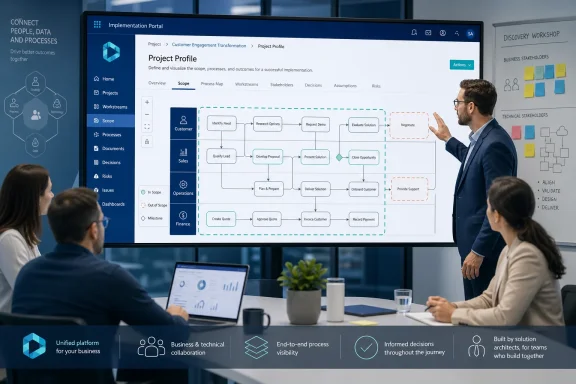 Process diagrams move into the scoping screen
The Implementation Portal is Microsoft’s project-management and guidance hub for Dynamics 365 deployments under the Success by Design and FastTrack programs. During onboarding, project teams create a project, assign users, select products and features, describe implementation complexity and integrations, and identify business processes in scope.
Before this change, process selection could be a classification exercise: teams picked process areas so Microsoft could produce relevant guidance, telemetry recommendations, and review content. Microsoft’s updated documentation says users can now select a business process, use the information control, and open the associated Mavim-powered visualization directly from the business-process profile control.
That is a meaningful improvement because it puts a fit-to-standard discussion where the decision is made. A process owner can look at a standard flow for a process area, determine whether it is genuinely in scope, and identify where the organization intends to follow standard Dynamics 365 behavior or needs an exception. In a well-run implementation, that discussion should happen before configuration work, backlog growth, integration design, or custom development turn an early assumption into a contractual commitment.
Microsoft’s Business Process Catalog is not a collection of generic swimlane diagrams. The catalog is a maintained structure of processes across Dynamics 365 apps and services. Microsoft’s July release expanded it to 6,834 rows, up from 5,874 in March, adding 960 rows and updating 2,569. Its structure spans end-to-end scenarios, process areas, individual business processes, and scenarios that connect processes to configurations in Dynamics 365.
For large finance, supply-chain, field-service, or project-operations engagements, that catalog scale explains why a visual layer matters. A checkbox naming a process such as order-to-cash says little about the operational boundaries under discussion. A navigable flow gives functional consultants, technical architects, and business stakeholders a shared reference point before they start arguing over requirements phrased differently by each department.
The portal is becoming the record of scope, not merely a FastTrack checkpoint
The larger implication is that Microsoft is pushing the Implementation Portal further upstream in the lifecycle. It has long been relevant to later-stage governance: finance and operations projects typically use it for the Go-live Readiness Review with Microsoft before production deployment. The portal’s project profile also feeds the tailored implementation guidance and reviews Microsoft presents to customers and partners.
Putting the process model inside project profiling makes the profile more than an administrative form. It creates a place where scope selections can be tied to an agreed Microsoft process baseline. That can improve the quality of the guidance generated later, but only if teams treat the profile as a living project artifact rather than a one-time onboarding task.
Microsoft’s own portal guidance says a complete profile affects the usefulness of guidance, insights, and reviews. It also requires at least one product to continue project creation and encourages teams to select the business processes supported by the solution. The new visual layer does not change those requirements. It gives teams more context while meeting them.
For finance and operations customers, the connection to delivery control is especially direct. Microsoft’s go-live guidance says most projects are required to use the FastTrack Implementation Portal for their Go-live Readiness Review, and that review checks areas including scope, testing, integrations, data migration, cutover, risks, and operational readiness. An imprecise process profile at the beginning can therefore echo into later Microsoft guidance and review conversations.
The gain is not automatic. A diagram can help a project team discover an unstated dependency; it cannot resolve an executive decision to preserve a local exception, fund a custom integration, or phase a region out of the first deployment. Teams still need a clear decision log for the gap between Microsoft’s standard process and the organization’s approved design.
Mavim is embedded for visualization, but the announced feature does not create end-to-end process management
Microsoft describes the experience as powered by Mavim, a separate business process management platform available through the Microsoft Marketplace. The Business Process Catalog has previously been distributed in two more operational forms: an Excel-based Azure DevOps template for implementation backlogs and a database package that organizations can import into Mavim.
That history clarifies what the portal addition is — and what it is not. The new portal capability is an embedded catalog viewer and navigator during profiling. Microsoft says teams can open diagrams, explore process hierarchies, and use that content to designate processes as in or out of scope. The announcement does not say that users can edit process models, map their organization’s variants, manage process ownership, synchronize requirements, or create Azure DevOps work items from inside the Implementation Portal.
Those omissions matter for implementation leaders deciding whether this reduces their process-governance tooling needs. It does not. Mavim documentation positions the full product as the environment for modeling and customizing processes, mapping processes to Dynamics 365 functions, connecting process IDs to Azure DevOps work items, and tracing change impact across roles and applications. The portal integration brings read-and-review context closer to scope selection; it does not replace that broader governance layer.
Microsoft’s July Learn update explicitly places profile import and export between the Implementation Portal, Mavim, and Azure DevOps on the future roadmap. It also lists downstream artifacts that carry process scope and AI-assisted guidance over structured process information as planned capabilities. Those roadmap items are the clearest evidence that the current release stops short of a shared, synchronized process record across the three systems.
Administrators and delivery leads should therefore avoid presenting the release as bidirectional integration. For now, there is no documented indication that marking a process in scope in the portal automatically updates a Mavim repository or populates an Azure DevOps backlog. Conversely, Microsoft has not documented whether an organization’s customized Mavim process model, as opposed to its standard catalog diagram, can appear in the embedded portal experience.
Availability is broad in language, narrow in the published detail
Microsoft calls the feature generally available as part of the standard project-profiling experience and says the Implementation Portal is available to customers with eligible Dynamics 365 products. But the announcement does not identify the eligible product list, a tenant-by-tenant rollout status, regional availability, any licensing condition tied to Mavim, or whether existing projects must be reprofiled to expose the information control.
That missing detail is more consequential than it sounds. Customers with active projects should not assume that a “generally available” label means every user will instantly see the capability. Portal access is role- and project-based, and implementation projects can contain both customer and partner users. Microsoft documentation also distinguishes between the portal’s standard self-service project flow and special handling for government cloud projects and other exceptions in the finance and operations go-live process.
The available documentation confirms that the viewer is intended for solution architects during project profiling, but Microsoft has not published a role matrix for the new visualizations. It also has not said whether use of the embedded diagrams requires a separate Mavim entitlement. Mavim’s standalone catalog documentation has historically listed access to the Mavim BPM tool as a prerequisite for navigating the catalog inside Mavim, which is not the same thing as the new embedded portal experience.
Until Microsoft answers those questions, partners should test the feature in a real customer project rather than building a workshop plan around assumed licensing or permissions. The first check should be simple: open the project profile, select a business process, and verify that the information control surfaces the expected standard diagram for the user roles participating in discovery.
What implementation teams should change now
The strongest use case is the discovery workshop, particularly where business and technical stakeholders have different definitions of scope. Instead of reviewing a slide deck or static process inventory separately from the portal, teams can use the catalog visualization while recording the profile selection that will drive Microsoft’s guidance.
A disciplined team should use the viewer to make three decisions explicit:
- The team should confirm whether the Microsoft-standard flow is in scope for the first deployment, a later phase, or excluded entirely.
- The team should document every agreed exception from the standard process in the requirements and design record rather than treating the diagram as proof that the standard process was accepted.
- The team should keep the portal profile current when scope changes, because Microsoft uses profile information for tailored guidance and project reviews.
Microsoft cites Kiwa’s use of Dynamics 365, the Business Process Catalog, and Mavim across more than 200 legal entities in over 40 countries as an example of a common-process foundation. The case study demonstrates why standardized process language can be valuable in multinational rollouts, but it is also a reminder that a catalog is a starting point. Harmonization across legal entities requires decisions about local regulation, operating models, master data, security, integrations, and change management that a portal diagram cannot settle.
The immediate result of this release is straightforward: Dynamics 365 project teams can see Microsoft’s standard process content while they select scope in the Implementation Portal. The more important consequence will arrive only when Microsoft delivers the planned profile exchange with Mavim and Azure DevOps; until then, teams must maintain the link between process decisions, design exceptions, and delivery backlogs themselves.