

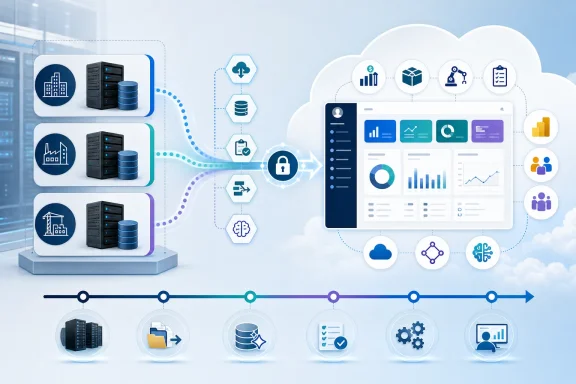
For Windows-centric businesses that have depended on these systems for finance, purchasing, inventory, projects, manufacturing, and operational reporting, the transition is bigger than moving a SQL database to a hosted environment. It is a decision about custom code, historical data, user roles, integrations, compliance processes, reporting practices, and the degree to which a company wants to standardize on Microsoft’s cloud business platform.
The opportunity is substantial: Business Central offers a current cloud ERP foundation with continuous servicing, Microsoft 365 and Power Platform connections, and a roadmap increasingly centered on AI-assisted work. The risk is equally real: a poorly scoped migration can reproduce old complexity in a new platform, disrupt critical operations, or force rushed choices around customizations that have accumulated over years.
The Strategic Shift Facing NAV, GP, and SL Customers
Dynamics NAV, GP, and SL each have long histories in the small and midsize business ERP market. They remain embedded in organizations precisely because they have been tailored around real operational needs: unique posting routines, project accounting models, industry-specific reporting, bespoke integrations, and familiar workflows.
That legacy is valuable. It is also why a migration cannot be reduced to a license conversion.
Microsoft’s latest guidance places the three products within a common direction of travel: customers should assess how to move away from maintaining aging on-premises ERP estates and toward a platform designed for cloud delivery, ongoing updates, connected data, and newer automation capabilities. Microsoft frames Business Central as the destination platform for NAV, GP, and SL modernization
For IT leaders, this changes the conversation from “Can we keep the existing system running?” to several more useful operational questions:
- Which business processes are genuinely differentiating and deserve tailored extensions?
- Which legacy modifications simply compensate for old software limitations?
- How much historical detail must remain live in the replacement ERP?
- Which integrations should be rebuilt, retired, or moved to an API-led architecture?
- Can reporting be simplified through Power BI, Dataverse, or other Microsoft cloud services?
- What period of parallel operation, data validation, and user training is needed before cutover?
The organizations that start with those questions are more likely to achieve a sustainable outcome than those that begin with a database export.
The Dates That Turn Planning Into a Business Priority
Lifecycle dates are not merely procurement details. They determine how long an organization can rely on normal support, obtain additional users, renew subscriptions, and retain service-plan coverage. The dates differ by product, so companies operating more than one legacy Dynamics environment should map them separately.
Dynamics NAV: Support and commercial changes
Microsoft says the final Dynamics NAV version was released in 2017, and that extended support ends in January 2028. Its broader commercial changes take effect on April 30, 2031: annual service-plan coverage ends, additional perpetual users can no longer be purchased for existing deployments, NAV subscriptions under the Solution Provider Agreement are no longer renewable, and SPLA-based subscription use is expected to end. Microsoft’s NAV, GP, and SL migration update
Microsoft’s lifecycle documentation also lists Dynamics NAV 2018 as reaching end of support on January 11, 2028, reinforcing the need for customers on that release generation to distinguish between product support timing and later commercial availability milestones. Microsoft Lifecycle: products ending support in 2028
The practical implication is that NAV customers should not wait until 2031 to begin discovery. A full NAV modernization can require staged application upgrades, C/AL-to-AL conversion, testing of localizations, remediation of integrations, and change management. Those activities are difficult to compress safely into a final-year project.
Dynamics GP: A defined runway, not an indefinite extension
For Dynamics GP, Microsoft previously stated that product enhancements, regulatory or tax updates, and technical support end on December 31, 2029, while security updates and patches, if needed, remain available until April 30, 2031. Microsoft’s GP and SL migration announcement
On April 30, 2031, GP service-plan coverage ends; subscription licenses can no longer be renewed; additional perpetual users cannot be added to existing systems; and SPLA subscription use is expected to end. Microsoft also noted that the final day for new customers to license Dynamics GP subscriptions was April 1, 2026. Microsoft’s GP and SL migration announcement
That gives established GP customers time, but it should not create complacency. Security support is not the same as a product innovation strategy. An ERP system can remain technically operational while becoming increasingly difficult to staff, integrate, customize, and align with changing business expectations.
Dynamics SL: The earliest commercial pressure point
Dynamics SL is on a shorter timeline. Microsoft says mainstream support ended on July 11, 2023, extended support ends on July 11, 2028, and service-plan coverage, additional perpetual-user licensing, and expected SPLA use reach their end point on January 15, 2030. Microsoft’s Dynamics SL directory and lifecycle notice
For SL users, especially those with project-driven businesses, the earliest priority should be an application and process assessment. Project accounting, job cost, billing schedules, government contracting requirements, and compliance reporting often make SL replacement programs more complex than a simple general-ledger migration.
Why Business Central Is Microsoft’s Preferred Migration Destination
Microsoft positions Dynamics 365 Business Central as a cloud ERP system spanning finance, operations, inventory, sales, service, manufacturing, and project management, with Microsoft 365, Teams, Outlook, Power Platform, and Azure integration. Microsoft’s NAV, GP, and SL migration update
That proposition matters because the strongest case for migration is not the removal of a server. It is the chance to change how ERP participates in the wider technology estate.
Continuous servicing changes the upgrade model
Traditional on-premises ERP planning often revolves around large, expensive upgrades. Versions are held back because upgrades can affect code customizations, integrations, reports, and user training. The result is familiar: a business gradually accumulates technical debt, then faces a high-risk modernization project years later.
Business Central’s cloud model moves toward ongoing platform updates rather than isolated major-version programs. That does not remove the need for testing—particularly when extensions are involved—but it does shift the organizational expectation. ERP maintenance becomes a recurring operational discipline rather than an event deferred until the software is already far behind.
Microsoft ecosystem integration is a real architectural advantage
For organizations already standardized on Windows, Microsoft 365, Entra ID, Azure, Teams, and Power BI, Business Central can reduce the friction between ERP transactions and everyday collaboration. Microsoft highlights connections across Microsoft 365, Teams, Outlook, Power Platform, and Azure as part of the platform’s value proposition. Microsoft’s modernization guidance for legacy Dynamics customers
The operational benefit should be evaluated in concrete terms:
- Sales users may need customer and order visibility inside familiar collaboration tools.
- Finance teams may want controlled Excel-based analysis without unmanaged spreadsheet copies becoming the reporting system of record.
- Operations leaders may need Power BI reporting that combines ERP data with warehouse, CRM, or service data.
- IT teams may want a more consistent identity, security, and integration model across business applications.
These benefits are meaningful only if the company designs the target architecture deliberately. Simply connecting every available Microsoft service can create a new sprawl problem.
AI capabilities are useful, but should not be the sole business case
Microsoft also emphasizes built-in AI and Copilot-oriented capabilities in Business Central. Microsoft’s migration announcement
That direction is important, particularly for tasks involving summaries, assistance with routine work, and faster access to operational context. But organizations should be cautious about treating AI features as the central return-on-investment argument for an ERP replacement.
The more durable value comes from clean master data, sound permissions, standardized processes, dependable integrations, and reporting that management trusts. AI can amplify those fundamentals. It cannot compensate for weak data governance or unclear financial controls.
Migration Options: Full Transition, Reimplementation, or a Staged Program
There is no single “NAV to Business Central” or “GP to Business Central” project template. Microsoft’s supported tooling recognizes that customers arrive with different product versions, customization levels, and data-retention requirements.
The first strategic choice is between a full migration and a reimplementation-oriented approach.
Full migration: Preserve more, transform more carefully
A full migration aims to retain a broad data set and reproduce or replace the required business capabilities in Business Central. It is usually appropriate when historical transactions, established configurations, and core operational practices need to remain readily available in the new ERP.
The benefit is continuity. Users retain access to relevant history, and the business avoids splitting operational records across multiple systems.
The risk is complexity. Every legacy customization becomes a decision point:
- Keep it as an extension.
- Replace it with standard Business Central functionality.
- Adopt a supported ISV application.
- Rebuild it through Power Platform or an integration.
- Retire it because the process no longer adds value.
A full migration should not mean blindly porting every report, table, field, or code modification. That approach may increase cost and perpetuate unnecessary technical debt.
Reimplementation: Keep the essentials and reset the design
A reimplementation approach moves essential information—typically master data, opening balances, setup, and selected history—while allowing an organization to begin with a cleaner operating model.
Microsoft describes the Business Central 14 reimplementation path for NAV-related scenarios as an option that migrates essential data rather than all legacy customizations and historical transactions. Microsoft’s NAV migration guidance
This option has clear advantages:
- It can reduce the amount of legacy code that must be converted or maintained.
- It creates an opportunity to rationalize charts of accounts, dimensions, posting groups, and approval processes.
- It may speed adoption of standard Business Central capabilities.
- It limits the volume of old transactional data that must be transformed and validated.
However, reimplementation has a trade-off: historical access becomes an explicit design issue. Finance, audit, customer service, operations, and compliance teams must agree on what remains online, what moves to a reporting archive, and what can be retained only in a read-only legacy system.
A clean start is powerful only when the organization is prepared to make disciplined process decisions.
What Makes Each Legacy Product Different
The destination may be Business Central, but the migration route and major risks differ materially among NAV, GP, and SL.
Dynamics NAV: Custom code is usually the central issue
NAV migrations demand close attention to the old customization model. Microsoft states that data from tables with code customizations cannot be carried forward unless those customizations are converted to AL extensions and appropriately handled in the destination environment. Microsoft’s Dynamics NAV cloud migration guidance
For NAV 2015 through NAV 2018, Microsoft documents a staged route through Business Central on-premises version 14 and then a later supported Business Central on-premises release before moving to Business Central online. Earlier NAV generations can require additional upgrade stages. Microsoft’s supported NAV upgrade-path table
That means NAV customers should create an early customization inventory containing:
- Modified standard objects and the processes they support.
- C/AL code that must be converted, replaced, or retired.
- Third-party add-ons and their Business Central availability.
- Custom tables and the historical data held within them.
- Country-specific tax, payroll, regulatory, or localization functionality.
- Interfaces to e-commerce, warehouse, EDI, payroll, banking, CRM, and document-management platforms.
The key lesson is simple: the NAV database is not the entire application. The business logic surrounding it matters just as much.
Dynamics GP: Use the tooling, but protect the production environment
Microsoft supports cloud migration from Dynamics GP 2015 and later to Business Central online. Microsoft’s on-premises migration overview
Its GP migration process is designed to replicate on-premises data to a Business Central online environment while the on-premises system remains the operative environment until migration completion. Microsoft advises using sandbox testing and warns against configuring cloud migration against a production Business Central environment already in use, because replication can overwrite online data. Microsoft’s GP end-to-end migration overview
This deserves emphasis. The migration environment is not a normal collaborative production tenant during replication. Microsoft notes that data entry is intentionally limited and that users without elevated permissions may be assigned a read-only Intelligent Cloud permission set during the process. Microsoft’s GP migration environment guidance
For GP organizations, the project should therefore distinguish between:
- A sandbox used for trial migrations, reconciliations, extension testing, and user acceptance testing.
- A controlled production migration environment that is protected from premature business use.
- The final go-live plan, including cutover timing, transaction freeze rules, reconciliation, support staffing, and rollback criteria.
Microsoft’s migration validation feature can compare GP source data and Business Central migrated data, including entities such as G/L accounts, customers, vendors, items, bank accounts, purchase orders, statistical accounts, and vendor 1099 information. Microsoft’s GP migration validation documentation
That validation is valuable, but it should complement—not replace—business-owned reconciliation. Finance leaders still need to sign off on balances, subledgers, aging, open documents, tax data, and reporting results.
Dynamics SL: Project and custom-table analysis should come first
Microsoft supports Business Central migration for Dynamics SL 2015 and later versions. Microsoft’s on-premises migration overview
SL organizations should pay particular attention to project accounting, job costing, billing patterns, and industry-specific customizations. Microsoft’s SL migration tools include functionality to view mappings between Dynamics SL source tables and Business Central target tables, including management of custom-table mappings. Microsoft’s Dynamics SL cloud migration management documentation
That capability does not automatically make every custom-table design a good candidate for transfer. A table mapping is a technical mechanism; it is not proof that the business process should remain unchanged.
The project team should ask whether each SL-specific capability is best delivered through:
- Standard Business Central functionality.
- A supported vertical or ISV extension.
- A Power Platform application.
- An Azure-based integration or reporting model.
- A separately retained archival dataset.
- A redesigned business process.
A Practical Migration Framework
A durable ERP migration should be run as a business transformation program with technical workstreams, not as a server retirement exercise.
1. Assess the current estate
Begin with a factual inventory. Document product versions, database sizes, companies, users, modules, customizations, extensions, integrations, reports, security roles, batch jobs, and dependent SQL Server components.
This is also the time to identify shadow processes: spreadsheet-based adjustments, manual approval routes, unofficial reports, file drops, and individual workarounds that may not appear in formal documentation but are essential to daily operations.
2. Define the target operating model
Before choosing exact migration tooling, define how the company intends to run in Business Central.
Key decisions include:
- Chart of accounts and dimension structure.
- Legal entities and company boundaries.
- Approval and segregation-of-duties design.
- Master-data stewardship.
- Document retention and historical inquiry requirements.
- Reporting ownership and Power BI strategy.
- Integration ownership, monitoring, and incident response.
- Extension governance and release-management processes.
A target operating model prevents the migration from becoming an expensive reproduction of the past.
3. Choose the data-retention strategy
Not every historical transaction must be brought into the operational ERP. Some organizations need many years of detail online for audit, service, or contractual reasons. Others can migrate balances, open transactions, master data, and a defined period of history while retaining a read-only archive for deeper inquiry.
This decision has major consequences for cost, performance, reconciliation effort, reporting, and user adoption. It should be made jointly by finance, operations, IT, compliance, and executive sponsors.
4. Run repeated dry runs
Microsoft’s NAV guidance explicitly includes preparation, upgrade, cloud migration setup, replication, validation, data upgrade, completion, and post-migration follow-up as distinct phases. Microsoft’s NAV migration roadmap
That staged approach should be mirrored in project governance. Multiple test cycles make it possible to measure data migration duration, surface mapping failures, validate extension behavior, train users on real scenarios, and rehearse the cutover sequence before the live business is affected.
5. Treat user adoption as a control, not an afterthought
ERP cutovers fail operationally when people do not understand new workflows, permissions, reporting locations, or exception-handling rules. Training should use the organization’s own business scenarios: month-end close, invoicing, purchase approvals, inventory adjustments, job postings, bank reconciliation, and management reporting.
Role-based training, floor support during go-live, and a clearly staffed hypercare period are often more valuable than a polished but generic training deck.
The Risks That Deserve Executive Attention
A Business Central migration offers a credible path forward, but the strongest programs acknowledge their risks early.
Customization scope can overwhelm the timeline
The most common risk is the assumption that all historical customization is mandatory. Some modifications are core to competitive advantage. Others exist because the old system lacked a feature, because a past policy no longer applies, or because no one has revisited the process in years.
Every customization should have a business owner, a stated value, a target-state decision, and a testable acceptance criterion.
Data quality problems become visible during migration
Duplicate vendors, inactive customers, inconsistent units of measure, malformed addresses, obsolete inventory, and poorly governed dimensions can remain hidden in a long-running legacy ERP. Migration exposes them because mappings must be explicit.
That is not a reason to avoid migration. It is a reason to fund data cleansing and establish enduring data-governance ownership.
Integrations are business-critical dependencies
Many legacy ERP systems sit at the center of a web of interfaces. Banks, EDI providers, payroll systems, warehouse systems, expense platforms, tax engines, CRM systems, document capture tools, and custom line-of-business applications may all depend on the old database or its scheduled jobs.
The project plan needs a complete integration catalog, including technical owner, business owner, data direction, frequency, failure behavior, credentials, monitoring, and cutover procedure.
Cloud does not eliminate responsibility
Moving to a SaaS ERP reduces the burden of managing local servers, backup infrastructure, and core application patching. It does not eliminate responsibility for access governance, extension quality, data classification, process controls, integration monitoring, or business continuity planning.
The organization’s responsibility shifts from maintaining infrastructure to governing a connected business platform.
The Bottom Line for Windows and Microsoft ERP Environments
The migration choices facing Dynamics NAV, Dynamics GP, and Dynamics SL customers are no longer abstract lifecycle discussions. The relevant milestones—NAV commercial changes on April 30, 2031, GP’s support and availability path through December 31, 2029 and April 30, 2031, and SL’s commercial changes on January 15, 2030—give organizations a defined window to make deliberate decisions. Microsoft’s NAV update Microsoft’s GP and SL update
Dynamics 365 Business Central is the clearest Microsoft-led destination, and it brings credible advantages in cloud operations, continuous updates, connected workflows, Microsoft ecosystem integration, and platform evolution. Yet the strongest migration case is not that the cloud is newer. It is that a well-designed transition can simplify an ERP estate, retire obsolete customizations, improve data visibility, and establish a more manageable foundation for future change.
The winning approach is neither panic nor passive maintenance. It is a structured migration program that starts early, inventories the real environment, chooses consciously between full migration and reimplementation, validates data repeatedly, protects production operations, and treats people and process design as seriously as technical conversion.