
MakeUseOf’s recent walkthrough put the tool through a familiar enthusiast workflow: scan an existing PC, save a portable
.endstatebundle to external storage, clean-install Windows, then apply the bundle on the new installation. The reported test found 114 applications but captured settings for only 29 of them. That ratio is the important result: Endstate reduces the rebuild burden substantially, but it is not a magic export of every preference, license, plug-in, game library, driver, credential, and custom binary on the machine.
Windows Central independently reported that Endstate has settings-restoration modules for 357 applications, including VS Code, Windows Terminal, PowerToys, Git, OBS Studio, Notepad++, ShareX, MSI Afterburner, and Adobe Lightroom Classic. Its GitHub repository currently lists the project as maintained by Hugo Ander Kivi and describes WinGet as the primary Windows installation method. The latest GUI release, version 3.10.0, was published on August 1, 2026, nine days before this article.
The key distinction is easy to lose beneath the “one-click restore” pitch: Endstate creates a desired software state, not a full-system backup. That makes it potentially useful after a clean installation, but it also defines exactly where administrators and power users must keep their existing backup plan.
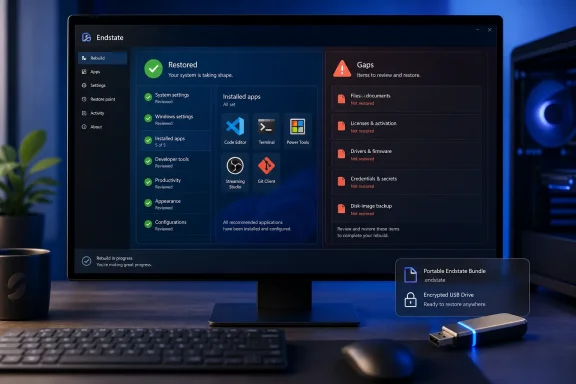 The gap between WinGet export and a working desktop
Microsoft’s
winget exportcommand already solves part of the reinstall problem. It generates a JSON file containing package identifiers from configured sources, which can later be fed to
winget importto batch-install applications. Microsoft explicitly documents this as a way to recreate a build environment.
The limitation is matching. WinGet tries to correlate installed entries in Windows’ Add or Remove Programs data with a package available from its configured sources. If it cannot find a match, it produces a warning. An application installed from a vendor’s custom installer, a portable app sitting outside normal registration, a legacy utility, a locally built executable, or a package from an unconfigured source may not return in the export at all.
Endstate works around the painful part of that workflow in two ways. First, it supplies a GUI and presents a before-you-change-anything review of what is present, missing, supported for settings restore, or ineligible. Second, it stores configuration payloads for applications that have an Endstate module. Its own project documentation says Windows captures WinGet community and Microsoft Store apps by default, while Chocolatey support is optional and requires explicit consent.
That is a real improvement over a raw WinGet JSON file, particularly for a workstation with a mixture of Store apps, conventional installers, developer tools, and carefully tuned utilities. A restored VS Code profile, Windows Terminal setup, Git configuration, OBS scene-related preferences, or PowerToys settings can save hours that a package manifest never addresses.
But an exported app list and a recreated environment are different operations. WinGet imports normally resolve current packages unless versions were included and remain available. Endstate can reinstall the application identity it knows about; it cannot promise the identical installer, the same dependency chain, or an application vendor’s unchanged setup behavior months later.
Settings support is catalog coverage, not universal backup
Endstate’s supported-app list is unusually broad for a new utility. It includes 7-Zip, AnyDesk, Audacity, Blender, DaVinci Resolve, Docker Desktop, Fences, Git, JetBrains IDEs, Microsoft Office, Notepad++, Office, OBS Studio, Obsidian, PowerShell profiles, Steam-adjacent tools, Visual Studio Code, VLC, VMware Workstation, Windows Terminal, WireGuard, and many more.
The existence of a module still should not be mistaken for a guarantee that every meaningful element of an app is transferable. The tool’s architecture is file-oriented: it detects settings at known locations, packages them, checks compatibility at restore time, and backs up overwritten files before applying changes. Its command-line documentation provides a revert function for a previous restore operation, and the company says the GUI makes a backup before altering settings.
That is responsible behavior, but it is also why validation can reject a restore. MakeUseOf reported that Stardock Fences was flagged for a validation failure when it was not installed on the target computer. A tool cannot safely restore settings into every arbitrary configuration path before the associated application has created the expected structure. Endstate exposes those cases instead of silently treating them as successes, which is preferable — but it means the “restore” is still an attended deployment task.
The 114-app, 29-settings test also gives a useful reality check. Only about one quarter of that particular app inventory received settings coverage. The other 85 applications may still have been installable through WinGet or Chocolatey, but most would return in their defaults. That is far better than hunting down installers by hand; it is nowhere near a full state transfer.
For a clean-install regular, the right preparation remains to identify the data that must survive outside Endstate: browser profiles and sync status, BitLocker recovery keys, encryption keys, password-manager vaults, SSH keys, code-signing certificates, virtual machines, game saves, local databases, application licenses, Outlook data, custom fonts, printer drivers, peripheral software, WSL distributions, and files stored in unusual locations. Some of those may be covered by an app-specific module; many should be backed up and verified independently.
One-click still includes installers, UAC, and package trust
Endstate does not silently rebuild an unattended fleet machine. Its own site says applications install one at a time and Windows will ask for permission where necessary. MakeUseOf observed UAC prompts and installer dialogs during a 114-app restore. That is an operational constraint rather than a flaw: consumer and commercial Windows installers frequently require interaction, offer license terms, select components, or perform elevation in ways a package front end cannot bypass safely.
The result is a better description of the tool: it is a supervised rebuild orchestrator. It remembers the catalog, downloads packages through the chosen managers, lays down supported settings, and gives the user a chance to inspect what will change. It does not run a bare-metal deployment, capture an operating-system image, or recreate proprietary software without its installer and license conditions.
There is also a supply-chain consideration. Using Endstate means trusting Endstate’s code, its selected package manager, the package manifests, and the application publishers behind them. The Endstate engine is published under the Apache 2.0 license, and its repository says tagged binaries can be built from source. That transparency is useful for a tool that can install software and write configuration files, though it is not a substitute for reviewing a restore plan.
The project is moving quickly. GitHub release notes show several late-July fixes involving large capture-bundle imports, profile import compatibility, stale module handling, and preview accuracy before the August 1 release. Rapid fixes are normal in young software, but they also argue for testing a snapshot in a virtual machine or on a noncritical device before depending on it for a production workstation rebuild.
The hosted-backup pitch is optional — and should stay that way
Endstate’s local capture-and-restore workflow is free and works without an account, according to the project’s documentation. The project also sells an optional Hosted Backup service for €4 per month, claiming that backups are encrypted on the client with keys Endstate does not hold. Its published principles state that users can instead store bundles on a USB drive, local disk, OneDrive, Dropbox, Git, or a self-hosted server without losing local features.
That is a sensible division. A Windows configuration bundle can contain sensitive material depending on what an app module captures: server names, local paths, extension lists, preferences, profiles, and possibly tokens or settings adjacent to credentials. Even if a service cannot decrypt hosted files by design, users should treat an Endstate bundle as potentially sensitive and inspect its contents and storage permissions accordingly.
The most useful storage choice for many clean-install users may be the unglamorous one: put the bundle on encrypted external storage alongside a separate, tested backup of documents, keys, installers that are absent from WinGet, and application data. Cloud hosting makes recovery more convenient; it does not make a configuration profile a complete disaster-recovery plan.
A clean reinstall tool, not a reason to reinstall casually
Endstate is compelling for users who already choose to wipe and reinstall Windows 11 after major changes, hardware moves, or accumulated configuration drift. It turns the software and supported-settings portion of that ritual into a repeatable process, preserves a readable record of the intended machine state, and makes it easier to spot software that is missing from a fresh build.
It should not, however, be interpreted as proof that clean-installing Windows after every major update is necessary. Windows feature updates are designed to be installed in place, and a configuration snapshot cannot replace normal maintenance, troubleshooting, backups, or an image-based recovery strategy. Wiping a system still carries the usual risks around forgotten data, encryption, device drivers, licenses, and applications that package managers cannot reproduce.
For enthusiasts and IT pros, the best use of Endstate is as the middle layer between a simple WinGet export and a full endpoint-management or imaging system. Capture a profile while the workstation is healthy, review the list for gaps, keep separately verified backups for critical data, and run a dry preview before clicking Apply. That workflow turns a fresh Windows installation from an afternoon of installer hunting into a controlled rebuild — while keeping the parts Endstate cannot restore visible rather than merely forgotten.
References
- Primary source: MakeUseOf
Published: August 9, 2026 at 10:00 PM UTC
Loading…
www.makeuseof.com - Related coverage: windowscentral.com
I spoke with the developer behind Endstate, a new app that fixes one of the worst parts of setting up a fresh Windows PC | Windows Central
WinGet or Chocolatey can reinstall your software in minutes, but this new open-source app brings back your custom settings and preferences too.www.windowscentral.com - Related coverage: virtualizationhowto.com
Loading…
www.virtualizationhowto.com - Related coverage: github.com
Loading…
github.com - Related coverage: docs-windows.readthedocs.io
Loading…
docs-windows.readthedocs.io