
Neowin first highlighted the latest Message Center notice on August 21. But its report contains a critical identifier error: the current advisory is MC1458474, not MC1485474. That is more than a clerical detail for IT teams trying to locate the notice in Microsoft 365 Message Center or document a change-control record. MC1458474 expands an earlier July announcement, MC1435782, with another group of blocked CSS properties.
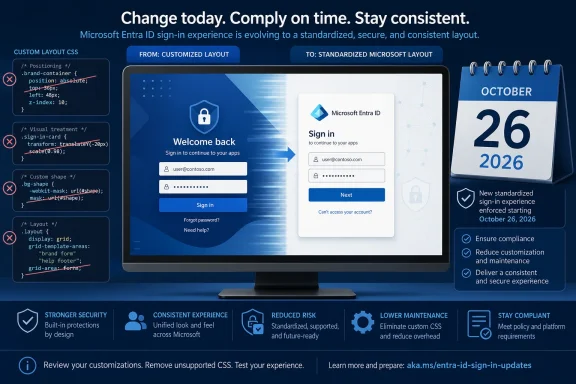
Microsoft’s practical message is straightforward: Entra sign-in pages may remain branded, but they can no longer be freely rearranged, hidden, layered, masked, or manipulated through custom CSS in ways that change how the authentication page presents itself. Administrators should treat the October 26 deadline as a production change date, not a date to begin investigating whether custom branding exists.
 The deadline applies to more than the newly listed CSS rules
MC1458474 names 28 newly retired layout and positioning properties, including offset, grid-area, grid-column, grid-row, margin-block, margin-inline, overflow-x, content-visibility, clip, mask, and several WebKit mask variants. Those are the properties Neowin listed, and they are the immediate focus of the August notice.
They are not, however, the full set that organizations need to inspect. Microsoft’s current Entra CSS template reference guide combines the earlier and later retirements into a broader list. It includes the familiar high-impact properties from the July notice: position, directional placement through top, right, bottom, and left, z-index, margin, transform, translate, opacity, overflow, filter, pointer-events, clip-path, and mix-blend-mode.
The same Microsoft documentation also identifies several rules that were not prominent in the initial public reporting: vendor-prefixed transforms, scale, rotate, perspective, display, visibility, inset, and zoom. A tenant that searches only for the 28 properties in MC1458474 can therefore miss older rules that Microsoft has already slated for retirement.
That is the operational consequence of the revised announcement: the audit needs to cover the full Microsoft list, not only the properties newly added in August. The latest Message Center item says it adds another set of properties; it does not cancel the original July deprecation.
For organizations that used CSS to move an authentication card over a particular background region, hide Microsoft-supplied components, force an unusual responsive layout, or layer a graphic over page controls, the failure mode will be visible. Microsoft says branding assets will remain, but affected rules will no longer be honored, causing elements to return to default placement and presentation.
Microsoft has already closed the door on new custom CSS use
The October deadline is the second part of a change already in progress. Microsoft began blocking new dependencies on custom CSS on July 21, 2026. Its current documentation says tenants created after January 5, 2026 do not have custom CSS available for Company branding. It also says older tenants that were not already using custom CSS by July 21 can no longer configure it.
That distinction is important when reviewing a tenant’s status. A tenant may still show its normal Company branding options—logos, background image or color, favicon, headers, footers, templates, and text—but that does not mean it retains the old custom-CSS capability. Microsoft is preserving a narrower supported branding model while progressively removing the part that allowed tenants to alter the structure and visual behavior of a sign-in page.
Existing tenants with custom CSS are not being asked to move to a supported one-for-one replacement. Microsoft explicitly says there is no supported migration path or replacement for the retired positioning properties. The expected remediation is redesign: remove the rule, choose one of Entra’s supported visual templates, revise the asset itself, or accept Microsoft’s standard layout.
That puts the burden on identity and communications teams rather than just the person who owns Entra administration. A marketing-approved sign-in mockup may depend on a masked image, an offset logo, an altered form position, or hidden content. Those design assumptions need to be revalidated in a browser before the enforcement date, especially across narrow displays and localized sign-in pages.
The security rationale is plausible, but the immediate benefit is consistency
Microsoft ties the retirement to its Secure Future Initiative and says limiting layout manipulation reduces opportunities for deceptive or misleading branded sign-in experiences. The technical premise is sound: CSS rules that can move, overlay, hide, clip, resize, or alter page visibility can be used to make an authentication prompt visually depart from a predictable, recognizable form.
This is a phishing-resistance control at the presentation layer. It does not replace phishing-resistant authentication methods such as passkeys, FIDO2 security keys, Windows Hello for Business, or certificate-based authentication. Nor does it prevent an attacker from building a lookalike page outside Microsoft’s Entra-hosted sign-in flow. It does narrow what a legitimate tenant—or an attacker with the ability to modify that tenant’s branding—can make Microsoft’s actual sign-in page look like.
The more immediate, observable result will be standardization. Microsoft gains greater control over page behavior, browser compatibility, accessibility behavior, responsive layouts, and supportability. Customers lose flexibility that had allowed highly tailored sign-in interfaces.
Microsoft has not published a per-tenant rollout schedule or a visual compatibility report showing how each retired property is handled after October 26. The previous advisory described worldwide and GCC availability beginning in October and expected to complete by late November, while the new advisory states that enforcement begins in late October. Organizations should not rely on a presumed grace period after the published action date.
How to audit Entra branding before October 26
Microsoft’s recommended starting point is the Entra admin center: open Entra ID > Custom Branding, select Edit, open Layout, then use Custom CSS > Download. That download should be retained with the change ticket before edits begin, because it provides a clean record of the branding configuration that existed before retirement.
A disciplined review should include all locales, not only the tenant’s default branding. Company branding can be configured by browser language, and a custom stylesheet applied to a localized sign-in experience can be missed if an administrator only reviews the default page.
Microsoft’s CSS reference guide also provides a deeper inspection route through Microsoft Graph. A Global Administrator or Organizational Branding Administrator can export branding localizations from the organization’s branding configuration, then use Microsoft’s tenant branding inspector to identify deprecated properties across those localized configurations. This is preferable to manually opening individual languages when a tenant has many regional branding variants.
The practical sequence is:
- Export the existing Company branding configuration and download every active custom CSS file before making changes.
- Search all files and localized configurations for both the original July property set and the additional August set.
- Remove the retired properties rather than attempting to substitute unsupported equivalents that reproduce the same positioning behavior.
- Test the revised sign-in page in a non-production tenant where possible, including desktop and mobile browser sizes, dark and light logo assets, and every configured browser language.
- Validate the entry points users actually follow, including Microsoft 365, My Apps, Outlook, SharePoint, self-service password reset, and applications using domain hints or Home Realm Discovery.
- Have help-desk and security-awareness teams approve screenshots and support material before the production configuration changes.
The warning about real entry points matters because tenant branding is not displayed identically in every authentication path. Microsoft documents that many SaaS and multitenant application flows show organization branding only after a user enters an email address or phone number. A page can appear correct in an Entra branding preview yet present differently in the sign-in flow employees and guests use every day.
Full custom CSS retirement is still ahead
The October change does not remove every CSS customization at once. Microsoft says it is the first step toward a full custom-CSS retirement and expects to provide advance notice, migration guidance, and future advanced customization options before that broader shutdown. MC1458474 places that later stage in 2027, without naming a specific date.
For now, the immediate job is narrowly defined but easy to underestimate: identify every branded Entra sign-in page that depends on CSS layout control, eliminate all properties Microsoft now classifies as retired, and review the resulting interface as a user would see it.
On October 26, the visual breakage will not necessarily appear as an error message or a failed authentication event. It may appear as a perfectly functional sign-in page with the wrong logo position, a missing visual treatment, an unexpected overlap, or text that no longer sits where an organization trained users to find it.