
Microsoft will retire the public-preview
For organizations using dynamic groups to target Microsoft 365 access, Intune deployments, Conditional Access, licenses, or access packages, that turns a group-maintenance problem into an access-control problem. New users can miss required applications or licenses; departed users can retain them; an administrative unit can preserve an obsolete management boundary. With August 6, 2026 as the starting point, tenants have 89 days to find and replace every affected rule.
Microsoft’s wording calls this the MemberOf rule operator, but in actual Entra dynamic-rule syntax it appears as the
It was often used as a way to aggregate people or devices from one or more groups into another dynamic group, particularly where a target workload only accepts a single direct group assignment. That made it attractive for group-based licensing, Teams or SharePoint membership, Intune assignments, and access-package automation.
There is an important correction to the way this change is being discussed:
That limitation matters because some administrators may assume the retirement affects all Active Directory or Entra group nesting. It does not. The November deadline concerns Entra’s specific preview dynamic-rule capability. On-premises Active Directory groups that are nested and synchronized to Entra are not, by themselves,
Microsoft had also barred
In other words, Microsoft is withdrawing a narrowly constrained aggregation feature that became useful precisely because many Entra-connected services prefer direct membership. It was never a clean replacement for a mature nested-group model, yet tenants could still build meaningful production dependencies around it.
That claim matches the warning already present in Microsoft Learn documentation. The
Microsoft had capped each tenant at 500
The more revealing point is what Microsoft is not offering: a direct, supported replacement with equivalent group-derived logic. Its guidance is to replace affected rules with supported user or device attributes, convert the target to assigned membership, or use another assignment method. For simple environments, that is sensible. For tenants whose identity model relies on group composition rather than clean directory attributes, it is a redesign.
Microsoft Learn still describes
Consider a dynamic licensing group that collects direct members from several departmental groups. After November 3, someone joining a qualifying source group may never receive the Microsoft 365 license attached to the target group. Someone removed from a source group may keep the license. License administrators will see a group that still exists and users who remain members, but the automation has silently stopped reflecting source membership.
The same pattern is more serious when the target group scopes access. A Microsoft 365 group can control Teams and SharePoint access. A security group might assign an enterprise application or Intune configuration. An Entitlement Management auto-assignment policy can grant or remove access-package assignments according to a membership rule. Microsoft’s documentation confirms that these policies normally re-evaluate identity attributes and automatically add or remove access when an identity no longer matches; a
Conditional Access deserves careful wording. The
Dynamic administrative units are a separate concern. They define a scoped set of users or devices over which delegated administrators can operate. If membership stops changing, a help desk or regional administrator may retain scope over former staff, or lose the ability to manage new staff who should have entered the unit. Microsoft’s Message Center notice specifically includes dynamic administrative units in the retirement scope.
For dynamic groups, the Entra admin center can export group data for review, while Microsoft Graph PowerShell can retrieve the
The operational inventory should then answer four questions for each result:
That solution works best where the underlying business fact is genuinely an attribute. “All employees in the Denver office,” “all corporate-owned Windows devices,” and “all users with a specific employee classification” are natural candidates. The organization should validate the source directory’s attribute quality before building access controls around it; otherwise, it merely swaps one hidden failure mode for another.
Where membership reflects exceptions, project assignments, temporary access, or a combination of several authorization decisions, a static assigned group may be the safer replacement. It creates an administrative burden, but it also creates an explicit membership record rather than a fragile rule built on indirectly managed groups. For entitlement cases, a redesigned access package or lifecycle workflow may be more appropriate than recreating old group composition with custom automation.
What tenants should avoid is treating the last known
On November 3, 2026, Entra will not announce this retirement with a mass outage. The affected configurations will simply stop changing. The organizations most exposed are therefore those that do not know where
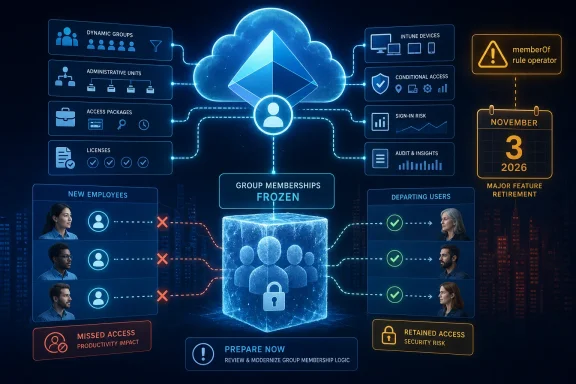
memberOf rule operator in Microsoft Entra ID on November 3, 2026. Any dynamic membership group, dynamic administrative unit, or Entitlement Management auto-assignment policy still using it will stop recalculating after that date, leaving its membership or assignments at their last successfully processed state.
The immediate operational risk is not that Entra will delete groups. Microsoft’s Message Center notice MC1448379 says the opposite: the objects and their existing members remain. The problem is that they become stale. A user who changes department, loses a role, leaves an access source group, or receives a new device will no longer be added to or removed from the dependent configuration.For organizations using dynamic groups to target Microsoft 365 access, Intune deployments, Conditional Access, licenses, or access packages, that turns a group-maintenance problem into an access-control problem. New users can miss required applications or licenses; departed users can retain them; an administrative unit can preserve an obsolete management boundary. With August 6, 2026 as the starting point, tenants have 89 days to find and replace every affected rule.
memberOf was a preview shortcut, not full nested-group support
Microsoft’s wording calls this the MemberOf rule operator, but in actual Entra dynamic-rule syntax it appears as the memberOf property. A typical rule looks like this:user.memberOf -any (group.objectId -in ['<source-group-object-id>'])It was often used as a way to aggregate people or devices from one or more groups into another dynamic group, particularly where a target workload only accepts a single direct group assignment. That made it attractive for group-based licensing, Teams or SharePoint membership, Intune assignments, and access-package automation.
There is an important correction to the way this change is being discussed:
memberOf did not provide general nested-group evaluation. Microsoft’s own Entra documentation says it added only the direct members of selected source groups. Members belonging through a group nested inside those groups did not flow through. Microsoft also prohibited one memberOf dynamic group from being used as the source for another memberOf dynamic group.That limitation matters because some administrators may assume the retirement affects all Active Directory or Entra group nesting. It does not. The November deadline concerns Entra’s specific preview dynamic-rule capability. On-premises Active Directory groups that are nested and synchronized to Entra are not, by themselves,
memberOf dynamic rules. A tenant should still inventory its configurations, but an ordinary synced security group is not automatically in scope.Microsoft had also barred
memberOf from being combined with other dynamic-rule conditions. An administrator could not reliably express “members of Group A who are also in the Finance department,” for example. The rule builder and validation interface did not support it either; administrators had to use advanced syntax in the Entra portal, Microsoft Graph, or PowerShell.In other words, Microsoft is withdrawing a narrowly constrained aggregation feature that became useful precisely because many Entra-connected services prefer direct membership. It was never a clean replacement for a mature nested-group model, yet tenants could still build meaningful production dependencies around it.
Microsoft’s performance warning is tenant-wide
Microsoft’s stated reason for the retirement is scale and reliability. In MC1448379, the company says that even onememberOf rule can affect dynamic membership processing across a tenant, including dynamic groups that do not use the operator.That claim matches the warning already present in Microsoft Learn documentation. The
memberOf feature page says it is not intended for production use and warns that users included through memberOf groups can slow processing in tenants with many groups or frequent membership updates. Microsoft’s troubleshooting guidance also lists MemberOf alongside expensive dynamic-rule choices such as CONTAINS and MATCH when explaining why membership processing can take longer than a day.Microsoft had capped each tenant at 500
memberOf dynamic groups and each such group at 50 source groups. Those limits signal that the service already treated the feature as an exceptional workload rather than a normal dynamic-membership primitive.The more revealing point is what Microsoft is not offering: a direct, supported replacement with equivalent group-derived logic. Its guidance is to replace affected rules with supported user or device attributes, convert the target to assigned membership, or use another assignment method. For simple environments, that is sensible. For tenants whose identity model relies on group composition rather than clean directory attributes, it is a redesign.
Microsoft Learn still describes
memberOf as a preview feature in documentation last updated on May 1, 2026, including setup instructions and limits, without a retirement banner. The Message Center notice is therefore the controlling record for administrators, but the documentation lag is a practical hazard: a technician following the public setup page today could still deploy a feature scheduled to stop updating in less than three months.Frozen membership creates asymmetric failures
A frozen group will not fail loudly in the way a deleted group or broken synchronization connector does. It will keep resolving, retain its object ID, and continue to be assigned to applications, licenses, policies, or resources. That makes the failure easy to miss.Consider a dynamic licensing group that collects direct members from several departmental groups. After November 3, someone joining a qualifying source group may never receive the Microsoft 365 license attached to the target group. Someone removed from a source group may keep the license. License administrators will see a group that still exists and users who remain members, but the automation has silently stopped reflecting source membership.
The same pattern is more serious when the target group scopes access. A Microsoft 365 group can control Teams and SharePoint access. A security group might assign an enterprise application or Intune configuration. An Entitlement Management auto-assignment policy can grant or remove access-package assignments according to a membership rule. Microsoft’s documentation confirms that these policies normally re-evaluate identity attributes and automatically add or remove access when an identity no longer matches; a
memberOf-based policy left frozen loses that lifecycle behavior.Conditional Access deserves careful wording. The
memberOf operator is not a Conditional Access condition. But Conditional Access policies can target Entra groups. If one of those target groups is populated through a now-frozen memberOf rule, the policy will continue applying to the old population rather than the intended current one. That can create both enforcement gaps and unnecessary blocks.Dynamic administrative units are a separate concern. They define a scoped set of users or devices over which delegated administrators can operate. If membership stops changing, a help desk or regional administrator may retain scope over former staff, or lose the ability to manage new staff who should have entered the unit. Microsoft’s Message Center notice specifically includes dynamic administrative units in the retirement scope.
Audit the rule text before redesigning anything
The first task is discovery, not conversion. Administrators should identify every use of thememberOf property across dynamic groups, dynamic administrative units, and Entitlement Management auto-assignment policies. Searching only group names, assigned applications, or Conditional Access policies will miss indirect dependencies.For dynamic groups, the Entra admin center can export group data for review, while Microsoft Graph PowerShell can retrieve the
membershipRule property. A basic tenant inventory should look for rules containing memberOf and record, at minimum, the target object, source group object IDs, processing state, owners, and every workload to which the target is assigned.The operational inventory should then answer four questions for each result:
- Which source group or groups currently feed this object, and are their members direct or nested?
- What depends on the target group: licenses, applications, Intune assignments, Teams, SharePoint sites, Conditional Access, or access packages?
- Can the intended population be expressed through a supported attribute such as
department,companyName,jobTitle,employeeType, a synchronized extension attribute, device ownership, or device trust type? - Who owns the source data and has permission to change it?
Attribute rules are preferable, but not universally equivalent
Microsoft’s recommended replacement is a normal attribute-based dynamic rule. A device group based ondevice.deviceOwnership -eq "Company" or a user group based on a properly governed department or extension attribute can be easier to process and easier to audit than an aggregate built from other groups.That solution works best where the underlying business fact is genuinely an attribute. “All employees in the Denver office,” “all corporate-owned Windows devices,” and “all users with a specific employee classification” are natural candidates. The organization should validate the source directory’s attribute quality before building access controls around it; otherwise, it merely swaps one hidden failure mode for another.
Where membership reflects exceptions, project assignments, temporary access, or a combination of several authorization decisions, a static assigned group may be the safer replacement. It creates an administrative burden, but it also creates an explicit membership record rather than a fragile rule built on indirectly managed groups. For entitlement cases, a redesigned access package or lifecycle workflow may be more appropriate than recreating old group composition with custom automation.
What tenants should avoid is treating the last known
memberOf population as proof that a static replacement is correct. Export the current target membership, compare it with the direct memberships of every source group, resolve exceptions, and test adds and removals before redirecting licensing or security policies. Microsoft notes that normal dynamic-group processing can take hours and, in larger tenants, more than 24 hours after a rule change; migration validation needs to account for that delay.On November 3, 2026, Entra will not announce this retirement with a mass outage. The affected configurations will simply stop changing. The organizations most exposed are therefore those that do not know where
memberOf is hiding — and those that discover its business purpose only after a new hire, a departed employee, or an unlicensed workstation reveals that the group was frozen.
References
- Primary source: Windows Report
Published: 2026-08-06T13:43:24+00:00
Loading…
windowsreport.com - Related coverage: learn.microsoft.com
Loading…
learn.microsoft.com - Related coverage: learn.microsoft.com
Loading…
learn.microsoft.com - Related coverage: labs.cloudsecurityalliance.org
CSA research note entra agent id admin takeover 20260428 csa styled
PDF documentlabs.cloudsecurityalliance.org
- Related coverage: microsoft.github.io
Loading…
microsoft.github.io - Related coverage: fpc.microsoft.com
Loading…
fpc.microsoft.com