
That is the useful part of the model described in Redmondmag’s Q&A with remote-access consultant Richard Hicks: shift remote access from “this device is on the network” to “this user and device may reach this named resource.” Microsoft’s own Entra documentation supports the basic architecture. Private Access is generally available as part of Global Secure Access, supports private TCP and UDP resources, and uses connector servers inside the organization to establish outbound connections to the Microsoft service.
But the migration advice needs one important correction. Starting with Quick Access to broadly recreate existing VPN connectivity may be a sensible discovery exercise, yet it does not deliver the least-privilege result being sold. It recreates the old access model in a new traffic path until administrators reduce those ranges and names into distinct application segments with separate assignments and policies.
The Q&A also has a date problem worth noting. Its supplied metadata says it was published on August 11, 2026, while the supplied Redmondmag address is dated August 14, 2026 — three days in the future as of August 11. That does not alter the technical discussion, but it means readers should treat the item as a conference-preview Q&A rather than evidence of an August 14 product announcement.
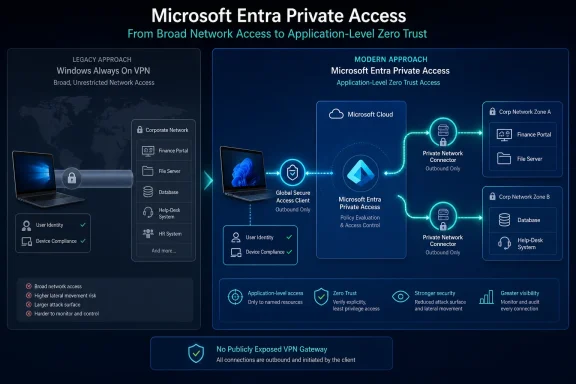 Entra Private Access changes the path, not the need for access design
Windows Always On VPN normally establishes a device or user tunnel to an organization-controlled VPN endpoint, often Windows Server Routing and Remote Access. The endpoint assigns the client an internal address and sends traffic according to routing rules. Whether that turns into broad access or a tightly restricted connection depends on the VPN profile, firewall policy, network segmentation, and split-tunnel configuration, but the client is fundamentally connected to the private network.
Entra Private Access does not put an internal IP address on the laptop. The Global Secure Access client intercepts traffic that matches configured private-access rules, sends it to Microsoft’s service, and the Private Network Connector reaches the designated internal target from inside the customer environment. Microsoft says the platform can publish resources by fully qualified domain name, IP range, port, and protocol, with Quick Access intended for broader groups of private resources and Global Secure Access applications intended for per-app segmentation.
The security upside is concrete. An organization can avoid exposing its own VPN gateway as an inbound public service, and a compromised endpoint does not automatically obtain network-layer reachability to every internal segment defined by a VPN route. The connector model reverses the public connection: the connector initiates outbound communication to Microsoft rather than waiting for arbitrary internet clients to contact it.
That does not mean the connector becomes a magic security boundary. It must still be placed where it has network visibility to the applications being published. A connector that can reach a domain controller, file server, legacy application server, SQL instance, and management network can potentially broker access to all of them if administrators publish overly broad segments. The old routing and firewall decisions therefore become application-segmentation decisions, and mistakes still scale.
Quick Access is a migration tool, not the finished Zero Trust design
Hicks’ proposed first pilot — technical users, Entra-joined or hybrid Entra-joined machines, and Quick Access configured broadly enough to emulate VPN access — is practical. It gives IT a way to identify traffic patterns before touching the production VPN estate, and it minimizes the operational risk of asking business users to troubleshoot every undocumented dependency on day one.
The trap is treating that pilot state as the deployment. Microsoft’s traffic-forwarding documentation says Quick Access is built from the FQDNs and IP addresses that should be sent into Private Access. If those entries represent broad RFC 1918 ranges, domain-wide wildcards, or large port ranges, the service may remove the public VPN endpoint while still granting a user access to a large private-network surface.
The end state should use the pilot to answer questions the VPN deployment often concealed:
- Which destinations are actually used by a finance application, an engineering tool, a help-desk console, or an internal web service?
- Which TCP and UDP ports are required, and which were only reachable because the VPN route made them available?
- Does the application use direct IP connections, multiple hostnames, service-discovery records, single-label hostnames, or an unexpected dependency such as LDAP, Kerberos, SMB, printing, or a license server?
- Can a user who needs one app be placed into a separate Entra group and granted a separate Global Secure Access application rather than a large shared network segment?
Microsoft’s Application Discovery feature can help by showing Quick Access segments used through the client over the preceding 30 days. That is valuable telemetry, but it is only a starting point. A monthly usage record will miss low-frequency workflows: payroll close, disaster recovery, year-end reporting, an administrator’s emergency console, or a line-of-business application invoked only when something fails.
Administrators should capture normal user traffic, scheduled workflows, service accounts, remote support procedures, and failure paths before removing an Always On VPN route. Otherwise, the VPN removal becomes the application inventory project that should have happened first.
Conditional Access is powerful, but “continuous” has limits
The Q&A describes Entra Private Access as continuously evaluating identity, device compliance, location, and risk before authorizing access to each resource. Microsoft’s documentation supports the general premise that Conditional Access can protect Quick Access and per-app Global Secure Access applications. Identity-aware policy enforcement, compliant-device requirements, named locations, and risk-driven controls are real advantages over a conventional VPN profile whose authorization may be based largely on a certificate, group membership, and the initial tunnel connection.
However, the current Microsoft Learn limitations page draws a more precise line than the Q&A does. Conditional Access policies cannot currently be applied directly to the Private Access traffic-forwarding profile; Microsoft directs administrators to apply policy at the Quick Access or Global Secure Access application layer. In other words, policy is associated with the access application, rather than being a universal rule automatically imposed on every private packet merely because it entered the Private Access tunnel.
Microsoft also documents real revocation timing. Universal Continuous Access Evaluation on supported Windows clients uses short-lived tokens lasting 60 to 90 minutes, while the signal that requires reauthentication can take roughly two to five minutes to reach the client. With the client’s grace periods, Microsoft says a disconnect can occur at approximately 10 minutes. That is materially better than waiting for a traditional VPN lease or a user logout in many environments, but it is not instantaneous enforcement.
For administrators, the practical conclusion is straightforward: build policies around named access applications, test what happens when a device becomes noncompliant or a user risk state changes, and measure the actual cutoff time in the pilot. Do not write security procedures that assume a user is severed from a private resource at the exact second an Entra signal changes.
DNS, local subnets, and endpoint agents remain migration blockers
The less glamorous details in Hicks’ answers are also the ones likely to decide whether a rollout works. Legacy applications frequently depend on naming behavior that VPN administrators rarely have to model explicitly because the client already has broad reachability to internal DNS and network services.
Microsoft’s current guidance confirms that private DNS configuration matters for internal domains. Single-label names and other legacy naming patterns need special treatment, and the client’s documented limitations include a significant condition: secure DNS mechanisms such as DNS over HTTPS, DNS over TLS, and DNSSEC are not currently supported for the traffic-acquisition scenarios Microsoft describes. If a browser or endpoint security product resolves internal destinations through secure DNS outside the expected path, FQDN-based steering may fail.
IP-based publishing has its own restriction. Microsoft says Private Access does not support tunneling an IP range that overlaps the end user device’s local subnet. A hotel, home office, branch, or customer network using the same private address range as a published resource can therefore create the familiar collision problem that VPN teams have wrestled with for years. Moving to ZTNA does not fix overlapping RFC 1918 addressing.
The Global Secure Access Windows client also tunnels socket-originated traffic, not traffic injected by a network driver. Microsoft specifically flags packet-injection scenarios as bypassing the client. Endpoint inspection, Nmap-style tooling, proprietary network drivers, and some security controls deserve explicit compatibility testing rather than an assumption that all traffic will behave like a browser connection.
Multi-session Windows environments need a separate review. Microsoft lists concurrent sessions on the same machine as unsupported for the client, including multi-session Remote Desktop Protocol servers and multi-session Azure Virtual Desktop configurations. Organizations using shared jump hosts or multi-user virtual desktops should not position Private Access as a universal replacement for their existing remote network connectivity without testing this limitation against their operating model.
The connector estate becomes production infrastructure
The Q&A recommends at least two Private Network Connectors, and Microsoft’s deployment documentation backs the high-availability rationale. Connectors require Windows Server 2016 or later, current .NET prerequisites, outbound connectivity to the Entra service, and network access to the private applications they serve. Microsoft also supports grouping connectors to handle distinct applications or network zones.
Two connectors prevent one server failure from becoming an access outage, but availability is only part of the design. Connector placement determines latency, fault domains, and the network reach available to a published application. A single connector group spanning every internal zone is easy to build and hard to defend. Separate groups for data-center applications, restricted administrative resources, and distinct cloud or regional workloads provide a cleaner operational boundary.
This is also where the cost conversation belongs. Private Access requires Microsoft Entra ID P1 or P2 as a prerequisite, plus Microsoft Entra Private Access licensing or Microsoft Entra Suite. Microsoft describes the services as largely per-user licensed. Redmondmag’s Q&A correctly identifies licensing as a pilot prerequisite, but it does not put a price on the migration or explain whether the organization will retain its VPN licenses and infrastructure during coexistence. In a real rollout, coexistence is likely to last longer than the connector installation.
Microsoft Entra Private Access is strongest when it replaces a known set of remote application flows with separate, testable access paths. It is weakest when it is asked to impersonate an undocumented corporate network. Keep Always On VPN available during the discovery phase, use Quick Access to expose what users actually reach, and retire routes only after those dependencies have been reduced to named applications, ports, and policies.