
=COPILOT worksheet function for Windows desktop, withdrawing Roadmap ID 499658 on August 13, 2026. The feature had been listed for worldwide multi-tenant availability in January 2027; the revised entry now says Microsoft has “decided not to move forward” and offers no technical reason, replacement, or migration plan.
For IT teams and Excel power users, the important detail is that this is a cancelled GA commitment, not a clean explanation of the feature’s current fate. Microsoft’s own Excel support documentation still describes =COPILOT as available through the Frontier and Microsoft 365 Insider programs, with qualifying Copilot licenses. That leaves organizations using preview channels with an unresolved operational question: whether Microsoft will remove the function, retain it as a limited preview capability, or replace it with a different in-grid AI workflow.
The cancellation also arrives after Microsoft had already published a detailed implementation model for the function. =COPILOT accepts natural-language prompt fragments and cell or range references, then sends that constructed prompt and selected context to an Azure-hosted language model. It was designed for jobs such as classifying survey feedback, generating text, tagging support tickets, producing summaries, and looking up web information from a cell formula.
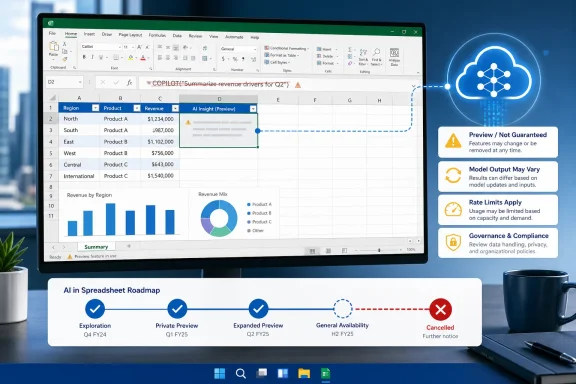 The cancelled feature would have made AI part of Excel recalculation
The difference between =COPILOT and the existing Copilot sidebar in Excel is more consequential than the roadmap description suggests. A chat-based Copilot interaction can suggest a formula, analyze a table, or edit a workbook after a user reviews the result. =COPILOT was intended to make an AI call itself a worksheet formula — part of the workbook’s calculation surface.
A formula such as =COPILOT("Summarize this feedback",A2:A20) could return a plain-language summary from a selected range. Another could classify cells into labels supplied elsewhere in the sheet. Microsoft also documented that the function could return a dynamic array, allowing one AI request to spill multiple results across the grid.
That model is useful for unstructured text that conventional functions do not understand: customer comments, support cases, free-form product descriptions, or survey answers. It is also fundamentally different from Excel’s normal calculation contract. SUM, XLOOKUP, FILTER, and IF are deterministic within a defined workbook state. Microsoft says the results of =COPILOT may change over time even when the formula arguments do not, because the underlying model will evolve.
That is likely the most significant practical reason the feature required unusually clear rollout and governance rules. A spreadsheet can look formula-driven and repeatable while containing outputs produced by an online model that Microsoft may update independently of the workbook author.
Microsoft’s own documentation defined strict limits
Microsoft never positioned the function as suitable for ordinary numerical work. Its support guidance explicitly says not to use =COPILOT for calculations requiring accuracy or reproducibility, workbook lookups, or tasks with financial-reporting, legal, regulatory, or compliance implications. For numerical calculations, Microsoft directs users back to native functions; for workbook lookups, it specifically points users to XLOOKUP.
Those constraints are not boilerplate. They mean a workbook with a Copilot formula was not a safe substitute for a model that must be audited, rerun, or defended months later. A generated sentiment label for customer feedback may be a useful triage aid. An AI-generated interpretation used to decide revenue recognition, calculate a commission, or classify a regulated complaint is something else entirely.
Microsoft’s support page also sets a rate limit of 100 COPILOT calculations per 10 minutes. That makes the function unsuitable for naïvely filling a generative formula down a large dataset. Microsoft’s preferred approach was to pass a range into fewer calls and let results spill into cells, which reduces the number of model requests. In practice, that requirement would have forced workbook authors to think about prompts, range sizes, recalculation behavior, and error handling in a way conventional Excel formulas do not demand.
The feature could not calculate in workbooks labelled Confidential or Highly Confidential, according to Microsoft. It also required an active internet connection and only had access to the prompt and the ranges explicitly passed into the formula; it could not inspect other workbook content, enterprise data, or files simply because they were available to the signed-in user.
Those restrictions provide some useful boundaries, but they do not solve the core workbook-management problem: a formula that depends on a cloud service and a changing model is not self-contained.
Preview users have a feature, but no stated path forward
The cancellation notice for Roadmap ID 499658 does not say whether users already seeing =COPILOT in Frontier or Microsoft 365 Insider builds will lose access. It also does not say whether existing workbooks containing the function will continue to calculate, return an error, retain their last stored values, or receive a compatibility path.
Microsoft needs to answer those questions before administrators can responsibly treat the cancellation as routine roadmap churn. The support article still says the function is available to commercial users with a Microsoft 365 Copilot add-on and to individual Microsoft 365 Premium subscribers. It further identifies the model in use as GPT-4.1 mini, dated April 14, 2025, and says prompts and context supplied to the function are not used to train AI models.
There is a second discrepancy. The public Microsoft 365 Roadmap has separately listed corresponding =COPILOT entries for Excel on Mac, Roadmap ID 499659, and Excel for the web, Roadmap ID 499660. Those entries had previously shown December 2026 rollout targets. Microsoft’s August 13 cancellation notice supplied here covers only the desktop Roadmap ID 499658. Microsoft has not explained whether the desktop cancellation also applies to the Mac and web plans or whether those listings will remain on their own schedules.
That uncertainty matters because Microsoft’s current support article lists the function as applying to Excel for Microsoft 365, Excel for Mac, Excel for the web, and even Excel for iPhone. A reader should not mistake an old platform listing or an Insider-enabled build for a commitment to broad release.
What admins and workbook owners should do now
Organizations that have not enabled the preview function do not need a technical rollback. They should, however, remove =COPILOT from rollout plans, internal training decks, workbook templates, and assumptions attached to a January 2027 desktop deployment. The original GA date no longer applies.
Teams already experimenting with the function should identify affected files and distinguish between exploratory outputs and business-critical calculations. Microsoft itself recommends converting generated results to values when users do not want them to recalculate. In the present situation, that advice has a new purpose: preserving a reviewed output before a preview capability, calculation behavior, or model changes.
A cautious response is straightforward:
- Inventory workbooks that use
=COPILOT, especially shared templates and recurring reporting packs. - Preserve reviewed preview outputs as values where the generated text must remain stable for a record or downstream process.
- Replace any use of the function for calculations, lookups, financial analysis, legal review, or compliance classification with deterministic Excel formulas and approved workflows.
- Tell pilot users that the feature’s general-availability plan is cancelled and that continued preview availability is not a deployment guarantee.
- Do not assume the desktop cancellation automatically resolves the status of the Mac and web roadmap entries until Microsoft updates those records or publishes a platform-wide statement.
Copilot in Excel continues without the formula promise
The cancelled roadmap item does not mean Copilot has disappeared from Excel. Microsoft continues to promote Copilot in Excel for workbook editing, formula generation, charts, PivotTables, natural-language data analysis, planning, and chat-based assistance. Its current documentation says the product can work in edit, plan, and chat modes, with some capabilities and model options varying by license and tenant configuration.
But the cancellation removes a specific promise: that organizations would receive an AI worksheet function as a broadly available desktop feature. That distinction matters for anyone designing standardized spreadsheets. Chat assistance can remain optional and reviewable; a formula embedded in a template can propagate through thousands of workbooks and be mistaken for ordinary Excel logic.
Microsoft has supplied the cancellation notice but not the explanation that customers need: why the GA plan was withdrawn, whether the preview will be retired, and what happens to workbooks that already use =COPILOT. Until those answers arrive, Excel teams should treat the function as an experimental dependency rather than an upcoming platform capability.