
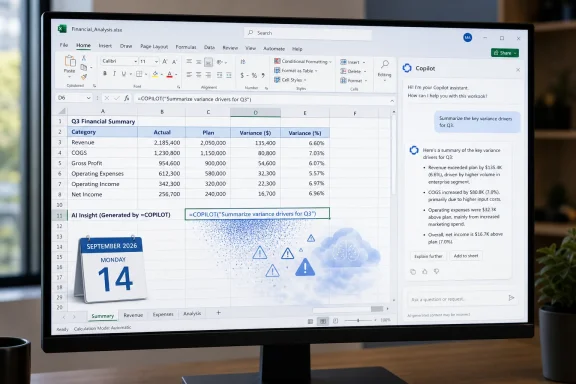
=COPILOT worksheet function on September 14, 2026, ending a feature that let eligible users send natural-language prompts and cell ranges directly to an AI model from the formula bar. XDA, citing Microsoft 365 Message Center notice MC1454373, reports that existing =COPILOT calls will stop working on that date; Microsoft is directing users to the Copilot side pane instead.The practical consequence is more serious than the announcement’s “streamline the experience” language suggests. The side pane can help create, explain, summarize, classify, and edit workbook content, but it is not a drop-in replacement for a formula embedded in a worksheet. A formula can spill results into a range, recalculate when referenced cells change, and remain visible as part of the workbook’s logic. A chat response is an interaction a user must review and apply.
For the relatively small group that built preview workbooks around =COPILOT, the immediate job is to find those formulas, preserve any outputs that matter, and redesign the sheet before the cutoff. This is not a retirement of a generally available Excel function: Microsoft kept =COPILOT inside its Frontier and Microsoft 365 Insider programs. But preview status does not erase the migration work for people who used it in active reports, prototypes, or internal processes.
 A formula engine experiment is being withdrawn
Microsoft introduced the COPILOT function in September 2025 through the Microsoft 365 Insider program. Its syntax was deliberately simple: a prompt plus optional cells or ranges that supplied context. A worksheet could, for example, ask Copilot to summarize customer feedback in A2:A50, assign sentiment labels to comments, generate draft product descriptions from a table, or retrieve web information.
Unlike Excel’s ordinary functions, the results were generated by an AI model hosted on Azure. Microsoft’s own support documentation is explicit that the function was intended for semantic and exploratory work, rather than deterministic computation. The company warned users not to rely on it for numerical calculations, financial reporting, legal or regulatory work, or any task requiring repeatable accuracy.
That warning was not boilerplate. Microsoft also disclosed that the same =COPILOT formula could return different results as its underlying model changed, even when the prompt and referenced cells remained the same. The company advised users who needed stable results to convert the output into values. In other words, Excel had briefly gained a function that looked like a conventional spreadsheet formula but did not offer a conventional formula’s reproducibility.
Microsoft imposed further constraints: the function required an active connection to its cloud-hosted models, was unavailable in workbooks labeled Confidential or Highly Confidential, and was limited to 100 calculations per 10 minutes. Its available model, according to Microsoft’s still-published support page, was GPT-4.1 mini. Those guardrails made it a poor candidate for unattended production workflows even before the announced removal.
The side pane does not preserve formula behavior
XDA says Microsoft’s Message Center notice describes the Copilot side pane as offering many of the same broad capabilities: summarizing text, classifying data, generating content, and pulling information from the web. That is true at the task level. It is incomplete at the workbook level.
A =COPILOT cell was an executable part of the grid. Users could include cell references as structured context, fill or spill results down a table, and have the formula run again when calculations refreshed. Even with its rate limits and non-deterministic output, that put generative AI inside a repeatable worksheet layout.
The Copilot side pane is a conversational interface. It can act on a workbook and generate formulas using Excel’s native functions, but its work generally depends on a user prompt and a user accepting or inserting the result. It is better suited to asking, “Help me build a formula for this column,” than to sustaining an AI-generated classification column alongside incoming records.
That difference should matter to anyone who treated =COPILOT as an AI enrichment step. A side-pane request can reproduce the one-time answer. It cannot automatically preserve a dynamic AI call in every affected cell. Microsoft has not publicly documented a direct conversion tool, formula migration path, or compatibility behavior for workbooks that still contain the function after September 14.
As of August 15, Microsoft’s public COPILOT function support page remains online and still describes the function as available through Frontier and the Microsoft 365 Insider program. That documentation has not yet been updated with the September 14 retirement date reported by XDA. The mismatch is important: IT teams should treat the Message Center notice as the operational warning for their tenant, while recognizing that external documentation may temporarily lead users to believe the function remains available.
Preview status limits the blast radius, not the cleanup
The feature was never broadly shipped to every Microsoft 365 customer. Microsoft initially made it available to Beta Channel users with a Microsoft 365 Copilot license on Windows version 2509, build 19212.20000 or later, and on Mac version 16.101, build 25081334 or later. Web availability followed through Frontier, Microsoft’s opt-in early-access program for experimental Copilot capabilities.
For commercial tenants, Frontier is administered by IT and can be enabled for selected users rather than the entire organization. Individual availability has also been tied to eligible Microsoft 365 subscriptions and the relevant early-access settings. That keeps the number of affected users below the audience for Excel’s standard formulas or its generally available Copilot experiences.
Still, the fact that a feature is preview-only is not a reason to ignore it. Frontier is specifically intended to let organizations evaluate emerging functions in their own environment, and those evaluations often produce pilot workbooks, training examples, templates, and proof-of-concept automations. If any of those assets have been copied beyond the original test group, the formula may already be in the hands of people who never knew it was a temporary experiment.
Admins should not assume a search of centrally stored files is sufficient. Excel formulas may be embedded in local workbooks, SharePoint libraries, OneDrive folders, Teams files, emailed attachments, or templates distributed through departments. The first task is inventory, not replacement.
A sensible short-term response is:
- Search known pilot and Frontier-related workbooks for formulas beginning with
=COPILOT(, including templates and files shared outside the original evaluation group. - Convert outputs to static values where preserving the current generated text is more important than keeping the process live.
- Replace classification, lookup, and calculation uses with native Excel functions, Power Query, Office Scripts, or an approved service where the result must be repeatable.
- Document any use that involved confidential or regulated information, because the original function’s restrictions already signaled that it was not designed for those workloads.
- Update user guidance so employees do not mistake the side pane for an automatic formula-compatible successor.
Microsoft is consolidating the interface, while abandoning a distinct workflow
Microsoft’s stated rationale, as relayed by XDA, is to simplify Copilot in Excel by concentrating AI assistance in a supported interface. The company has increasingly emphasized Copilot’s chat and agent-style experiences inside Office apps, where a user asks for help building, editing, and analyzing a workbook rather than invoking an AI model from every applicable cell.
There is a reasonable product argument for that decision. A dedicated formula function creates hard questions about recalculation costs, changing models, auditability, data access, formula portability, and what a workbook should display when a cloud model is unavailable. Excel’s value rests heavily on transparent, inspectable logic. An opaque remote model call embedded in a cell creates a different kind of dependency.
But Microsoft’s retreat also narrows the experiment. The most compelling part of =COPILOT was not that it could draft a summary—Copilot chat can already do that. It was that the prompt and the relevant source range could live together in the grid, making AI output visible beside the data that produced it. That workflow was inherently more useful for low-stakes enrichment than a separate chat window, even if it was never appropriate for financial models or compliance-sensitive work.
Microsoft has not announced a new worksheet-native replacement, according to the public material available on August 15. Organizations should therefore plan around the removal itself rather than assume an equivalent function will reappear under a different name.
September 14 is only 30 days away. Any workbook that depends on =COPILOT should be treated as a migration candidate now, because after that date the formula’s failure will be visible wherever the workbook is opened—not merely when an employee decides to try Copilot again.
Update: Additional details (August 15, 2026)
Neowin reports that Microsoft had originally planned to make the COPILOT() function generally available in January 2027, before deciding to retire it during its Frontier and Insider testing phase.
The report also identifies the Dynamic Action Button alongside the Copilot side pane as alternative Excel entry points, and says the experimental function required a Microsoft 365 Premium subscription.
