
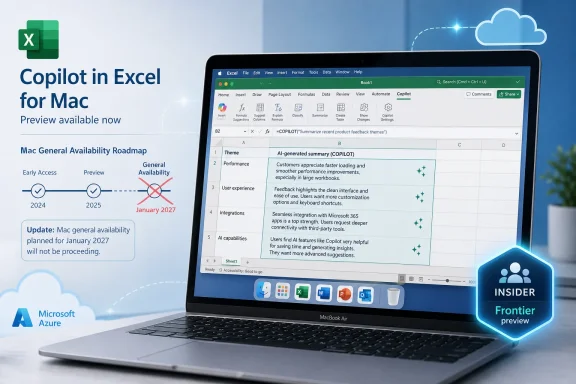
=COPILOT roadmap item, but the cancellation does not amount to a public withdrawal of the formula itself. Roadmap ID 499659, updated August 13, says Microsoft has “decided not to move forward” with the feature previously targeted for worldwide GA on Mac in January 2027.
The important distinction is buried in Microsoft’s own product records: =COPILOT remains documented by Microsoft Support as a feature available through the Frontier and Microsoft 365 Insider programs, including Excel for Microsoft 365 for Mac. Microsoft’s support documentation also continues to describe the formula’s syntax, licensing requirements, calculation limits, and current behavior. For Excel users and administrators, this is a cancellation of a delivery commitment—not, on the evidence currently available, an instruction to remove the function from preview installations.
Microsoft has not explained why it cancelled Roadmap ID 499659, whether Mac preview access will continue unchanged, or whether it intends to replace that GA plan with a differently scoped release. That silence means organizations using the formula in Mac Insider builds should treat it as experimental until Microsoft provides a new shipping plan.
 What Microsoft cancelled—and what it did not say
The cancelled listing promised a simple but consequential addition to Excel’s formula language: =COPILOT, a worksheet function that can generate text, classify content, summarize ranges, and work from prompt text plus cell references. Its stated platform was Mac, its release ring was General Availability, and its target date was January 2027.
The wording matters. Microsoft’s current roadmap update does not say that =COPILOT is being removed from Excel for Mac, disabled for existing participants, or abandoned across all platforms. It only says the company will not move forward with this feature entry. Nor does it give Mac users a migration path, announce a replacement function, or identify a new GA date.
That is a narrower outcome than headlines suggesting Microsoft has “cancelled the Excel Copilot function” would imply. But it is still a material setback for anyone who had expected a supported, broadly deployable Mac release at the start of 2027. A roadmap target is not a product guarantee; Microsoft has now made that explicit for this particular release plan.
A second roadmap item points to a split release strategy
There is a further complication: Microsoft has maintained a separate roadmap item for the same basic feature. Roadmap ID 499658, archived by the Microsoft 365 Message Center Archive, describes “Excel: =COPILOT Function” for desktop, with a December 2026 general-availability target and an In development status as of February 27, 2026.
That separate entry is not the same as the newly cancelled Mac listing. It has a different roadmap ID, a different platform designation, and a different delivery date. The existence of both records suggests Microsoft was tracking at least two release tracks: one for desktop and one specifically for Mac.
Microsoft has not publicly reconciled the two entries. It has not said whether the desktop item includes Windows only, whether it still covers Mac despite the platform-specific cancellation, or whether the remaining roadmap schedule will change. The official support page currently lists Windows, Mac, the web, and iPhone among applicable Excel products, but availability is still limited to Frontier and Insider channels.
For IT teams, the practical conclusion is straightforward: do not infer that a continuing desktop roadmap item guarantees Mac GA, and do not infer from the Mac cancellation that every =COPILOT preview build is being turned off. The public records support neither conclusion.
The formula is deliberately unlike normal Excel functions
Microsoft introduced =COPILOT as a formula-shaped entry point for an AI model, rather than a deterministic calculation function such as SUM, XLOOKUP, or TEXTSPLIT. Its syntax accepts alternating prompt text and optional cell references:
=COPILOT(prompt_part1, [context1], [prompt_part2], [context2], ...)
A user might supply a range of customer comments and ask the model to classify sentiment, create tags, condense feedback into a summary, or draft a product description from listed specifications. Microsoft says the prompt transmitted to the model is assembled from the text and referenced grid values.
That design makes the function powerful for semantic work, but it also means the result behaves differently from the formula discipline Excel users expect. Microsoft’s support documentation says =COPILOT calls an AI model hosted on Azure, requires an active internet connection, and can return dynamic arrays that spill across cells. It also says results may change over time even when the formula arguments do not, because the underlying model can evolve.
In other words, a workbook containing =COPILOT is not fully self-contained. Its outputs depend on an online service and a model version outside the workbook author’s control. That is a much larger operational dependency than a conventional formula whose behavior is fixed by Excel’s calculation engine.
Microsoft currently identifies the function’s model as GPT-4.1 mini, dated April 14, 2025. The company also says it may change the model in the future. For analysts who need repeatable conclusions, that is not a footnote—it is a deployment constraint.
Microsoft’s own guidance limits where it belongs
Microsoft’s documentation is unusually clear that =COPILOT should not be used where deterministic accuracy or reproducibility is required. The company directs users to native Excel formulas for numerical calculations and specifically warns against using AI-generated output for financial reporting, legal documents, regulatory work, or other high-stakes scenarios.
The function also has strict data boundaries. It can use the prompt, the context ranges explicitly passed to it, and web data when asked to search the web. Microsoft says it cannot read unrelated cells elsewhere in the workbook, other files, or enterprise data. That limits accidental context leakage, but it also means the formula can produce a plausible answer without seeing the surrounding information a human analyst would consider essential.
There are operational limits as well. Microsoft lists a maximum of 100 COPILOT calculations every 10 minutes, and the function is blocked in workbooks labelled Confidential or Highly Confidential. Those restrictions make it unsuitable as a high-volume enrichment engine or an easy workaround for protected-data policies.
The function’s web-search capability introduces an additional consideration. Microsoft says =COPILOT can search the web for information and notes that citations to sources used are “coming soon.” Until those citations arrive in the function’s output, a workbook cell may contain externally sourced factual text without a built-in, auditable trail showing where it came from. That is a poor fit for reports that require source verification.
Mac preview users should preserve outputs they need
The most immediate risk is not that an existing =COPILOT cell will necessarily stop calculating tomorrow; Microsoft has not announced that. The risk is that preview users build active processes around a feature whose Mac GA path has now been cancelled and whose outputs are inherently non-static.
Microsoft itself recommends converting results to ordinary cell values when users do not want them to recalculate. For workbooks that feed presentations, decisions, reports, or downstream systems, that is sensible now: validate the generated output, then use Paste Values to preserve the reviewed result rather than leaving a live AI call in the production workbook.
Administrators should also identify whether Mac users in Insider or Frontier programs have adopted the formula informally. This is especially relevant where spreadsheets are shared between Windows, Mac, and web users; a workbook can become harder to support when its results depend on a licensed, connected AI feature not available consistently to every collaborator.
A short internal control list is warranted:
- Review Mac Excel workbooks for
=COPILOTformulas before treating the function as a supported production dependency. - Replace AI-based calculations with native Excel formulas where a result must be precise, reproducible, or auditable.
- Convert reviewed AI output to values when the workbook needs a stable record of what was approved.
- Confirm that users have the required Microsoft 365 Copilot add-on or Microsoft 365 Premium entitlement before troubleshooting
#BLOCKEDlicensing errors. - Keep Confidential and Highly Confidential workbooks out of any workflow that assumes
=COPILOTcan calculate.
Microsoft’s current support page says work and school users need a Microsoft 365 Copilot add-on license, while individual users need Microsoft 365 Premium. Cancellation of the Mac GA roadmap item does not change those preview requirements, but it does make license planning for a broad Mac deployment premature.
Microsoft now needs to clarify the Mac roadmap
Microsoft first publicized the =COPILOT function for Windows and Mac Insider users in 2025, then expanded its stated capabilities in 2026 to include web-grounded responses. The function remains documented today, and the separate desktop roadmap listing has not been publicly marked cancelled. The abrupt change is therefore specific enough to demand clarification, especially because the cancelled entry carried a January 2027 GA date only hours before its status changed.
Until then, Excel for Mac users should regard =COPILOT as a preview capability with no confirmed general-availability schedule. The function may remain useful for drafts, tagging, and exploratory text work, but the cancelled roadmap item has removed the one assurance enterprises needed before standardizing on it: a committed Mac release path.