
An Exchange Online archive mailbox is not a compliance archive by itself. It is extra mailbox storage that lets users or mailbox policies move older mail out of the primary mailbox, and Microsoft explicitly describes it that way. The compliance question is answered elsewhere: by the retention configuration, the scope of captured communications, the applicable license features, and whether the organization can demonstrate that its setup meets the rule it is claiming to meet.
That distinction is buried in the August 5 article from TYN Magazine, which correctly warns against treating “we enabled archiving” as a legal-defense strategy. But its central claim goes too far: Microsoft 365’s native controls are not categorically incapable of regulated recordkeeping. Microsoft Purview includes Preservation Lock specifically to prevent even a global administrator from disabling, deleting, or making a retention policy less restrictive. Microsoft also says its Preservation Lock capability can help financial institutions meet the immutable-storage requirements of SEC Rule 17a-4.
The operational conclusion for IT teams is more exacting than “buy a third-party archive.” An archive mailbox solves capacity; Purview retention and records controls can solve preservation for Microsoft 365 content when they are deliberately designed, locked, tested, and kept within their supported boundaries. If the company needs capture from personal texting apps, third-party collaboration systems, or other channels outside Microsoft 365, that is where a separate collection or archive platform may become necessary.
Microsoft’s archive mailbox, sometimes called In-Place Archiving, creates a secondary mailbox associated with a user. It can be populated manually or through Exchange messaging records management policies; Microsoft’s default archive policy can move items that are two years old from the primary mailbox into the archive mailbox.
This helps control primary-mailbox size and can make long-lived mail more manageable in Outlook. Both the primary and archive mailbox are available to Purview Content Search, retention, and Litigation Hold, which is useful. But merely moving mail to an archive does not establish a retention period, make the record immutable, capture every business communication, or create a litigation hold.
That is the first implementation trap: organizations often call all three things “archiving.”
It is incomplete as a description of Microsoft 365’s available compliance controls.
With Preservation Lock applied, Microsoft says no one — including a global administrator — can turn off, delete, or make the policy less restrictive. A locked policy can be extended and its scope can be expanded, but its retention duration cannot be reduced and protected locations cannot be removed. This is exactly the control a firm should examine before concluding that Microsoft 365 cannot provide protected preservation.
There is a substantial catch: Preservation Lock is a one-way operational decision. A bad policy design, a mistaken scope, or an excessive retention period can become a long-term burden because the organization cannot simply roll it back. That makes a pilot, written records schedule, and legal approval prerequisites, not paperwork to finish after the switch is thrown.
The article also presents SEC Rule 17a-4 as though it still required only write once, read many storage. That has not been the complete rule since the SEC’s 2022 amendments took effect. Broker-dealers can use either a WORM-style electronic recordkeeping system or an audit-trail alternative capable of recreating an original record when it has been modified or deleted. The SEC’s own guidance confirms the alternative.
Microsoft’s claim that Preservation Lock can help meet the immutable-storage option is not the same as an SEC certification of every tenant. A broker-dealer still has to establish that its particular configuration, record categories, retention periods, supervision, retrieval process, and third-party-access arrangements satisfy the rule. But “native Office 365 cannot do this” is no longer a defensible blanket statement.
Microsoft Purview retention policies cover Exchange mailboxes and can be scoped to Teams chats, channel messages, SharePoint, OneDrive, Microsoft 365 Groups, Viva Engage, Copilot interactions, and other Microsoft-hosted workloads. Microsoft has continued adding coverage; from late April 2026, it also supports retention policies for newly created Teams call logs through PowerShell.
That is a meaningful list, but it is not a magic perimeter. Teams retention cannot preserve an employee’s WhatsApp conversation on a personally managed device. It does not independently ingest SMS, Signal, Bloomberg, WeChat, personal Gmail, or an industry application simply because those channels were used for company business. Nor does a retention policy compensate for an organization that has not identified which channels its staff actually use.
The SEC’s recordkeeping enforcement makes this distinction concrete. In September 2022, the agency charged 15 broker-dealers and one affiliated investment adviser over widespread failures to preserve business communications conducted through employees’ personal devices, imposing more than $1.1 billion in combined penalties. The issue was not that the firms lacked email storage; it was that the communications were occurring on unapproved channels and were not retained. By November 2024, an SEC enforcement official said its broader off-channel communications initiative had resulted in charges against more than 100 firms and more than $2 billion in penalties since December 2021.
TYN Magazine reports combined 2021 and 2022 penalties exceeding $1.8 billion. The SEC’s September 2022 group resolution alone was $1.1 billion, while the agency’s fiscal-year 2022 enforcement report placed the cumulative penalties connected to the JPMorgan and 2022 matters at $1.235 billion. The article’s larger figure is not supported by those SEC releases. The later $2 billion figure is real, but it reflects enforcement through late 2024, not just 2021 and 2022.
For a Microsoft 365 administrator, the practical work begins with a communications inventory: approved email domains, Teams chat types, shared mailboxes, mobile-device policy, SMS and messaging platforms, trading or case-management tools, and external collaboration services. The capture solution should follow that inventory. Buying an email archive while leaving business conversations in unmanaged apps only creates a well-preserved subset of the record.
Microsoft’s current Purview eDiscovery tools support searching and exporting content across Exchange Online, OneDrive, SharePoint Online, Teams, Microsoft 365 Groups, and Viva Engage. eDiscovery case activity is recorded in the Microsoft 365 audit log, and Purview supports exports of mailbox messages as PST files or individual messages and documents in native formats. Those capabilities are designed for investigation and legal workflows.
There are nonetheless concrete limitations that administrators should treat as test cases. Microsoft warns that SharePoint sites in a locked NoAccess state cannot be retrieved by eDiscovery and their content is skipped during export. Restricted SharePoint files can appear in search results but be excluded from export unless the collecting user has direct access. For large tenant-wide exports, Microsoft recommends generating search statistics first to optimize the export process, a direct acknowledgement that scope and scale affect performance.
Audit exports have their own limits. A single Purview Audit Standard query can export up to 50,000 records; Audit Premium raises that to one million. Results beyond those thresholds can be omitted unless the search is segmented. This does not mean Purview is incapable of producing audit evidence. It means an incident-response or discovery runbook needs date slicing, saved query criteria, export reports, hash verification where appropriate, access controls, and documented handoffs.
“Chain of custody” is similarly not a single Microsoft 365 checkbox. Purview logs eDiscovery actions, but a defensible process also records who authorized collection, which query was run, what data sources were searched, which exceptions occurred, which export package was produced, where it was stored, and who received it. A third-party archive can help standardize that workflow; it does not eliminate the organization’s responsibility to operate it correctly.
That does not make complex configurations safe by default. It means the answer is calculable — and therefore testable. Administrators should use Purview’s Policy lookup function on representative executives, former employees, shared mailboxes, Teams users, SharePoint sites, and high-risk departments. They should then document the expected outcome and verify it with controlled test content before relying on the policy in production.
The HIPAA example in the submitted article also needs narrower framing. The HIPAA Privacy Rule does not prescribe a general medical-record retention period; the Department of Health and Human Services says state law generally governs how long medical records must be kept. HIPAA does require appropriate safeguards for protected health information while it is maintained, but it does not itself impose SEC-style WORM storage for every healthcare email. Healthcare organizations may still face demanding state, contractual, evidentiary, and clinical-record requirements, but the applicable obligation must be identified before technology is selected.
Federal Rule of Civil Procedure 37(e) likewise does not mandate a particular archive product, immutable medium, or generic chain-of-custody report. It focuses on whether electronically stored information that should have been preserved was lost because a party failed to take reasonable preservation steps, and whether it can be restored or replaced. The standard is fact-specific, which makes tested legal holds and documented operational controls more valuable than a vendor’s compliance label.
The sensible decision is not “native versus third-party.” It is whether the organization can prove that its actual communications are captured, retained for the required period, protected against unauthorized weakening, searchable, exportable, and governed by a repeatable process. For mail and collaboration that live inside Microsoft 365, Purview can provide much more than mailbox management. For communications that never enter Microsoft 365 — or for firms that need independent capture, specialized supervision, or a unified archive across many platforms — an additional archive may be the missing control.
The operational conclusion for IT teams is more exacting than “buy a third-party archive.” An archive mailbox solves capacity; Purview retention and records controls can solve preservation for Microsoft 365 content when they are deliberately designed, locked, tested, and kept within their supported boundaries. If the company needs capture from personal texting apps, third-party collaboration systems, or other channels outside Microsoft 365, that is where a separate collection or archive platform may become necessary.
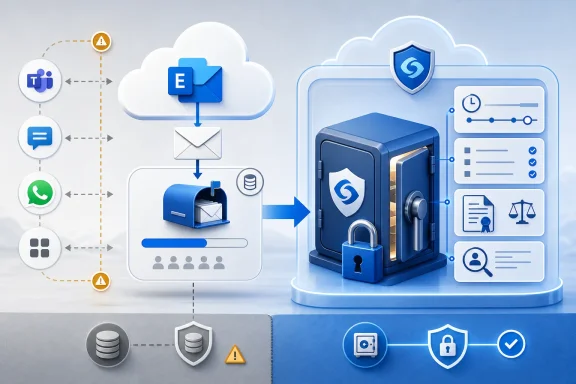 Archive Mailboxes Move Mail; They Do Not Freeze It
Microsoft’s archive mailbox, sometimes called In-Place Archiving, creates a secondary mailbox associated with a user. It can be populated manually or through Exchange messaging records management policies; Microsoft’s default archive policy can move items that are two years old from the primary mailbox into the archive mailbox.This helps control primary-mailbox size and can make long-lived mail more manageable in Outlook. Both the primary and archive mailbox are available to Purview Content Search, retention, and Litigation Hold, which is useful. But merely moving mail to an archive does not establish a retention period, make the record immutable, capture every business communication, or create a litigation hold.
That is the first implementation trap: organizations often call all three things “archiving.”
- An archive mailbox is an Exchange storage location.
- A retention policy or retention label determines whether content must be retained, deleted, or retained and later deleted.
- An eDiscovery hold or Litigation Hold preserves material connected to a legal matter.
- A regulatory records configuration may add Preservation Lock, record labels, audit procedures, and other requirements specific to the organization’s rule set.
The “Admins Can Change It” Claim Omits Preservation Lock
TYN Magazine says that native Microsoft 365 retention is insufficient for immutability because privileged administrators can alter retention settings or disable holds. That statement is accurate for an ordinary, unlocked retention policy. Microsoft’s documentation says an administrator can delete or disable a policy that does not have Preservation Lock, effectively switching off the policy’s retention settings.It is incomplete as a description of Microsoft 365’s available compliance controls.
With Preservation Lock applied, Microsoft says no one — including a global administrator — can turn off, delete, or make the policy less restrictive. A locked policy can be extended and its scope can be expanded, but its retention duration cannot be reduced and protected locations cannot be removed. This is exactly the control a firm should examine before concluding that Microsoft 365 cannot provide protected preservation.
There is a substantial catch: Preservation Lock is a one-way operational decision. A bad policy design, a mistaken scope, or an excessive retention period can become a long-term burden because the organization cannot simply roll it back. That makes a pilot, written records schedule, and legal approval prerequisites, not paperwork to finish after the switch is thrown.
The article also presents SEC Rule 17a-4 as though it still required only write once, read many storage. That has not been the complete rule since the SEC’s 2022 amendments took effect. Broker-dealers can use either a WORM-style electronic recordkeeping system or an audit-trail alternative capable of recreating an original record when it has been modified or deleted. The SEC’s own guidance confirms the alternative.
Microsoft’s claim that Preservation Lock can help meet the immutable-storage option is not the same as an SEC certification of every tenant. A broker-dealer still has to establish that its particular configuration, record categories, retention periods, supervision, retrieval process, and third-party-access arrangements satisfy the rule. But “native Office 365 cannot do this” is no longer a defensible blanket statement.
The Real Compliance Gap Is Usually Capture Scope
The stronger argument for a specialized archive is not that Exchange mail cannot be retained. It is that regulated business communication has escaped Exchange.Microsoft Purview retention policies cover Exchange mailboxes and can be scoped to Teams chats, channel messages, SharePoint, OneDrive, Microsoft 365 Groups, Viva Engage, Copilot interactions, and other Microsoft-hosted workloads. Microsoft has continued adding coverage; from late April 2026, it also supports retention policies for newly created Teams call logs through PowerShell.
That is a meaningful list, but it is not a magic perimeter. Teams retention cannot preserve an employee’s WhatsApp conversation on a personally managed device. It does not independently ingest SMS, Signal, Bloomberg, WeChat, personal Gmail, or an industry application simply because those channels were used for company business. Nor does a retention policy compensate for an organization that has not identified which channels its staff actually use.
The SEC’s recordkeeping enforcement makes this distinction concrete. In September 2022, the agency charged 15 broker-dealers and one affiliated investment adviser over widespread failures to preserve business communications conducted through employees’ personal devices, imposing more than $1.1 billion in combined penalties. The issue was not that the firms lacked email storage; it was that the communications were occurring on unapproved channels and were not retained. By November 2024, an SEC enforcement official said its broader off-channel communications initiative had resulted in charges against more than 100 firms and more than $2 billion in penalties since December 2021.
TYN Magazine reports combined 2021 and 2022 penalties exceeding $1.8 billion. The SEC’s September 2022 group resolution alone was $1.1 billion, while the agency’s fiscal-year 2022 enforcement report placed the cumulative penalties connected to the JPMorgan and 2022 matters at $1.235 billion. The article’s larger figure is not supported by those SEC releases. The later $2 billion figure is real, but it reflects enforcement through late 2024, not just 2021 and 2022.
For a Microsoft 365 administrator, the practical work begins with a communications inventory: approved email domains, Teams chat types, shared mailboxes, mobile-device policy, SMS and messaging platforms, trading or case-management tools, and external collaboration services. The capture solution should follow that inventory. Buying an email archive while leaving business conversations in unmanaged apps only creates a well-preserved subset of the record.
Search, Export, and Audit Need Testing Rather Than Assumptions
The article is right to tell organizations not to discover retention failures during litigation. Its assertion that Purview eDiscovery produces incomplete or indefensible results at scale, however, is too broad.Microsoft’s current Purview eDiscovery tools support searching and exporting content across Exchange Online, OneDrive, SharePoint Online, Teams, Microsoft 365 Groups, and Viva Engage. eDiscovery case activity is recorded in the Microsoft 365 audit log, and Purview supports exports of mailbox messages as PST files or individual messages and documents in native formats. Those capabilities are designed for investigation and legal workflows.
There are nonetheless concrete limitations that administrators should treat as test cases. Microsoft warns that SharePoint sites in a locked NoAccess state cannot be retrieved by eDiscovery and their content is skipped during export. Restricted SharePoint files can appear in search results but be excluded from export unless the collecting user has direct access. For large tenant-wide exports, Microsoft recommends generating search statistics first to optimize the export process, a direct acknowledgement that scope and scale affect performance.
Audit exports have their own limits. A single Purview Audit Standard query can export up to 50,000 records; Audit Premium raises that to one million. Results beyond those thresholds can be omitted unless the search is segmented. This does not mean Purview is incapable of producing audit evidence. It means an incident-response or discovery runbook needs date slicing, saved query criteria, export reports, hash verification where appropriate, access controls, and documented handoffs.
“Chain of custody” is similarly not a single Microsoft 365 checkbox. Purview logs eDiscovery actions, but a defensible process also records who authorized collection, which query was run, what data sources were searched, which exceptions occurred, which export package was produced, where it was stored, and who received it. A third-party archive can help standardize that workflow; it does not eliminate the organization’s responsibility to operate it correctly.
Retention Conflicts Are Defined, but Still Need Governance
Overlapping retention policies do not create an unknowable outcome. Microsoft documents the precedence rules: retention generally takes priority over permanent deletion, and the longest applicable retention period wins. For deletion conflicts, a retention label’s delete action can take priority over a retention policy, while more specifically scoped policies can override organization-wide ones.That does not make complex configurations safe by default. It means the answer is calculable — and therefore testable. Administrators should use Purview’s Policy lookup function on representative executives, former employees, shared mailboxes, Teams users, SharePoint sites, and high-risk departments. They should then document the expected outcome and verify it with controlled test content before relying on the policy in production.
The HIPAA example in the submitted article also needs narrower framing. The HIPAA Privacy Rule does not prescribe a general medical-record retention period; the Department of Health and Human Services says state law generally governs how long medical records must be kept. HIPAA does require appropriate safeguards for protected health information while it is maintained, but it does not itself impose SEC-style WORM storage for every healthcare email. Healthcare organizations may still face demanding state, contractual, evidentiary, and clinical-record requirements, but the applicable obligation must be identified before technology is selected.
Federal Rule of Civil Procedure 37(e) likewise does not mandate a particular archive product, immutable medium, or generic chain-of-custody report. It focuses on whether electronically stored information that should have been preserved was lost because a party failed to take reasonable preservation steps, and whether it can be restored or replaced. The standard is fact-specific, which makes tested legal holds and documented operational controls more valuable than a vendor’s compliance label.
The sensible decision is not “native versus third-party.” It is whether the organization can prove that its actual communications are captured, retained for the required period, protected against unauthorized weakening, searchable, exportable, and governed by a repeatable process. For mail and collaboration that live inside Microsoft 365, Purview can provide much more than mailbox management. For communications that never enter Microsoft 365 — or for firms that need independent capture, specialized supervision, or a unified archive across many platforms — an additional archive may be the missing control.
References
- Primary source: TyN Magazine
Published: 2026-08-05T06:38:00+00:00
Why Native Office 365 email archiving isn't enough for compliance - TyN Magazine
Organizations that use Microsoft 365 often think that the retention policies and archiving included in that productivity platform are enough to help them meet their legal and regulatory obligations․ Microsoft has made meaningful investments in compliance․ Retention policies‚ litigation hold and... tynmagazine.com
- Related coverage: learn.microsoft.com
Limits for Microsoft 365 retention policies and retention label policies | Microsoft Learn
Understand the maximum number of policies and items per policy for Microsoft 365 retention policies and retention label policieslearn.microsoft.com - Related coverage: learn.microsoft.com
Use Preservation Lock to restrict changes to retention policies | Microsoft Learn
Use Preservation Lock with retention policies and retention label policies to help you meet regulatory requirements and safeguard against rogue administrators.learn.microsoft.com - Related coverage: hhs.gov
- Related coverage: support.microsoft.com
Archive in Outlook for Windows | Microsoft Support
Archive in Outlook for Windows support.microsoft.com
- Related coverage: microsoft.com
New compliance assessment builds financial services confidence in Microsoft 365 Copilot | The Microsoft Cloud Blog
To help financial institutions embrace cloud and AI technologies, Microsoft has commissioned an independent assessment to help ensure compliance worldwide. www.microsoft.com
- Related coverage: techradar.com
Good news email hoarders - Microsoft Outlook will start auto-archiving your oldest messages to protect your inbox | TechRadar
Outlook adds new auto-archiving featurewww.techradar.com
