
Figma’s new guidance on turning a design system into a Claude skill has a practical message for teams using AI to create UI: a component library is no longer enough on its own. If the rules governing that library are not available in an agent-readable workflow, Claude Code can access the right Figma file and still generate a screen full of raw color values, one-off spacing, and components that resemble—but do not reuse—the company’s system.
The Figma resource published August 3 frames the fix as a custom
There is an important correction to the simple “single Markdown file” pitch, however. A basic skill can indeed be a
Figma correctly separates Model Context Protocol access from a skill, even if the terminology has been blurred in a growing number of AI design demos.
The Figma MCP server exposes tools and design context to an agent. Depending on the client and server configuration, that can include files, components, variables, styles, layout information, assets, and the ability to create or modify native Figma content. It is the connection that lets a coding agent see beyond a screenshot or a pasted CSS fragment.
A skill does not grant any of those capabilities. It tells the agent how to sequence and constrain its use of them. Anthropic describes skills as reusable instructions, knowledge, or workflows; Figma’s own documentation makes the same distinction, saying that MCP exposes individual tools while skills guide the agent through which tools to use and how to apply their output.
For Windows developers and IT teams already familiar with the difference between a PowerShell module and an operational runbook, the divide is straightforward. MCP is closer to installing the module and granting permissions. A skill is the runbook that says which command to use first, which output is authoritative, what must be validated, and which shortcuts are forbidden.
That has a direct consequence for design systems. A team can give an agent read and write access to a Figma library, yet still get poor results if the agent has no explicit instruction to search the library before drawing a rectangle, no policy on semantic versus primitive variables, and no check that a generated control is an instance of an approved component. Access expands what an agent can do. A skill narrows what it should do.
Figma’s recommendation to put “search the library first” at the top of a custom skill is therefore sound, but it should be paired with an enforceable review step. Instructions alone are probabilistic guidance, not a policy engine. A robust workflow should require the agent to report which library components, variables, and styles it found and used before it declares a screen complete.
Figma now lists these as its principal MCP skills:
That matters in practice because plugins, clients, and skills can change independently. A team that hardcodes
The broader point survives the naming churn: Figma’s supported workflow expects an agent to find published components and variables rather than manufacture visual approximations. The example
That is useful guidance—but only if the underlying library is ready for it. A Figma file full of unnamed layers, detached component copies, manually applied hex colors, and ambiguous variants gives an agent the same problem it gives a new human hire: there is no reliable way to know which artifact represents the approved system.
A useful custom skill should start with a short frontmatter description that makes its purpose and trigger conditions clear. Claude Code uses that information to decide whether the skill is relevant, and Anthropic warns that descriptions are subject to a length limit in the skill listing. The task needs to be described plainly: build or update Figma screens using the organization’s published library, bind values to approved variables, and avoid new reusable components unless a stated exception applies.
The main procedure should then be ordered and testable. A production-worthy design-system skill should tell the agent to:
For that reason, teams should avoid treating a skill as a substitute for an audit. Figma’s own MCP best practices continue to recommend variables for color, spacing, radius, and typography; semantic layer names; auto layout; reusable components; and Code Connect links to the codebase. Those choices create machine-readable evidence that an agent can inspect. The skill then turns that evidence into a repeatable procedure.
Figma’s example involving light and dark token files illustrates the risk. An agent may successfully create variables from separate JSON files yet model them as multiple collections rather than light and dark modes in one collection. The output technically exists and may look acceptable in one mode, but it fails the design-system model. The correct fix is not another request to “make it right.” It is a rule explaining how the organization models modes, plus a validation check that detects a collection structure that violates that rule.
A single “design system” skill often becomes a dumping ground: component guidance, token definitions, content style, accessibility rules, migration notes, code conventions, release policy, and every past failure an agent has made. It may feel comprehensive, but it creates a vague trigger surface and makes it difficult to tell which rule is responsible when the model behaves badly.
A more maintainable approach separates stable and task-specific guidance. One skill can govern Figma canvas construction; another can explain token modes and variable taxonomy; another can handle library migration; another can set Code Connect mapping requirements. A concise organization-wide
Version control is also essential. Anthropic supports project skills in
The same applies to the article’s proposed “gotchas” section. Recording recurring mistakes is sensible, but a gotcha should name a reproducible failure and a measurable correction. “Do not make badges wrong” is useless. “For status badges, use the
Code Connect can map Figma components to production code components and help agents or developers reuse the real implementation rather than guessing from a design. Figma itself presents it as a way to improve consistency and bring code context into the workflow. It does not establish that a newly generated screen satisfies product requirements, handles every state, meets accessibility needs, or matches the behavior of the shipped application.
The practical handoff becomes better, not automatic. Developers should still inspect component props, responsive behavior, empty and error states, localization, keyboard behavior, focus treatment, permissions, telemetry, and the implementation branch targeted by the mapping. Design-system teams should especially verify whether an agent selected a component because it is semantically correct, rather than because its visual appearance happened to be close.
Figma says its remote MCP server’s write-to-canvas capability remains in beta and is currently free, while the company expects it to become usage-based in the future. That is a deployment consideration teams should account for before standardizing high-volume automated design generation. The cost model, rollout conditions, and limits are operational details—not reasons to avoid the workflow, but reasons not to build an internal process on an assumption of permanently free writes.
The immediate payoff of a well-built
SKILL.md file: reusable Markdown instructions that tell an agent when to search a library, which token hierarchy to use, and when creation of a new component is prohibited. Anthropic’s Claude Code documentation confirms the central mechanism: skills package instructions and optional supporting files, load on demand when relevant, and can be invoked directly with a slash command or selected automatically from their descriptions.There is an important correction to the simple “single Markdown file” pitch, however. A basic skill can indeed be a
SKILL.md, but current Claude Code and Figma guidance treat a skill as a directory-based package. The Markdown entry point can be accompanied by examples, detailed token references, templates, and validation scripts. For a mature design system, that distinction is more than implementation trivia: putting every semantic token, migration note, component matrix, and accessibility rule into one giant file is likely to make the instructions harder to maintain—and more expensive in context when the skill is used.
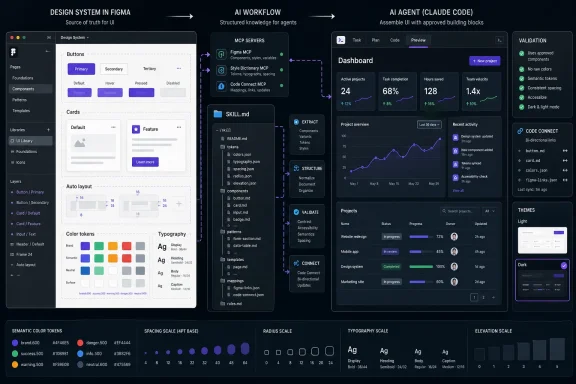 MCP Provides Access; Skills Specify the Workflow
Figma correctly separates Model Context Protocol access from a skill, even if the terminology has been blurred in a growing number of AI design demos.The Figma MCP server exposes tools and design context to an agent. Depending on the client and server configuration, that can include files, components, variables, styles, layout information, assets, and the ability to create or modify native Figma content. It is the connection that lets a coding agent see beyond a screenshot or a pasted CSS fragment.
A skill does not grant any of those capabilities. It tells the agent how to sequence and constrain its use of them. Anthropic describes skills as reusable instructions, knowledge, or workflows; Figma’s own documentation makes the same distinction, saying that MCP exposes individual tools while skills guide the agent through which tools to use and how to apply their output.
For Windows developers and IT teams already familiar with the difference between a PowerShell module and an operational runbook, the divide is straightforward. MCP is closer to installing the module and granting permissions. A skill is the runbook that says which command to use first, which output is authoritative, what must be validated, and which shortcuts are forbidden.
That has a direct consequence for design systems. A team can give an agent read and write access to a Figma library, yet still get poor results if the agent has no explicit instruction to search the library before drawing a rectangle, no policy on semantic versus primitive variables, and no check that a generated control is an instance of an approved component. Access expands what an agent can do. A skill narrows what it should do.
Figma’s recommendation to put “search the library first” at the top of a custom skill is therefore sound, but it should be paired with an enforceable review step. Instructions alone are probabilistic guidance, not a policy engine. A robust workflow should require the agent to report which library components, variables, and styles it found and used before it declares a screen complete.
Figma’s Published Skills Have Moved Beyond the Four-Item Starter List
The submitted Figma article points readers tofigma-use, figma-generate-library, figma-generate-design, and figma-code-connect as the key skills. Those names describe real workflows, but Figma’s current help documentation draws a more useful distinction that teams should not miss.Figma now lists these as its principal MCP skills:
figma-usefor working with Figma content through the available tools.figma-code-connect-componentsfor connecting Figma components with their code counterparts.figma-create-design-system-rulesfor generating rules aligned to a codebase.figma-create-new-filefor new-file workflows.figma-implement-designfor translating designs into implementation work.
figma-generate-library and figma-generate-design—are currently described by Figma as example skills. They remain valuable references, especially because they demonstrate library discovery, variable use, and screen generation, but teams should not treat their presence or exact behavior as a permanent product contract.That matters in practice because plugins, clients, and skills can change independently. A team that hardcodes
/figma-generate-design into its internal onboarding documentation without checking the installed Figma plugin may be teaching a command that is unavailable, renamed, or replaced in its chosen client. Figma says plugins can include the MCP configuration and common skills automatically, while other tools may require manual installation. The safest instruction is to have users list their installed skills first, then invoke the local name exposed by their client.The broader point survives the naming churn: Figma’s supported workflow expects an agent to find published components and variables rather than manufacture visual approximations. The example
figma-generate-design skill explicitly directs agents to discover and import a design system, then assemble full screens incrementally with components, variables, and styles rather than hardcoded values.That is useful guidance—but only if the underlying library is ready for it. A Figma file full of unnamed layers, detached component copies, manually applied hex colors, and ambiguous variants gives an agent the same problem it gives a new human hire: there is no reliable way to know which artifact represents the approved system.
A Team Skill Should Encode Decisions, Not Duplicate Documentation
The strongest part of Figma’s guidance is its emphasis on team-specific rules: token names, component naming, variant structures, usage constraints, and examples. Those are exactly the decisions an LLM cannot infer safely from a visual result.A useful custom skill should start with a short frontmatter description that makes its purpose and trigger conditions clear. Claude Code uses that information to decide whether the skill is relevant, and Anthropic warns that descriptions are subject to a length limit in the skill listing. The task needs to be described plainly: build or update Figma screens using the organization’s published library, bind values to approved variables, and avoid new reusable components unless a stated exception applies.
The main procedure should then be ordered and testable. A production-worthy design-system skill should tell the agent to:
- Identify the target Figma file, library, and codebase version before editing.
- Search for existing components, variants, variables, styles, and Code Connect mappings.
- Reuse those assets before creating primitives or introducing a new component.
- Bind colors, typography, radius, elevation, and spacing to approved semantic variables.
- Use the team’s naming and auto-layout conventions.
- Validate the finished screen for detached instances, raw values, missing modes, and inaccessible contrast.
- Summarize exceptions separately instead of silently creating local substitutes.
For that reason, teams should avoid treating a skill as a substitute for an audit. Figma’s own MCP best practices continue to recommend variables for color, spacing, radius, and typography; semantic layer names; auto layout; reusable components; and Code Connect links to the codebase. Those choices create machine-readable evidence that an agent can inspect. The skill then turns that evidence into a repeatable procedure.
Figma’s example involving light and dark token files illustrates the risk. An agent may successfully create variables from separate JSON files yet model them as multiple collections rather than light and dark modes in one collection. The output technically exists and may look acceptable in one mode, but it fails the design-system model. The correct fix is not another request to “make it right.” It is a rule explaining how the organization models modes, plus a validation check that detects a collection structure that violates that rule.
Small, Versioned Skills Beat a Design-System Monolith
Figma’s livestream advice from Brett McMillin and Anthropic technical staff member Thariq Shihipar—to keep skills small and composable—is more than prompt-writing preference. It aligns with Claude Code’s own behavior: skill content enters the conversation when invoked and remains there, meaning every unnecessary paragraph competes with the task, tool output, and the rest of the session context.A single “design system” skill often becomes a dumping ground: component guidance, token definitions, content style, accessibility rules, migration notes, code conventions, release policy, and every past failure an agent has made. It may feel comprehensive, but it creates a vague trigger surface and makes it difficult to tell which rule is responsible when the model behaves badly.
A more maintainable approach separates stable and task-specific guidance. One skill can govern Figma canvas construction; another can explain token modes and variable taxonomy; another can handle library migration; another can set Code Connect mapping requirements. A concise organization-wide
CLAUDE.md or equivalent persistent instruction file can hold the non-negotiable rules that apply to every task, while skills handle workflows that should load only when needed.Version control is also essential. Anthropic supports project skills in
.claude/skills/<skill-name>/SKILL.md, which means the instructions can live alongside the code and be reviewed through the same pull-request process as a component change. When a design-system release deprecates Button/Primary in favor of a new variant API, the skill must change in the same release window—or the AI will keep generating yesterday’s implementation.The same applies to the article’s proposed “gotchas” section. Recording recurring mistakes is sensible, but a gotcha should name a reproducible failure and a measurable correction. “Do not make badges wrong” is useless. “For status badges, use the
StatusBadge component; do not draw ellipses; use status.* semantic color variables; verify the component remains an instance” gives the agent and the reviewer something concrete to check.Code Connect Still Needs Human Verification
Figma’s article suggests that once an AI-created screen lands in Figma, Dev Mode and Code Connect remove the need for a manual conversation explaining what was built and why. That overstates what Code Connect does.Code Connect can map Figma components to production code components and help agents or developers reuse the real implementation rather than guessing from a design. Figma itself presents it as a way to improve consistency and bring code context into the workflow. It does not establish that a newly generated screen satisfies product requirements, handles every state, meets accessibility needs, or matches the behavior of the shipped application.
The practical handoff becomes better, not automatic. Developers should still inspect component props, responsive behavior, empty and error states, localization, keyboard behavior, focus treatment, permissions, telemetry, and the implementation branch targeted by the mapping. Design-system teams should especially verify whether an agent selected a component because it is semantically correct, rather than because its visual appearance happened to be close.
Figma says its remote MCP server’s write-to-canvas capability remains in beta and is currently free, while the company expects it to become usage-based in the future. That is a deployment consideration teams should account for before standardizing high-volume automated design generation. The cost model, rollout conditions, and limits are operational details—not reasons to avoid the workflow, but reasons not to build an internal process on an assumption of permanently free writes.
The immediate payoff of a well-built
SKILL.md is consistency: fewer invented controls, fewer raw values, and a more auditable path from a Figma canvas to production code. The longer-term payoff is governance. As AI agents become regular contributors to design and implementation work, the organizations that version their rules, validate outputs, and keep their libraries machine-readable will retain control of the system those agents are asked to use.
References
- Primary source: Figma
Published: 2026-08-03T17:00:27.115013
Loading…
www.figma.com - Related coverage: github.com
Loading…
github.com - Related coverage: fig-events.figma.com
Loading…
fig-events.figma.com - Related coverage: figma.com
Loading…
www.figma.com - Related coverage: resources.anthropic.com
Loading…
resources.anthropic.com - Related coverage: code.claude.com
Loading…
code.claude.com - Related coverage: code.claude.com
Loading…
code.claude.com - Related coverage: docs.anthropic.com
Advanced setup - Claude Code Docs
System requirements, platform-specific installation, version management, and uninstallation for Claude Code.docs.anthropic.com - Related coverage: github.com
Loading…
github.com