
Google appears to be building a Plugins layer for Gemini Enterprise, but the evidence so far is an unfinished interface rather than a product announcement—and that distinction matters for IT teams deciding whether Google’s agent platform is ready to standardize repetitive work across Microsoft 365 and other business systems.
TestingCatalog first reported seeing a revised Gemini Enterprise Connectors area divided into Connectors, Skills, and Plugins, alongside a separate Notifications area. The Plugins catalog was empty in the reported build, and Google has not added Plugins or a user-facing Notifications hub to its Gemini Enterprise documentation or release notes as of August 3, 2026. No other outlet has independently published the interface details or a rollout timetable.
The potential payoff is clear: a packaged workflow could spare employees from having to understand which connector, skill, prompt, and approval path is needed to complete a job. But Google’s current documentation shows its existing building blocks are more fragmented than the leaked tab names suggest. The company still has to solve how those pieces are assembled, permissioned, distributed, monitored, and supported before “Plugins” becomes a meaningful enterprise feature rather than another catalog label.
Google already markets Gemini Enterprise as a governed front end for agents and company data. Its official connector catalog now includes Google Workspace services and a long list of third-party systems, including Microsoft OneDrive, Outlook, SharePoint, Teams, Entra ID, Jira, Confluence, ServiceNow, Slack, GitHub, Asana, Box, and HubSpot.
Connectors are the data and action layer. They can let a user search across company content, but several also carry out actions: creating a folder in OneDrive, managing an Outlook calendar, updating a Jira issue, sending a Slack message, or working with an Asana project. That makes the distinction between a connector that merely retrieves data and one that can modify it especially important.
Skills, meanwhile, are reusable custom instructions. Google describes them as packages centered on a
That is useful, but it is not the same thing as an application-like workflow. Google’s own skills documentation says skills currently cannot be used with agents, cannot be shared organization-wide, and do not work with custom Model Context Protocol servers connected to Gemini Enterprise. The company also says natural-language skill creation does not use conversation context or connectors as inputs.
Those limitations undercut the easiest reading of the reported Plugins tab: that Google has already built a working format that bundles a skill with multiple connectors into an autonomous workflow. It may be headed there, but the public record does not establish that. The more defensible conclusion is that Google is designing a new organizational surface around components that are presently managed with separate constraints.
A plugin could package a specific job around those decisions. A help-desk workflow might retrieve a user’s Entra ID and Microsoft Teams context, inspect a Jira issue, draft a status update, and pause for approval before a message is posted. A sales-operations workflow could bring together Outlook, SharePoint, HubSpot, and a company-approved customer briefing skill without requiring each employee to construct the same sequence repeatedly.
The practical advantage would be consistency. A support team should not have ten versions of “prepare an incident update,” each with different data sources and differing instructions for handling confidential details. A curated plugin could give admins a deployable baseline with defined tools, prompts, owners, and approval points.
Google already provides a separate path for more ambitious work through no-code agents, developer-built agents, and partner-built agents distributed through its Agent Marketplace. That raises a product-boundary question that Google has not answered: how would a Plugin differ from a no-code agent, a Marketplace agent, an imported skill package, or a connector with actions?
The answer will determine whether Plugins simplify Gemini Enterprise or create a fourth way to package automation. Google needs to be precise here. If a plugin is only a discoverability wrapper for existing agents and connections, it could be valuable but relatively modest. If it creates a new deployable artifact with a defined permission model and workflow runtime, it would be a more consequential expansion—and a larger governance responsibility.
A packaged workflow that spans those systems cannot simply inherit a broad “Microsoft 365 access” switch and call the job done. It has to answer which identity runs each action, whether the workflow can see only documents and messages the initiating employee is permitted to access, whether an administrator can restrict specific operations, and whether a result can be traced back to the plugin, connector, user, and approval event that produced it.
Google says Gemini Enterprise enforces document-level controls from connected systems and supports centralized governance over connectors, user permissions, and policies. Its Standard and Plus editions also offer audit logging and stricter security controls. Those claims describe the platform’s intended foundation, but Google has not said whether a future Plugin would have its own permission scope, version history, approval policy, or administrator controls.
That omission matters more for action-capable connections than search-only ones. Reading an Outlook mailbox or SharePoint library is sensitive; sending email, creating calendar events, changing a task, or copying files creates a different operational and compliance risk. Google’s current scheduled-agent documentation recognizes that difference: a scheduled agent can perform personal tasks automatically, but actions involving other people pause for user review and approval.
A plugin system that obscures those boundaries in the name of convenience would be a step backward. A well-designed one would make them visible: which connected services it uses, whether it reads or writes, whose credentials apply, what requires confirmation, and where administrators can revoke it.
That works when an employee remembers which agent generated which thread. It becomes cumbersome when multiple background tasks are producing reports, research summaries, updates, or approval requests. A dedicated completion queue would give users a place to find work that finished while they were elsewhere, instead of making them hunt through chat history.
Google’s present scheduled-agent model has operational constraints that a Notifications panel would not erase. Scheduled agents run under a user’s credentials, which expire every 14 days and must be manually refreshed. Google also warns that a scheduled run can be delayed by as much as five minutes and is supported only in multi-region locations.
In other words, a completion notification could tell an employee that a report is ready, but it cannot guarantee that the report ran if the owner’s authorization expired two weeks earlier. For administrators, the missing piece remains a central view of failed or suspended user-level automations. Google already supports email alerts for connector data-store sync events, such as failed, canceled, or successful synchronization, but that is a different administrative workflow from alerting a user that their scheduled agent completed a task.
That leaves several material questions unanswered:
If Google ships Plugins, the feature will be judged less by the number of prebuilt workflows in its catalog than by whether it can package cross-service automation without hiding the identity, data-access, and approval controls that enterprise deployments require.
The potential payoff is clear: a packaged workflow could spare employees from having to understand which connector, skill, prompt, and approval path is needed to complete a job. But Google’s current documentation shows its existing building blocks are more fragmented than the leaked tab names suggest. The company still has to solve how those pieces are assembled, permissioned, distributed, monitored, and supported before “Plugins” becomes a meaningful enterprise feature rather than another catalog label.
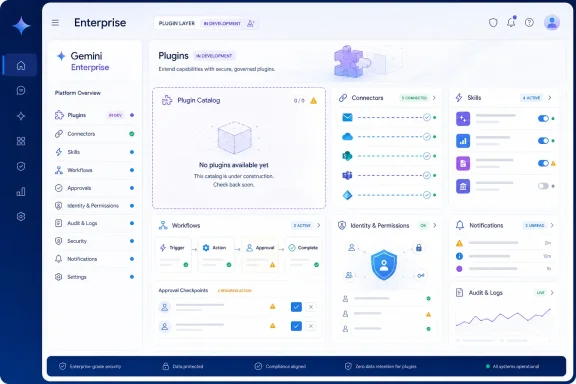 The current Gemini Enterprise pieces do not yet form a clean package
Google already markets Gemini Enterprise as a governed front end for agents and company data. Its official connector catalog now includes Google Workspace services and a long list of third-party systems, including Microsoft OneDrive, Outlook, SharePoint, Teams, Entra ID, Jira, Confluence, ServiceNow, Slack, GitHub, Asana, Box, and HubSpot.Connectors are the data and action layer. They can let a user search across company content, but several also carry out actions: creating a folder in OneDrive, managing an Outlook calendar, updating a Jira issue, sending a Slack message, or working with an Asana project. That makes the distinction between a connector that merely retrieves data and one that can modify it especially important.
Skills, meanwhile, are reusable custom instructions. Google describes them as packages centered on a
skill.md file, with optional scripts, files, and background context. A company can build a skill for contract review, brand voice enforcement, customer briefings, project updates, or its own internal procedures, then invoke it manually in a chat or let Gemini select it when the skill description matches the task.That is useful, but it is not the same thing as an application-like workflow. Google’s own skills documentation says skills currently cannot be used with agents, cannot be shared organization-wide, and do not work with custom Model Context Protocol servers connected to Gemini Enterprise. The company also says natural-language skill creation does not use conversation context or connectors as inputs.
Those limitations undercut the easiest reading of the reported Plugins tab: that Google has already built a working format that bundles a skill with multiple connectors into an autonomous workflow. It may be headed there, but the public record does not establish that. The more defensible conclusion is that Google is designing a new organizational surface around components that are presently managed with separate constraints.
A Plugins tab would address the adoption problem, not just add another feature
For employees, Gemini Enterprise’s rapidly growing connector inventory can be a strength and a usability problem. Connecting Microsoft 365, Google Workspace, a ticketing system, CRM, project tracker, and document repository gives Gemini more context. It also leaves a user facing a growing set of choices about where information lives, which connection has the authority to act, and what an agent should do next.A plugin could package a specific job around those decisions. A help-desk workflow might retrieve a user’s Entra ID and Microsoft Teams context, inspect a Jira issue, draft a status update, and pause for approval before a message is posted. A sales-operations workflow could bring together Outlook, SharePoint, HubSpot, and a company-approved customer briefing skill without requiring each employee to construct the same sequence repeatedly.
The practical advantage would be consistency. A support team should not have ten versions of “prepare an incident update,” each with different data sources and differing instructions for handling confidential details. A curated plugin could give admins a deployable baseline with defined tools, prompts, owners, and approval points.
Google already provides a separate path for more ambitious work through no-code agents, developer-built agents, and partner-built agents distributed through its Agent Marketplace. That raises a product-boundary question that Google has not answered: how would a Plugin differ from a no-code agent, a Marketplace agent, an imported skill package, or a connector with actions?
The answer will determine whether Plugins simplify Gemini Enterprise or create a fourth way to package automation. Google needs to be precise here. If a plugin is only a discoverability wrapper for existing agents and connections, it could be valuable but relatively modest. If it creates a new deployable artifact with a defined permission model and workflow runtime, it would be a more consequential expansion—and a larger governance responsibility.
Microsoft 365 connectors make permissions the hard part
The reported UI comes at a time when Gemini Enterprise is increasingly relevant to Windows-centric organizations. Google’s connector catalog includes Microsoft Outlook, OneDrive, SharePoint, Teams, and Entra ID, while its Business edition documentation specifies that some third-party connections require users to authenticate with the underlying service.A packaged workflow that spans those systems cannot simply inherit a broad “Microsoft 365 access” switch and call the job done. It has to answer which identity runs each action, whether the workflow can see only documents and messages the initiating employee is permitted to access, whether an administrator can restrict specific operations, and whether a result can be traced back to the plugin, connector, user, and approval event that produced it.
Google says Gemini Enterprise enforces document-level controls from connected systems and supports centralized governance over connectors, user permissions, and policies. Its Standard and Plus editions also offer audit logging and stricter security controls. Those claims describe the platform’s intended foundation, but Google has not said whether a future Plugin would have its own permission scope, version history, approval policy, or administrator controls.
That omission matters more for action-capable connections than search-only ones. Reading an Outlook mailbox or SharePoint library is sensitive; sending email, creating calendar events, changing a task, or copying files creates a different operational and compliance risk. Google’s current scheduled-agent documentation recognizes that difference: a scheduled agent can perform personal tasks automatically, but actions involving other people pause for user review and approval.
A plugin system that obscures those boundaries in the name of convenience would be a step backward. A well-designed one would make them visible: which connected services it uses, whether it reads or writes, whose credentials apply, what requires confirmation, and where administrators can revoke it.
Notifications would fix a real gap in scheduled work
The separate Notifications area reported by TestingCatalog may be the less flashy of the two additions, but it addresses a limitation Google already documents. Gemini Enterprise supports scheduled agent executions in preview, with hourly, daily, weekly, monthly, and annual options. Users can view scheduled runs and approval requests in the Chats section, where each task corresponds to a conversation thread.That works when an employee remembers which agent generated which thread. It becomes cumbersome when multiple background tasks are producing reports, research summaries, updates, or approval requests. A dedicated completion queue would give users a place to find work that finished while they were elsewhere, instead of making them hunt through chat history.
Google’s present scheduled-agent model has operational constraints that a Notifications panel would not erase. Scheduled agents run under a user’s credentials, which expire every 14 days and must be manually refreshed. Google also warns that a scheduled run can be delayed by as much as five minutes and is supported only in multi-region locations.
In other words, a completion notification could tell an employee that a report is ready, but it cannot guarantee that the report ran if the owner’s authorization expired two weeks earlier. For administrators, the missing piece remains a central view of failed or suspended user-level automations. Google already supports email alerts for connector data-store sync events, such as failed, canceled, or successful synchronization, but that is a different administrative workflow from alerting a user that their scheduled agent completed a task.
Google has not committed to scope, availability, or governance
The strongest evidence here is still narrow: TestingCatalog found an incomplete Plugins tab and a Notifications interface in a Gemini Enterprise build. Google’s public product pages, skills documentation, and release notes confirm the surrounding capabilities—connectors, skills, agents, scheduled executions, Marketplace distribution, and audit controls—but they do not confirm Plugins as a shipping feature.That leaves several material questions unanswered:
- Google has not said whether Plugins will be available in Business edition, Standard, Plus, or only selected enterprise tenants.
- Google has not identified any first-party or third-party plugin partners, catalog categories, pricing, or geographic availability.
- Google has not explained whether plugins will wrap existing agents, contain skills and connectors, use MCP, or introduce a separate runtime.
- Google has not documented how administrators would approve, deploy, update, disable, audit, or revoke a plugin across an organization.
- Google has not said whether Notifications would surface failed jobs, approval requests, scheduled results, agent handoffs, or only completed chat work.
If Google ships Plugins, the feature will be judged less by the number of prebuilt workflows in its catalog than by whether it can package cross-service automation without hiding the identity, data-access, and approval controls that enterprise deployments require.
References
- Primary source: TestingCatalog AI News
Published: 2026-08-03T13:56:00+00:00
Loading…
www.testingcatalog.com - Related coverage: cloud.google.com
Connectors for Gemini Enterprise app | Google Cloud
Connect Gemini Enterprise app to your favorite business applications and tools.cloud.google.com
- Related coverage: support.google.com
Loading…
support.google.com - Related coverage: testingcatalog.com
Google plans to upgrade Gemini Enterprise connectors
Google Gemini Enterprise is rolling out a glowing prompt bar and updating Workspace connectors, preparing support for the Gemini Spark agent. www.testingcatalog.com
- Related coverage: cloud.google.com
Loading…
cloud.google.com - Related coverage: docs.cloud.google.com
Loading…
docs.cloud.google.com - Related coverage: help.openai.com
Loading…
help.openai.com - Related coverage: geminicli.work
Loading…
geminicli.work - Related coverage: sc102-prod-cd.azurewebsites.net
Loading…
sc102-prod-cd.azurewebsites.net - Related coverage: geminidata.com
Loading…
www.geminidata.com - Related coverage: persistent.com
Loading…
www.persistent.com - Related coverage: sc102-prod-cd.azurewebsites.net
Loading…
sc102-prod-cd.azurewebsites.net - Related coverage: services.google.com
Loading…
services.google.com - Related coverage: docs.cloud.google.com
Loading…
docs.cloud.google.com