
runs-on: windows-11-vs2026-arm. The immediate operational concern is not whether the new label exists; it is that GitHub will begin moving the existing floating windows-11-arm label to the Visual Studio 2026 image on September 21, 2026, completing the rollout by September 30.
GitHub’s August 20 changelog calls the image generally available on both standard and larger GitHub-hosted runners and explicitly warns that workflows depending on Visual Studio 2022 may break. The corresponding actions/runner-images repository confirms the new Arm64 label and its Visual Studio 2026 image definition. For teams building native Windows-on-Arm software, C++ projects, drivers, or packages that require Microsoft’s IDE and build-chain components, that makes the hosted Windows Arm runner substantially more useful than it was during the image’s preview period.
The migration also turns windows-11-arm into a moving dependency. Any workflow that uses that label is opting into the Visual Studio 2026 transition unless its maintainers redirect the job to another runner before the September rollout.
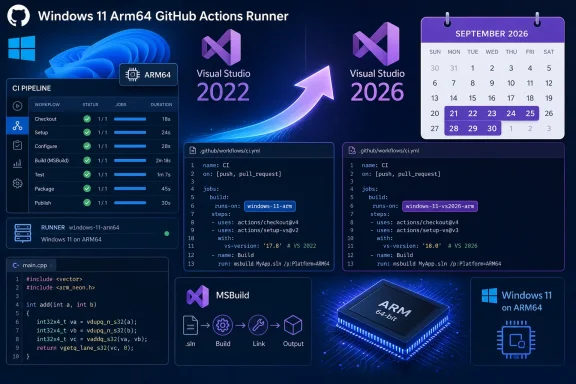 The September migration changes a floating runner label
GitHub’s announcement separates two decisions that workflow owners should make deliberately. A project that wants Visual Studio 2026 can switch its YAML now to the explicit windows-11-vs2026-arm label and discover failures before the default image starts changing. A project that does not want to use Windows 11 Arm64 at all will need to change the runner target for standard runners, or change the assigned image for a larger runner.
There is no announced option to keep using the old Visual Studio 2022-backed configuration through windows-11-arm after the migration. GitHub says that label will gradually move to the new image between September 21 and September 30. The word gradually is significant in CI: two otherwise identical runs may land on different image generations during the rollout window, complicating attempts to reproduce a build failure from a single job log.
This is different from pinning an operating-system label such as windows-2022 instead of windows-latest. Here, the operating system remains Windows 11 Arm64 while the principal toolchain changes underneath the same label. GitHub’s runner-images documentation describes image labels as mutable and notes that its images receive weekly software updates, but the Visual Studio change is large enough to warrant a separate compatibility pass rather than routine dependency maintenance.
For organizations that use reusable workflows, the practical task is to find where windows-11-arm is set indirectly. A repository may contain no direct reference to that label while inheriting it from a central workflow, an organization template, or a matrix assembled from JSON or environment variables. Those abstractions are helpful until an image change makes the effective runner hard to identify.
Visual Studio’s installation path is the likely fault line
The current Windows 11 Arm64 image definition lists Visual Studio Enterprise 2022 version 17.14 at:
C:\Program Files\Microsoft Visual Studio\2022\Enterprise
The dedicated Windows 11 Arm64 Visual Studio 2026 image instead lists Visual Studio Enterprise 2026 version 18.8 at:
C:\Program Files\Microsoft Visual Studio\18\Enterprise
That path change is more consequential than a cosmetic version-number update. Many Windows build workflows still use hard-coded Visual Studio directories to locate MSBuild, C++ toolsets, Windows SDK integrations, custom .props files, CMake generators, test adapters, or vendor extensions. A job can compile successfully on a developer workstation and still fail in Actions if the workflow assumes the 2022 directory layout.
The potential failure mode has already appeared during GitHub’s earlier Visual Studio 2026 work on x64 Windows Server 2025 runners. A user report in the actions/runner-images repository documented jobs unexpectedly receiving the VS 2026 image and failing because scripts tested or copied files under the old ...\Visual Studio\2022\Enterprise path. The report specifically identified CUDA MSBuild integration as one affected case. That was an x64 runner incident, not proof that every Arm64 migration will fail the same way, but it is a precise example of the class of breakage GitHub is warning about.
Scripts should resolve the installation path dynamically where possible. vswhere, included in both current Windows 11 Arm64 image manifests, is the obvious Windows-native mechanism. A PowerShell step that asks vswhere for the active installation path is more durable than embedding 2022 or 18 in a file path. Build systems should also avoid assuming that a particular MSVC toolset version, SDK installation directory, or Visual Studio workload is present solely because it was present on the previous hosted image.
The safest test is a clean Actions run on windows-11-vs2026-arm, not a local Visual Studio 2026 build. Hosted images carry their own set of preinstalled workloads, environment variables, package-manager state, and tool versions. GitHub’s current manifest shows CMake 4.4.2, .NET SDKs through 10.0.300, Node.js 24.19.0, Python 3.13.15, Rust 1.97.1, and a Windows Driver Kit installation alongside Visual Studio 2026. Those details are useful, but they are not a compatibility guarantee for a repository’s exact extension set or bootstrap scripts.
General availability and the documentation still disagree
GitHub’s changelog is unambiguous: it says the Windows 11 Arm64 VS2026 image is generally available. GitHub’s own hosted-runner reference, however, still labels both windows-11-arm and windows-11-vs2026-arm as Public preview for both public and private repositories.
That inconsistency is worth treating as a documentation lag until GitHub reconciles it. The runner-images project defines a generally available image as one that has completed beta testing, has compatible versions of major software, has addressed major reported beta bugs, and falls under the GitHub Actions customer SLA. GitHub’s public documentation currently applies the preview designation to the very label that the changelog says is GA.
This does not negate the release announcement or block use of the image. The changelog is GitHub’s official statement of the rollout, and the image is present in the official runner-images catalog. But it leaves an unresolved support-status question for enterprises whose CI policy distinguishes preview infrastructure from SLA-backed production infrastructure. Teams should preserve the August 20 changelog internally, check the runner documentation again before enforcing a production-only policy, and ask GitHub support for written confirmation if contractual coverage matters.
The confusion is amplified by GitHub’s use of “standard and larger runners” in the changelog. Standard hosted runner documentation lists the Windows Arm64 labels and their hardware allocation: four vCPUs, 16 GB of RAM, and 14 GB of SSD storage for public repositories; two vCPUs, 8 GB of RAM, and 14 GB of storage for private repositories. Larger runners have separate organization-level provisioning and image-assignment controls, so an administrator can have another layer of runner configuration beyond a repository’s YAML file.
What to validate before September 21
The new image should be tested as a controlled toolchain migration, with particular attention to Windows-specific setup code that ordinary cross-platform CI review can miss.
- Run the current build, packaging, signing, and test jobs on
windows-11-vs2026-armbefore September 21, 2026, and retain the runner-image details from successful and failed logs. - Replace fixed Visual Studio installation paths with discovery through
vswhere, environment variables supplied by the build tools, or supported build-system discovery features. - Verify CMake configuration, MSBuild imports,
vcvarsall.bator developer-shell bootstrapping, Windows SDK selection, and any manually installed C++ or CUDA build customizations. - Test native dependencies and GitHub Actions that download architecture-specific tools, because Windows Arm64 compatibility is a separate issue from the Visual Studio version change.
- Audit reusable workflows and matrices for
windows-11-arm, then decide whether each job should opt intowindows-11-vs2026-arm, move to a different architecture, or stop using the Arm64 image.
GitHub’s September 30 completion date creates a hard practical deadline: after that point, leaving windows-11-arm unchanged means accepting the Visual Studio 2026 image as the default. The explicit VS2026 label is available now, so a failure found in late September will be a deferred test—not an unavoidable surprise.