
The important practical change is narrower and more useful: developers maintaining eligible C# or Visual Basic applications can now use a managed Copilot workflow to reduce the repetitive investigation and conversion work involved in moving from .NET Framework to current .NET. Microsoft’s documentation says the upgrade agent supports Windows Forms, WPF, WinUI, ASP.NET, Azure Functions, class libraries, console programs, and test projects, with .NET Framework projects eligible to target .NET 8 or later.
That makes the tool relevant to Windows shops with large internal application portfolios. It does not make a decades-old desktop application modern by itself, and it does not change Windows 11’s underlying application-compatibility policy.
 The demonstration is real, but it is a controlled sample
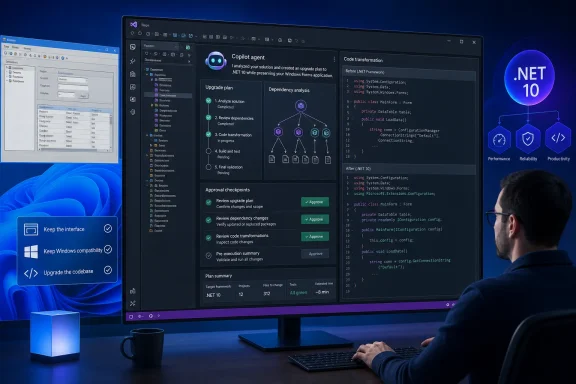
Microsoft’s Visual Studio Blog uses BookCatalog, a small forms-over-data application that can list, add, edit, and delete books. In the walkthrough, a developer opens the solution in Visual Studio, selects Modernize, chooses .NET 10 as the target, and uses the guided mode so the agent stops at checkpoints rather than altering the entire solution without review.
The agent first examines the project and dependencies, then writes an upgrade plan that the developer can change before execution begins. Microsoft says the BookCatalog example completes through five tasks, after which the application can be launched and tested. The broader GitHub Copilot upgrade documentation describes the same assess-plan-execute sequence and says it can record assessment results, tasks, build failures, and execution progress.
There is value in that structure beyond a free-form prompt. Framework migrations often fail less because a developer cannot edit a project file than because the effort exposes package dependencies, obsolete APIs, configuration differences, project ordering, and test failures that were invisible at the beginning. A written plan and incremental tasks give a team artifacts to inspect, put under source control, and review in a pull request.
But BookCatalog is a training exercise, not evidence that the process will be equally smooth on a line-of-business application with COM integrations, native DLLs, custom installers, third-party controls, proprietary authentication code, or years of untested business rules. Microsoft itself makes the limitation plain in the demonstration: AI output is not deterministic, and an upgrade may not work on the first pass.
Windows 11 compatibility is not the problem this solves
Calling this a route past a Windows 11 hurdle confuses two different problems. Microsoft’s Windows 11 planning documentation continues to promise Windows 10-level application compatibility, reporting a compatibility rate above 99.7% for enterprise organizations’ apps and offering App Assure support for qualifying customers with application problems. Windows 11 also includes .NET Framework 4.8.1 on current releases, so a .NET Framework desktop app does not need a migration to .NET 10 merely to remain runnable on the operating system.
In other words, the Windows compatibility layer is Microsoft’s answer to the immediate problem of keeping old applications working. The Copilot upgrade agent addresses a different problem: the technical and organizational cost of changing an application that still works but has become expensive to maintain, hard to secure, difficult to test, or difficult to connect to newer services.
That distinction matters for IT administrators deciding where to spend scarce application-remediation budget. A stable Windows Forms application on .NET Framework 4.8.1 may be a perfectly defensible candidate to leave in place after testing it on Windows 11. Microsoft’s lifecycle record still ties .NET Framework support to the Windows versions on which it runs, rather than imposing a single standalone retirement date for 4.8.1.
A migration is more compelling when the application needs a newer library, cross-platform deployment, updated web stack, cloud-hosting work, or a development model that the old framework makes awkward. It may also be necessary when an application is pinned to earlier .NET Framework releases: Microsoft retired .NET Framework 4.5.2, 4.6, and 4.6.1 on April 26, 2022, while .NET Framework 4.6.2 has an end date of January 12, 2027.
The agent upgrades code; it does not modernize the experience
The most revealing part of Microsoft’s BookCatalog post is what does not happen. After the agent completes the .NET 10 upgrade, Microsoft says the application looks exactly the same. The modernization agent does not redesign the user interface.
That is not a small footnote. A substantial share of the cost and risk in desktop application modernization lies outside a framework target: UI behavior, accessibility, DPI handling, keyboard navigation, deployment, signing, localization, telemetry, update mechanisms, and training users who depend on a familiar workflow. Moving a Windows Forms or WPF application to .NET 10 can improve its maintainability while deliberately preserving its legacy appearance and interaction model.
Microsoft has separate AI-assisted material for the next stage. Its WinUI agent plugin supplies specialized skills for WinUI 3 development, code review, packaging, migration, and UI tests generated through Windows UI Automation. The plugin includes a WPF-to-WinUI migration skill and design guidance intended to steer coding agents away from deprecated UWP patterns.
Yet these are separate tools, and that separation was blurred in the original framing. Microsoft’s WinUI plugin documentation says the plugin works with the GitHub Copilot CLI and Claude Code; it does not currently integrate with VS Code Copilot Chat. The .NET upgrade workflow, meanwhile, can run through Visual Studio, VS Code, GitHub Copilot CLI, or the GitHub Copilot app, but its dashboard is not available in Visual Studio or VS Code.
For a Windows development team, the credible workflow is therefore staged rather than magical: use the upgrade agent to understand and modernize the supported .NET codebase; run the existing automated and manual tests; then decide whether the application needs a UI redesign or a move to WinUI 3. Treating those as one-click steps will produce bad estimates and, potentially, broken business software.
Review gates are the feature, not an inconvenience
Microsoft’s agent is deliberately designed to ask for decisions. The company says it assesses code, configuration, and dependencies; offers an ordered plan; applies transformations; and validates that the application builds and tests. Its earlier public-preview material also said that the tooling can create Git commits as it works and run unit tests when they exist.
Those capabilities should change how teams evaluate it. The best immediate use is not granting an AI agent permission to rewrite a production branch. It is using it in a disposable modernization branch to generate an inventory of blockers, dependency changes, proposed transformations, and missing tests—work that gives an engineering lead a more defensible estimate even if the eventual migration remains mostly manual.
Teams should also distinguish a successful build from a successful migration. Unit tests can confirm only the behavior they cover. A payroll, inventory, healthcare, manufacturing, or financial application may rely on external components and operational assumptions that never appear in a build log. Manual acceptance testing, package and installer validation, identity checks, rollback planning, and security review remain mandatory before deploying an upgraded desktop application broadly.
Microsoft requires a Windows development environment for the Visual Studio route, Visual Studio 2026 or Visual Studio 2022 version 17.14.17 or later, the .NET desktop workload, the GitHub Copilot and GitHub Copilot app modernization components, and a GitHub account with Copilot access. The documentation says a free Copilot tier can qualify, but usage limits make that a practical consideration for large solutions and repeated migration work.
A useful accelerator, not an escape hatch
Microsoft is making a credible attempt to turn .NET migration from an open-ended cleanup project into an auditable engineering workflow. The upgrade agent’s broad stated support for Windows Forms, WPF, and WinUI projects means it could reduce the initial friction that has kept many internal applications on old targets long after teams wanted to move.
What it has not done is eliminate Windows legacy support, retire .NET Framework, or convert a familiar desktop application into a modern WinUI product. Windows 11 still carries the compatibility responsibility that lets old software run; the Copilot tooling gives developers a potentially faster way to change software when maintaining it becomes the bigger risk.
For administrators, the immediate consequence is a better triage option: test legacy applications on Windows 11 as before, keep stable .NET Framework 4.8.1 software where that is the sensible business choice, and pilot the Copilot upgrade workflow on a well-tested, noncritical application before trusting it with the code that keeps the organization running.