
That distinction is important for Windows users and homelab operators. The project’s own documentation confirms that Glance is a compact, YAML-configured dashboard available as a Docker image and as native binaries for Windows, Linux, and macOS. MakeUseOf focused on the Docker route, but Windows users do not need to run Docker Desktop, WSL 2, or a Linux VM merely to host a personal start page: the official Windows binary listens locally on port 8080 and reads its configuration from
glance.yml.
The catch is that a dashboard is only as useful — and as safe — as the feeds, credentials, service endpoints and privileged sockets connected to it. Glance can replace the visiting half of a dozen bookmarked sites. It cannot replace the sites when the task requires interaction, nor should it be given broad access to a home server simply to make a homepage more attractive.
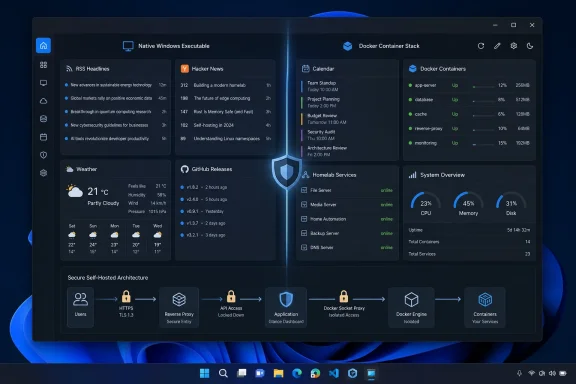 Glance changes the unit of browsing
A bookmark is a promise to visit something later. It stores a destination, not the information that makes the destination worth visiting. After enough bookmarks accumulate, the browser bar becomes a directory of intentions: a few frequently checked pages, a long tail of tools, and a collection of links whose original purpose is hard to remember.
Glance changes that model by placing summaries directly on a configurable page. Its built-in widgets include RSS feeds, subreddit posts, Hacker News, weather forecasts, YouTube uploads, Twitch channels, market prices, Docker container status, server statistics, release tracking, bookmarks and custom API-driven panels. The practical effect is not that it makes Reddit, YouTube or GitHub disappear. It makes them compete for attention on one page before they earn a full tab.
That is the point MakeUseOf’s Yadullah Abidi arrives at after consolidating daily reading, calendars, Home Assistant controls and 3D-printer information. A dashboard works best when it removes repetitive checking, not when it tries to reproduce a full service in a small widget. A headline, a failed container, a calendar conflict, a new GitHub release or a weather alert can be assessed in seconds. The original page is opened only when there is something to do.
For IT pros, that same model has a more operational use. A separate Glance page for patch advisories, Microsoft 365 service notices, vendor RSS feeds, backup reports and release watches can be a calmer front end than a stack of pinned tabs. It will not replace monitoring or incident response tooling, but it can reduce the small daily interruptions that lead administrators to miss the signal hidden among routine checks.
The project’s multi-page layout matters here. Putting every interest and every service on one oversized dashboard recreates the problem in a new form. Splitting a configuration into “Morning,” “Homelab,” “Work,” or “Security” pages keeps a homepage from becoming another dense portal that users stop reading.
The Docker deployment is simple, but it is not the only Windows path
Glance’s recommended Docker Compose setup is genuinely small. The official template provides a Compose file, a configuration directory and starter YAML; the core deployment maps a local configuration folder into the container and publishes port 8080. For someone already running Docker on a NAS, Linux server or Proxmox host, that is a low-friction deployment.
The project also publishes precompiled Windows binaries. That changes the calculation for a Windows desktop or small Windows Server installation. If the dashboard only aggregates public RSS feeds, weather, GitHub releases and bookmarks, running the native executable avoids the overhead and complexity of maintaining Docker Desktop and its WSL 2 backend solely for Glance. Point the browser’s startup or home-page setting at the local service and the same dashboard workflow is available.
Docker becomes more compelling when Glance joins an existing container stack, needs a predictable deployment model, or must live beside other services on a Linux host. It also makes upgrades and rollback procedures familiar to homelab users already managing Compose files. But “one container” should not be mistaken for “no administration.” Someone still owns the YAML, image tag, network exposure, data sources, update cadence and credentials.
The dashboard’s configuration is both its strength and its dividing line. YAML is transparent and portable: it can be committed to Git, copied between hosts and divided into included files for separate pages and widgets. It is also a manual configuration language. Users expecting a point-and-click portal will spend their time reading documentation, adjusting indentation and troubleshooting APIs rather than arranging tiles in a graphical interface.
That trade-off is reasonable for the audience Glance attracts. It is much less appealing for a household dashboard maintained by someone who does not want to touch Compose files or configuration syntax. The MakeUseOf article correctly describes setup as quick for users already comfortable with Docker Compose. The general claim needs that qualifier; the container starts quickly, while a useful personal dashboard takes time to curate.
The refresh model makes Glance a dashboard, not a live monitor
Glance’s own FAQ explicitly says a full page refresh is required to update most data. It does not continuously poll widgets in the background; information is fetched when the page loads and cached for a configured interval. The clock and relative-time elements can update dynamically, but feeds and service data do not become live merely because they are on-screen.
MakeUseOf presents this as a necessary expectation-setting detail. It is more than that: it defines where Glance should and should not be used. An RSS-led morning page benefits from caching. So do release feeds, YouTube uploads, market summaries that do not drive trades, and a list of services that a user checks periodically. Less traffic, faster loads and fewer calls to third-party services are a sensible bargain.
A dashboard displaying an uptime check or Docker status should not be treated as an alerting system, however. A container can fail immediately after the page loads and Glance will continue to display its cached result until a reload or cache expiry. For operations work, it is a situational display, not a substitute for notifications from Uptime Kuma, Grafana Alerting, Zabbix, PRTG, Windows Event Forwarding, Azure Monitor or another system designed to push an alert when conditions change.
The project documentation also confirms an easily missed deployment problem reported by MakeUseOf: a page with many widgets can generate enough requests at load time to hit the default rate limits of Pi-hole, AdGuard Home or another local ad-blocking DNS resolver. The result is widget timeouts that can look like a broken dashboard or unreliable internet connection. The documented remedy is to raise the relevant resolver rate limit, but administrators should first establish why the limit was reached and whether the dashboard is resolving unnecessary third-party assets or feeds.
The sensible answer is not simply to remove DNS protection. Audit the widget count, cache durations and external calls first. A dashboard meant to reduce browser noise should not quietly create a burst of outbound requests every time it opens.
Docker status is the feature that changes the security posture
Glance can display Docker container status, and that capability is useful enough to tempt users into adding it immediately. Its documentation is direct about the requirement: the dashboard needs access to Docker’s
docker.socksocket, typically mounted from the host into the Glance container. The documentation also notes that a socket proxy can be used instead.
This is where the “lightweight homepage” framing becomes incomplete. The Docker socket is a privileged control interface, not a harmless status file. Mounting it makes Glance’s container a bridge to the host’s Docker daemon; if the dashboard or a dependency were compromised, that access could carry consequences far beyond a broken homepage. A read-only mount is not a complete remedy for an API socket, because requests to the daemon still require the ability to communicate with it.
For a personal news-and-bookmarks page, do not mount the Docker socket at all. The dashboard loses only the container-status widget and remains useful. For a homelab status page where the widget is worth the exposure, place a narrowly configured Docker socket proxy between Glance and the daemon, allow only the endpoints required for inspection, and do not publish the resulting dashboard directly to the public internet.
Glance added authentication capabilities in its current feature set, including password hashes, a generated secret key and temporary blocks after repeated failed sign-ins. Those are welcome controls, but they do not make broad backend access safe by default. If a dashboard is reachable outside a trusted LAN, put it behind a correctly configured reverse proxy using HTTPS, ensure forwarded-client-IP handling is set correctly, and treat every embedded endpoint or API token as production access.
The same caution applies to the custom API widget, which is one of Glance’s most powerful features. It can turn almost any JSON-returning endpoint into a tailored panel, and the community widget collection expands that flexibility further. It also means a dashboard configuration can accumulate API keys, URLs, internal hostnames and credentials. Keep secrets in environment variables or Docker secrets rather than committing them in a public YAML repository, and review every copied widget before deploying it.
What the bookmark-bar experiment actually proves
The strongest lesson in MakeUseOf’s Glance experiment is not that self-hosting always beats bookmarks. It is that the browser homepage remains underused. Most people let it be a search box, a new-tab feed or an empty page, then build a manual ritual around clicking the same destinations again and again.
Glance gives that ritual structure. It is especially effective for mostly read-only information with clear signals: a new post, a new release, a failed service, a changed price, an appointment, or an item worth opening in the original application. It is ineffective when a task depends on posting, searching deeply, handling alerts in real time, editing data, or using the full interaction model of the source site.
For Windows enthusiasts, the lowest-risk first deployment is also the most revealing: run the native Glance binary locally, add a few RSS feeds, a calendar, release watches and the bookmarks that repeatedly become tabs, then set it as a home page. Add Docker visibility, Home Assistant controls and custom APIs only after deciding which information actually deserves permanent space on the screen.
The payoff is not fewer websites on the internet. It is fewer reflexive visits to them — and a homepage that shows what changed before another day disappears into a row of tabs.
References
- Primary source: MakeUseOf
Published: August 8, 2026 at 2:30 PM UTC
Loading…
www.makeuseof.com - Related coverage: antlatt.com
Loading…
www.antlatt.com - Related coverage: opensource.com
Loading…
opensource.com - Related coverage: docs.dayglance.app
Loading…
docs.dayglance.app - Related coverage: ossalt.com
Loading…
ossalt.com - Related coverage: paho.org
Loading…
www.paho.org - Related coverage: sh0.dev
Loading…
sh0.dev