

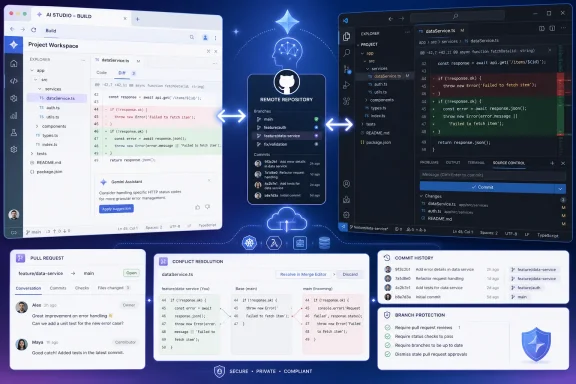
The update surfaced this week in Google’s AI Studio Build documentation and is the substance behind a promotional YouTube video published August 21 that calls the feature “insane” while advertising an AI business course. The marketing language deserves to be separated from the product record: Google documents a real workflow improvement, including repository import, linking an existing repository, bidirectional pushes and pulls, and a conflict-resolution view. It does not make AI Studio a replacement for a development environment, source-control policy, or code review.
For Windows developers and IT teams already centered on GitHub, the change matters because GitHub remains the point where code can be inspected, branched, reviewed, scanned, and retained outside Google AI Studio. Google’s new sync removes a major break in that chain, but it also creates a new place where generated code can enter a shared repository quickly.
Google AI Studio can now work against an existing repository
Google’s documentation says developers can import a repository from GitHub through AI Studio Build, or link an AI Studio project to either a new or existing GitHub repository from the GitHub tab in Settings. Once linked, changes generated through AI Studio prompts can be pushed to GitHub with AI-generated commit messages. Changes made outside AI Studio—including edits made in a local IDE or changes arriving through teammates’ pull requests—can be pulled back into AI Studio.
That last direction is the material improvement. Earlier AI-assisted app builders often treated GitHub primarily as an export destination: generate code, publish it, then leave the browser workspace behind. AI Studio’s documented workflow instead acknowledges that useful software work moves in both directions. A developer may ask Gemini to scaffold a feature in the browser, open the resulting project in Visual Studio Code on Windows, repair a dependency issue, submit a pull request, and then return to AI Studio with the current repository state.
Google also says that AI Studio presents a side-by-side difference view when changes conflict. Users can choose, file by file, whether to retain the AI Studio version or the GitHub version. That is far more credible than pretending concurrent edits can be merged automatically without judgment. The feature treats a conflict as a normal version-control problem, rather than hiding it behind an agent workflow.
Independent reports from Postium and TechieXpert also identified the GitHub synchronization rollout around August 19 and 20. Their reporting broadly matches Google’s documentation, although neither publication adds evidence of broad enterprise deployment or reliability testing at scale. The authoritative detail remains Google’s own product documentation.
The important boundary is still GitHub, not the chat prompt
The YouTube presentation frames the feature as a shortcut for landing pages and small teams that can build and deploy applications without a full-time developer. It is true that AI Studio can generate web applications from prompts, connect services, manage secrets in its server-side environment, and deploy to Google Cloud Run. But a generated application becoming easier to export or synchronize does not establish that it is ready to operate in production.
GitHub is valuable here because it offers a durable system of record beyond the AI Studio session. Teams can use branches, protected branch rules, required reviewers, pull requests, commit history, dependency scanning, secret scanning, code owners, CI pipelines, and release tags. None of those controls automatically appear simply because an AI Studio project has been linked to a repository.
The sync feature could make AI Studio more useful to developers who already have those safeguards. It is much less compelling for teams that would use it to bypass them. A direct push of prompt-generated changes to a default branch is convenient, but it puts generated code in the same category as any other unreviewed contribution: potentially functional, potentially insecure, and not yet suitable for deployment.
Google’s documentation confirms that AI Studio-generated apps can use a server-side Gemini API key, with the key held in the app’s secrets configuration rather than exposed in client-side code. That is a welcome default, but it does not remove the need to inspect the repository for hard-coded credentials, overly broad OAuth scopes, unsafe API routes, permissive CORS settings, insecure authentication flows, or package changes the agent introduced to satisfy a prompt.
Conflict resolution is useful, but it is not collaborative editing
Google is clear that AI Studio does not offer direct real-time collaborative editing. Instead, its recommended collaboration path is a shared GitHub repository: teammates push commits or open pull requests, and an AI Studio user pulls those updates into the project.
That limitation is important. Two-way synchronization is not equivalent to Google Docs-style simultaneous editing, nor is it a replacement for an engineering team’s branching model. It is a bridge between two separate working environments: Google AI Studio Build and a GitHub repository.
Teams should assume that the bridge needs rules. If a project’s local work happens in feature branches, AI Studio should be linked and used in a manner that respects those branches rather than treating the browser workspace as a parallel source of truth. If AI Studio’s generated commit messages are enabled, they should be reviewed for accuracy; a machine-written summary is not proof that a change is small, safe, or understandable.
The value is strongest for a narrow but increasingly common workflow: product or operations staff build an initial internal tool with Gemini, then developers take ownership through GitHub. Previously, that transition could mean downloading an archive, moving files into a repository manually, and risking that the browser version and repository diverged immediately. With two-way sync, the repository can remain connected as the project moves from experiment to ordinary engineering work.
Treat the first sync like importing third-party code
A safe adoption path is straightforward, even if it is less dramatic than the video’s pitch. Link a disposable test repository first, make a small AI Studio change, inspect the generated diff locally, and verify which files, dependencies, configuration changes, and commit metadata appear. Then make a local change or merge a controlled pull request and pull it back into AI Studio to see how the interface represents the difference.
For a production repository, teams should keep ordinary controls in place:
- Use a feature branch or a dedicated integration repository rather than allowing an AI Studio session to write directly to a protected production branch.
- Require pull-request review and automated checks for any generated code, particularly changes to authentication, payment, data access, deployment configuration, and package manifests.
- Review every newly added dependency for provenance, licensing, maintenance status, and known vulnerabilities.
- Confirm that environment variables and service credentials remain outside the repository, even when Google manages a Gemini API key in the deployed AI Studio environment.
- Ensure the GitHub application authorization is limited to the repositories AI Studio actually needs, especially for organizations with private source code.
Google’s own AI Studio agent guidance gives the same broad security direction for connected tools: grant the minimum permissions necessary, use narrowly scoped credentials, and verify code and configuration changes before deployment. That advice becomes more pressing when an agent can make a change in one interface and commit it to a repository used by other people.
Google is positioning AI Studio as a full-stack entry point
The GitHub work fits into Google’s broader 2026 effort to make AI Studio less of a model playground and more of an application-building environment. In March, Google introduced a full-stack Build experience built around its Antigravity coding agent, with support for server-side runtime features, npm packages, secrets management, Firebase services, and Cloud Run deployment. In May, Google added native Android-oriented development capabilities and further Google service integrations.
Two-way GitHub sync closes one of the more obvious gaps in that strategy. A browser-based agent can generate a prototype, but established teams still work from repositories, local editors, CI systems, code review, and deployment controls. Google’s approach now tries to connect its prompt-first builder to that existing machinery rather than insisting that teams abandon it.
The company has not published a formal rollout matrix for the sync feature, a pricing change tied to GitHub synchronization, or a service-level commitment for conflict handling. It also has not said whether the feature supports every repository policy, enterprise GitHub configuration, branch topology, or GitHub Enterprise deployment. Those omissions mean administrators should validate the integration against their own organization’s controls before presenting it as a standard development path.
For now, the honest reading is simpler than the promotional video: Google AI Studio has become easier to use alongside GitHub, including Microsoft’s developer tooling on Windows. The feature reduces friction between AI-generated prototypes and real repositories. It does not reduce the responsibility to review what the AI wrote before that code reaches a shared branch or a production environment.