
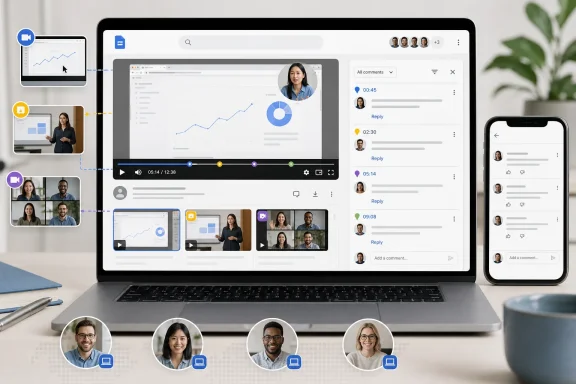
Google Drive has begun adding timestamped comments to videos in its web player, giving reviewers a way to pin feedback to the exact moment on screen rather than writing “around 02:14” in an email, chat thread, or separate document. According to Neowin’s August 4 report, a reviewer moves the playback slider to a moment in the video, opens the comment control, and posts a note; the resulting marker on the timeline can be selected to jump back to the associated frame.
For teams that already pass screen recordings, training clips, product demos, and Google Meet recordings through Drive, this is a meaningful workflow upgrade. The practical benefit is not that Drive has gained comments — it has offered ordinary file-level comments for years — but that comments now carry location data that the player itself can act on.
There is an important qualification for administrators and production teams: Google has not yet published the usual rollout record for this feature. As of August 5, the public Google Workspace Updates index does not show a dedicated announcement with release-track dates, supported editions, regional scope, supported video formats, or an administrator control. Neowin is currently the only outlet located reporting the feature’s mechanics and availability.
That does not negate the rollout, but it does mean organizations should avoid treating it as a documented, universally deployed Drive capability until Google fills in those details.
Timestamped notes solve a routine and expensive coordination problem. A reviewer watching a 45-minute meeting recording can attach “replace the customer name on this slide” to the exact second it appears, rather than forcing the editor to hunt through the recording. A support lead can mark the point where a reproduction video diverges from expected behavior. A training owner can identify the precise segment that needs to be re-recorded.
The reported workflow is deliberately simple: open a video in Google Drive on the web, scrub to the desired point, select the comment button, and post feedback. Timeline markers represent the discussion locations; selecting one sends playback to the marker and surfaces its comment.
That puts Drive closer to the review mechanics offered by specialist tools such as Frame.io, Vimeo Review, and Dropbox Replay. Those products still offer broader production controls, including frame annotations, approval states, comparison workflows, and purpose-built review dashboards. Google’s addition addresses the most basic missing layer: associating a normal Drive conversation with a place in a video.
The feature also closes a long-standing gap in Google’s own collaboration model. A 2019 Google Drive Community request described users being forced to use Dropbox or paid Vimeo plans because Drive comments could not be tied to video timecodes. In a separate 2022 Google Meet Community discussion, a Google product expert advised users to add conventional comments that manually listed timestamps because video bookmarks were unavailable. The new behavior, as described by Neowin, finally eliminates that workaround.
A comment that points to a moment in a video is useful only when a reviewer can immediately confirm the moment being discussed. If mobile clients expose the conversation as a standard comment thread without the interactive timeline marker, a user receiving feedback on a phone has the note but may still need to locate the referenced scene manually. Google has not publicly clarified whether selecting a timestamped comment in its mobile apps jumps playback to the proper position, whether markers appear in the mobile scrubber, or whether users can create timestamped notes from mobile.
For Windows users, that makes the desktop browser the safe operational path for now. Teams should not train reviewers to rely on mobile capture or mobile approval until the behavior has been verified in their own tenant. The reported launch is specifically for Drive on the web, and Google’s recent product updates often arrive with different capabilities and timing across web, Android, and iOS.
This is also relevant for external review. A client may have permission to comment on a shared Drive file yet open it in the Drive app, a mobile browser, or a managed device with a different account. The comments may remain visible, but the efficient click marker, inspect frame, reply loop is not currently documented outside the web experience.
Those features solve different problems. Transcripts help find what was said. Gemini helps summarize what happened. Timestamped comments let people state what should change or what needs attention. Together, they can turn a long recording from a passive file into something closer to a reviewable work item.
But the features do not share the same availability model. Google’s video transcript feature is available to Workspace customers, Workspace Individual subscribers, and personal Google accounts, provided the video has captions. Gemini video analysis has been tied to eligible plans and requires the relevant Drive and smart-feature settings. The timestamped-comment rollout has no published availability table at all.
That gap is more than paperwork. IT teams cannot yet answer basic deployment questions with confidence:
Google announced general availability for ransomware detection and file restoration on March 30, 2026. Google says Drive for desktop pauses syncing when it detects ransomware encryption; detection alerts require Drive for desktop version 114 or later, although sync pausing can still occur on older versions. The feature is aimed at stopping encrypted local changes from being propagated through cloud synchronization after an endpoint has been compromised.
The restoration component is available more broadly than detection itself. Google’s published availability says bulk file restoration is available to all Workspace customers, Workspace Individual subscribers, and personal Google accounts. Ransomware detection is restricted to specified Workspace editions, including Business Standard and Plus, Enterprise Starter through Plus, Education Standard and Plus, and Frontline Standard and Plus.
Google’s Drive Help documentation says the Restore file versions tool retains the last 25 days of revisions. That is not the same guarantee as restoring files “up to 25 days prior to the attack point.” Recovery depends on when the encrypted changes were created and synced, whether the relevant files still have prior revisions, and selecting an appropriate restoration point. Google also warns that the bulk tool restores the chosen earlier versions across the selected set rather than letting users pick individual files, and it does not cover Google-native Docs or Slides files because ransomware cannot encrypt their cloud-native contents in the same way.
For Windows admins, the practical sequence remains familiar: isolate and remediate the infected PC first, confirm the last clean point, then restore Drive file versions. A synchronized cloud folder is not a backup strategy merely because it has version history.
The absence of a published Google rollout notice leaves one more operational concern: retention and governance. Comments on Drive files can be part of collaboration history, but Google has not said whether the timestamp itself is retained as first-class metadata in exports or whether the visual marker is only a web-player rendering. Organizations subject to records retention, litigation holds, or regulated review processes should test that distinction before replacing established approval workflows.
For everyone else, the immediate action is straightforward: open a noncritical Drive-hosted video in a desktop browser, post a timestamped note, then test it with the same mix of Windows browsers, Android devices, iPhones, internal users, and external collaborators that the organization actually supports. Google Drive now appears to have the review feature teams have requested for years; the remaining work is finding out exactly where — and for whom — it is live.
There is an important qualification for administrators and production teams: Google has not yet published the usual rollout record for this feature. As of August 5, the public Google Workspace Updates index does not show a dedicated announcement with release-track dates, supported editions, regional scope, supported video formats, or an administrator control. Neowin is currently the only outlet located reporting the feature’s mechanics and availability.
That does not negate the rollout, but it does mean organizations should avoid treating it as a documented, universally deployed Drive capability until Google fills in those details.
 A useful review feature, delivered inside a storage product
Timestamped notes solve a routine and expensive coordination problem. A reviewer watching a 45-minute meeting recording can attach “replace the customer name on this slide” to the exact second it appears, rather than forcing the editor to hunt through the recording. A support lead can mark the point where a reproduction video diverges from expected behavior. A training owner can identify the precise segment that needs to be re-recorded.The reported workflow is deliberately simple: open a video in Google Drive on the web, scrub to the desired point, select the comment button, and post feedback. Timeline markers represent the discussion locations; selecting one sends playback to the marker and surfaces its comment.
That puts Drive closer to the review mechanics offered by specialist tools such as Frame.io, Vimeo Review, and Dropbox Replay. Those products still offer broader production controls, including frame annotations, approval states, comparison workflows, and purpose-built review dashboards. Google’s addition addresses the most basic missing layer: associating a normal Drive conversation with a place in a video.
The feature also closes a long-standing gap in Google’s own collaboration model. A 2019 Google Drive Community request described users being forced to use Dropbox or paid Vimeo plans because Drive comments could not be tied to video timecodes. In a separate 2022 Google Meet Community discussion, a Google product expert advised users to add conventional comments that manually listed timestamps because video bookmarks were unavailable. The new behavior, as described by Neowin, finally eliminates that workaround.
Mobile users will see the discussion, but not the video marker workflow
Neowin reports that timestamped notes will appear as ordinary file-level comments when the video is opened through Google Drive for Android or iOS. That distinction deserves more attention than it has received.A comment that points to a moment in a video is useful only when a reviewer can immediately confirm the moment being discussed. If mobile clients expose the conversation as a standard comment thread without the interactive timeline marker, a user receiving feedback on a phone has the note but may still need to locate the referenced scene manually. Google has not publicly clarified whether selecting a timestamped comment in its mobile apps jumps playback to the proper position, whether markers appear in the mobile scrubber, or whether users can create timestamped notes from mobile.
For Windows users, that makes the desktop browser the safe operational path for now. Teams should not train reviewers to rely on mobile capture or mobile approval until the behavior has been verified in their own tenant. The reported launch is specifically for Drive on the web, and Google’s recent product updates often arrive with different capabilities and timing across web, Android, and iOS.
This is also relevant for external review. A client may have permission to comment on a shared Drive file yet open it in the Drive app, a mobile browser, or a managed device with a different account. The comments may remain visible, but the efficient click marker, inspect frame, reply loop is not currently documented outside the web experience.
Drive’s video tools are becoming more capable, but they remain fragmented
Google has been steadily expanding what a Drive-hosted video can do. In February 2025, Google added searchable video transcripts for videos with captions, allowing users to search spoken text and jump to a matching part of a recording. In May 2025, it extended Gemini in Drive so eligible paid Workspace and Google AI customers could request summaries and ask questions about a video, including prompts to identify action items.Those features solve different problems. Transcripts help find what was said. Gemini helps summarize what happened. Timestamped comments let people state what should change or what needs attention. Together, they can turn a long recording from a passive file into something closer to a reviewable work item.
But the features do not share the same availability model. Google’s video transcript feature is available to Workspace customers, Workspace Individual subscribers, and personal Google accounts, provided the video has captions. Gemini video analysis has been tied to eligible plans and requires the relevant Drive and smart-feature settings. The timestamped-comment rollout has no published availability table at all.
That gap is more than paperwork. IT teams cannot yet answer basic deployment questions with confidence:
- Whether personal Google accounts and Workspace Individual subscribers receive the feature alongside business tenants.
- Whether it is available in Shared Drives, externally shared files, and visitor-sharing scenarios.
- Whether existing comments can be converted into timestamped markers.
- Whether the marker and timecode are exposed through the Google Drive API, Vault, eDiscovery exports, or audit logs.
- Whether a timestamped thread remains correctly positioned if the owner uploads a replacement video version.
anchor field for comments, but Google’s own developer documentation says an app-defined anchor is saved and returned while Workspace editor applications treat it as unanchored. That documentation does not establish how Drive’s new native video markers are represented, nor whether third-party workflows can read them. Until Google documents the implementation, developers should not assume a standard Drive comment export includes usable video timecodes.The ransomware context needs one correction
Neowin’s report also points to Google Drive for desktop’s ransomware detection and mass-restoration features. Those are real and substantially more documented than timestamped video notes, but the timing and recovery description need tightening.Google announced general availability for ransomware detection and file restoration on March 30, 2026. Google says Drive for desktop pauses syncing when it detects ransomware encryption; detection alerts require Drive for desktop version 114 or later, although sync pausing can still occur on older versions. The feature is aimed at stopping encrypted local changes from being propagated through cloud synchronization after an endpoint has been compromised.
The restoration component is available more broadly than detection itself. Google’s published availability says bulk file restoration is available to all Workspace customers, Workspace Individual subscribers, and personal Google accounts. Ransomware detection is restricted to specified Workspace editions, including Business Standard and Plus, Enterprise Starter through Plus, Education Standard and Plus, and Frontline Standard and Plus.
Google’s Drive Help documentation says the Restore file versions tool retains the last 25 days of revisions. That is not the same guarantee as restoring files “up to 25 days prior to the attack point.” Recovery depends on when the encrypted changes were created and synced, whether the relevant files still have prior revisions, and selecting an appropriate restoration point. Google also warns that the bulk tool restores the chosen earlier versions across the selected set rather than letting users pick individual files, and it does not cover Google-native Docs or Slides files because ransomware cannot encrypt their cloud-native contents in the same way.
For Windows admins, the practical sequence remains familiar: isolate and remediate the infected PC first, confirm the last clean point, then restore Drive file versions. A synchronized cloud folder is not a backup strategy merely because it has version history.
Treat the new markers as collaboration metadata, not formal approval
Timestamped comments will reduce ambiguous revision requests immediately, especially for teams whose current process is “send an MP4 through Drive, then collect notes in email.” They are less likely to replace a dedicated review platform where client sign-off, visual markup, media version comparison, and immutable approval records are contractual requirements.The absence of a published Google rollout notice leaves one more operational concern: retention and governance. Comments on Drive files can be part of collaboration history, but Google has not said whether the timestamp itself is retained as first-class metadata in exports or whether the visual marker is only a web-player rendering. Organizations subject to records retention, litigation holds, or regulated review processes should test that distinction before replacing established approval workflows.
For everyone else, the immediate action is straightforward: open a noncritical Drive-hosted video in a desktop browser, post a timestamped note, then test it with the same mix of Windows browsers, Android devices, iPhones, internal users, and external collaborators that the organization actually supports. Google Drive now appears to have the review feature teams have requested for years; the remaining work is finding out exactly where — and for whom — it is live.
References
- Primary source: Neowin
Published: 2026-08-04T13:48:01+00:00
You can now add timestamped comments to videos in Google Drive - Neowin
If you work with a lot of videos in Google Drive, you'll love Google's new feature that lets you leave timestamped comments instead of traditional file-level comments. www.neowin.net
- Related coverage: support.google.com

Timecode comment on videos at my Google Drive - Google Drive Community
support.google.com
- Related coverage: zoho.com
Zoho WorkDrive Help videos
Series of how-to videos that gives you a complete overview of Zoho WorkDrive and its features.www.zoho.com
- Related coverage: support.google.com
Get updates & summaries on your files with Gemini in Drive - Google Drive Help
Important: To use Gemini in Drive, you must have an eligible Google Workspace or Google AI plan. Learn more about Gemini features and plans.
support.google.com
- Related coverage: services.google.com
- Related coverage: services.google.com
- Related coverage: techradar.com
Google Workspace is copying a very familiar YouTube feature to help you get through videos | TechRadar
Thumbnail previews will show on Google Drive progress barwww.techradar.com - Related coverage: androidcentral.com
Google's huge August Workspace update gets you caught up faster, Vids gets Gen AI | Android Central
The company's detailing everything new you'll find in its Workspace ecosystem this month.www.androidcentral.com - Related coverage: techradar.com
Here are the most interesting smaller upgrades Google Workspace got at Google Cloud Next 2026 | TechRadar
Workspace got a lot of love at Google Cloud Next - here's what we sawwww.techradar.com - Related coverage: androidcentral.com
Gemini in Google Drive can analyze those long company videos for you | Android Central
The AI lends its strengths to make those long videos a little less daunting.www.androidcentral.com - Related coverage: workspaceupdates.googleblog.com
Google Workspace Updates: New comment interface for Google Drive, Docs, Sheets, and Slides rolling out to more devices
workspaceupdates.googleblog.com
- Related coverage: chromewebstore.google.com
- Related coverage: docs.google.com
What's New in Apps - Recap of January 2016
Featured Launch: Quick and easy commenting in Docs, Sheets & Slides Instant comments in Google Docs on the web Instant mentions in Google Docs, Sheets, and Slides on the web, Android, and iOSComments in the Google Sheets and Slides apps for Android and iOS Comment swiping in the Google ...docs.google.com
- Related coverage: developers.google.com
Manage comments and replies | Google Drive | Google for Developers
Learn how to manage comments in Google Drive API. developers.google.com
- Related coverage: androidauthority.com
Need to find a quote? Google Drive's new video feature will lead you right to it
Google Drive can now automatically generate transcripts for uploaded videos. Users can view and search for spoken text in the video.www.androidauthority.com - Related coverage: workspaceupdates.googleblog.com
Google Workspace Updates: Enhancing video navigation and accessibility with Google Drive video transcripts
- Related coverage: blog.google
Google introduces new Android 17 features for creators
New features on Android 17 include an optimized Instagram experience, advanced editing tools and Adobe Premiere.blog.google - Related coverage: blog.google
Collaborating on mobile has never been easier
Improved commenting features increase collaboration opportunitiesblog.google - Related coverage: drive.googleblog.com
Google Drive Blog: Introducing discussions in Google Docs
News and notes from the Google Drive teamdrive.googleblog.com
- Related coverage: developers.google.com
REST Resource: comments | Google Drive | Google for Developers
developers.google.com
- Related coverage: androidauthority.com
Google Drive’s Gemini collaboration finally comes to Android and iOS apps
Google Drive on Android and iOS now supports Gemini collaboration, with tools for summaries, synthesizing information, and more.www.androidauthority.com - Related coverage: feedtracks.com
Feedtracks vs Google Drive - Audio-First Alternative
Feedtracks vs Google Drive for audio. Waveforms, timestamped feedback, blockchain cert. Built for music production, not documents. Compare now.feedtracks.com - Related coverage: notetracks.com
How to Leave Timestamped Comments at Specific Points or Ranges on Audio Files | Notetracks - Audio Review and Collaboration
An easy-to-follow guide from Notetracks on how to leave timestamped comments at specific points or ranges on audio files.www.notetracks.com - Related coverage: knowledge.workspace.google.com
Google Drive for desktop release notes | Drive & Docs | Google Workspace Help
 knowledge.workspace.google.com
- Related coverage: knowledge.workspace.google.com
What's new in Google Workspace (recent releases) | Getting started | Google Workspace Help
knowledge.workspace.google.com
- Related coverage: help.asana.com
Asana Help Center
help.asana.com
- Related coverage: googblogs.com
New comment interface for Google Drive, Docs, Sheets, and Slides rolling out to more devices - googblogs.com
Quick Summary We’re updating the user interface for comments and action items in the Google Drive, Docs, Sheets, and Slides apps for iOS. These improvements include: Larger, clearer interface to make it easier to see comments and their contex...www.googblogs.com - Related coverage: assets.noviams.com
- Related coverage: fan.gov