
Android Police reports that recent Android beta builds expose more of Keep’s unfinished lock-screen integration, including controls for how long a newly created note remains available when launching Keep from the lock screen. The options reportedly range from a few minutes to always reusing the same note. But there is still no announced rollout date, and the feature remains gated behind beta and developer-only conditions.
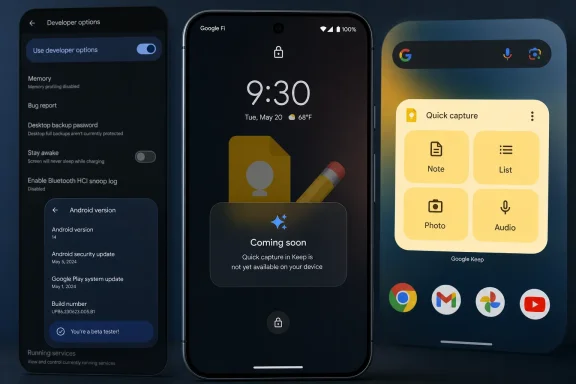 An Android 14 feature that never arrived
The groundwork dates to Android 14. Google added a system-level “Notes” role that lets a user choose one default note-taking app. Android can then launch that app directly from the lock screen or in a floating window while the device is unlocked.
Google’s Android developer documentation confirms the intended behavior: a notes app launched from the lock screen opens full-screen, while the unlocked-device path can use a floating window. The role can also grant access to Android’s capture-content flow, allowing a notes app to incorporate a screenshot into a note when launched in the appropriate mode.
Keep appeared to be preparing support in late 2023. As 9to5Google documented at the time, Keep builds contained a “Lock screen notes” settings area and acknowledged the Notes role, but opening the shortcut prompted users to update Keep even when they were already running the latest version. A February 2024 update changed that language to “Coming soon.”
More than two years later, “coming soon” is still the most accurate public status.
Hidden settings are not a rollout
Android Authority found in May that Google Keep version 5.26.181.01.90 included hidden settings for lock-screen notes. Its testing got the option working on Android 17 QPR1 Beta 1 only after forcing Keep into the Notes role through Developer Options; otherwise, the feature still led to a “Coming soon” screen.
That distinction matters. The Notes role is a real Android capability, but it does not mean every device, Android build, or notes app exposes the user-facing shortcut. Google’s own documentation says app developers must implement the role and the required lock-screen activity behavior, while device makers must support the system integration.
The latest reported work suggests Google has narrowed its immediate goal to the lock-screen launch path rather than also delivering the floating bubble and stylus-button workflows originally associated with the feature. That could make a release simpler, but it is not confirmation of one.
What users can do now
There is no supported switch to enable Google Keep lock-screen note capture on stable Android builds. Users who need faster access can still use Keep’s existing Android home-screen widgets, including the Quick capture widget, which Google documents as a way to start new notes and lists from the home screen.
For Windows users who rely on Keep’s cross-platform sync, that is still the practical option: capture from the phone’s home screen, then continue in the Keep web app or browser.
Until Google publishes the feature in a stable Keep and Android release, the lock-screen shortcut remains an unfinished beta-era capability rather than a feature users can depend on.
