

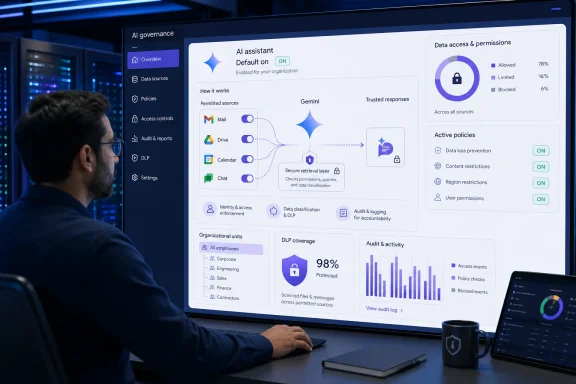
Google announced the feature on April 22, 2026, during its Cloud Next event, with rollout to Rapid Release and Scheduled Release domains beginning that day. Google Workspace Updates explicitly says each of the four data sources is on by default. TechCrunch and Computerworld also covered the launch at the time as part of Google’s broader push to turn Workspace into a more context-aware, agent-oriented productivity suite.
The reporting circulating now gets the central concern right: administrators who expected Gemini to operate only on a document or message a user deliberately supplied should revisit their configuration. But it overstates both the timing and the mechanics. Workspace Intelligence is a retrieval and context layer. It allows Gemini in Gmail, Docs, Sheets, Slides, Drive, Chat, and related features to look across permitted Workspace material to answer a request without requiring the user to manually attach every email, file, meeting, or Chat thread.
For IT teams, the question is not whether Google has suddenly begun “scanning company communications” in the consumer-AI sense. The practical question is whether a default-on, cross-application retrieval system fits the organization’s data-classification rules, least-privilege model, legal-hold procedures, and acceptable-use policy.
The default is real, and it covers four broad sources
Google’s administrator documentation is unambiguous. Workspace Intelligence can actively search four sources:
- Gmail.
- Drive and Docs, a category that also includes Sheets, Slides, PDFs, images, Vids, and other Drive-hosted material.
- Google Calendar.
- Google Chat.
The scope is wider than a Gemini side panel summarizing the document currently open in front of a user. Google’s own example says a user drafting a status update in Docs can receive a report grounded in relevant meeting notes, documentation, and Chat discussions. Google also says Workspace Intelligence powers Gemini experiences in the side panels of Gmail, Docs, Sheets, Slides, Drive, and Chat, along with features such as Help me write and Gemini-powered meeting notes.
This is why the setting deserves attention. A user asking Gemini to write an email can potentially receive an answer informed by material in another Workspace service. An executive’s Calendar entry, a product team’s Chat decision, and a project document can become part of the same relevant-context search—provided the requesting employee could already access them.
That last condition is critical. Workspace Intelligence does not override Google Workspace permissions. Google says Gemini can retrieve only content the individual user already has permission to view. It cannot use a file, email, calendar event, or Chat message merely because it exists in the company tenant.
The control therefore does not replace standard access reviews. It makes those reviews more important. A broadly shared Drive folder or an over-permissive Google Group was already a data-exposure problem; Workspace Intelligence can make the consequences more immediate by reducing the effort needed to surface that material in a generated answer.
Turning a source off is not a complete AI embargo
The most consequential detail is buried in Google’s administrative guidance: disabling a source prevents Workspace Intelligence from actively searching that source for background context. It does not necessarily prevent a user from deliberately supplying or referencing specific content from that source.
If an administrator turns off Drive and Docs as a Workspace Intelligence source, Gemini will no longer search the broader Drive corpus to find relevant material. But a user can still ask Gemini about a specific file they link or identify, and Gemini can still analyze the document currently open in Docs. Google makes the same distinction for specifically referenced emails and Chat messages.
This is a sensible product design from Google’s standpoint—users expect Gemini to answer questions about a file they intentionally place in its context—but it is not the same as an all-purpose data-boundary control. Administrators looking to prohibit a class of data from reaching generative AI must examine more than the Workspace Intelligence switches.
Google points to Data Loss Prevention rules as another control over which sources may be used. Information Rights Management settings, Drive sharing policies, label-based controls, client-side encryption, and the separate service-level Gemini settings also remain relevant. The right approach is layered:
- Disable broad background retrieval from sources that have not passed governance review.
- Review Drive sharing, external-sharing rules, Google Groups, and access inherited through shared drives.
- Apply DLP and classification rules to content that should not be used in AI-assisted workflows.
- Decide whether Gemini itself should be enabled for every organizational unit, rather than treating a data-source switch as a substitute for service governance.
- Test the controls with representative accounts before declaring a regulated or sensitive workload covered.
Google’s documentation says configuration changes can take up to 48 hours to fully take effect. That is another operational detail administrators should build into change windows and validation testing.
The control is administrative, but users still influence the outcome
The submitted claim that users have no way to control the feature is too broad. Google says there is no individual end-user switch specifically for Workspace Intelligence itself, and the tenant-level source controls belong to administrators. However, some user-level Workspace smart-feature preferences can govern whether a person uses Gemini in Workspace at all, including Workspace Intelligence-powered experiences.
More importantly, Google separates several adjacent services that are easy to conflate. Workspace Intelligence controls context use for Gemini in Workspace. It does not govern the Gemini app, Gemini for Education, Gemini Notebook, or other Google services. Those services have their own administrative and user settings.
That distinction matters for policy writing. “Gemini is disabled” can be an inaccurate statement if an organization has disabled the Workspace Intelligence source layer while leaving the Gemini app enabled, or vice versa. Conversely, disabling Gmail as a Workspace Intelligence source may remove AI Overviews in Gmail search and affect AI Inbox functionality, while leaving other Gemini features available elsewhere.
Google’s admin path is straightforward, though it requires the Gemini Settings administrator privilege: in the Admin console, go to Generative AI, then Gemini for Workspace, open the Workspace Intelligence panel, and set each source on or off. The policy can be assigned at the domain, organizational-unit, or configuration-group level; Google says group settings override organizational-unit settings.
That hierarchy is useful for staged deployment. Rather than making an irreversible tenant-wide choice, an IT department can enable the four sources for a pilot group, validate outputs and data behavior against real departmental workflows, then expand access only where the benefit is clear.
Google’s training and retention statements are clearer than critics suggest
The claim that Google has not explained whether Workspace data trains Gemini is contradicted by Google’s current Workspace Privacy Hub and service commitments. Google states that Workspace customer data—including prompts, relevant Workspace content, web context, and generated responses—is not used to train or fine-tune the generative AI models supporting Google Workspace services without the customer’s prior permission or instruction. It also says enterprise Workspace content is not used for advertising.
Those are vendor commitments, not an excuse to skip a legal or security review. They do, however, materially change the allegation that Google has silently turned corporate mailboxes into training data. The record does not support that claim for qualifying Google Workspace business, education, and public-sector customers operating under the Workspace agreement.
Retention is also documented, rather than absent. Google says Gemini in Workspace prompts and responses can be retained from 90 days to indefinitely depending on administrator configuration, while generated or inserted content in Workspace apps follows Google’s cloud data-deletion terms. Gemini conversation history can be controlled by administrators, with users ordinarily able to delete individual conversations unless policy prohibits it.
For regulated organizations, the unanswered work is less about whether Google has published a retention figure and more about mapping those settings to a records-management policy. Legal teams should determine whether Gemini prompts and responses belong in their retention schedule, whether Vault coverage meets evidentiary requirements, and whether any business process creates privileged or highly sensitive prompts that need a more restrictive organizational unit.
The operational risk is context leakage, not permission bypass
The useful security test is to ask what Gemini can synthesize for someone who already has broad but legitimate access. Workspace Intelligence does not need to defeat permissions to create an awkward disclosure. A project manager with access to several shared folders, customer emails, and team Chats could ask a general question and receive a concise synthesis that joins information they would otherwise have had to locate manually.
That can be valuable for productivity. It can also undermine practical obscurity—the friction that previously kept widely dispersed but sensitive information from being casually assembled into a single answer.
Organizations handling merger discussions, litigation strategy, personnel records, health information, export-controlled data, or customer secrets should therefore review whether users with normal operational access ought to have Gemini actively searching those sources in the first place. The answer may differ by team. Finance, legal, HR, security operations, and general corporate communications do not necessarily need the same configuration.
Google made the tradeoff in favor of broad usefulness when it set Workspace Intelligence’s sources to on by default on April 22. Administrators who have not reviewed that decision still can—but they should do so with a precise understanding of what the setting changes: Gemini gains background retrieval across permitted Workspace data, while turning a source off stops that background search rather than blocking every deliberate use of a specific file, email, or chat.