
The distinction changes what IT teams should expect. A researcher will not open Gemini Notebook and find it silently monitoring folders or browsing the web for new references. Instead, an admin-enabled Workspace Studio flow can take something that has already happened elsewhere in Google Workspace — a file arriving in Drive, content generated by a process, a selected URL, or text from an earlier step — and add that material to a designated notebook.
Google started the gradual rollout on August 6, 2026. The company says feature visibility can take up to 15 business days, putting the outer edge of the stated rollout window around August 26, rather than “the coming days” suggested by some summaries.
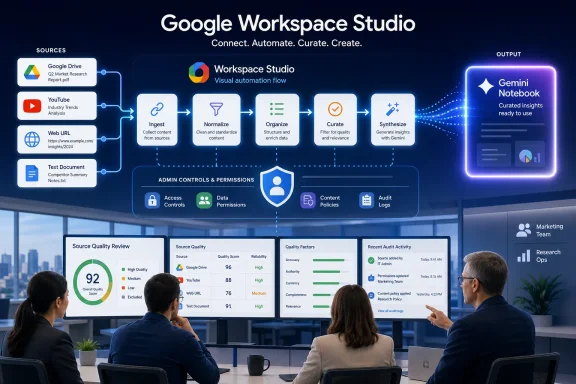 The update belongs to Workspace Studio, not the normal Notebook interface
Android Authority correctly identified Google’s new “Add a source to Gemini Notebook” step and the supported source categories. But the official update’s title — Automatically add sources to your Gemini Notebooks in Workspace Studio — supplies the missing operational detail: this is an action used inside a Workspace Studio flow.
Workspace Studio is Google’s automation builder for Google Workspace. A flow starts with a trigger or input, then runs one or more actions. Google has spent the past several months connecting Gemini Notebook to that system: in May it added an “Ask NotebookLM” step, allowing a flow to query a pre-existing notebook for a grounded answer. This August update handles the inverse operation: putting new source material into the notebook.
That makes the feature useful for recurring knowledge-management jobs rather than casual one-off research. A support organization could build a flow that adds approved product documentation to a troubleshooting notebook. A project team could deposit finalized briefs, Drive files, and relevant public URLs into a notebook used for status reporting. An education administrator could use a controlled process to populate a course resource notebook from an approved source list.
What Google has not announced is a general-purpose agent that decides which new documents, videos, or webpages belong in a notebook. The “automation” is the handoff after an organization defines a flow. Someone still has to design that workflow, decide its trigger, select its notebook, and determine what source data the workflow is permitted to add.
That is a far narrower — and more useful — capability than the impression that Gemini Notebook now auto-collects research.
Drive syncing and source ingestion solve different problems
The new action also should not be confused with Google’s automatic Drive syncing, which Android Authority referenced as the earlier related feature. That rollout, reported in May, keeps a Drive-backed source current after it has already been added to a notebook. If the original file changes, is deleted, or the user loses permission to view it, the notebook’s source relationship is updated accordingly.
The Workspace Studio action addresses the earlier stage: how a new source gets into the notebook in the first place.
For Windows and IT administrators, that separation is more than product taxonomy. Automatic Drive syncing is a content-freshness control; it helps prevent a notebook from reasoning over an old version of a document. Studio-based source addition is an intake automation control; it can reduce the manual work of assembling a notebook, but it can also create a larger and more rapidly changing set of source material.
Google’s current Gemini Notebook documentation says Drive files added to notebooks remain subject to the organization’s existing sharing controls. Users need at least viewer access to the original Drive file to use it as a source. That is a meaningful safeguard, but it does not remove the governance work. A workflow that continuously adds files to a notebook can still make it easier for a broadly shared notebook to become a central point of access to sensitive internal material.
Admins should treat the update as a content-routing feature. Before enabling it widely, they should decide which teams can create flows, which accounts can use Gemini Notebook, what Drive locations are valid sources, and whether the resulting notebooks may be shared beyond their original project group.
Personal accounts are excluded because the automation layer is excluded
Google says the new source-adding action is available to Business Starter, Standard, and Plus; Enterprise Standard and Plus; and Education Fundamentals, Standard, and Plus customers. Personal Google accounts are excluded from this particular rollout.
That does not mean personal-account users have lost the ability to add sources manually. Gemini Notebook’s standard interface still supports sources such as uploaded files, Google Drive items, websites, YouTube videos, and copied text. Google’s help documentation also describes browser and mobile workflows for manually adding supported source types and finding web sources.
The difference is access to the automation plumbing. The new action is aimed at organizations using Workspace Studio, where administrators can control both Workspace Studio and Gemini-related access. Google’s administrator documentation explicitly says that organizations can turn Workspace Studio on or off and can use API controls to block Gemini from Studio. Separately, administrators can control availability of Gemini Notebook.
That creates a two-switch deployment model. Granting people access to Gemini Notebook does not necessarily mean they should be allowed to create automated flows that add material to it. Conversely, enabling Workspace Studio without governing Gemini Notebook access can create confusion when staff attempt to build flows around a service they cannot use.
For managed Windows environments, the sensible approach is staged enablement. Start with a small group that already maintains shared Drive content and has clear ownership over its notebooks. Test one read-only or low-risk intake path, verify that source access and notebook-sharing behavior meet policy, then expand access after the organization has a repeatable pattern.
The real operational risk is source quality, not the new button
Gemini Notebook is designed to ground its responses in material provided to a notebook. Its usefulness therefore depends heavily on the source set being current, relevant, and internally consistent. Automation makes it easier to build a richer source collection, but it also makes it easier to pollute one.
Consider a notebook used by an IT help desk. Automatically adding published KB articles, approved runbooks, and current service notices could make its answers more useful. Automatically adding draft documents, obsolete runbooks, copied email threads, or arbitrary web links could produce a source base full of contradictions. Gemini may cite the material it was given, but citations do not fix bad intake rules.
The source types make the policy question broader than Drive governance. The action can add plain text, Drive links, YouTube URLs, and general web URLs. Each category carries different retention, accuracy, licensing, and review concerns.
A few controls are worth putting in place before deploying the action:
- Restrict flows that add web and YouTube URLs to designated owners, because public content can change, disappear, or be misleading even when its URL remains valid.
- Keep production notebooks focused on a bounded purpose, such as a single product, policy set, customer program, or course. A notebook that combines authoritative guidance with exploratory material will be harder to trust.
- Use a separate notebook for drafts and incoming material rather than automatically adding unreviewed sources to a notebook employees rely on for operational answers.
- Review sharing permissions on both the notebook and the underlying Drive sources. Source automation does not override Drive access controls, but a notebook can still become an attractive index of content that was previously scattered across folders.
- Record who owns each flow and each target notebook. When a source is added incorrectly, teams need to know whether to fix the workflow, the source permissions, or the notebook’s content selection.
Google has not published pricing changes, source quotas specific to this action, or a detailed audit model for automated source additions in the announcement. Those omissions matter for enterprises planning broad adoption. A flow that adds sources on every event may encounter practical usage limits or create notebooks that are too large and noisy to be useful; Google has not explained how this new action behaves in those edge cases.
A useful addition, but not autonomous research
The practical value of the rollout is straightforward: it removes a repetitive handoff between Workspace processes and Gemini Notebook. For teams that already use Workspace Studio, the new step can turn a notebook from a manually maintained collection into a controlled destination for operational knowledge.
But the early reports’ framing of an “automatic source addition feature” needs a qualifier. Google has automated the act of adding a source inside a Workspace Studio flow; it has not automated editorial judgment about what belongs in a notebook. The organization still owns the trigger, the source selection, the permissions, and the quality of the material Gemini will later use to answer questions.
Eligible tenants that do not see the action immediately should allow Google’s stated 15-business-day rollout window to run through approximately August 26. When it appears, administrators should view it first as a governance feature with productivity benefits — not as a harmless shortcut for dumping more material into an AI research workspace.
References
- Primary source: pkrevenue.com
Published: August 9, 2026 at 12:44 PM UTC
Google Gemini Notebooks gets automatic source addition feature
Google is rolling out automatic source addition to Gemini Notebooks, supporting text, Drive files, YouTube and web URLs.pkrevenue.com - Independent coverage: androidauthority.com
Published: August 8, 2026 at 8:22 PM UTC
Google is making it easier to add new sources to Gemini Notebook
Google is rolling out an update to Gemini Notebook that will add a new "Add a source to Gemini Notebook" step.www.androidauthority.com - Related coverage: support.google.com

Create a notebook in Gemini Notebook - Gemini Notebook Help
Important: At this time, the Gemini Notebook mobile app may have limitations to this feature. Learn more about the supported features in the Gemini Notebook mobile app. In Gemini Notebook, you ca
support.google.com
- Related coverage: support.google.com
Get started with the Gemini Notebook mobile app - Android - Gemini Notebook Help
Our early version of the Gemini Notebook mobile app includes many core features of Gemini Notebook and is designed to help you understand anything, anywhere. With the app, you can: Get insights in
support.google.com
- Related coverage: computerworld.com
Google NotebookLM cheat sheet: Get fast insights into your docs – Computerworld
Feed your documents and other research resources into NotebookLM, and its genAI will analyze them, create new materials from them — even turn them into a spoken podcast with human-sounding AI hosts. www.computerworld.com
- Related coverage: androidauthority.com
Google's handy NotebookLM tool is dropping the worst part of its name
Google announced today that its AI research and learning tool formerly known as NotebookLM is now called Gemini Notebook.www.androidauthority.com - Related coverage: docs.cloud.google.com
Use Gemini Notebook Enterprise within Gemini Enterprise | Google Cloud Documentation
docs.cloud.google.com
- Related coverage: chromewebstore.google.com
- Related coverage: apps.apple.com
Gemini Notebook App - App Store
Download Gemini Notebook by Google on the App Store. See screenshots, ratings and reviews, user tips, and more apps like Gemini Notebook. apps.apple.com
- Related coverage: glama.ai
Schema | notebooklm-mcp | Glama
View the complete schema definition for notebooklm-mcp. Explore data structures, field types, and relationships used in this MCP implementation. glama.ai
- Related coverage: androidcentral.com
Gemini at Unpacked: Google announces major AI updates for foldables, glasses | Android Central
Gemini wants to get on stage too, and it's bringing a few key updates.www.androidcentral.com - Related coverage: tomsguide.com
Samsung just added Automated Tasks and Gemini Notebook to Galaxy Z Fold 8 — here's what these AI features let you do | Tom's Guide
During this year’s Samsung Galaxy Unpacked event, the tech giant announced its plans to add two AI features to its latest smartphone lineup.www.tomsguide.com - Related coverage: workspaceupdates.googleblog.com
Google Workspace Updates: Take your notebooks further by adding NotebookLM as a source in the Gemini app
workspaceupdates.googleblog.com
- Related coverage: digitalapplied.com
Gemini Notebook's Fetcher Ignores robots.txt: Now What?
NotebookLM is now Gemini Notebook, and its fetcher UA changes to Google-GeminiNotebook. Why it ignores robots.txt and how to actually control access.www.digitalapplied.com - Related coverage: docs.cloud.google.com
Use Gemini Notebook Enterprise within Gemini Enterprise | Google Cloud Documentation
- Related coverage: geminiomniprompts.org
如何使用 Gemini Notebook(NotebookLM):新手指南 | Gemini Omni 提示词库
正在搜索 Gemini Notebook 的使用方法?本指南带你了解 Gemini Notebook(原名 NotebookLM)的核心工作流:添加资料来源、提出带引用的问题、制作学习笔记,并谨慎开展研究。geminiomniprompts.org - Related coverage: cloud.google.com
Prompt guide for Gemini Enterprise App | Google Cloud
Get started with our Gemini Enterprise App prompt guide to help professionals leverage AI across all industries.cloud.google.com
- Related coverage: github.com
gemini-notebook-mcp-cli/CHANGELOG.md at main · jacob-bd/gemini-notebook-mcp-cli · GitHub
Programmatic access to Gemini Notebook - via command-line interface (CLI), Model Context Protocol (MCP) server, and AI agent skills. - gemini-notebook-mcp-cli/CHANGELOG.md at main · jacob-bd/gemini-notebook-mcp-cli github.com
- Related coverage: faithfulbiz.com.ng
How to Use Google NotebookLM: Complete Beginner Guide - FaithfulBiz
I signed up for Google NotebookLM and explored every feature. Here's the honest guide on how to use NotebookLMfaithfulbiz.com.ng - Related coverage: buildfastwithai.com
Google AI Studio Vibe Coding: Full Guide (2026)
Google AI Studio launched full-stack vibe coding on Mar 19, 2026. Build apps with Antigravity + Firebase for free. Compare vs Cursor, Bolt, Lovable.www.buildfastwithai.com - Related coverage: devopsschool.com
- Related coverage: workspaceupdates.googleblog.com
Google Workspace Updates: Use your Gems in your Google Workspace Studio flows
- Related coverage: knowledge.workspace.google.com
Control Gemini sources for Workspace Studio flows | Set up & manage services | Google Workspace Help
 knowledge.workspace.google.com
- Related coverage: seamrog.ie
- Related coverage: nobledesktop.com
- Related coverage: larryschrenk.com
- Related coverage: skillspout.com
- Related coverage: lists.roe3.org
- Related coverage: tomsguide.com
I turned Gemini Gems into automated Google Workspace agents — here's how | Tom's Guide
I turned custom Gemini Gems into automated Google Workspace agents using Workspace Studio — here’s how I built AI workflows that summarize emails, organize files and handle repetitive tasks automatically.www.tomsguide.com - Related coverage: techradar.com
Google wants to help businesses build AI agents with no prior experience | TechRadar
Workspace Studio is a natural-language, AI agent builderwww.techradar.com - Related coverage: knowledge.workspace.google.com
Quickstart Guide to Gemini and Gemini Notebook for Education | Getting started | Google Workspace Help
knowledge.workspace.google.com
