
An HP 15-dw1036ne owner has shown that Claude Code can accelerate a difficult firmware-reversing job, exposing 55 concealed setup fields and four previously hidden BIOS tabs on a laptop running BIOS F.68. But the viral framing needs a hard correction: RSA-2048 was not broken, and the available record does not show that the owner recovered or bypassed a BIOS password.
The underlying account comes from Reddit user Reddit_2049 in the r/ClaudeAI community; Dev.ua’s August 3 report amplified it as an AI-assisted rescue of a “passworded” laptop. The original post says the machine rejected altered firmware with a “BIOS Corruption Detected” message, then describes a modified firmware image that booted with extra settings exposed. It never identifies a power-on, administrator, or drive password, and it does not document an authentication prompt being defeated.
That distinction is more than semantics. A forgotten BIOS password, an inaccessible boot device, a hidden OEM setup menu, and a firmware integrity check are different problems with different security implications. What this owner appears to have overcome was HP/Compal’s firmware modification check on one consumer notebook model—not RSA cryptography itself, and not a general-purpose HP password-reset method.
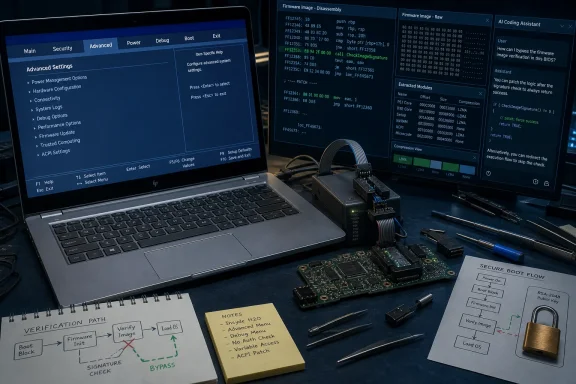
According to the Reddit post, the system’s firmware includes a signed compressed firmware volume. A modification within that volume triggers HP’s corruption warning and stops the machine from booting. The owner supplied a firmware dump and reverse-engineering tooling to Claude Code, then used the model’s output to identify the verifier and alter its decision path so a failed signature validation would be treated as successful.
In other words, the public-key signature machinery may still correctly identify a modified image. The patch changes what the firmware does after that result is returned. That is a software logic bypass, not an attack that derives HP’s private signing key, forges a valid signature, factors a 2048-bit RSA modulus, or compromises RSA-2048 generally.
This is the central discrepancy in the story. “AI breaks RSA-2048 protection” suggests a cryptographic event with consequences far beyond one HP laptop. It was not that. The practical result is still technically interesting: an AI coding agent reportedly helped map an opaque, compressed firmware image, identify the relevant code path, test the logic outside the laptop, and prepare a working model-specific modification. But calling that an RSA break turns a local firmware patch into a claim the evidence does not support.
Several technically minded readers who reviewed the post reached the same conclusion: the work bypasses enforcement by modifying a verifier in the firmware image. The original author’s own description supports that reading. The security control was defeated because the attacker controlled the code responsible for enforcing it.
That is precisely why platform-firmware protections are supposed to be anchored below the firmware being checked. Intel describes Boot Guard as a hardware-based verified-boot technology: when enabled by the OEM, an Intel-authenticated component runs before the BIOS and verifies an initial boot block before allowing execution to continue. NIST’s firmware-resiliency guidance similarly stresses that integrity protections cannot depend solely on code an attacker can rewrite in the same flash image.
The Reddit post does not establish what hardware-backed protections, if any, were provisioned on this particular HP 15-dw1036ne. It documents a successful result on one device, not the security posture of the entire 15-dw family, let alone HP’s current business notebooks.
Yet menu visibility is not the same as platform capability. Firmware projects commonly reuse setup code across multiple board configurations, processors, and regional SKUs. A setting may exist in the interface because the same firmware branch supports another board revision, a different chipset configuration, or a factory diagnostic workflow. It may do nothing on this machine; it may be incompatible with its hardware; or it may alter an initialization path that HP never tested for the consumer configuration.
The original post does not include a catalog of all 55 entries, proof that each one is functional, stability testing, thermal testing, Windows compatibility testing, or a recovery plan beyond reflashing the chip if something goes wrong. There is also no evidence that any of the exposed controls deliver a performance improvement. A Debug tab can be valuable for analysis and equally capable of making a machine unbootable.
HP’s support page for the exact 15-dw1036ne model identifies the laptop and offers its normal support categories, but it does not publish a supported procedure to expose engineering-grade BIOS options. Nor does it list a security advisory for this model covering the modification described by the Redditor. That absence is expected for an unsupported firmware mod, but it leaves owners without vendor validation, a compatible recovery image, or a statement about which settings are safe.
For a machine whose only goal is to boot Windows, exposing every hidden setup field is a poor trade. For a hobbyist system with a full firmware backup and a willingness to accept a dead board, it can be an educational project. Those are not interchangeable use cases.
Reddit_2049 says they wanted to “unlock” the BIOS because no existing mod for the model could be found. The post describes the corruption detection encountered after modifying a BIOS dump. It does not say the laptop stopped at a power-on password, that F10 setup demanded an administrator password, that the boot order was locked, or that a password was reset. No before-and-after images demonstrate a password prompt disappearing.
That matters for anyone considering a cheap “BIOS locked” laptop from an auction, recycler, or online marketplace. This work should not be read as a reliable route around an unknown pre-boot password. On many systems, a password can be stored separately from ordinary CMOS settings, tied to embedded-controller data, protected by vendor service processes, or intertwined with enterprise management policies. A firmware mod that exposes hidden configuration pages may not clear any of it.
It also does nothing by itself for a Windows installation encrypted with BitLocker or another full-disk encryption product. Access to the firmware setup screen does not yield the recovery key required to read an encrypted drive. A recovered laptop should be treated as an untrusted asset: erase or replace its storage, install a known-good operating system, update it from the manufacturer’s current supported firmware where possible, and verify ownership before putting it back into service.
Claude Code did not operate unsupervised on a live laptop. The owner chose the target, supplied the firmware dump and analysis tools, reviewed a generated process, tested behavior, and used external hardware to recover or write the firmware. The model’s contribution, according to the account, was reducing the amount of specialist knowledge required to navigate the binary and connect the pieces.
That is meaningful. Firmware analysis has long been possible with tools such as Ghidra and UEFI parsers, but the work is laborious and model-specific. An agent that can explain a disassembled routine, correlate compressed modules with runtime behavior, write test scaffolding, and keep track of a patching workflow changes who can attempt it. It may give old hardware more years of useful life, particularly when a vendor has stopped shipping updates or never offered configuration access.
It also means vendors cannot treat obscurity as a durable control. Hidden menus and undocumented checks have always been discoverable by capable researchers. AI makes the discovery and interpretation phase cheaper. The defensive answer is not to hide more setup fields; it is to make firmware integrity meaningful even when an attacker has physical access to the device and can rewrite its flash storage.
For IT administrators, the event is a reminder that BIOS passwords alone are not a complete asset-security control. A determined person with possession of a device, time, hardware access, and the ability to alter its firmware can attack assumptions made at the pre-OS layer. Organizations handling sensitive data should pair firmware configuration controls with full-disk encryption, secure key recovery procedures, device custody controls, inventory and disposal processes, and hardware-rooted boot integrity where the platform supports it.
The more immediate warning is for would-be tinkerers: the shared work targets an HP 15-dw1036ne on BIOS F.68. The original author explicitly cautions that the resulting script may not work even on superficially similar HP models. Firmware-family names conceal meaningful differences in board identifiers, flash layouts, embedded controllers, processors, and security provisioning. Applying a binary patch intended for one exact image to another laptop is a credible way to create a machine that no longer powers on.
The HP 15-dw1036ne in this case may indeed have gained a new life as an enthusiast machine. What it has not produced is a universal BIOS-unlock utility, a verified password-recovery method, or an RSA-2048 break. The durable lesson is narrower and more consequential: AI can now help non-specialists inspect and alter firmware that vendors assumed few owners would ever understand.
That distinction is more than semantics. A forgotten BIOS password, an inaccessible boot device, a hidden OEM setup menu, and a firmware integrity check are different problems with different security implications. What this owner appears to have overcome was HP/Compal’s firmware modification check on one consumer notebook model—not RSA cryptography itself, and not a general-purpose HP password-reset method.
 The check was bypassed, not cryptographically defeated
According to the Reddit post, the system’s firmware includes a signed compressed firmware volume. A modification within that volume triggers HP’s corruption warning and stops the machine from booting. The owner supplied a firmware dump and reverse-engineering tooling to Claude Code, then used the model’s output to identify the verifier and alter its decision path so a failed signature validation would be treated as successful.In other words, the public-key signature machinery may still correctly identify a modified image. The patch changes what the firmware does after that result is returned. That is a software logic bypass, not an attack that derives HP’s private signing key, forges a valid signature, factors a 2048-bit RSA modulus, or compromises RSA-2048 generally.
This is the central discrepancy in the story. “AI breaks RSA-2048 protection” suggests a cryptographic event with consequences far beyond one HP laptop. It was not that. The practical result is still technically interesting: an AI coding agent reportedly helped map an opaque, compressed firmware image, identify the relevant code path, test the logic outside the laptop, and prepare a working model-specific modification. But calling that an RSA break turns a local firmware patch into a claim the evidence does not support.
Several technically minded readers who reviewed the post reached the same conclusion: the work bypasses enforcement by modifying a verifier in the firmware image. The original author’s own description supports that reading. The security control was defeated because the attacker controlled the code responsible for enforcing it.
That is precisely why platform-firmware protections are supposed to be anchored below the firmware being checked. Intel describes Boot Guard as a hardware-based verified-boot technology: when enabled by the OEM, an Intel-authenticated component runs before the BIOS and verifies an initial boot block before allowing execution to continue. NIST’s firmware-resiliency guidance similarly stresses that integrity protections cannot depend solely on code an attacker can rewrite in the same flash image.
The Reddit post does not establish what hardware-backed protections, if any, were provisioned on this particular HP 15-dw1036ne. It documents a successful result on one device, not the security posture of the entire 15-dw family, let alone HP’s current business notebooks.
“Unlocked” means menus appeared—not that all 55 settings are useful
The visible payoff was substantial. Reddit_2049 reports revealing 55 setup entries that were present in the firmware’s interface forms but suppressed or grayed out, plus previously hidden Advanced, Power, Debug, and Boot tabs. For enthusiasts, service technicians, and owners of used hardware, seeing settings that an OEM elected to hide can be valuable. It can expose power, boot, virtualization, or debugging controls that are otherwise unavailable through the ordinary F10 setup screen.Yet menu visibility is not the same as platform capability. Firmware projects commonly reuse setup code across multiple board configurations, processors, and regional SKUs. A setting may exist in the interface because the same firmware branch supports another board revision, a different chipset configuration, or a factory diagnostic workflow. It may do nothing on this machine; it may be incompatible with its hardware; or it may alter an initialization path that HP never tested for the consumer configuration.
The original post does not include a catalog of all 55 entries, proof that each one is functional, stability testing, thermal testing, Windows compatibility testing, or a recovery plan beyond reflashing the chip if something goes wrong. There is also no evidence that any of the exposed controls deliver a performance improvement. A Debug tab can be valuable for analysis and equally capable of making a machine unbootable.
HP’s support page for the exact 15-dw1036ne model identifies the laptop and offers its normal support categories, but it does not publish a supported procedure to expose engineering-grade BIOS options. Nor does it list a security advisory for this model covering the modification described by the Redditor. That absence is expected for an unsupported firmware mod, but it leaves owners without vendor validation, a compatible recovery image, or a statement about which settings are safe.
For a machine whose only goal is to boot Windows, exposing every hidden setup field is a poor trade. For a hobbyist system with a full firmware backup and a willingness to accept a dead board, it can be an educational project. Those are not interchangeable use cases.
The password claim is not supported by the primary record
Dev.ua’s report frames the laptop as “passworded” and suggests the modification gave previously blocked equipment a second life. The motivation is plausible: secondhand laptops are frequently sold without the credentials or ownership history needed to use every pre-boot feature. But the primary account provides no evidence that a password lock was present.Reddit_2049 says they wanted to “unlock” the BIOS because no existing mod for the model could be found. The post describes the corruption detection encountered after modifying a BIOS dump. It does not say the laptop stopped at a power-on password, that F10 setup demanded an administrator password, that the boot order was locked, or that a password was reset. No before-and-after images demonstrate a password prompt disappearing.
That matters for anyone considering a cheap “BIOS locked” laptop from an auction, recycler, or online marketplace. This work should not be read as a reliable route around an unknown pre-boot password. On many systems, a password can be stored separately from ordinary CMOS settings, tied to embedded-controller data, protected by vendor service processes, or intertwined with enterprise management policies. A firmware mod that exposes hidden configuration pages may not clear any of it.
It also does nothing by itself for a Windows installation encrypted with BitLocker or another full-disk encryption product. Access to the firmware setup screen does not yield the recovery key required to read an encrypted drive. A recovered laptop should be treated as an untrusted asset: erase or replace its storage, install a known-good operating system, update it from the manufacturer’s current supported firmware where possible, and verify ownership before putting it back into service.
The real AI story is a lower barrier for specialized reverse engineering
The strongest part of this episode is not a miraculous cryptographic breakthrough. It is that a determined owner with a firmware image, a test setup, and AI assistance reportedly completed a project that previously demanded familiarity with UEFI internals, compression formats, disassembly, emulation, and binary patching.Claude Code did not operate unsupervised on a live laptop. The owner chose the target, supplied the firmware dump and analysis tools, reviewed a generated process, tested behavior, and used external hardware to recover or write the firmware. The model’s contribution, according to the account, was reducing the amount of specialist knowledge required to navigate the binary and connect the pieces.
That is meaningful. Firmware analysis has long been possible with tools such as Ghidra and UEFI parsers, but the work is laborious and model-specific. An agent that can explain a disassembled routine, correlate compressed modules with runtime behavior, write test scaffolding, and keep track of a patching workflow changes who can attempt it. It may give old hardware more years of useful life, particularly when a vendor has stopped shipping updates or never offered configuration access.
It also means vendors cannot treat obscurity as a durable control. Hidden menus and undocumented checks have always been discoverable by capable researchers. AI makes the discovery and interpretation phase cheaper. The defensive answer is not to hide more setup fields; it is to make firmware integrity meaningful even when an attacker has physical access to the device and can rewrite its flash storage.
What HP owners and IT teams should take from this
For ordinary HP owners, there is no action required from this single report. It is not evidence that remote attackers can rewrite an HP laptop’s BIOS, that an HP account has been compromised, or that RSA signatures are broadly unsafe. It is a physical-access, device-specific modification performed on a consumer laptop by its owner.For IT administrators, the event is a reminder that BIOS passwords alone are not a complete asset-security control. A determined person with possession of a device, time, hardware access, and the ability to alter its firmware can attack assumptions made at the pre-OS layer. Organizations handling sensitive data should pair firmware configuration controls with full-disk encryption, secure key recovery procedures, device custody controls, inventory and disposal processes, and hardware-rooted boot integrity where the platform supports it.
The more immediate warning is for would-be tinkerers: the shared work targets an HP 15-dw1036ne on BIOS F.68. The original author explicitly cautions that the resulting script may not work even on superficially similar HP models. Firmware-family names conceal meaningful differences in board identifiers, flash layouts, embedded controllers, processors, and security provisioning. Applying a binary patch intended for one exact image to another laptop is a credible way to create a machine that no longer powers on.
The HP 15-dw1036ne in this case may indeed have gained a new life as an enthusiast machine. What it has not produced is a universal BIOS-unlock utility, a verified password-recovery method, or an RSA-2048 break. The durable lesson is narrower and more consequential: AI can now help non-specialists inspect and alter firmware that vendors assumed few owners would ever understand.
References
- Primary source: dev.ua
Published: 2026-08-03T16:00:27.116279
Loading…
dev.ua - Related coverage: tomshardware.com
Loading…
www.tomshardware.com - Related coverage: malwarebytes.com
Loading…
www.malwarebytes.com - Related coverage: tomshardware.com
AMD will reinstate memory encryption on Ryzen 9000 CPUs through a BIOS update in July — TSME is coming back after 'valuable community feedback' | Tom's Hardware
The feature was quietly removed through a firmware update on some non-PRO Ryzen CPUs.www.tomshardware.com - Related coverage: h30434.www3.hp.com
Loading…
h30434.www3.hp.com - Related coverage: h30434.www3.hp.com
Loading…
h30434.www3.hp.com - Related coverage: pcgamer.com
Loading…
www.pcgamer.com - Related coverage: zenn.dev
Loading…
zenn.dev - Related coverage: support.microsoft.com
Loading…
support.microsoft.com - Related coverage: nist.gov
Loading…
www.nist.gov - Related coverage: csrc.nist.gov
Loading…
csrc.nist.gov - Related coverage: nvlpubs.nist.gov
Loading…
nvlpubs.nist.gov - Related coverage: nvlpubs.nist.gov
Loading…
nvlpubs.nist.gov - Related coverage: csrc.nist.gov
Loading…
csrc.nist.gov - Related coverage: intel.com
Loading…
www.intel.com - Related coverage: edc.intel.com
Loading…
edc.intel.com - Related coverage: nccoe.nist.gov
Loading…
www.nccoe.nist.gov - Related coverage: pages.nist.gov
Loading…
pages.nist.gov - Related coverage: nccoe.nist.gov
Loading…
www.nccoe.nist.gov