
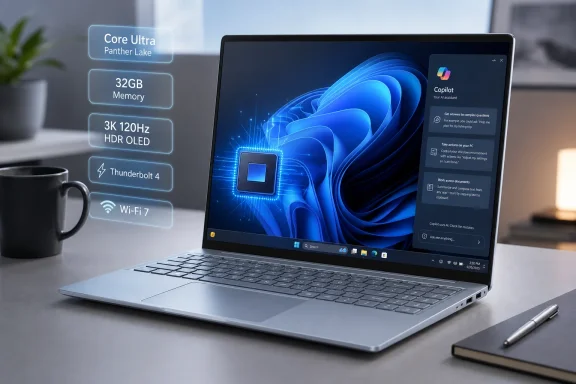
HP has begun selling a Panther Lake-based version of the OmniBook 5 14 in the United States, putting Intel Core Ultra Series 3 processors, up to 32GB of onboard memory, and an optional 3K OLED panel rated for 1,100 nits in HDR into a thin-and-light Windows 11 laptop that starts at $1,299.99.
The new configuration is notable less for a radical chassis redesign than for how far HP is stretching a mainstream OmniBook tier. As first reported by VideoCardz, the top model pairs Intel’s 16-core Core Ultra 9 386H with 32GB of memory and can pass the $2,000 mark once display and storage choices are applied. HP’s U.S. store and support documentation confirm the processor, display, and configuration options.
For Windows users, this is an early retail route to Intel’s Panther Lake platform in a conventional 14-inch clamshell rather than a gaming system or an experimental ultra-premium design. But HP’s configuration strategy also makes the OmniBook 5 14 a machine buyers will need to spec carefully on day one: the memory is onboard, and the processor, RAM, display, and SSD choices are tied together more closely than the product name suggests.
The Intel configuration is sold as the HP OmniBook 5 Laptop Next Gen AI 14t-hh000. HP lists three CPU options: the six-core Core Ultra 5 322, the eight-core Core Ultra 7 355, and the 16-core Core Ultra 9 386H. Every version includes Intel AI Boost, with HP quoting 46 NPU TOPS on the Core Ultra 5, 49 TOPS on the Core Ultra 7, and 50 TOPS on the Core Ultra 9.
Those figures matter because they put all three configurations comfortably above Microsoft’s 40-TOPS NPU threshold for the Copilot+ PC class. That does not guarantee that every Windows AI experience will be equally useful or available immediately, but it means HP is selling this as a PC designed to handle local NPU-backed features rather than simply relying on cloud processing.
The Core Ultra 9 386H is the attention-grabbing option. HP specifies a maximum Turbo frequency of 4.9GHz, 18MB of L3 cache, 16 CPU cores, and 16 threads. The equal core-and-thread count is an important reminder that buyers should not read the familiar “16-core” label as a conventional 16-performance-core design; practical application performance will depend on Intel’s architecture, operating power limits, cooling profile, and the workload.
That is particularly relevant for an OmniBook 5 rather than an OmniBook Ultra or Omen system. HP is positioning the model as a portable consumer laptop with integrated Intel graphics, not as a desktop-replacement workstation. The higher-end processor should provide more headroom for code compilation, photo exports, multitasking, local AI workloads, and heavy browser sessions, but it should not be treated as an automatic substitute for a laptop with a discrete GPU.
The more consequential divide is not necessarily Core Ultra 7 versus Core Ultra 9. It is 16GB versus 32GB of non-upgradeable memory. HP’s product configurator shows 16GB onboard memory for the Core Ultra 5 model and offers 16GB or 32GB with Core Ultra 7. The Core Ultra 9 is paired with 32GB as standard.
For office use, web browsing, streaming, and ordinary Windows 11 workloads, 16GB remains workable. It becomes less comfortable when the laptop is expected to run virtual machines, Docker or WSL development environments, large Lightroom catalogs, local models, CAD tools, or several demanding browser profiles at once. Because the memory is soldered, a buyer who expects to keep the PC for several years should view the 32GB configuration as a durability decision, not merely a performance indulgence.
Storage is configurable from 256GB through 512GB to 1TB, with HP identifying the larger choices as PCIe Gen4 NVMe drives. The 256GB starting point keeps the advertised entry price down, but it is difficult to recommend for an enthusiast or IT-oriented buyer once Windows 11, recovery partitions, applications, sync folders, and games or media libraries begin competing for space. A 512GB SSD is the practical minimum for most purchasers; 1TB is the more sensible choice where the machine will be a primary PC.
The optional display is far more ambitious. HP specifies a 2,880-by-1,800 OLED running at up to 120Hz, with a 0.2ms response time, 500 nits in SDR, 1,100 nits in HDR, 100% DCI-P3 coverage, and variable refresh-rate support. In practical terms, it is this panel—not merely the Core Ultra 9 badge—that most clearly moves the OmniBook 5 14 toward premium-laptop territory.
The distinction between 500 nits SDR and 1,100 nits HDR deserves emphasis. The laptop will not deliver 1,100 nits across the whole screen during normal desktop work. HDR peak-brightness figures generally apply to appropriate HDR content and limited portions of the panel. Still, a 500-nit SDR rating should provide a meaningful advantage for bright rooms and occasional outdoor work compared with the standard 300-nit option.
The higher resolution and 120Hz mode will also carry tradeoffs. Windows 11’s display scaling handles 2,880-by-1,800 well on a 14-inch screen, preserving sharp text and UI elements, but higher pixel density and refresh rate can increase power use. Buyers prioritizing maximum battery runtime may find the 1,920-by-1,200, 60Hz OLED the more rational option; buyers who care about scrolling, visual work, high-resolution media, and overall screen quality should regard the 3K panel as the machine’s signature upgrade.
HP also offers a touch-enabled version of the lower-resolution OLED with Corning Gorilla Glass 3. That creates an unusual split: touch is available at 2K, while the highest-resolution 3K OLED is described as a non-touch BrightView panel. Anyone who considers touch input essential should verify the chosen configuration before checkout rather than assuming the more expensive screen includes it.
Two Thunderbolt 4 ports should be valuable for docking, fast external SSDs, display adapters, and eGPU-class connectivity where supported by the platform. The native HDMI 2.1 port is equally important in mundane office deployments, where a conference-room display connection should not require a dongle. Retaining two USB-A ports gives the laptop immediate compatibility with older peripherals, receivers, installer media, and enterprise accessories.
Wireless options include Wi-Fi 6 with Bluetooth 5.4 or Wi-Fi 7 with Bluetooth 6.0, depending on configuration. Wi-Fi 7 is welcome future-proofing for networks that support it, but it should not be a deciding factor unless the buyer has—or expects to deploy—a compatible access point. A well-run Wi-Fi 6 or Wi-Fi 6E network will remain sufficient for most homes and offices.
HP also lists a 1080p IR camera, a meaningful inclusion for Windows Hello face sign-in, along with a 59Wh battery and a 65W USB-C GaN charger. HP has not made a Panther Lake-specific battery-life promise in the currently listed technical specifications, so prospective buyers should resist treating the battery size as a runtime guarantee until independent reviews measure the laptop across the two OLED configurations.
That makes careful configuration more important than chasing the highest processor name. For many users, the Core Ultra 7 with 32GB of RAM, at least 512GB of storage, and the 3K OLED may be the most balanced option. The Core Ultra 9 makes greater sense for people who can clearly identify CPU-heavy work that will benefit from it, since the system remains dependent on integrated graphics and offers no memory upgrade path later.
HP currently lists availability through its U.S. store, with finishes including Meteor Silver, Glacier Silver, Sahara Silver, and Starlit Blue. The next test is whether retail availability broadens and whether independent testing confirms that the Panther Lake configuration can balance its ambitious display, compact weight, and new NPU hardware without compromising the battery life and sustained performance buyers now expect from a $2,000 Windows laptop.
For Windows users, this is an early retail route to Intel’s Panther Lake platform in a conventional 14-inch clamshell rather than a gaming system or an experimental ultra-premium design. But HP’s configuration strategy also makes the OmniBook 5 14 a machine buyers will need to spec carefully on day one: the memory is onboard, and the processor, RAM, display, and SSD choices are tied together more closely than the product name suggests.
 HP Turns the OmniBook 5 Into a Panther Lake Entry Point
The Intel configuration is sold as the HP OmniBook 5 Laptop Next Gen AI 14t-hh000. HP lists three CPU options: the six-core Core Ultra 5 322, the eight-core Core Ultra 7 355, and the 16-core Core Ultra 9 386H. Every version includes Intel AI Boost, with HP quoting 46 NPU TOPS on the Core Ultra 5, 49 TOPS on the Core Ultra 7, and 50 TOPS on the Core Ultra 9.Those figures matter because they put all three configurations comfortably above Microsoft’s 40-TOPS NPU threshold for the Copilot+ PC class. That does not guarantee that every Windows AI experience will be equally useful or available immediately, but it means HP is selling this as a PC designed to handle local NPU-backed features rather than simply relying on cloud processing.
The Core Ultra 9 386H is the attention-grabbing option. HP specifies a maximum Turbo frequency of 4.9GHz, 18MB of L3 cache, 16 CPU cores, and 16 threads. The equal core-and-thread count is an important reminder that buyers should not read the familiar “16-core” label as a conventional 16-performance-core design; practical application performance will depend on Intel’s architecture, operating power limits, cooling profile, and the workload.
That is particularly relevant for an OmniBook 5 rather than an OmniBook Ultra or Omen system. HP is positioning the model as a portable consumer laptop with integrated Intel graphics, not as a desktop-replacement workstation. The higher-end processor should provide more headroom for code compilation, photo exports, multitasking, local AI workloads, and heavy browser sessions, but it should not be treated as an automatic substitute for a laptop with a discrete GPU.
The Price Ladder Makes 32GB the Real Upgrade
According to VideoCardz, HP’s initial U.S. pricing begins at $1,299.99 for the Core Ultra 5 322, 16GB RAM, and 256GB SSD configuration. The Core Ultra 7 355 with 16GB is listed at $1,479.99, while the 32GB Core Ultra 7 option rises to $1,739.99. The Core Ultra 9 386H with 32GB starts at $1,889.99 before higher-spec display and storage selections push the system beyond $2,000.The more consequential divide is not necessarily Core Ultra 7 versus Core Ultra 9. It is 16GB versus 32GB of non-upgradeable memory. HP’s product configurator shows 16GB onboard memory for the Core Ultra 5 model and offers 16GB or 32GB with Core Ultra 7. The Core Ultra 9 is paired with 32GB as standard.
For office use, web browsing, streaming, and ordinary Windows 11 workloads, 16GB remains workable. It becomes less comfortable when the laptop is expected to run virtual machines, Docker or WSL development environments, large Lightroom catalogs, local models, CAD tools, or several demanding browser profiles at once. Because the memory is soldered, a buyer who expects to keep the PC for several years should view the 32GB configuration as a durability decision, not merely a performance indulgence.
Storage is configurable from 256GB through 512GB to 1TB, with HP identifying the larger choices as PCIe Gen4 NVMe drives. The 256GB starting point keeps the advertised entry price down, but it is difficult to recommend for an enthusiast or IT-oriented buyer once Windows 11, recovery partitions, applications, sync folders, and games or media libraries begin competing for space. A 512GB SSD is the practical minimum for most purchasers; 1TB is the more sensible choice where the machine will be a primary PC.
The 3K OLED Is the Upgrade That Changes Daily Use
HP’s basic panel is already an OLED: a 14-inch, 1,920-by-1,200 display with a 60Hz refresh rate, 300-nit brightness, and full DCI-P3 coverage. It is a respectable specification for a mainstream ultraportable and avoids the washed-out, low-gamut panels that still appear at this price range.The optional display is far more ambitious. HP specifies a 2,880-by-1,800 OLED running at up to 120Hz, with a 0.2ms response time, 500 nits in SDR, 1,100 nits in HDR, 100% DCI-P3 coverage, and variable refresh-rate support. In practical terms, it is this panel—not merely the Core Ultra 9 badge—that most clearly moves the OmniBook 5 14 toward premium-laptop territory.
The distinction between 500 nits SDR and 1,100 nits HDR deserves emphasis. The laptop will not deliver 1,100 nits across the whole screen during normal desktop work. HDR peak-brightness figures generally apply to appropriate HDR content and limited portions of the panel. Still, a 500-nit SDR rating should provide a meaningful advantage for bright rooms and occasional outdoor work compared with the standard 300-nit option.
The higher resolution and 120Hz mode will also carry tradeoffs. Windows 11’s display scaling handles 2,880-by-1,800 well on a 14-inch screen, preserving sharp text and UI elements, but higher pixel density and refresh rate can increase power use. Buyers prioritizing maximum battery runtime may find the 1,920-by-1,200, 60Hz OLED the more rational option; buyers who care about scrolling, visual work, high-resolution media, and overall screen quality should regard the 3K panel as the machine’s signature upgrade.
HP also offers a touch-enabled version of the lower-resolution OLED with Corning Gorilla Glass 3. That creates an unusual split: touch is available at 2K, while the highest-resolution 3K OLED is described as a non-touch BrightView panel. Anyone who considers touch input essential should verify the chosen configuration before checkout rather than assuming the more expensive screen includes it.
Connectivity Is Better Than the Thin-and-Light Norm
The OmniBook 5 14 carries two Thunderbolt 4 ports, two USB Type-A ports, HDMI 2.1, and a 3.5mm audio connector. That is a notably practical port selection for a 1.33kg, or roughly 2.9-pound, laptop. Many compact systems now expect users to rely on USB-C docks for displays, legacy peripherals, and removable storage; HP has left room for direct connections.Two Thunderbolt 4 ports should be valuable for docking, fast external SSDs, display adapters, and eGPU-class connectivity where supported by the platform. The native HDMI 2.1 port is equally important in mundane office deployments, where a conference-room display connection should not require a dongle. Retaining two USB-A ports gives the laptop immediate compatibility with older peripherals, receivers, installer media, and enterprise accessories.
Wireless options include Wi-Fi 6 with Bluetooth 5.4 or Wi-Fi 7 with Bluetooth 6.0, depending on configuration. Wi-Fi 7 is welcome future-proofing for networks that support it, but it should not be a deciding factor unless the buyer has—or expects to deploy—a compatible access point. A well-run Wi-Fi 6 or Wi-Fi 6E network will remain sufficient for most homes and offices.
HP also lists a 1080p IR camera, a meaningful inclusion for Windows Hello face sign-in, along with a 59Wh battery and a 65W USB-C GaN charger. HP has not made a Panther Lake-specific battery-life promise in the currently listed technical specifications, so prospective buyers should resist treating the battery size as a runtime guarantee until independent reviews measure the laptop across the two OLED configurations.
A Mainstream Name With Premium Configuration Consequences
The new model illustrates where Windows laptop shopping is heading in 2026: mainstream branding increasingly hides a broad range of hardware tiers. An OmniBook 5 14 can mean a $1,299 Core Ultra 5 machine with 16GB RAM, a standard 2K OLED, and 256GB storage—or a Core Ultra 9 laptop with 32GB, a 3K 120Hz HDR OLED, and a price that sits in premium territory.That makes careful configuration more important than chasing the highest processor name. For many users, the Core Ultra 7 with 32GB of RAM, at least 512GB of storage, and the 3K OLED may be the most balanced option. The Core Ultra 9 makes greater sense for people who can clearly identify CPU-heavy work that will benefit from it, since the system remains dependent on integrated graphics and offers no memory upgrade path later.
HP currently lists availability through its U.S. store, with finishes including Meteor Silver, Glacier Silver, Sahara Silver, and Starlit Blue. The next test is whether retail availability broadens and whether independent testing confirms that the Panther Lake configuration can balance its ambitious display, compact weight, and new NPU hardware without compromising the battery life and sustained performance buyers now expect from a $2,000 Windows laptop.
