
HP’s OmniBook X Flip 14 is a premium Windows 11 convertible with an uncomfortable ceiling: the fully equipped Ryzen AI 9 465 model stops at Radeon 880M integrated graphics while newer Intel-based rivals—and HP’s own non-convertible OmniBook X 14—offer meaningfully faster GPU options. PCWorld’s August 6 review calls the 3.09-pound system a luxurious, laptop-first 2-in-1, but its testing puts the graphics shortfall at roughly 15 to 40 percent against Core Ultra Series 3 systems with Intel Arc B390 graphics.
That is the part buyers need to weigh before treating the “Ryzen AI 9” label as a blanket premium-performance guarantee. The OmniBook’s 10-core, 20-thread processor, 32GB of soldered LPDDR5x-8533 memory, 2TB PCIe 4.0 SSD, 50-TOPS NPU, Wi-Fi 7, Bluetooth 6.0, and Windows 11 Pro read like an uncompromised configuration. The graphics platform is not. It is an older integrated design paired with a current CPU generation, and HP offers no Radeon 890M option in the X Flip 14.
PCWorld first reported the review configuration at $2,529.99 MSRP, discounted to $2,279.99 at publication. HP’s current U.S. configurator confirms the fundamental configuration choices—Ryzen AI 9 465 with Radeon 880M and 32GB memory, 2TB storage, and three screen choices—but it also shows why fixed-price comparisons are hazardous. The company’s own build-to-order prices and promotions move frequently, and the high-capacity 2TB drive alone carries a substantial premium over the included 512GB model.
For Windows buyers who want an elegant machine for Office, browser-heavy work, video calls, docked monitors, and the occasional pen session, the problem is not that the OmniBook X Flip 14 is slow. It plainly is not. The problem is that the top configuration charges premium money while its graphics and its default OLED panel lag the class the chassis and price invite it into.
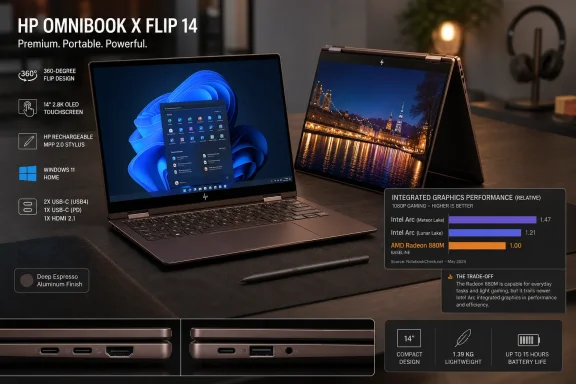
The strongest case for the OmniBook X Flip 14 is physical rather than benchmark-driven. PCWorld found the aluminum chassis sturdy, the 360-degree hinge well tuned, and the Deep Espresso finish unusually distinctive without looking out of place in an office. Notebookcheck separately praised the chassis quality and portability, while Tom’s Hardware likewise highlighted the build, keyboard, webcam, and speakers.
At 12.25 by 8.6 by 0.57 inches and 3.09 pounds, it is compact enough to travel easily but still large enough to use as an ordinary laptop. That balance is more important than it sounds in a 14-inch convertible. HP has not redesigned the sides around tablet mode with awkwardly placed power or volume controls, so the machine retains the familiar daily ergonomics of a clamshell notebook.
The 360-degree hinge still has value. It supports tent mode for presentations or a cramped airline tray, stand mode for video, and tablet mode for markup or note-taking. But this is not a replacement for an iPad-sized tablet; PCWorld’s conclusion that it is designed chiefly as a laptop is the right reading of the hardware. A 3-pound, 14-inch slab is usable for short touch and pen tasks, not something most people will want to hold for an extended reading session.
The practical connectivity is also unusually generous for a machine this thin. HP includes two 40Gbps USB-C ports with Power Delivery and DisplayPort 2.1, two 10Gbps USB-A ports, HDMI 2.1, and a 3.5mm headset jack. For home and hybrid workers, that means a dock is optional rather than mandatory: an HDMI display, wired peripherals, external SSD, and charging can be accommodated without immediately resorting to dongles.
The 5MP IR camera supports Windows Hello facial sign-in, and HP includes a physical camera shutter. Those are better day-to-day credentials than the brochure’s AI language. The NPU can meet Copilot+ PC-era local AI requirements, but the camera shutter, Hello login, and full-size port selection solve problems users actually encounter every morning.
Notebookcheck’s data adds the useful context that the 880M remains competent for an integrated GPU. Its tested OmniBook recorded 3,606 in 3DMark Time Spy and managed about 31 fps in Baldur’s Gate 3 at 1080p Ultra, 31 fps in the Final Fantasy XV benchmark’s High Quality mode, and about 51 fps in Strange Brigade at 1080p Ultra. Those numbers are enough for older titles, esports games, indie games, and work that can accept reduced resolution or quality settings.
But they also explain why calling this an “aging graphics” problem is fair. The Radeon 880M has not suddenly become unusable; it remains substantially faster than the Radeon 860M and 840M configurations HP also sells. What has changed is the competition. A buyer paying near the top of the X Flip 14’s range can now find thin Windows machines with stronger current-generation integrated graphics, while HP withholds AMD’s faster Radeon 890M-equipped Ryzen AI 9 470 from this convertible.
Notebookcheck identified that product decision in July: the clamshell OmniBook X 14 can be configured with Ryzen AI 9 470 and Radeon 890M, but the X Flip 14 tops out at the Ryzen AI 9 465 and Radeon 880M. That is a deliberate segmentation line, not an accident of a low-end model. HP is effectively asking customers to choose between the flexible hinge and the best AMD graphics option.
For an IT buyer, that makes the X Flip 14 a poor candidate for a standardized “premium creative” fleet if staff rely on GPU-accelerated Adobe workloads, 3D visualization, demanding local AI tools that use the GPU, or occasional game-engine and CAD work. The system’s NPU does not erase that limitation. NPU TOPS and GPU throughput are different resources; a 50-TOPS NPU may help compatible local AI features, while a GPU-bound render, 3D viewport, or game still depends heavily on Radeon 880M performance.
Tom’s Hardware also observed the system maintain a fairly consistent result across ten Cinebench 2026 loops, falling from 3,465 points to 3,070 at the lowest point before closing at 3,306. That is a better outcome than a machine that wins a single short benchmark then collapses under sustained work. It suggests the OmniBook is well suited to heavy multitasking, development work, Office workloads, photo processing, and occasional CPU video exports.
The limitation is value rather than capability. CPU performance has become table stakes in the premium Windows ultrabook category. Once the build includes 32GB memory and a 2TB SSD, a buyer should reasonably expect more than “adequate.” HP delivers a polished, capable general-purpose system, but it does not turn the Ryzen AI 9 465 configuration into a workstation.
PCWorld tested the 1920×1200 OLED fitted to its review system and found that its reflective finish struggled with glare. Tom’s Hardware measured only 266 nits, close to HP’s 300-nit rating, and also found the screen dim for a premium OLED laptop. Both outlets agreed on the upside—excellent contrast and rich color—but they reached the same conclusion about brightness and value.
HP’s current configurator lists the better 3K OLED at 500 nits in SDR, up to 1,100 nits in HDR, 100 percent DCI-P3 coverage, and up to a 120Hz refresh rate. It is a $130 upgrade from the lower-resolution OLED in the current U.S. build-to-order menu. That is unusually modest next to HP’s $620 jump from 1TB to 2TB storage.
The implication is clear. If the budget stretches to Ryzen AI 9, 32GB, and 2TB, spending another $130 on the display should be non-negotiable. The 3K option removes two of the entry OLED’s clearest weaknesses—low brightness and 60Hz motion—while better matching the price and convertible use case. A touchscreen used for inking, scrolling, sketching, and tent-mode media deserves a panel that does more than merely meet the OLED baseline.
The pen remains a separate $30 option. That is not unreasonable, but it does mean HP sells a convertible without the accessory that makes tablet mode substantially more useful. Buyers who expect to annotate PDFs or handwrite notes should add it at checkout rather than assume it is in the box.
PCWorld attributed part of that gap to AMD’s Ryzen AI platform relative to newer Intel and Qualcomm alternatives. Notebookcheck’s test results reinforce the broader point, with the HP lasting less than a Lenovo Yoga 7a 2-in-1 carrying a larger 70Wh battery. The OmniBook does not have a battery failure; it simply does not turn its 59Wh capacity into the standout endurance buyers may expect from a premium AI PC.
HP’s current configurator lists a 70Wh battery option, though its availability can vary with selected components and regional configurations. Buyers should verify the final configuration summary before ordering rather than rely on a review sample’s battery specification. The company’s own product pages expressly warn that specifications, prices, and availability can change without notice.
The OmniBook X Flip 14 therefore earns a narrow recommendation: buy it for its chassis, ports, Windows Hello camera, laptop-first convertible design, and a sale price that leaves room for the 3K OLED upgrade. Do not buy the Ryzen AI 9 465 version expecting leading graphics performance, and do not pay a top-tier price for the 1920×1200 OLED. HP’s own lineup offers a faster Radeon 890M path only when the hinge is left behind.
PCWorld first reported the review configuration at $2,529.99 MSRP, discounted to $2,279.99 at publication. HP’s current U.S. configurator confirms the fundamental configuration choices—Ryzen AI 9 465 with Radeon 880M and 32GB memory, 2TB storage, and three screen choices—but it also shows why fixed-price comparisons are hazardous. The company’s own build-to-order prices and promotions move frequently, and the high-capacity 2TB drive alone carries a substantial premium over the included 512GB model.
For Windows buyers who want an elegant machine for Office, browser-heavy work, video calls, docked monitors, and the occasional pen session, the problem is not that the OmniBook X Flip 14 is slow. It plainly is not. The problem is that the top configuration charges premium money while its graphics and its default OLED panel lag the class the chassis and price invite it into.
 The premium hardware is real
The strongest case for the OmniBook X Flip 14 is physical rather than benchmark-driven. PCWorld found the aluminum chassis sturdy, the 360-degree hinge well tuned, and the Deep Espresso finish unusually distinctive without looking out of place in an office. Notebookcheck separately praised the chassis quality and portability, while Tom’s Hardware likewise highlighted the build, keyboard, webcam, and speakers.At 12.25 by 8.6 by 0.57 inches and 3.09 pounds, it is compact enough to travel easily but still large enough to use as an ordinary laptop. That balance is more important than it sounds in a 14-inch convertible. HP has not redesigned the sides around tablet mode with awkwardly placed power or volume controls, so the machine retains the familiar daily ergonomics of a clamshell notebook.
The 360-degree hinge still has value. It supports tent mode for presentations or a cramped airline tray, stand mode for video, and tablet mode for markup or note-taking. But this is not a replacement for an iPad-sized tablet; PCWorld’s conclusion that it is designed chiefly as a laptop is the right reading of the hardware. A 3-pound, 14-inch slab is usable for short touch and pen tasks, not something most people will want to hold for an extended reading session.
The practical connectivity is also unusually generous for a machine this thin. HP includes two 40Gbps USB-C ports with Power Delivery and DisplayPort 2.1, two 10Gbps USB-A ports, HDMI 2.1, and a 3.5mm headset jack. For home and hybrid workers, that means a dock is optional rather than mandatory: an HDMI display, wired peripherals, external SSD, and charging can be accommodated without immediately resorting to dongles.
The 5MP IR camera supports Windows Hello facial sign-in, and HP includes a physical camera shutter. Those are better day-to-day credentials than the brochure’s AI language. The NPU can meet Copilot+ PC-era local AI requirements, but the camera shutter, Hello login, and full-size port selection solve problems users actually encounter every morning.
Radeon 880M is the configuration limit
PCWorld’s central criticism is supported by the broader test record. Its Radeon 880M result trailed systems using Intel’s newer Arc B390 integrated graphics by an estimated 15 to 40 percent. Tom’s Hardware reached a similar conclusion in 3DMark Steel Nomad: the HP outpaced a weaker Intel Graphics implementation in a Lenovo Yoga Slim 7i, but fell far behind the Arc-equipped Dell XPS 14 and several other premium thin-and-light systems.Notebookcheck’s data adds the useful context that the 880M remains competent for an integrated GPU. Its tested OmniBook recorded 3,606 in 3DMark Time Spy and managed about 31 fps in Baldur’s Gate 3 at 1080p Ultra, 31 fps in the Final Fantasy XV benchmark’s High Quality mode, and about 51 fps in Strange Brigade at 1080p Ultra. Those numbers are enough for older titles, esports games, indie games, and work that can accept reduced resolution or quality settings.
But they also explain why calling this an “aging graphics” problem is fair. The Radeon 880M has not suddenly become unusable; it remains substantially faster than the Radeon 860M and 840M configurations HP also sells. What has changed is the competition. A buyer paying near the top of the X Flip 14’s range can now find thin Windows machines with stronger current-generation integrated graphics, while HP withholds AMD’s faster Radeon 890M-equipped Ryzen AI 9 470 from this convertible.
Notebookcheck identified that product decision in July: the clamshell OmniBook X 14 can be configured with Ryzen AI 9 470 and Radeon 890M, but the X Flip 14 tops out at the Ryzen AI 9 465 and Radeon 880M. That is a deliberate segmentation line, not an accident of a low-end model. HP is effectively asking customers to choose between the flexible hinge and the best AMD graphics option.
For an IT buyer, that makes the X Flip 14 a poor candidate for a standardized “premium creative” fleet if staff rely on GPU-accelerated Adobe workloads, 3D visualization, demanding local AI tools that use the GPU, or occasional game-engine and CAD work. The system’s NPU does not erase that limitation. NPU TOPS and GPU throughput are different resources; a 50-TOPS NPU may help compatible local AI features, while a GPU-bound render, 3D viewport, or game still depends heavily on Radeon 880M performance.
CPU performance is adequate, not category-leading
The processor side is more nuanced. PCWorld scored the machine at 8,226 in PCMark 10 and described Cinebench 2024 and HandBrake performance as solid but not exceptional. Tom’s Hardware measured a 13,734 multi-core Geekbench result and a 4-minute, 56-second 4K-to-1080p HandBrake conversion. Those are respectable results for a 14-inch convertible, but they did not lead its comparison group.Tom’s Hardware also observed the system maintain a fairly consistent result across ten Cinebench 2026 loops, falling from 3,465 points to 3,070 at the lowest point before closing at 3,306. That is a better outcome than a machine that wins a single short benchmark then collapses under sustained work. It suggests the OmniBook is well suited to heavy multitasking, development work, Office workloads, photo processing, and occasional CPU video exports.
The limitation is value rather than capability. CPU performance has become table stakes in the premium Windows ultrabook category. Once the build includes 32GB memory and a 2TB SSD, a buyer should reasonably expect more than “adequate.” HP delivers a polished, capable general-purpose system, but it does not turn the Ryzen AI 9 465 configuration into a workstation.
Skip the 1920×1200 OLED
The most consequential buying advice is simpler: do not buy the 1920×1200, 60Hz OLED panel in an expensive configuration when HP offers the 2880×1800, 120Hz OLED upgrade.PCWorld tested the 1920×1200 OLED fitted to its review system and found that its reflective finish struggled with glare. Tom’s Hardware measured only 266 nits, close to HP’s 300-nit rating, and also found the screen dim for a premium OLED laptop. Both outlets agreed on the upside—excellent contrast and rich color—but they reached the same conclusion about brightness and value.
HP’s current configurator lists the better 3K OLED at 500 nits in SDR, up to 1,100 nits in HDR, 100 percent DCI-P3 coverage, and up to a 120Hz refresh rate. It is a $130 upgrade from the lower-resolution OLED in the current U.S. build-to-order menu. That is unusually modest next to HP’s $620 jump from 1TB to 2TB storage.
The implication is clear. If the budget stretches to Ryzen AI 9, 32GB, and 2TB, spending another $130 on the display should be non-negotiable. The 3K option removes two of the entry OLED’s clearest weaknesses—low brightness and 60Hz motion—while better matching the price and convertible use case. A touchscreen used for inking, scrolling, sketching, and tent-mode media deserves a panel that does more than merely meet the OLED baseline.
The pen remains a separate $30 option. That is not unreasonable, but it does mean HP sells a convertible without the accessory that makes tablet mode substantially more useful. Buyers who expect to annotate PDFs or handwrite notes should add it at checkout rather than assume it is in the box.
Battery life clears a workday, not the endurance race
The 59Wh battery is smaller than many premium 14-inch competitors, and the reports differ modestly because they use different tests. PCWorld recorded more than 14 hours in its standard video playback test. Notebookcheck measured 12 hours and 2 minutes in Wi-Fi web browsing. Both results support the same real-world conclusion: this is enough endurance for a typical workday, but it is not a long-life champion.PCWorld attributed part of that gap to AMD’s Ryzen AI platform relative to newer Intel and Qualcomm alternatives. Notebookcheck’s test results reinforce the broader point, with the HP lasting less than a Lenovo Yoga 7a 2-in-1 carrying a larger 70Wh battery. The OmniBook does not have a battery failure; it simply does not turn its 59Wh capacity into the standout endurance buyers may expect from a premium AI PC.
HP’s current configurator lists a 70Wh battery option, though its availability can vary with selected components and regional configurations. Buyers should verify the final configuration summary before ordering rather than rely on a review sample’s battery specification. The company’s own product pages expressly warn that specifications, prices, and availability can change without notice.
The OmniBook X Flip 14 therefore earns a narrow recommendation: buy it for its chassis, ports, Windows Hello camera, laptop-first convertible design, and a sale price that leaves room for the 3K OLED upgrade. Do not buy the Ryzen AI 9 465 version expecting leading graphics performance, and do not pay a top-tier price for the 1920×1200 OLED. HP’s own lineup offers a faster Radeon 890M path only when the hinge is left behind.
References
- Primary source: PCWorld
Published: August 6, 2026 at 12:00 AM UTC
Loading…
www.pcworld.com - Related coverage: tomshardware.com
Loading…
www.tomshardware.com - Related coverage: notebookcheck.net
Loading…
www.notebookcheck.net - Related coverage: notebookcheck.net
Loading…
www.notebookcheck.net - Related coverage: hp.com
Loading…
www.hp.com - Related coverage: laptopscheck.com
Loading…
www.laptopscheck.com - Related coverage: jp.ext.hp.com
Loading…
jp.ext.hp.com - Related coverage: jp.ext.hp.com
Loading…
jp.ext.hp.com - Related coverage: laptopmedia.com
Loading…
laptopmedia.com - Related coverage: hp.com
Loading…
www.hp.com - Related coverage: notebookcheck.org
Loading…
www.notebookcheck.org - Related coverage: bestbuy.com
Loading…
www.bestbuy.com - Related coverage: playox.de
Loading…
www.playox.de - Related coverage: primeselectusa.com
Loading…
primeselectusa.com - Related coverage: shop.inso.ca
Loading…
shop.inso.ca