
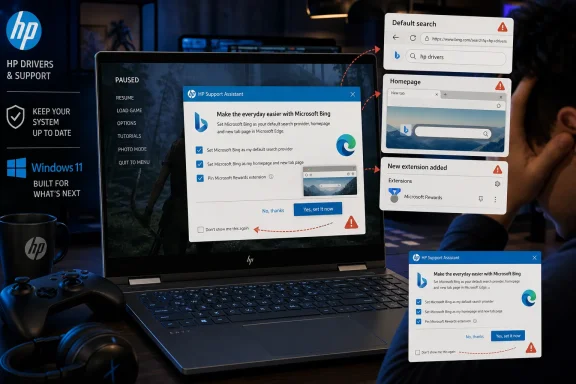
 A support utility crosses into browser promotion
There is a legitimate reason for HP Support Assistant to be preinstalled. HP describes the software as a support hub that can apply firmware and driver updates, run automated troubleshooting tools, surface device-specific resources, and help customers manage support and warranty information. HP Support also documents that Windows users can use the application to view a device’s current warranty status, category, and estimated end date.
Those are useful functions. Driver delivery and firmware maintenance are not cosmetic extras on a Windows laptop; they can affect security, stability, battery life, hardware compatibility, and the availability of fixes for platform-specific issues. A vendor support tool therefore has a defensible place on an OEM image, particularly for customers who would otherwise need to identify model numbers, locate downloads, and distinguish between routine updates and critical ones.
The reported Bing pop-up is different. It is not a driver notification, a warranty warning, a security advisory, or a hardware support recommendation. It is a campaign to alter a user’s browser behavior, presented through an application that customers reasonably associate with maintaining an expensive PC.
That distinction matters. A support utility occupies a privileged position on a Windows system. It comes preinstalled, carries the manufacturer’s branding, is likely to be trusted by less technical users, and can appear at moments when people are not actively shopping for a browser extension or considering a search-engine change. When that privileged channel becomes an advertising surface, the support relationship starts to look less like assistance and more like distribution.
What the HP Bing pop-up reportedly does
According to the report, HP Support Assistant displayed a message built around the phrase “Search that gives back.” The pitch encouraged the user to make Bing the default search provider and homepage, with a preselected option that would also install a Bing extension in Google Chrome or Mozilla Firefox.
The available choices were presented as:
- Yes, let’s try it
- Remind me later
- Don’t show me this again
At face value, this looks like an opt-in campaign. Users are not forced to press the affirmative button, and the prompt includes decline-oriented options. That is an important difference from malware-like behavior that silently changes a browser configuration without a visible decision point.
But meaningful consent is about more than the existence of a button. It also depends on whether the prompt is clear, whether defaults favor the vendor’s preferred outcome, whether rejection is persistent, and whether the timing respects the user’s activity. A prechecked setting that changes both a homepage and default search provider, while offering to add a browser extension, puts the promotional burden on the customer to notice and reverse the configuration.
The account is also notable because the user says HP Support Assistant opened both Firefox and Chrome after the Bing extension was accepted. The browsers reportedly prevented the extension from automatically making Bing the default search engine, after which a new tab was opened with guidance for changing the preference manually.
That browser resistance is a positive safeguard. Modern browsers have increasingly treated search-provider and homepage changes as sensitive settings, precisely because they have long been targets for aggressive installers, unwanted extensions, and revenue-sharing bundles. A browser that forces a user back into a visible settings flow creates a useful friction point.
Yet it also exposes the awkward design of the campaign. If the preferred browser controls reject the automatic change, the next step becomes a guide intended to persuade the customer to complete it manually. That may still be a lawful and technically legitimate process, but it is hard to reconcile with the expectation that an OEM support app should remain tightly focused on supporting the hardware already purchased.
The “gives back” message needs fuller context
The Bing appeal is not invented out of thin air. Microsoft’s Microsoft Rewards program allows eligible users to earn points through qualifying activities, including Bing searches in supported markets, and to use those points for items such as gift cards, sweepstakes entries, and charity-related options. Microsoft Support
Microsoft also operates Give with Bing, under which Rewards points can be redeemed and Microsoft makes a corresponding donation. Microsoft says it works with Benevity to provide an eligible charity catalog that includes more than one million registered organizations worldwide. Microsoft Support
So the central message—that Bing can be part of a charitable giving program—is not inherently false. A customer who joins Microsoft Rewards, selects an eligible nonprofit, and uses the relevant donation functionality can direct points toward that cause.
The issue is that the slogan “Search that gives back” compresses several distinct steps into a feel-good message. Searching with Bing does not, by itself, mean that every search automatically becomes a charitable contribution. The customer must have the relevant account, be in an eligible region, earn qualifying points, and opt into the appropriate giving mechanism. Microsoft’s own Rewards documentation notes that earning availability and rates may vary by country or region, while its donation documentation describes Give with Bing as a points-redemption program rather than a universal per-search donation system. Microsoft Support Microsoft Support
That context should be front and center in any promotion using philanthropy as the rationale for changing core browser settings. A clear campaign would distinguish among three ideas:
- Using Bing as a search engine.
- Earning Microsoft Rewards points through eligible searches and activities.
- Allocating points to a nonprofit through Give with Bing.
Conflating those actions risks creating an impression that is warmer and broader than the underlying mechanics. The charitable element may be genuine, but it is still attached to a commercial ecosystem built to increase Bing engagement, account participation, and advertising reach.
Microsoft’s own financial disclosures demonstrate why default-search distribution remains commercially significant. In its fiscal 2025 fourth-quarter results, the company said search and news advertising revenue excluding traffic-acquisition costs increased 21% year over year. Microsoft Investor Relations additionally cited a $13.88 billion net advertising-revenue figure for Bing in 2025; that specific number should be treated as reported rather than as a directly comparable line item from Microsoft’s public earnings release, which presents growth rates rather than that exact Bing-only figure.
The bigger issue is persistence after rejection
The alleged failure of “Don’t show me this again” is the part HP and Microsoft should address most urgently. A promotion can be annoying without being unacceptable. A promotion that ignores an explicit opt-out can become a direct challenge to user choice.
There are only a few reasonable explanations for a prompt that returns after a user has declined it:
- The preference was not saved correctly.
- The preference was saved but later reset by an app update or configuration refresh.
- The option suppresses one variation of the campaign but not another.
- The campaign is intentionally designed to resurface after a set period.
- A defect causes the application to misread or overwrite the local preference.
None of those possibilities is flattering from a customer-experience standpoint. The first four point to poor design or policy; the fifth points to inadequate quality control. Either way, HP should make the behavior observable, explainable, and easy to disable.
A dismissal mechanism should be durable. If a user selects “Remind me later,” a periodic reappearance is at least consistent with the wording. If a user selects “Don’t show me this again,” the default expectation is that the decision survives app restarts, system restarts, updates, and ordinary maintenance activity.
The moment a “never show again” selection is ignored, customers lose confidence not just in that one message but in the entire utility. They may start to avoid legitimate driver or firmware notices because they no longer regard HP Support Assistant as a trusted support channel. That is a significant long-term cost for a short-term promotional conversion opportunity.
Why the LG comparison is uncomfortable for Microsoft
The HP episode lands only days after Microsoft intervened in another OEM software controversy involving LG. In that case, LG’s Monitor App Installer drew criticism for offering McAfee software as part of its installation experience.
LG argued that McAfee was not installed automatically and required explicit user consent, while noting that the Monitor App Installer was distributed through Microsoft’s official Windows delivery process. That defense focused on the technical question of whether software was installed without authorization.
But many users saw the larger problem differently: a monitor companion utility had little obvious reason to promote a third-party antivirus product in the first place. Even an optional offer can be inappropriate when it comes from an app whose core purpose is to make a purchased device work properly.
Microsoft Executive Vice President of Windows and Devices Pavan Davuluri later said LG had agreed to disable the McAfee pop-up, describing the move as an immediate step toward a better experience for mutual customers.
That intervention established a useful principle: ecosystem partners do not get a free pass simply because a prompt contains an apparent consent flow. Context, relevance, user expectations, and friction all matter.
The HP Bing campaign complicates that principle because Bing is Microsoft’s own search product. The pop-up is not selling an unrelated security suite; it is promoting a Microsoft service through an OEM support app. That does not make the behavior automatically improper, but it creates an obvious conflict in enforcement optics.
If Microsoft pushes LG to remove a McAfee promotion while leaving an HP campaign that nudges users into Bing extensions and default changes untouched, the company risks appearing to apply a different standard when its own services benefit. The issue is especially acute because Microsoft has been trying to make Windows 11 feel more coherent, secure, and respectful of user settings.
Consistency is the test. Either OEM support utilities should be permitted to run persistent, preselected campaigns that change browser defaults, or they should be restricted from doing so except under tightly defined, user-controlled conditions. A distinction based purely on whether the promoted service belongs to Microsoft would be difficult to defend.
HP Support Assistant is valuable enough to deserve better boundaries
It would be a mistake to treat HP Support Assistant itself as useless bloatware. HP’s software can provide genuine value by delivering updates and support functions that Windows Update does not always expose with the same device-specific context. HP explicitly positions the tool around automated fixes, support resources, connected-device management, and configurable firmware and driver updates. HP Support
For many owners, especially those who are not comfortable hunting through vendor support pages, that is practical software. It can reduce support friction and keep a device within HP’s intended update path.
The problem is the boundary between maintenance and marketing. A support assistant has strong reasons to notify someone about:
- A critical BIOS or firmware update.
- A driver update that resolves a compatibility or stability problem.
- A battery-health alert.
- A warranty or service-contract change.
- A diagnostic issue that needs customer action.
- A product recall or security notice.
It has much weaker reasons to interrupt a game to promote a search engine, homepage change, and browser extension. Even if a commercial agreement exists, it should not override the basic expectation that vendor utilities stay relevant to the device and the support relationship.
HP could preserve the useful core of Support Assistant while taking several straightforward steps:
- Remove browser-default promotions from interruption-based notifications. If HP wants to advertise a partner program, it should be confined to an optional, clearly labeled offers area that customers must visit deliberately.
- Make rejection permanent by default. “Don’t show me this again” should be a durable setting, not a temporary cooldown timer.
- Remove preselected browser-change options. No homepage, search engine, or extension installation should be opt-out inside an OEM utility.
- Provide a single advertising and recommendations toggle. Customers should be able to shut off promotional content without disabling legitimate update and support notifications.
- Publish plain-language disclosure. If an offer is sponsored, paid, or subject to a commercial arrangement, HP should say so directly.
These are not radical demands. They are basic design practices for software that arrives on a customer’s PC before the customer has made any independent decision to install it.
What Windows 11 users can do now
Users who want to keep HP Support Assistant for drivers and diagnostics but avoid promotional interruptions should first look through the app’s notification, recommendation, and privacy options. The exact labels can vary by version, so the practical goal is to disable nonessential messages while keeping desired update alerts enabled.
If the app does not offer a reliable way to suppress marketing prompts, uninstalling it is the cleanest consumer option. Windows 11 supports standard application removal through Settings > Apps > Installed apps, where users can find an app, open the three-dot menu, and select Uninstall. Microsoft’s WinGet documentation also identifies Settings as a supported route for removing applications. Microsoft Learn
Before removing it, users should understand the trade-off. HP Support Assistant may be convenient for finding hardware-specific updates and warranty information, but HP also provides web-based support paths for driver downloads, diagnostic tools, and warranty checks. HP Support HP Support
Users should also review their browser settings after interacting with any Bing offer:
- Check installed extensions in Chrome, Firefox, or another preferred browser.
- Confirm the default search engine.
- Confirm the homepage and new-tab behavior.
- Remove extensions that are not wanted.
- Review browser startup pages for unexpected changes.
Windows itself offers a Default apps settings page, and Microsoft documents the ms-settings:defaultapps route for launching it directly. Microsoft Learn That does not replace browser-specific checks, but it is useful for ensuring Windows-level associations still reflect the user’s preferred applications.
A test of Microsoft’s Windows ecosystem standards
The HP Bing pop-up controversy is not ultimately about whether Bing is a legitimate search engine, whether Microsoft Rewards can support charities, or whether HP is allowed to include a useful support application with its PCs. All three can be true.
It is about who controls a Windows PC after purchase. A person who buys a premium laptop should not need to wonder whether the manufacturer’s maintenance tool will interrupt entertainment or work to market a browser extension. They should not need to distrust an explicit opt-out because it might be ignored. And they should not have to parse charitable language to understand that a commercial search platform is being promoted through a support channel.
Microsoft’s response to the LG McAfee episode showed that it can use its ecosystem influence to improve a poor Windows experience. The HP situation is a more difficult credibility test because the promoted product is Bing. If Microsoft wants Windows 11 to be seen as a platform where customer choice is respected, it should apply the same standard here: OEM utilities should support the hardware, promotions should be transparent and strictly opt-in, and “Don’t show me this again” must actually mean it.
