
The most important correction is timing. The guide says its team spent 90 days testing Proxmox VE 8.1 and 8.2, then presents the results as recommendations for 2026. Proxmox released VE 9.0 on August 5, 2025, followed by VE 9.1 in November 2025 and Proxmox VE 9.2 on May 21, 2026. Proxmox says VE 8.4 security and critical-bug support runs only through August 2026. A fresh build in August 2026 should therefore be validated on VE 9.2, not represented chiefly by tests on a now-retiring major release.
That does not mean every listed thin client suddenly stops working. It means the supplied guide did not test the platform a 2026 buyer is actually downloading, and it never discloses firmware revisions, Proxmox kernels, BIOS settings, storage models, power-meter methodology, or reproducible benchmark results. The quoted CPU-utilization figures—such as a J4105 cluster staying under 60 percent, or a t740 workload holding at 70 percent—cannot be independently assessed from the article.
 The Dell Wyse 5070 is misdescribed as an NVMe machine
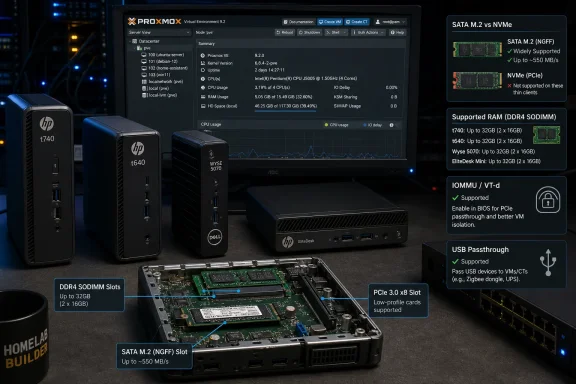
The Dell Wyse 5070 remains a reasonable low-power Proxmox candidate, especially when found cheaply with RAM and a usable SSD already installed. Its Celeron J4105 supports Intel VT-x, VT-d, and Extended Page Tables, so it has the processor-level prerequisites for KVM and IOMMU-based device passthrough. Dell’s own documentation also confirms a SATA controller and an M.2 storage slot.
But the PropelRC guide repeatedly calls a 256GB drive in the Wyse 5070 an “NVMe SSD.” Dell’s Wyse 5070 technical documentation specifies a SATA-based M.2 2260/2280 connector, not an NVMe slot. Dell lists supported SSD capacities up to 512GB, but the transport matters: a SATA M.2 drive is perfectly adequate for a modest Proxmox node, yet it does not offer NVMe behavior or throughput.
The guide also gives internally conflicting advice about memory. It says 8GB is sufficient for a few light guests, then warns that the J4105 “caps out at 8GB” while separately saying the 5070 is unsuitable for users needing more than 16GB. Intel’s official J4105 specification lists 8GB as the processor’s supported maximum, and Dell’s original Wyse 5070 documentation likewise lists 8GB maximum in Dell-supported configurations. Community reports of larger modules functioning exist, but they are not a warranty, nor are they a replacement for a supported hardware configuration.
The practical conclusion is straightforward: buy a Wyse 5070 as an 8GB, SATA-M.2, one-Gigabit-node unless the seller provides a complete, verifiable configuration. It can run Home Assistant, DNS filtering, reverse proxies, and a few Linux containers well. It is a poor foundation for a plan that assumes NVMe storage, a large ZFS ARC, or an upgrade path based on undocumented high-density memory compatibility.
The guide confuses virtualization, IOMMU, and ordinary USB passthrough
Several recommendations blur together three separate functions: CPU virtualization, IOMMU, and USB device forwarding. This is more than terminology. It can cause a buyer to spend money for a feature they do not need, or assume a setup will work when it will not.
VT-x on Intel and AMD-V on AMD enable hardware-assisted virtual machines. VT-d and AMD-Vi are IOMMU technologies that allow the host to isolate and assign PCIe devices or controllers directly to a guest. Nested virtualization is another matter: it depends on the host hypervisor configuration, guest CPU model, and exposed virtualization extensions. It is not enabled simply because a chip has VT-d.
Likewise, passing a Zigbee, Z-Wave, or USB serial dongle to a Home Assistant VM normally does not require passing through an entire USB controller. Proxmox can attach an individual USB device to a QEMU guest. IOMMU becomes relevant when assigning the full controller, a NIC, an HBA, or a GPU.
The guide’s claim that the Wyse 5070 can pass its integrated Intel GPU through “for hardware-accelerated transcoding in a Jellyfin or Plex LXC” mixes incompatible approaches. An LXC container generally uses the host’s GPU device nodes, such as Intel’s
/dev/dri, rather than receiving a PCIe device through VM passthrough. A full GPU assignment usually gives a VM exclusive control of the device; it is not the standard route to share Quick Sync among several containers.
The HP t740 is still the standout system in the group where PCIe experimentation is the goal. HP documents a half-height PCIe x16 slot electrically wired as x8, along with M.2 NVMe and SATA storage options. That makes a multigig NIC, HBA, or modest PCIe accelerator materially more realistic than on the other thin clients. But the guide’s assertion that Radeon Vega 8 supports SR-IOV partitioning for multiple VMs is unsupported by the HP t740 documentation and AMD’s V1756B product information. Buyers should not treat it as a promised virtualization feature.
HP’s own specifications contradict the stated RAM limits
The HP t630 is described as a 16GB maximum platform. HP’s QuickSpecs says otherwise: the t630 has two DDR4 SODIMM slots and lists 4GB, 8GB, 16GB, and 32GB configurations. That makes the machine more interesting as a used Linux-container host than the guide admits, although its older AMD GX-420GI remains a low-end embedded processor and should not be mistaken for a modern Ryzen system.
The HP t640 has the reverse problem. PropelRC says the t640 supports “up to 16GB DDR4,” but HP documents two SODIMM slots and memory capacities through 32GB. Its Ryzen Embedded R1505G has two cores and four threads, so 32GB does not turn it into a multi-VM powerhouse. It does, however, make the t640 considerably more credible for a mix of several containers, a small Windows or Linux VM, and storage that would otherwise push an 8GB system into swap.
The t740 is the group’s most expandable true thin client, but its memory story needs the same discipline. HP’s published material identifies two DDR4 SODIMM slots, while its listed and documented configurations center on capacities through 32GB. Larger aftermarket configurations may operate, but the roundup offers no test evidence, compatible-module list, or firmware information to support its confident 64GB recommendation. For a virtualization host, “it booted with 64GB” and “64GB works reliably under sustained KVM, ZFS, and backup workloads” are different claims.
The older low-power entries should be treated as container appliances
The Dell Wyse 3040 is the weakest recommendation in the roundup, even if its very low power draw is appealing. Intel’s Atom x5-Z8350 has four low-clocked cores, 2GB maximum memory, and VT-x support. That is enough to install a hypervisor and run a very narrow workload, but it is not enough headroom for the broad “Proxmox-ready” framing used in the guide.
Proxmox itself specifies 2GB as the minimum for the operating system and its services before allocating memory to guests. On a 2GB Wyse 3040, a Debian LXC running Pi-hole or an equally small service may be defensible. A Home Assistant OS VM plus additional services is an operational compromise, not a recommendation readers should buy into as a general-purpose homelab node.
The Dell Wyse 5060 is also presented too loosely. Dell identifies it as an AMD GX-424-based unit with Radeon R5E graphics, DDR3 memory in 4GB or 8GB configurations, and 8GB or 64GB SATA flash storage options. It can be repurposed, but it is a substantially older platform than the 5070, t640, or t740. The supplied article calls it a reasonable choice for one or two VMs without establishing whether the particular refurbished SKU has adequate RAM, a replaceable drive, or BIOS support needed for the proposed arrangement.
Neither system is worthless. Both make more sense as low-risk, single-purpose Linux or LXC appliances than as the base of a new virtual-machine lab.
The EliteDesk is the better VM host, but it is not a thin client
The HP EliteDesk 800 G2 Mini is arguably one of the sounder practical recommendations in the guide because its Core i5-6500T and two memory slots give it more conventional desktop headroom than most of the actual thin clients. Its M.2 PCIe storage support and 2.5-inch SATA bay also make a straightforward Proxmox boot-and-VM-storage layout possible.
It is also explicitly not a thin client. Calling it a “thin client alternative” is accurate; including it as the seventh “best thin client” is not. The same issue applies to the Dell OptiPlex 3000 Thin Client only in reverse: it is a genuine thin client, but the guide presents a fixed 8GB/32GB configuration and sub-$100 price without identifying a seller, part number, warranty condition, or storage type.
Dell’s current OptiPlex 3000 documentation shows N5105 and Pentium N6005 variants, 8GB or 16GB DDR4 options, onboard 32GB or 64GB eMMC configurations, and an M.2 2230 PCIe SSD slot. That is more flexible than the article suggests, but it also illustrates why a generic model name is not enough. A prospective buyer must verify the exact chassis and configuration, particularly when a listing may contain soldered eMMC rather than an installed SSD.
The best takeaway from the list is narrower than its headline: the HP t740 remains the compelling option for a thin-client-sized Proxmox host needing PCIe expansion; the t640 deserves consideration when upgraded to 16GB or 32GB; the Wyse 5070 can be a cheap, quiet starter node if buyers accept SATA M.2 storage and Dell’s supported 8GB memory ceiling. The 3040 and 5060 belong in the parts-bin category, not on a 2026 shopping shortlist for new VM-heavy builds.
A buyer should choose the workload first, verify the exact unit second, and install Proxmox VE 9.2—not rely on affiliate-listing configurations and tests performed on Proxmox VE 8.x.