

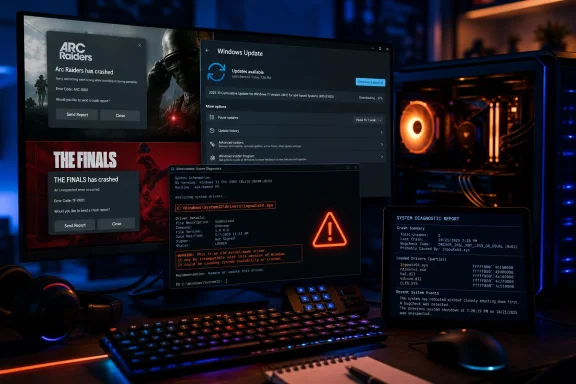
inpoutx64.sys, is present. The immediate practical fix is to address that driver rather than reflexively remove the security update: KB5121003 is the mandatory August patch for Windows 11 24H2 and 25H2, moving systems to builds 26100.9168 and 26200.9168 respectively.
Windows Latest first reported the failures after players began tying new crashes and occasional reboots to the update. Embark Studios, which develops both games, has since acknowledged the problem in its Discord channels and identified inpoutx64.sys as the common file in its workaround. That is meaningful corroboration: this is no longer only a collection of post-update anecdotes, though it remains a compatibility failure affecting a subset of PCs rather than evidence that KB5121003 broadly breaks games.
Microsoft’s release information does not yet list the game crashes as a known issue. That leaves affected users in an uncomfortable position: a monthly security update remains installed on machines where a legacy, kernel-level utility driver can now destabilize modern anti-cheat-protected games.
The collision is with a legacy hardware-access driver
inpoutx64.sys is not part of Windows 11 or either game. It is an old kernel-mode port-access driver associated with Highresolution Enterprises’ InpOut32/InpOutx64 components. Its purpose is to let software access low-level hardware resources, which made it useful to older peripheral-control, system-tuning, sensor-reading, and RGB tools.
The driver’s age is the issue worth focusing on. File records identify the commonly encountered inpoutx64.sys driver as version 1.2, with origins dating to 2008. It has continued to surface because applications can quietly bundle and install it rather than because users intentionally install a product named InpOutx64.
Microsoft community support threads and hardware-software discussions have previously linked the driver to utilities such as X-Mouse Button Control, ZenTimings, OpenRGB-related tools, OEM control software, and other programs that need direct hardware access. That does not mean every installation comes from the same application. A Razer updater was one suspected source in reporting collected by Windows Latest, while users have also traced the driver to laptop-management and tuning utilities.
Embark’s diagnosis is narrower than some early social-media claims. The studio says the crash concerns how inpoutx64.sys behaves after KB5121003, not that every Windows 11 PC with the August patch is affected. Players reporting success after uninstalling the update have established a useful correlation, but that rollback does not prove the cumulative update alone is defective in isolation. The driver-and-game combination is the actionable fault line.
Embark’s workaround removes a dependency, not a Windows component
Embark advises affected players to stop and delete the inpoutx64 service, remove C:\Windows\System32\drivers\inpoutx64.sys, optionally clear its service registry entry, and restart Windows. Community reposts of the studio’s Discord notice show the same instructions for both ARC Raiders and THE FINALS.
That procedure may restore the games, but it has a consequence that the short workaround can obscure: deleting the driver can disable features in the software that installed it. RGB controls, fan settings, peripheral macros, sensor monitoring, or motherboard-tuning functions may stop working until the originating application is updated, reconfigured, or removed. On laptops, that risk deserves particular caution because vendor utilities can be tied to performance profiles and thermal controls.
For that reason, the best first step is not to delete a file from System32 blindly. Identify what installed it. In an elevated Command Prompt, administrators can inspect the service with:
sc qc inpoutx64
The command will not always reveal the parent application, but it confirms whether the service exists and where Windows expects the driver to load from. Check installed applications and any recently updated peripheral, RGB, overclocking, or system-monitoring utilities before removing the driver. If a specific application is identified, uninstalling or updating that application is cleaner than leaving an orphaned kernel-driver service behind.
A restore point or a full backup is sensible before making service and registry changes. The driver is not malware merely because it is old or because anti-cheat software objects to it; it is legitimate third-party code with a very broad hardware-access role. But its kernel-level privileges and long-lived distribution through unrelated utilities make it exactly the kind of component that can become incompatible when Windows or anti-cheat software tightens enforcement.
Uninstalling KB5121003 should be the last temporary measure
The August update contains security fixes, and the patch should not be treated as optional just because a game crashes on a particular configuration. Windows Latest characterized the release as fixing more than 400 security issues, while Microsoft’s Security Update Guide remains the authoritative record for the individual vulnerabilities covered by August’s Patch Tuesday releases.
Removing KB5121003 can be a reasonable short-term containment step for a home machine where the owner cannot safely remove or update the software that installed inpoutx64.sys. It is a weaker choice for work systems, shared PCs, or devices subject to patch-management requirements. In those cases, an IT administrator should document the exception, identify the driver’s owner, and plan to reapply KB5121003 as soon as the incompatible dependency is eliminated.
The distinction matters operationally. A user who uninstalls the cumulative update but keeps the legacy driver has only deferred the conflict, because a future cumulative update or game anti-cheat revision may confront the same component again. A user who removes inpoutx64.sys without identifying its parent software may find that a later utility update simply reinstalls it.
For managed fleets, the sensible approach is to query for the service and driver path before making a broad rollback decision. Endpoint-management tools can inventory C:\Windows\System32\drivers\inpoutx64.sys and the HKLM\SYSTEM\CurrentControlSet\Services\inpoutx64 service key, then correlate affected machines with installed OEM and peripheral-management software. That creates a targeted remediation list instead of turning a gaming issue into an organization-wide security-patch exception.
Other reported graphics problems remain unproven
Windows Latest also collected reports of black screens, refresh-rate drops, HDR failures, anti-cheat crashes, and problems in Marvel Tōkon: Fighting Souls after KB5121003. Those claims should be treated separately from the Embark-confirmed inpoutx64.sys crash pattern.
There is no public evidence yet that all of those symptoms share one root cause. Display behavior is especially vulnerable to coincidental graphics-driver updates, monitor firmware, HDR configuration changes, overlays, and game-specific patches. Users seeing those issues should record the Windows build, GPU driver version, display model, game, and crash or Event Viewer details before concluding KB5121003 is responsible.
PC Gamer’s coverage of KB5121003 has focused on performance-related changes in the update rather than the Embark crash reports. That split reinforces the current evidence: the update is installing and operating normally on many systems, while a specific legacy driver is causing a serious failure in an identifiable subset of gaming PCs.
What affected players should do now
Players who began crashing only after installing KB5121003 should first confirm they are running Windows 11 build 26100.9168 or 26200.9168 and check whether the inpoutx64 service or driver file exists. If it does, identify and update or remove the utility that installed it before resorting to removal of the Windows security patch.
Embark is working on a longer-term game-side fix, but it has not published a delivery date or explained precisely which post-update behavior changed. Microsoft has also not yet added the issue to KB5121003’s known-problems list. Until one of those vendors provides a durable remedy, the practical resolution is to remove the obsolete dependency where possible, verify that the hardware utility it belonged to still works as intended, and keep the August security update installed.
Update: Isolated Windows Hello failures are now being reported alongside KB5121003 game crashes (August 17, 2026)
Notebookcheck reports that KB5121003 may also be causing isolated Windows Hello problems, citing Windows Latest’s collection of user reports. In one case, a user reportedly had to re-enroll a PIN after every restart because its credential key was corrupted when regenerated; another report involved an existing Windows Hello container failing to load.
These reports are not yet acknowledged by Microsoft, and KB5121003’s official release notes still list no known issues. Unlike the Embark-confirmed inpoutx64.sys game-crash pattern, there is no identified root cause, reproducible scope, or vendor workaround for the Hello failures.
Users affected by repeated PIN enrollment or Hello sign-in failures should preserve an alternative sign-in method, document the Windows build and relevant Event Viewer errors, and avoid treating the scattered reports as proof of a broad update defect. Removing KB5121003 remains a last-resort temporary measure where the device cannot be used reliably.
Update: Reports link KB5121003 to Teams and Outlook launch failures on ARM PCs (August 20, 2026)
Neowin reports that some Windows 11 ARM64 users are unable to launch Microsoft Teams or the new Outlook after installing KB5121003. Reported affected hardware includes Surface Laptop 7, Surface Pro 11, and HP OmniBook 3 systems, while traditional Win32 applications such as classic Outlook, Word, and Excel reportedly continue to work.
According to the report, the failures appear to affect MSIX/AppX applications and may involve AppModel Runtime package-state or dependency errors, including 0x80073CFC during token generation. Some users say uninstalling KB5121003 restores the affected apps, whereas DISM, SFC, resets, and even new user profiles have not provided a durable fix once the update is reapplied.
Microsoft has not added this ARM-specific Teams and Outlook issue to the Windows health dashboard. Until it is investigated or resolved, administrators deploying KB5121003 to ARM devices should validate Teams and new Outlook before wider rollout and consider a targeted pause where those apps are business-critical.
Update: Microsoft opens investigation into KB5121003 game crashes (August 20, 2026)
Neowin reports that Microsoft opened an investigation late on August 19 into KB5121003-related game crashes on Windows 11 24H2 and 25H2. The company reportedly recognizes EXCEPTION_ACCESS_VIOLATION errors, unexpected game exits, app hangs, and occasional system restarts affecting ARC Raiders, THE FINALS, and Marvel Tōkon: Fighting Souls.
That changes the status of the issue: Microsoft is now examining whether the trigger lies in Windows itself or in an incompatible third-party component. The investigation does not yet establish that KB5121003 is solely at fault, nor does it replace Embark’s identified inpoutx64.sys workaround.
Affected players should submit reproducible crash details and diagnostic telemetry through Feedback Hub, including the game title, Windows build, crash time, and any third-party hardware-control utilities installed. Administrators should continue to avoid broad removal of the security update while Microsoft investigates, using narrowly targeted mitigations where affected games are operationally important.
Update: Microsoft formally lists KB5121003 game failures as a known issue (August 20, 2026)
Microsoft has now formally acknowledged the Windows 11 gaming problem in an updated support document, according to TechPowerUp. The advisory says reports began after the August 11, 2026 release of KB5121003 and later updates, and names ARC Raiders, MARVEL Tōkon: Fighting Souls, and THE FINALS among the limited number of affected games.
The official symptom list includes games becoming unresponsive, closing without notice, displaying an EXCEPTION_ACCESS_VIOLATION error, and in some cases restarting the device unexpectedly. This supersedes the earlier status based on reports that Microsoft had opened an investigation: the issue is now documented by Microsoft itself.
Microsoft still has not published a fix, root-cause explanation, or a timeline for resolution. Its current advice is to submit affected-system details through Feedback Hub. The formal acknowledgment strengthens the case for targeted mitigation on gaming PCs, but it does not alter the need to keep broad security-update rollbacks tightly limited.
Update: Microsoft links KB5121003 game failures to RGB-related hardware components (August 21, 2026)
Microsoft’s KB5121003 known-issues guidance now identifies an association between the game crashes and certain peripherals or internal components that support RGB lighting. The advisory says these devices may install drivers or software components with names similar to inpoutx64, refining the earlier picture that centered on Embark’s identification of inpoutx64.sys.
That is a meaningful narrowing of scope, but not a complete root-cause disclosure. Microsoft has not named affected vendors or devices, published a permanent fix, or advised users to remove the security update. Players experiencing crashes should focus their troubleshooting on installed RGB, fan-control, overclocking, and peripheral utilities rather than reinstalling the affected games.
For administrators, the updated wording supports targeted inventory of hardware-control software on affected gaming PCs, particularly where legacy kernel drivers may be bundled with RGB tooling.
Update: Additional details (August 21, 2026)
PCMag quotes Microsoft as saying the affected RGB-capable peripherals or internal components may install drivers or code components with filenames “similar to inpoutx64,” and that launching certain games triggers the issue when those components are present. Microsoft says it is still working to understand that relationship and has not issued a fix.
Update: Microsoft workaround reportedly disables the legacy inpoutx64 driver (August 22, 2026)
HotHardware reports that Microsoft has now provided a more specific mitigation for affected gaming PCs: disable the inpoutx64 service rather than immediately uninstalling KB5121003. The reported instruction is to set the service’s Start registry value under HKEY_LOCAL_MACHINE\SYSTEM\CurrentControlSet\Services\inpoutx64 to 4, then restart Windows.
That approach differs from Embark’s earlier delete-the-driver workaround by preserving the driver file while preventing it from loading. It may be easier to reverse if needed, but it can still break the software or hardware features that rely on the legacy component.
Users should expect possible loss of RGB controls, hardware monitoring, fan-control or memory-tuning functions, and peripheral macros. The reported guidance also notes that reverting the registry change may be appropriate if those compatibility losses outweigh the game-crash mitigation.
For IT administrators, the new workaround supports a targeted remediation path: identify affected systems, disable the service only where necessary, validate dependent hardware-management software, and retain KB5121003 rather than broadly removing a security update.
Update: Microsoft’s published guidance does not include the reported registry workaround (August 23, 2026)
Contrary to the August 22 report that characterized disabling the inpoutx64 service as Microsoft-provided guidance, Wccftech reports that Microsoft’s current KB5121003 support page contains no Registry Editor instructions, no Start=4 setting, and no directive to disable the driver.
Microsoft’s official position remains that it is investigating the interaction between affected games and RGB-related components that may install inpoutx64-like drivers. It has not published a permanent fix, named affected vendors, or issued a specific user mitigation beyond requesting feedback from affected systems.
The registry change may still function as a community-reported, reversible troubleshooting measure, but it should not be presented as an official Microsoft workaround. Users who choose to disable the service should first confirm it exists, identify the utility that installed it, record its original setting, and expect possible loss of RGB, fan-control, monitoring, or peripheral-management features.
Update: Microsoft reportedly adds a registry-based inpoutx64 mitigation (August 24, 2026)
According to iXBT Games, Microsoft has since added a temporary workaround to its KB5121003 known-issues guidance: disable the inpoutx64 driver service by changing the Start value at HKEY_LOCAL_MACHINE\SYSTEM\CurrentControlSet\Services\inpoutx64 to 4, then restarting Windows.
If confirmed on Microsoft’s live support page, this would supersede the earlier finding that no official registry instructions had been published. The mitigation is narrower and more reversible than deleting inpoutx64.sys, but it can still disable RGB controls, fan management, temperature monitoring, macros, or other features supplied by the utility that installed the driver.
Affected users should back up the registry, verify that the specific inpoutx64 service exists before changing anything, and test the game after restarting. KB5121003 removal should remain a fallback rather than the first response.
References
- KB5121003 Breaks Games With inpoutx64 RGB Driver wccftech.com