
But the record does not support the simpler claim that Dell’s PCs were universally “broken” by Windows Update, or that Dell has merely discovered the scope this week. Microsoft and Dell describe a narrower driver compatibility issue, and Dell’s public knowledge-base article containing the expanded model list was last modified on July 22. Windows Latest’s August 7 report usefully draws attention to that list, but the underlying Dell document has been publicly available for more than two weeks.
The significant new takeaway is the mismatch between Microsoft’s continued wording — a “limited number” of Dell devices — and Dell’s detailed list covering approximately 245 product models. Those are not necessarily 245 machines, nor proof that every configuration of each named model fails. They are the systems Dell has associated with the fault condition. For IT departments that manage a mixed Dell estate, that distinction turns a narrowly described Windows known issue into a deployment check across several years of client, workstation, desktop, rugged, and gaming hardware.
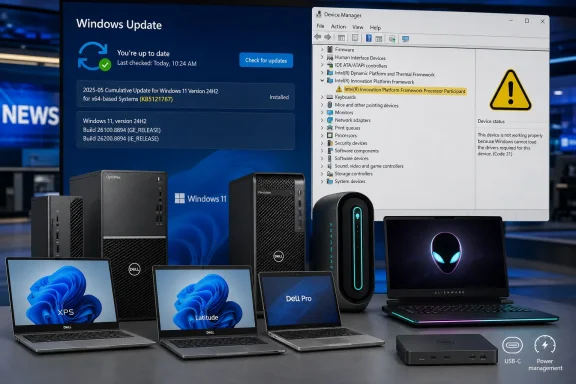 The failure sits in a power-management driver, not USB-C hardware
The problem traces to the Intel Innovation Platform Framework Processor Participant driver, commonly shortened to Intel IPF. This is a component used to coordinate platform power, thermal behavior, and performance policy between firmware, Intel silicon, Windows, and OEM tuning. On systems where it fails to initialize or communicate correctly, a laptop may throttle unexpectedly, consume more power, run hot, or behave unpredictably even if the processor, cooling system, and battery are physically sound.
Microsoft says the issue emerged after the June 23 optional Windows 11 preview update, KB5095093. Dell’s own advisory identifies an incompatibility between the Intel IPF Processor Participant driver and the Windows USB-C Connection Manager interface introduced in that update and carried into the July 14 security release, KB5101650.
That technical detail is more important than the broad “Windows update broke Dell PCs” framing. The affected component is not simply a USB-C dock driver. Windows’ USB-C Connection Manager added an interface that conflicted with an Intel driver Dell ships across systems that use IPF for thermal and power management. USB-C is the integration point Microsoft names; the observed consequences can surface well beyond charging or external-display use because IPF is involved in system-level power and performance decisions.
Microsoft’s Windows release-health entry says the visible diagnostic clue is often a yellow warning icon beside Intel Innovation Platform Framework Processor Participant in Device Manager under System devices. The company also warned that affected systems could experience unexpected shutdowns, poor performance, increased heat, and battery drain. Dell’s support article likewise leads with the Device Manager warning rather than an outright no-boot condition.
That is a meaningful boundary on the incident. A listed system that has never shown the IPF warning and is already operating normally on a newer cumulative update should not be treated as a failed machine solely because its model appears in Dell’s list. Conversely, a Dell owner who attributes thermal throttling or battery drain to a recent driver update should check IPF before replacing a battery, reinstalling Windows, or attempting a BIOS rollback.
Dell’s list makes the “limited” hold much less reassuring
The Dell list spans far more than current premium laptops. It includes recent Alienware Area-51 and Aurora systems, XPS 13 through XPS 17 models, Dell G15 and G16 gaming laptops, numerous Inspiron systems, Latitude business notebooks, OptiPlex desktops and all-in-ones, Precision mobile workstations and towers, Vostro systems, Dell Pro hardware, rugged tablets, and thin clients.
Several older or still-common systems appear alongside current-generation hardware: XPS 15 9520 and 9530, XPS 17 9720 and 9730, XPS 8950 and 8960 desktops, Alienware Aurora R13 through R16, Precision 5470 through 5490, Latitude 5430 through 5550, and OptiPlex 3000, 5000, 7000, 7010, and 7020 variants. The inclusion of desktops and all-in-ones reinforces that this was never exclusively a laptop battery issue.
The model count is also not an incident count. Dell has not published the number of systems that encountered the failure, the proportion of eligible devices that have the affected IPF driver version, the geographic rollout scope, or the configurations that make a listed model susceptible. Microsoft has similarly avoided quantifying affected endpoints. “Limited” may be accurate in relation to the installed base of Windows 11 devices, but it is imprecise guidance for administrators with fleets of Dell machines.
This is where the full list changes the operational response. An administrator should inventory model and Windows build, then look for the Intel IPF device state, rather than assuming that only the early-reported Dell Pro Max and Precision systems required attention. A consumer owner can use Dell’s model lookup or the computer’s service tag to establish the exact model; names such as “Inspiron 14” and “XPS 15” cover multiple generations with different driver stacks.
Microsoft blocked the July update, then shipped a cumulative replacement
Microsoft did not allow KB5101650 to continue reaching the affected Dell devices once the compatibility problem was acknowledged. The July 14 security update was temporarily withheld from those systems while Microsoft and Dell worked on a resolution. BleepingComputer and PCWorld independently reported the block and Microsoft’s later out-of-band repair release.
The repair is KB5121767, released July 18 for Windows 11 24H2 and 25H2. It is an out-of-band cumulative update, meaning it includes the previous July security and quality content as well as the IPF-specific correction. A machine that was held back from KB5101650 does not need to install that earlier package first.
Dell’s guidance is straightforward:
- Check whether KB5095093 or KB5101650 is recorded in Windows Update history.
- Open Device Manager, expand System devices, and look for a yellow warning icon next to Intel Innovation Platform Framework Processor Participant.
- Install KB5121767 through Windows Update, restart, and confirm build 26100.8894 or later on Windows 11 24H2, or build 26200.8894 or later on Windows 11 25H2.
There is one deployment detail that the “all good now” framing misses: KB5121767 was not initially handled like an ordinary mandatory Patch Tuesday update for every consumer PC. Microsoft describes it as an optional out-of-band update. Systems with the “Get the latest updates as soon as they’re available” setting enabled can receive it automatically; otherwise, an affected device may need a manual Windows Update check and selection of Download & install. Microsoft makes the package available through the Update Catalog for managed deployments.
For Windows 11 Enterprise LTSC 2024 installations using hotpatching, the corresponding repair is KB5121768, not KB5121767. Microsoft says Windows Autopatch-managed devices with hotpatch enabled receive that repair automatically, while Intune administrators can expedite the relevant quality update.
The update is a fix, but it also closes the delayed security gap
The immediate priority is restoring stable thermal and power behavior. The less visible consequence is that the safeguard hold delayed the July security update on the affected Dell systems. KB5121767 is therefore not merely a convenience patch for users annoyed by heat or reduced performance; it is the supported path back onto July’s Windows servicing baseline for affected 24H2 and 25H2 machines.
Dell’s full list should be read as an inventory and triage document, not a reason to force-install an emergency package on every Dell computer. Microsoft explicitly says the out-of-band update is recommended for devices affected by the issue, and Dell provides the Device Manager indicator to identify that condition. Yet any Dell organization that paused Windows 11 quality updates in response to the July reports should now revise that temporary policy, target the listed systems, and confirm the post-install builds.
The material correction is this: the fix was released on July 18, and Dell publicly attached its broad affected-products list to support article 000488916 by July 22. What has changed with the latest reporting is visibility, not the availability of a remedy. For users still on KB5095093 or a held-back July baseline, the remaining task is concrete: check the IPF device, install KB5121767 where applicable, restart, and verify that the system has reached build 26100.8894 or 26200.8894.
References
- Related coverage: learn.microsoft.com
- Related coverage: support.microsoft.com
July 14, 2026—KB5101650 (OS Builds 26200.8870 and 26100.8875) | Microsoft Support
July 14, 2026—KB5101650 (OS Builds 26200.8870 and 26100.8875)support.microsoft.com - Related coverage: pcworld.com
Microsoft fixes the Windows 11 bug slowing down some Dell PCs | PCWorld
Microsoft released KB5121767 to fix Windows 11 performance issues on certain Dell PCs caused by a driver conflict. Here's who needs it.www.pcworld.com - Related coverage: learn.microsoft.com
Windows 11 - release information | Microsoft Learn
Learn release information for Windows 11 releaseslearn.microsoft.com - Related coverage: support.microsoft.com
Loading…
support.microsoft.com - Related coverage: bleepingcomputer.com
Loading…
www.bleepingcomputer.com - Related coverage: dl.dell.com
Loading…
dl.dell.com - Related coverage: dl.dell.com
Loading…
dl.dell.com - Related coverage: intel.com
Loading…
www.intel.com - Related coverage: delltechnologies.com
Loading…
www.delltechnologies.com - Related coverage: downloads.dell.com
Loading…
downloads.dell.com - Related coverage: windowscentral.com
Microsoft issues emergency Windows 11 KB5121767 update to address unexpected shutdowns and overheating on certain Dell PCs | Windows Central
After blocking the most recent Patch Tuesday updates on Dell PCs, Microsoft has now released an emergency fix that addresses some big issues.www.windowscentral.com - Related coverage: techradar.com
Microsoft fixes Windows 11's nasty bugs with Dell laptops — and shows there's a catch to jumping the update queue | TechRadar
Emergency patch could end up on your non-Dell PC if you're not carefulwww.techradar.com - Related coverage: dell.com
Loading…
www.dell.com - Related coverage: dell.com
Loading…
www.dell.com