
TechPowerUp first highlighted the NVIDIA overclocking and sensor additions, while LACT’s own GitHub release notes confirm version 0.10.0 was published on August 12. The project also adds an AMD graphical GTT-memory display, a new service-setup wizard, Polkit authentication for administrative actions, and a command-line mechanism to temporarily release a GPU for virtual-machine attachment.
For Linux desktop users, this is a practical release rather than a cosmetic feature drop. LACT is one of the few Linux GUI tools attempting to put AMD and NVIDIA tuning, fan control, profiles, sensors, and logging behind one interface. But the new NVIDIA controls come with limits that users should understand before applying them.
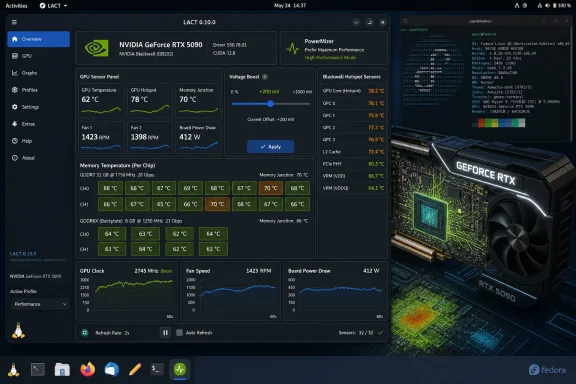 PowerMizer makes a high-performance state selectable
The new PowerMizer setting lets LACT force an NVIDIA GPU into its highest P-state, the performance and power-management state that governs how aggressively the card clocks and consumes power. LACT compares it with AMD’s performance-level control; in everyday use, it is the setting most likely to prevent a GPU from dropping clocks when a workload is intermittent, poorly detected, or sensitive to latency.
That can help in narrow circumstances: GPU compute tasks that arrive in bursts, games whose workload causes aggressive downclocking, and testing where consistent clocks matter more than idle efficiency. It is not a free performance preset. Holding the GPU in its highest state can increase idle or light-load power consumption, temperatures, fan activity, and laptop battery drain even when an application is not materially benefiting.
The release does not say whether LACT restores the prior PowerMizer behavior automatically when a profile is disabled, when the system sleeps, or after an NVIDIA driver update. Users should therefore treat the setting as an explicit tuning change, verify clocks and power draw after applying it, and avoid making it their default answer to every performance problem.
LACT’s existing profiles can make this more manageable, particularly for users who want performance behavior only while selected games or compute applications run. Still, a forced high P-state should be paired with measured evidence—frame-time consistency, sustained clocks, or task completion time—not just a higher number in a monitoring panel.
“Voltage boost” is extra headroom, not full voltage control
LACT 0.10.0 also exposes NVIDIA voltage boost, presented as a slider. The project is unusually clear about what it is not: this does not provide a conventional global voltage offset. Instead, it allows the GPU to boost to slightly higher voltages, providing additional headroom for certain overclocking configurations.
That distinction matters for people arriving from MSI Afterburner on Windows. LACT says the control corresponds to Afterburner’s main-window voltage slider, but it should not be mistaken for direct, unrestricted voltage programming. NVIDIA’s boost logic, firmware limits, board power limits, thermal limits, and the driver’s voltage/frequency behavior still determine whether a card actually draws more voltage or clocks higher under load.
In other words, a higher voltage-boost value alone does not constitute an overclock, and it does not guarantee stability. It may simply allow a previously selected frequency curve or clock target to remain viable under a workload that would otherwise become unstable. The release notes do not quantify the allowable voltage range, list supported GPU generations for the feature, or identify NVIDIA driver versions required for it.
That omission is important for troubleshooting. If the control is unavailable or has no observable effect, the likely explanation may be a driver, VBIOS, mobile-GPU, or board-level limitation rather than an LACT defect. LACT’s hardware-support documentation says NVIDIA support requires the proprietary NVIDIA driver and CUDA libraries; the project is exposing driver-accessible functionality, not replacing the restrictions imposed by NVIDIA’s stack.
For anyone tuning a desktop GPU, the safe sequence remains familiar: establish a baseline, change one control at a time, test a sustained workload, watch power and thermals, and retain a known-good profile. The new telemetry in 0.10.0 makes the monitoring part considerably more useful—provided users do not overinterpret a single sensor number.
Blackwell monitoring becomes more granular, but hotspot values need context
The most consequential monitoring change is the Blackwell-specific hotspot path. LACT’s release notes state that the earlier path could report bogus readings on Blackwell, whereas version 0.10.0 uses a path tailored to the architecture. That is a meaningful correction: a plausible but wrong hotspot temperature is worse than a missing sensor because it can lead users to chase cooling failures that do not exist—or miss ones that do.
LACT now also reports temperatures for individual GDDR6X and GDDR7 memory chips. On clamshell designs, where memory packages can sit on both sides of the PCB, it can display readings for the front and back sides. That detail is particularly useful for diagnosing a cooler, pad, mounting-pressure, or airflow problem that an aggregate “VRAM temperature” can conceal.
The wider Blackwell telemetry story argues for some restraint. In July, ComputerBase compared Blackwell hotspot readings from multiple Windows utilities on an RTX 5080 Founders Edition and found meaningful differences between tools. Igor’sLAB also documented that direct Blackwell telemetry access can require elevated rights in its own utility. Tom’s Hardware reported that community work had enabled per-module Blackwell memory-temperature readings, but those readings stem from previously inaccessible or undocumented sensor paths rather than a newly published NVIDIA consumer-monitoring interface.
LACT’s correction may be accurate and valuable, but its release announcement does not establish that its hotspot number is identical to NVIDIA’s internal definition of GPU hotspot across every Blackwell card. Users should use the reading as a trend indicator first: compare idle with load, watch for sudden changes after repasting or changing fan curves, and compare repeated runs under the same workload. Avoid treating it as a solitary RMA threshold until the value is corroborated by another tool or by a clearly documented vendor specification.
The per-chip memory temperatures have a more immediate diagnostic benefit. A single memory module running materially hotter than its neighbors can reveal uneven cooling or localized airflow trouble that a package-average figure masks. For overclockers pushing GDDR7, that turns a previously broad question—“is VRAM too hot?”—into a much more actionable one.
AMD users gain visibility into system-memory spillover
LACT 0.10.0 is not exclusively an NVIDIA release. AMD systems now get a GTT usage bar, showing graphics translation table memory: system RAM that the GPU can access. The project positions this as especially useful for integrated GPUs running VRAM-heavy applications, where the usable graphics-memory budget and system-memory pressure are tightly linked.
This will also matter to owners of older discrete AMD cards with limited VRAM. When a workload exceeds local video memory, performance can collapse as data movement crosses the PCIe bus and leans on system memory. GTT usage does not by itself prove that a game or application is suffering from VRAM oversubscription, but it gives users a visible clue to investigate alongside VRAM use, RAM pressure, stutter, and frame times.
It is a diagnostic metric, not a performance target. High GTT use may be normal for an iGPU, and low GTT use does not guarantee a workload is free of memory-management problems. LACT’s value here is that it puts the number next to the GPU data users already inspect instead of forcing them to correlate several command-line tools and desktop monitors.
Setup and virtualization changes may matter more than the sliders
The release also changes how LACT gets its privileged service running. Until now, the project says new users were told to copy and run a command to enable the daemon; version 0.10.0 replaces that with an interactive setup wizard. LACT still needs its system service enabled for much of its control functionality, so this is a genuine reduction in installation friction rather than a feature limited to screenshots.
The security model is also becoming more explicit. Profile-hook commands now require administrator authentication through Polkit, and LACT ships a Polkit policy file for standard installations. That is a sensible tightening: profile hooks can run commands when profiles activate or deactivate, which makes them powerful but unsuitable for silent authorization.
Finally, lact cli detach and reattach allow a GPU to be temporarily ignored by LACT so it can be attached to a virtual machine. This does not replace GPU passthrough configuration, IOMMU setup, or driver unbinding, but it removes LACT itself as a competing management layer during a passthrough workflow. For Linux hosts that alternate a GPU between desktop tuning and a VM, that is a more operationally useful addition than another theme preference.
LACT 0.10.0 brings Linux closer to the hands-on GPU monitoring experience enthusiasts expect, but the release’s strongest feature is not the voltage slider. It is the move from generic NVIDIA telemetry toward Blackwell-specific readings, where the difference between a reported number and a trustworthy number can decide whether a user tunes a card confidently or diagnoses the wrong problem.