
Lekuo’s SouthBridge Max PB65MX3 is an unusual PCIe add-in card that uses AMD’s B650-class Promontory 21 I/O controller to turn one PCIe 4.0 x4 slot into four M.2 NVMe positions, four SATA ports, two 10Gbps USB-A ports, 10Gbps USB-C, and 20Gbps USB-C. The practical catch is simple: all of that traffic reaches the host through one four-lane PCIe 4.0 link, so this is a port-density product rather than a way to create more high-speed bandwidth.
TechPowerUp’s report correctly identifies why the card has drawn attention among homelab and storage enthusiasts. Unlike passive four-M.2 carrier cards, the PB65MX3 does not require a motherboard BIOS to split an x16 slot into four separate x4 links. That means it can, in principle, work in AMD AM4 systems, Intel desktops, and other machines with an electrically connected PCIe slot — the host does not need to be an AM5 motherboard merely because the card contains an AMD chipset.
Lekuo is now selling the card through its own storefront as the SouthBridge Max, although the page showed it sold out when checked. Its listed sale price is $129, marked down from a $269 regular price; an Alibaba listing from the same seller lists $119 for one unit before shipping. That undercuts the $269 figure circulating in the earliest coverage, but it does not erase the central engineering limit: one PCIe 4.0 x4 uplink is still one PCIe 4.0 x4 uplink.
The “B650” name needs a little unpacking. On an AM5 motherboard, B650 is not a CPU socket feature; the chipset is an I/O hub connected back to the Ryzen processor by PCIe. It provides extra PCIe lanes, USB controllers, SATA connectivity, and assorted platform functions after the CPU’s directly attached lanes have already been allocated to graphics, primary NVMe storage, and other devices.
Lekuo has placed that same kind of I/O component on a PCIe card. The approach is technically legitimate and has precedent. AMD’s X670 platform used two Promontory 21 chips chained together, while ASRock previously shipped its X670 Xpansion Kit to add a second chipset to a specific B650 LiveMixer board. WisdPi also began selling a similarly conceived Promontory 21 expansion card in 2026, and Minisforum demonstrated another B650-based M.2 and OCuLink card at Computex.
The key benefit is enumeration, not magic. A passive M.2 adapter exposes the PCIe lanes the motherboard has already assigned to the slot. If the motherboard does not support bifurcation — splitting a wider slot into independently visible links — a four-drive passive carrier often detects only one SSD. Lekuo’s onboard chipset presents multiple downstream devices behind its own PCIe connection, so a conventional x4 slot can expose the individual drives, SATA controller, and USB controllers to the operating system without motherboard lane-splitting support.
That makes the PB65MX3 potentially useful in a desktop that has a spare physical x4, x8, or x16 slot but lacks enough onboard M.2 connectors and USB headers. It is particularly relevant to older Intel and AM4 boards, OEM workstations with locked-down firmware, and compact servers where adding several types of I/O matters more than maximum benchmark throughput.
Lekuo’s claim that the card is broadly usable without bifurcation is therefore plausible. Its broader “plug-and-play” language deserves more caution. The company says the card supports Windows, Linux, and macOS on its product page, while its retail listing limits the operating-system claim to Windows 10/11 and Linux. It also does not publish a motherboard compatibility list, boot-from-NVMe guidance, tested BIOS versions, or independent validation of its macOS claim. For Windows users, expect the storage, USB, and SATA components to be detected as standard PCIe-attached hardware — but do not assume every board will boot reliably from an SSD installed on the card until that exact board has been tested.
That is a reasonable compromise for capacity expansion. A PCIe 4.0 x2 NVMe SSD can still deliver roughly the performance needed for many VM stores, game libraries, media archives, cache devices, and ordinary NAS workloads. Four independently visible SSDs can also be more useful than a single faster drive when the goal is software RAID, ZFS pools, separate virtual-machine datastores, or tiered storage.
It is not equivalent to connecting four full-speed Gen4 x4 drives. A PCIe 4.0 x4 host link supplies roughly 7.9 GB/s of usable bandwidth per direction before overhead. Two modern Gen4 x4 SSDs can each approach that figure on sequential reads, and four drives plus USB traffic can easily demand far more than that in aggregate. No routing inside the card changes the bandwidth of the single link back to the PC.
Lekuo’s product page says the card offers “intelligent bandwidth allocation” and explicitly notes that its M.2 interfaces share the upstream PCIe 4.0 x4 speed. That admission is important, because the storefront’s marketing copy separately says the card’s Gen4 x4 connection ensures NVMe drives operate “without bottlenecks.” Those two statements cannot both describe simultaneous peak-throughput workloads. Under a single-drive benchmark, or several lightly loaded devices, the card may look fast. Under sustained parallel reads, backups, rebuilds, cloning, or VM activity, the upstream x4 link becomes the limiting resource.
The same applies to the USB ports. A 20Gbps USB-C device, three additional 10Gbps USB ports, SATA drives, and NVMe SSDs can coexist on the card. They cannot all receive their headline bandwidth concurrently through an approximately 64Gbps-class PCIe 4.0 x4 connection. The card provides connectivity, and the controller arbitrates demand; it does not provide the sum of every port’s advertised maximum speed to the host.
Lekuo includes screws, standoffs, and a short bracket, but its public product page does not clearly specify an auxiliary power connector or a formal power budget. That omission is material. Four M.2 drives, several SATA devices, and bus-powered USB peripherals can draw far more power than an expansion card should casually expect from a slot alone. SATA data connectors do not provide SATA power, and the card does not turn its four SATA ports into a complete four-drive cabling solution.
Potential buyers should inspect the card photos and documentation closely, then plan the build around the actual connector layout and power requirements rather than the port count. A SATA power harness, external enclosure power, or supplemental card power may be required depending on the attached hardware. Lekuo’s consumer-facing documentation does not set out a supported total load, identify USB Power Delivery behavior for its USB-C ports, or explain how much bus power each port can supply.
The company also uses two different descriptions of the underlying logic. Its formal product page says the PB65MX3 is based on the B650 southbridge chip; its retail FAQ calls it an “onboard PCIe switch chip.” Both descriptions gesture toward the same user-facing result — multiple devices behind one host connection — but they are not interchangeable technical terms. A PCIe switch, a chipset I/O hub, and a PCIe signal redriver have different functions. The hardware appears to use the B650/Promontory controller, but Lekuo’s simplified retail language muddies a distinction that matters to buyers trying to understand latency, lane allocation, and compatibility.
It is a poorer fit for someone who already lacks expansion lanes. Consumer platforms frequently route secondary slots through their existing chipset rather than directly to the CPU. Installing this card there can create a topology in which its SSDs and USB devices share a PCIe path with other onboard controllers before they ever reach the processor. On PCIe 3.0, the host-side ceiling falls to roughly 3.9 GB/s per direction; on PCIe 2.0, it is roughly 2 GB/s. The card remains usable, but its multi-drive performance proposition changes dramatically.
Users also should not expect it to solve GPU lane constraints. A primary graphics card may retain its x16 allocation on many boards, but slot wiring varies by model. On others, using a secondary slot disables onboard SATA ports, shares lanes with an M.2 socket, or changes the graphics slot to x8. The motherboard manual, not the card’s compatibility claim, is the document that decides that outcome.
At its current $129 storefront price, the PB65MX3 is far more defensible than at $269. But buyers should treat it as an I/O concentrator with a fixed 7.9 GB/s-class Gen4 ceiling, not as four unconstrained Gen4 NVMe links plus 50Gbps of USB plus SATA. If that shared-bandwidth model matches the workload, Lekuo has made a genuinely flexible card for systems that firmware bifurcation leaves behind. If the job is a high-throughput all-NVMe array, the correct upgrade remains a platform with more directly attached PCIe lanes or a purpose-built PCIe switch and storage controller.
Lekuo is now selling the card through its own storefront as the SouthBridge Max, although the page showed it sold out when checked. Its listed sale price is $129, marked down from a $269 regular price; an Alibaba listing from the same seller lists $119 for one unit before shipping. That undercuts the $269 figure circulating in the earliest coverage, but it does not erase the central engineering limit: one PCIe 4.0 x4 uplink is still one PCIe 4.0 x4 uplink.
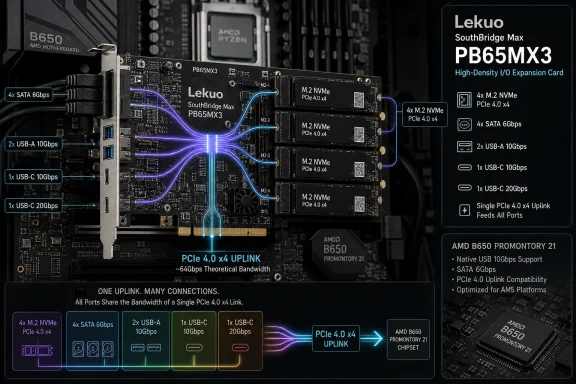 The B650 chip is functioning as a downstream I/O hub
The “B650” name needs a little unpacking. On an AM5 motherboard, B650 is not a CPU socket feature; the chipset is an I/O hub connected back to the Ryzen processor by PCIe. It provides extra PCIe lanes, USB controllers, SATA connectivity, and assorted platform functions after the CPU’s directly attached lanes have already been allocated to graphics, primary NVMe storage, and other devices.Lekuo has placed that same kind of I/O component on a PCIe card. The approach is technically legitimate and has precedent. AMD’s X670 platform used two Promontory 21 chips chained together, while ASRock previously shipped its X670 Xpansion Kit to add a second chipset to a specific B650 LiveMixer board. WisdPi also began selling a similarly conceived Promontory 21 expansion card in 2026, and Minisforum demonstrated another B650-based M.2 and OCuLink card at Computex.
The key benefit is enumeration, not magic. A passive M.2 adapter exposes the PCIe lanes the motherboard has already assigned to the slot. If the motherboard does not support bifurcation — splitting a wider slot into independently visible links — a four-drive passive carrier often detects only one SSD. Lekuo’s onboard chipset presents multiple downstream devices behind its own PCIe connection, so a conventional x4 slot can expose the individual drives, SATA controller, and USB controllers to the operating system without motherboard lane-splitting support.
That makes the PB65MX3 potentially useful in a desktop that has a spare physical x4, x8, or x16 slot but lacks enough onboard M.2 connectors and USB headers. It is particularly relevant to older Intel and AM4 boards, OEM workstations with locked-down firmware, and compact servers where adding several types of I/O matters more than maximum benchmark throughput.
Lekuo’s claim that the card is broadly usable without bifurcation is therefore plausible. Its broader “plug-and-play” language deserves more caution. The company says the card supports Windows, Linux, and macOS on its product page, while its retail listing limits the operating-system claim to Windows 10/11 and Linux. It also does not publish a motherboard compatibility list, boot-from-NVMe guidance, tested BIOS versions, or independent validation of its macOS claim. For Windows users, expect the storage, USB, and SATA components to be detected as standard PCIe-attached hardware — but do not assume every board will boot reliably from an SSD installed on the card until that exact board has been tested.
Four M.2 slots do not mean four x4 SSDs at full speed
Lekuo’s own specification page gives away the real lane allocation. The two front M.2 sockets can operate at PCIe 4.0 x4 when they are the only NVMe drives installed. The two rear sockets are limited to x2. Once all four sockets are occupied, every M.2 slot is reduced to PCIe 4.0 x2, with all of them sharing the PCIe 4.0 x4 upstream connection.That is a reasonable compromise for capacity expansion. A PCIe 4.0 x2 NVMe SSD can still deliver roughly the performance needed for many VM stores, game libraries, media archives, cache devices, and ordinary NAS workloads. Four independently visible SSDs can also be more useful than a single faster drive when the goal is software RAID, ZFS pools, separate virtual-machine datastores, or tiered storage.
It is not equivalent to connecting four full-speed Gen4 x4 drives. A PCIe 4.0 x4 host link supplies roughly 7.9 GB/s of usable bandwidth per direction before overhead. Two modern Gen4 x4 SSDs can each approach that figure on sequential reads, and four drives plus USB traffic can easily demand far more than that in aggregate. No routing inside the card changes the bandwidth of the single link back to the PC.
Lekuo’s product page says the card offers “intelligent bandwidth allocation” and explicitly notes that its M.2 interfaces share the upstream PCIe 4.0 x4 speed. That admission is important, because the storefront’s marketing copy separately says the card’s Gen4 x4 connection ensures NVMe drives operate “without bottlenecks.” Those two statements cannot both describe simultaneous peak-throughput workloads. Under a single-drive benchmark, or several lightly loaded devices, the card may look fast. Under sustained parallel reads, backups, rebuilds, cloning, or VM activity, the upstream x4 link becomes the limiting resource.
The same applies to the USB ports. A 20Gbps USB-C device, three additional 10Gbps USB ports, SATA drives, and NVMe SSDs can coexist on the card. They cannot all receive their headline bandwidth concurrently through an approximately 64Gbps-class PCIe 4.0 x4 connection. The card provides connectivity, and the controller arbitrates demand; it does not provide the sum of every port’s advertised maximum speed to the host.
The power and physical-installation details need checking first
The PB65MX3 is a 174 mm by 69 mm card with two M.2 sockets on the front and two on the rear. That rear-mounted arrangement matters in real cases. A motherboard may have enough nominal slot spacing for the card but leave too little clearance behind it for an M.2 drive, heatsink, standoff, or airflow path. The back-side SSDs also sit where case ventilation is commonly weakest.Lekuo includes screws, standoffs, and a short bracket, but its public product page does not clearly specify an auxiliary power connector or a formal power budget. That omission is material. Four M.2 drives, several SATA devices, and bus-powered USB peripherals can draw far more power than an expansion card should casually expect from a slot alone. SATA data connectors do not provide SATA power, and the card does not turn its four SATA ports into a complete four-drive cabling solution.
Potential buyers should inspect the card photos and documentation closely, then plan the build around the actual connector layout and power requirements rather than the port count. A SATA power harness, external enclosure power, or supplemental card power may be required depending on the attached hardware. Lekuo’s consumer-facing documentation does not set out a supported total load, identify USB Power Delivery behavior for its USB-C ports, or explain how much bus power each port can supply.
The company also uses two different descriptions of the underlying logic. Its formal product page says the PB65MX3 is based on the B650 southbridge chip; its retail FAQ calls it an “onboard PCIe switch chip.” Both descriptions gesture toward the same user-facing result — multiple devices behind one host connection — but they are not interchangeable technical terms. A PCIe switch, a chipset I/O hub, and a PCIe signal redriver have different functions. The hardware appears to use the B650/Promontory controller, but Lekuo’s simplified retail language muddies a distinction that matters to buyers trying to understand latency, lane allocation, and compatibility.
It is a targeted upgrade, not a substitute for more CPU lanes
The strongest case for the SouthBridge Max is a system with a genuinely idle PCIe 4.0 x4-or-wider slot and a need to attach varied devices that will not all run flat out at once. Think of a Windows workstation needing several NVMe scratch volumes, more USB, and a few SATA archive disks; a compact Plex or backup server; or an AM4 Intel-era desktop that needs a storage refresh without replacing the motherboard, CPU, and memory.It is a poorer fit for someone who already lacks expansion lanes. Consumer platforms frequently route secondary slots through their existing chipset rather than directly to the CPU. Installing this card there can create a topology in which its SSDs and USB devices share a PCIe path with other onboard controllers before they ever reach the processor. On PCIe 3.0, the host-side ceiling falls to roughly 3.9 GB/s per direction; on PCIe 2.0, it is roughly 2 GB/s. The card remains usable, but its multi-drive performance proposition changes dramatically.
Users also should not expect it to solve GPU lane constraints. A primary graphics card may retain its x16 allocation on many boards, but slot wiring varies by model. On others, using a secondary slot disables onboard SATA ports, shares lanes with an M.2 socket, or changes the graphics slot to x8. The motherboard manual, not the card’s compatibility claim, is the document that decides that outcome.
At its current $129 storefront price, the PB65MX3 is far more defensible than at $269. But buyers should treat it as an I/O concentrator with a fixed 7.9 GB/s-class Gen4 ceiling, not as four unconstrained Gen4 NVMe links plus 50Gbps of USB plus SATA. If that shared-bandwidth model matches the workload, Lekuo has made a genuinely flexible card for systems that firmware bifurcation leaves behind. If the job is a high-throughput all-NVMe array, the correct upgrade remains a platform with more directly attached PCIe lanes or a purpose-built PCIe switch and storage controller.
References
- Primary source: TechPowerUp
Published: 2026-08-04T10:52:55+00:00
Loading…
www.techpowerup.com - Related coverage: lekuo.com
Loading…
lekuo.com - Related coverage: lekuo.com
Loading…
www.lekuo.com - Related coverage: igorslab.de
Loading…
www.igorslab.de - Related coverage: videocardz.com
Loading…
videocardz.com - Related coverage: techspot.com
Loading…
www.techspot.com - Related coverage: lekuo.shop
Loading…
lekuo.shop - Related coverage: lekuo.shop
Loading…
lekuo.shop - Related coverage: dls.ieiworld.com
Loading…
dls.ieiworld.com - Related coverage: tomshardware.com
Loading…
www.tomshardware.com - Related coverage: tomshardware.com
Loading…
www.tomshardware.com