
The incident centered on Windows companion-app installation, not an LG webOS feature built into a display. Gamers Nexus reproduced the behavior on an LG UltraGear 34GX900A-B connected to multiple Windows 11 test systems, finding that Windows Update installed an LG extension and then the LG Monitor App Installer without a conventional installer prompt. Ars Technica, PCWorld, Tom’s Hardware, and Android Authority independently documented the resulting McAfee promotion and reports from affected owners.
That is a real consent problem for Windows users. It is also a narrower and more fixable problem than the “your monitor is now a smart TV” framing published by Gadget Review on August 25.
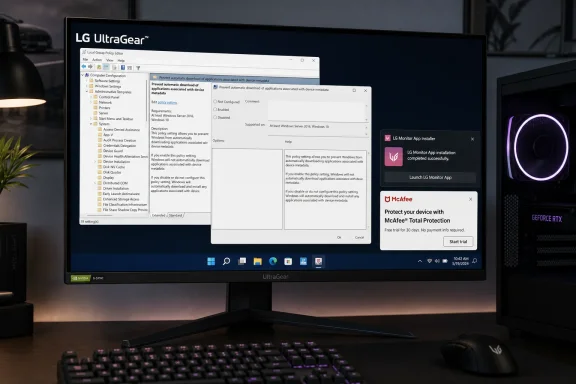 The ad was delivered by a Windows companion app
The critical sequence was not a monitor detecting what someone watched, nor a webOS dashboard injecting advertising into the picture. Windows recognized a connected LG display and retrieved a device-associated application through Microsoft’s established hardware-support-app system.
Microsoft documents that system as a way for hardware makers to pair device-specific apps with drivers and distribute or update them through the Microsoft Store. There are legitimate uses: monitor calibration, split-screen controls, USB features, firmware utilities, color-profile management, and software KVM functions. The problem is that the same trusted delivery channel can install a vendor portal before the owner has decided whether they want any of those functions.
PCWorld’s reporting describes the LG sequence as an extension-driver update followed by a software component that installed LG Monitor App Installer. Users did not need to connect a USB cable to make it happen; DisplayPort or HDMI was enough for Windows to identify the monitor model. That detail matters: a user reasonably expects a video cable to transmit a display signal, not to authorize the installation of a startup application.
Gamers Nexus reported that, in its reboot testing, a McAfee offer appeared on 31 of 32 starts, while the other boot showed a promotion for an LG application. The reporting supports calling the pop-up intrusive advertising. It does not support saying McAfee itself was silently installed. LG has consistently said the McAfee offer was optional and required a separate approval before the security product would be installed.
The distinction does not excuse the original behavior. A vendor-installed application pushing an unrelated paid trial at login is poor practice, especially when it arrives through the same Windows machinery users trust for drivers. But precision is important: this was an automatically installed LG app advertising McAfee, rather than a covert antivirus installation.
LG’s affected-display list remains unclear
The UltraGear 34GX900A-B was at the center of the test by Gamers Nexus, but complaints and follow-up reporting identified several additional LG models, including the 45GX950-B.AEU, 32GS95UE-B, 39GX950B, 27GP83B-B, 27GN800, and 27GN850-B. Ars Technica reported that LG did not provide it with a definitive affected-model list when asked.
That omission is meaningful for IT administrators. A problem that can be triggered by device metadata should be assessed by hardware identifier and application package, not by vague product categories such as “smart monitor” or “gaming monitor.” The reports demonstrate behavior on certain LG displays; they do not establish that all LG monitors, all webOS displays, Samsung Tizen monitors, or ordinary PC monitors generally follow the same advertising model.
Nor does the central model support the operating-system claim in the submitted report. LG’s own U.S. product page for the 34GX900A-B describes it as an UltraGear OLED gaming monitor with HDMI 2.1, DisplayPort 1.4, and USB-C connectivity. Its advertised feature list does not identify webOS. The installation route investigated by Gamers Nexus was Windows Update and the Microsoft Store, which means the objection exists even for a display that is functioning as a conventional PC monitor.
That is the uncomfortable part for Windows users: this incident did not require a TV-style interface, a streaming platform, automatic content recognition, or advertising embedded in the monitor firmware. It took advantage of a PC feature meant to make peripherals easier to use.
Microsoft stopped the McAfee campaign, not the platform
Microsoft Executive Vice President of Windows Pavan Davuluri said in July that Microsoft had contacted LG and that LG agreed to disable the McAfee pop-up as an immediate step. Ars Technica and PCWorld both reported that outcome. The LG Monitor App Installer itself was not removed from the Windows device-app mechanism at that point.
Then, on August 7, LG gave a more consequential response than the initial reports reflected. According to PCGamesN, LG said it had stopped recommending McAfee and other third-party applications through the installer, said the McAfee prompt had been limited to a period in the United States, and said customers would be given a choice over whether to install the companion app.
If implemented consistently, that last point addresses the core user-control failure. An optional monitor utility offered after a clear choice is normal. A device-linked application installed in the background, then configured to launch at boot and pitch a third-party product, is where the relationship breaks down.
LG also said the installer does not collect or transmit customers’ personal information or user data. That assurance answers a data-transfer allegation only to the extent that LG’s statement can be verified; it does not alter the consent issue around automatic installation. Reports highlighting the application’s broad permissions correctly raised questions, but permissions alone do not prove that particular data was collected or exfiltrated.
The record also leaves an important operational gap: neither LG nor Microsoft has publicly detailed which already-installed copies were changed, whether the installer will be removed automatically, or when the new opt-in behavior reached every affected model and Windows configuration. Owners who already have the app should not assume a removed McAfee prompt means the application itself has disappeared.
The Windows control administrators can use now
Windows has a built-in policy designed to stop this class of automatic companion-app download. Microsoft’s DeviceInstallation policy documentation calls it “Prevent automatic download of applications associated with device metadata.” When enabled, Windows does not download apps associated with installed-device metadata.
On Windows Pro, Enterprise, Education, and supported IoT editions, administrators can set it in Local Group Policy Editor:
Computer Configuration > Administrative Templates > System > Device Installation > Prevent automatic download of applications associated with device metadata
Set the policy to Enabled. Microsoft says the control applies to Windows 10 version 1809 and later, including Windows 11, and notes that it overrides the older Device Installation Settings dialog. For managed fleets, the corresponding MDM policy is PreventDeviceMetadataFromNetwork, making it suitable for deployment through an endpoint-management platform rather than manual changes on each machine.
This setting is a trade-off. It does not block ordinary display output or basic drivers, but it can prevent useful vendor utilities from arriving automatically for many device categories. Enterprises that depend on approved docking, audio, printer, display, or peripheral-management tools should deploy those utilities deliberately through Intune, Configuration Manager, or another managed software channel instead of relying on metadata-triggered installation.
For individual LG owners, check Settings > Apps > Installed apps for LG Monitor App Installer and uninstall it if its features are not wanted. Then review Startup apps in Task Manager in case an existing installation configured itself to launch at sign-in. Removing the LG app is separate from removing McAfee; the reports indicate that the pop-up advertised a trial rather than silently installing the antivirus product.
This is a Windows trust-boundary issue
The strongest conclusion from the LG episode is not that monitors have inevitably become smart TVs. It is that Windows’ frictionless peripheral setup created a trust boundary that vendors can misuse. A monitor-management utility is a defensible companion application; a third-party trial offer delivered through the same path is not.
LG says it has removed third-party recommendations and is changing the installation flow to give customers a choice. Microsoft intervened on the McAfee pop-up but has not announced a broader rule that prevents hardware partners from using device-associated apps for promotions. Until that changes, system administrators should treat automatic device-app installation as a managed policy decision rather than a harmless Windows convenience.