
LG announced U.S. availability on August 24, while PC Guide highlighted the preorder opening this week. Tom’s Hardware and HotHardware independently confirmed the $999.99 price and the direct-from-LG preorder listing. LG’s promotion, which ends August 31, offers two years of Premium Care for $1 and 5% in MyLG Rewards, but the company has not published a firm U.S. delivery date in its announcement. HotHardware reports that shipments are expected in early September.
This is a genuine display milestone rather than a routine overclocking trick. LG’s claim is carefully limited to the first consumer-brand gaming monitor with native 1,000Hz at Full HD resolution. Other monitors have reached 1,000Hz by switching to 720p or smaller active display areas. Here, the 1,920 × 1,080 mode is the monitor’s standard maximum refresh rate, with 1,100Hz available as an overclock.
The preorder is also a reminder that a refresh-rate number describes what the panel can accept and display; it does not create frames that a PC or game engine cannot produce.
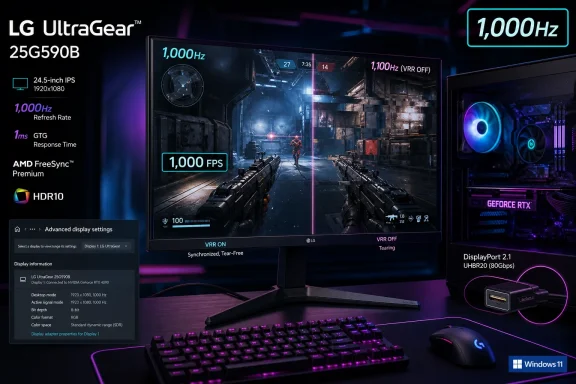 Windows 11 and DisplayPort are part of the specification
LG explicitly lists the latest version of Windows 11 as a requirement for its 1,000Hz feature, along with DisplayPort 2.1 and either an Nvidia GeForce RTX 50-series card or AMD Radeon RX 7900, RX 9060, or RX 9070-series hardware and newer. The company says CPU, memory, game limits, Windows version, driver version, and the specific game can all affect the result.
That means this is not a monitor where a buyer with a powerful older GPU can reasonably assume that an HDMI cable and a high-end CPU will unlock the signature mode. The product has two HDMI 2.1 ports, but LG’s stated requirement for its maximum refresh rate is a DisplayPort 2.1 connection. A Windows PC should therefore be treated as a complete signal chain: compatible GPU output, appropriate cable, current driver, and the DisplayPort input selected at the monitor.
There is a useful distinction within LG’s hardware list. Nvidia’s RTX 50-series desktop cards advertise DisplayPort 2.1b with UHBR20 support, the top DisplayPort link rate. VESA defines UHBR20 as an 80Gbps four-lane link. AMD’s RX 9070 family lists DisplayPort 2.1a support, while AMD’s earlier RX 7900 family supports DisplayPort 2.1 at the lower UHBR13.5 tier. LG nevertheless includes RX 7900-series cards in its validated hardware list.
LG has not said publicly which color depth, compression behavior, cable certification, or timing settings it uses for every supported 1,000Hz configuration. That omission matters more at 1,000Hz than it does for an ordinary 144Hz or 240Hz monitor. Buyers should not substitute a generic “DisplayPort 2.1” label for a confirmed end-to-end configuration, particularly if they are using an older Radeon card, an add-in-board model with altered ports, a dock, an adapter, or a long cable.
The included DisplayPort 2.1 cable is therefore more than a box accessory. It is the sensible baseline for initial setup. After Windows detects the display, users should install the newest Nvidia or AMD driver, select 1,920 × 1,080 at 1,000Hz in Windows’ Advanced display settings, and then verify the refresh rate in the monitor’s on-screen display and in the game itself.
1,000Hz does not mean 1,000 FPS
At 1,000Hz, the display updates once every millisecond. That reduces the time between possible new images compared with 500Hz, which updates every two milliseconds, or 240Hz, which updates roughly every 4.17 milliseconds. The gain is real in principle, especially in games where visual tracking and cursor placement matter at very high speed.
But the monitor can only show genuinely new game states as quickly as the PC delivers them. LG itself says support for a 1,000Hz signal does not guarantee 1,000 frames per second in any game. Its own product documentation warns that game-level frame-rate and refresh-rate limits can prevent the maximum mode from being used.
For current Windows gaming, that makes the 25G590B a narrowly targeted product. Low-overhead esports titles and older competitive shooters may be able to approach or exceed several hundred frames per second with deliberately tuned settings, powerful CPUs, and reduced image quality. Recent single-player releases, ray-traced games, and visually intensive multiplayer titles will generally not turn a 1,000Hz panel into a 1,000-FPS experience simply because the monitor is capable of receiving that signal.
Frame generation deserves particular caution in this use case. It can raise the number of frames presented to the display, but generated frames do not reduce the input latency of the underlying rendered frames in the same way as a game natively running at an equivalent rate. For competitive players seeking the clearest and most immediate response, the relevant starting point remains native render performance, stable frame pacing, low latency settings, and a game engine without a restrictive frame cap.
LG includes an FPS counter, which may help expose the gap between the selected panel refresh rate and actual game performance. It should be treated as a troubleshooting tool, not evidence that a system is benefiting equally from every one of the monitor’s 1,000 refresh cycles.
The 1,100Hz mode gives up two important safeguards
The 1,100Hz figure is an overclock, not the panel’s certified native maximum. LG says it evaluated that mode through internal testing, but it does not promise the same performance guarantees as the 1,000Hz setting.
More importantly, the feature trade-off is explicit. At 1,100Hz, AMD FreeSync Premium is unavailable, and Nvidia G-Sync Compatible certification applies only at 1,000Hz. Variable refresh rate is meant to match monitor updates to the game’s fluctuating frame output, reducing tearing and stutter. At the extreme setting, the user is giving up AMD VRR entirely and moving beyond Nvidia’s certified operating point.
The same conflict exists for LG’s Motion Blur Reduction Pro, or MBR Pro. The feature briefly controls the backlight between frames to reduce the sample-and-hold blur inherent to LCDs, but LG says enabling it disables both FreeSync Premium and G-Sync Compatible. In other words, a buyer cannot combine every motion-oriented feature at once.
This is the practical setup decision LG’s headline does not convey: users must pick the behavior that matches the game. A player with a reliably enormous, stable frame rate may prefer 1,000Hz with blur reduction. A player whose frame rate swings below the selected refresh rate will generally get a more consistent experience from the native 1,000Hz mode with variable refresh rate enabled. The 1,100Hz option is a specialist experiment, with fewer protections against visible tearing or uneven frame delivery.
A $1,000 1080p monitor is buying speed, not image density
At 24.5 inches and 1,920 × 1,080, the 25G590B uses a familiar competitive-gaming format. LG calls it a 25-inch screen in its marketing, though the detailed specifications identify the viewable panel as 24.5 inches. That size and resolution keep the pixel load low enough to chase exceptionally high frame rates and allow a player to see the whole image without the head movement common with larger displays.
The trade-off is plain: this is not a premium general-purpose display in the way a $1,000 OLED or high-resolution Mini LED monitor might be. LG lists an 8-bit IPS panel, sRGB coverage rated at 99%, VESA DisplayHDR 400, and a typical 1,000:1 contrast ratio. Those are competent specifications for a fast IPS display, but the price is overwhelmingly tied to refresh-rate engineering rather than resolution, HDR performance, or deep black levels.
LG does include practical competitive-use details: a height-, tilt-, and swivel-adjustable stand, a base it says is 49% smaller than that of the 25G550B, an anti-glare surface, an ATW polarizer, an on-screen crosshair, black stabilization, and the FPS counter. There is also a four-pole headset jack that carries microphone support, but LG says a USB Type-C upstream connection to the PC is required for that microphone function and for monitor firmware updates. The USB-C connection is not a display input or a laptop power-delivery feature.
The UltraGear 25G590B is a credible technological first, but it is also a specialized Windows peripheral with unusually strict conditions. At $999.99, the sensible buyer is the competitive player who can document sustained, very high native frame rates in one or two favored games, owns the necessary DisplayPort 2.1-capable hardware, and accepts that 1,100Hz removes VRR support that may be more valuable than the final 100Hz.