
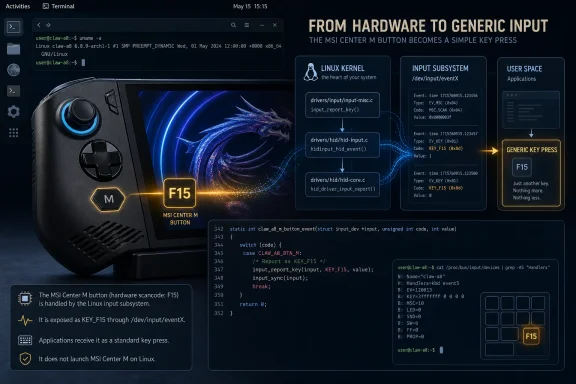
Linux 7.3 is poised to make the left-side MSI Center M button on the Ryzen Z2 Extreme-powered MSI Claw A8 usable under Linux, but the kernel change is narrower than the headline suggests: it exposes one previously missing hardware event as an F15 keypress. It does not install MSI Center M, recreate MSI’s Windows quick-settings interface, or automatically bind the button to Steam, Gamescope, Handheld Daemon, or another launcher.
Phoronix first reported that the MSI Claw key fixes are headed for Linux 7.3. The upstream patch record confirms the underlying work has been accepted into maintainer Ilpo Järvinen’s
The MSI Claw A8 BZ2EM is MSI’s AMD-based handheld with a Ryzen Z2 Extreme, Radeon 890M graphics, 24GB of LPDDR5X memory, an 8-inch 120Hz VRR display, and dedicated buttons for MSI Center M and Quick Settings. MSI ships the device with Windows 11 Home, where the Center M button is meant to open the company’s handheld control software.
On Linux, the Claw does send a firmware event when that button is pressed. The problem is that the firmware delivers its event through the MSI WMI hotkey interface as an ACPI buffer, while the existing
Derek J. Clark’s patch series changes
This is a firmware-compatibility repair, not a new MSI Linux application. The core defect was that an existing driver knew the relevant WMI GUID but did not understand the way the Claw packages its data.
For Linux users, F15 is useful precisely because it is a generic, available signal. A desktop environment, Steam input layer, launcher, game-mode session, or handheld utility can bind it to a desired action. In practice, a Claw A8 owner could use that signal to open Steam’s overlay, launch a menu program, switch controller profiles, bring up an on-screen keyboard, or invoke a custom script.
What the kernel cannot know is what MSI’s Windows button is supposed to mean outside Windows. MSI Center M combines TDP settings, fan behavior, power profiles, game-library functions, control configuration, and Xbox Game Bar-linked Quick Settings. MSI documents those controls as part of its Windows software stack; Linux has no equivalent vendor service bundled with the machine. The kernel’s job ends at recognizing the press reliably and handing it to userspace.
That distinction changes the practical reading of this fix. It eliminates a missing piece of input support, but a polished handheld experience still depends on the distribution and the software stack above the kernel. A Bazzite, CachyOS, SteamOS-derived, KDE Plasma, or standard desktop installation may all make different choices about what F15 does by default—if anything.
That is not an omission. Clark’s testing found those other controls are already duplicated by the AT keyboard device that Linux exposes through
The A8’s left-side Center M control is different because it lacks that second, conventional keyboard path. The upstream patch closes that one gap.
This also means a user troubleshooting an MSI Claw A8 should not expect Linux 7.3 to suddenly alter the behavior of every special control. If the Quick Settings button, volume controls, rear macros, gyroscope configuration, RGB controls, or TDP management are missing or poorly integrated in a particular handheld distribution, this patch alone will not resolve them. It addresses the M-Center Menu event and the WMI parsing needed to process the Claw family’s event format.
Clark reported that the duplication appeared harmless in his testing. That is a reasonable assessment for ordinary desktop use, where few applications bind F15 by default. But “harmless” is not the same as nonexistent for a handheld environment that assigns F15 to an overlay or launcher action. A user mapping F15 on an older Claw should test whether one button press triggers the action twice after adopting the new kernel.
The trade-off appears intentional. The maintainer accepted the v2 patch set after review by Armin Wolf, and the alternative was to leave the A8’s dedicated button dead under Linux or undertake a much larger modernization of an old WMI driver. Clark noted during review that converting the legacy driver wholesale to newer WMI APIs could increase regression risk across its older supported interfaces. For a patch intended to expose one missing button and silence spurious warnings, the contained fix is proportionate.
Owners who need the M-Center button working before their distribution packages Linux 7.3 have only the usual advanced options: run a kernel that includes the maintainer branch once it is public, use a distribution-provided backport if one appears, or build and test the small upstream patch series themselves. For most users, waiting for their distribution’s Linux 7.3 package is the safer choice.
The important consequence is simple: Linux will soon recognize the Claw A8’s missing button, but the final experience remains a configuration task. Once a Linux 7.3-based kernel reaches the device, the left-side MSI Center M button should generate F15; what opens after that will be determined by the handheld software the owner chooses to run.
review-ilpo-next branch, with the M-Center-key change recorded as commit 0c716d1848ac86cd4aa4ea2a997bf1e835017869. That is a meaningful milestone, but it is not identical to a release-tree merge: Linux distributions and Claw A8 owners should treat this as expected 7.3 support, not a feature already present in stable kernels.
 The actual failure is an unhandled firmware event
The MSI Claw A8 BZ2EM is MSI’s AMD-based handheld with a Ryzen Z2 Extreme, Radeon 890M graphics, 24GB of LPDDR5X memory, an 8-inch 120Hz VRR display, and dedicated buttons for MSI Center M and Quick Settings. MSI ships the device with Windows 11 Home, where the Center M button is meant to open the company’s handheld control software.On Linux, the Claw does send a firmware event when that button is pressed. The problem is that the firmware delivers its event through the MSI WMI hotkey interface as an ACPI buffer, while the existing
msi-wmi driver was built around events supplied as ACPI integers. The result was twofold: the driver emitted “unknown” event messages into the kernel log, and the A8’s M-Center Menu button never appeared as an input a Linux desktop or handheld interface could assign.Derek J. Clark’s patch series changes
drivers/platform/x86/msi-wmi.c so the driver can parse the Claw’s buffer-formatted event. The code checks that the buffer contains at least two bytes, uses the first byte as the key identifier, and treats the action as an auto-releasing press because the firmware does not provide a conventional release event.This is a firmware-compatibility repair, not a new MSI Linux application. The core defect was that an existing driver knew the relevant WMI GUID but did not understand the way the Claw packages its data.
The M-Center button becomes F15, not a Linux control center
The code maps the Claw’s M-Center Menu event, key ID0x29, to KEY_F15. That choice is deliberate: on other Claw models, the equivalent button is already exposed through the AT Translated Set 2 keyboard device as F15. The A8 was the outlier because its physical menu button had no matching standard keyboard event.For Linux users, F15 is useful precisely because it is a generic, available signal. A desktop environment, Steam input layer, launcher, game-mode session, or handheld utility can bind it to a desired action. In practice, a Claw A8 owner could use that signal to open Steam’s overlay, launch a menu program, switch controller profiles, bring up an on-screen keyboard, or invoke a custom script.
What the kernel cannot know is what MSI’s Windows button is supposed to mean outside Windows. MSI Center M combines TDP settings, fan behavior, power profiles, game-library functions, control configuration, and Xbox Game Bar-linked Quick Settings. MSI documents those controls as part of its Windows software stack; Linux has no equivalent vendor service bundled with the machine. The kernel’s job ends at recognizing the press reliably and handing it to userspace.
That distinction changes the practical reading of this fix. It eliminates a missing piece of input support, but a polished handheld experience still depends on the distribution and the software stack above the kernel. A Bazzite, CachyOS, SteamOS-derived, KDE Plasma, or standard desktop installation may all make different choices about what F15 does by default—if anything.
“M-Center keys” overstates the scope of the new mapping
The patch is titled “Add MSI Claw M-Center keys,” plural, but only one Claw control is turned into a new Linux input event: the M-Center Menu button. The Quick Settings button, its long-press action, and both volume controls are explicitly listed in the driver as events to ignore.That is not an omission. Clark’s testing found those other controls are already duplicated by the AT keyboard device that Linux exposes through
evdev, the normal event-device interface used by input software. Processing the WMI versions as well would generate duplicate keycodes. The patch therefore suppresses the redundant WMI notifications, both reducing kernel-log noise and avoiding unnecessary double input.The A8’s left-side Center M control is different because it lacks that second, conventional keyboard path. The upstream patch closes that one gap.
This also means a user troubleshooting an MSI Claw A8 should not expect Linux 7.3 to suddenly alter the behavior of every special control. If the Quick Settings button, volume controls, rear macros, gyroscope configuration, RGB controls, or TDP management are missing or poorly integrated in a particular handheld distribution, this patch alone will not resolve them. It addresses the M-Center Menu event and the WMI parsing needed to process the Claw family’s event format.
Existing Claws may emit F15 twice
The upstream review has a small but important side effect. Because the newmsi-wmi mapping handles the shared Claw WMI event, older MSI models—the original Claw A1M, Claw 7 AI+ A2VM, and Claw 8 AI+ A2VM—can produce two F15 events: one from the existing AT keyboard device and one from the WMI driver.Clark reported that the duplication appeared harmless in his testing. That is a reasonable assessment for ordinary desktop use, where few applications bind F15 by default. But “harmless” is not the same as nonexistent for a handheld environment that assigns F15 to an overlay or launcher action. A user mapping F15 on an older Claw should test whether one button press triggers the action twice after adopting the new kernel.
The trade-off appears intentional. The maintainer accepted the v2 patch set after review by Armin Wolf, and the alternative was to leave the A8’s dedicated button dead under Linux or undertake a much larger modernization of an old WMI driver. Clark noted during review that converting the legacy driver wholesale to newer WMI APIs could increase regression risk across its older supported interfaces. For a patch intended to expose one missing button and silence spurious warnings, the contained fix is proportionate.
Linux 7.3 is the integration target, not the immediate remedy
As of August 5, 2026, the relevant two-patch series has been applied to the x86 platform-driver maintainer’s review branch. That provides stronger evidence than an announced intention, but it does not guarantee that every Linux 7.3 build will carry the code on day one. The normal path still runs through the platform-driver tree, the kernel’s integration cycle, and then downstream distribution packaging.Owners who need the M-Center button working before their distribution packages Linux 7.3 have only the usual advanced options: run a kernel that includes the maintainer branch once it is public, use a distribution-provided backport if one appears, or build and test the small upstream patch series themselves. For most users, waiting for their distribution’s Linux 7.3 package is the safer choice.
The important consequence is simple: Linux will soon recognize the Claw A8’s missing button, but the final experience remains a configuration task. Once a Linux 7.3-based kernel reaches the device, the left-side MSI Center M button should generate F15; what opens after that will be determined by the handheld software the owner chooses to run.
References
- Primary source: Phoronix
Published: Tue, 04 Aug 2026 09:57:00 GMT
Linux 7.3 To Fix MSI Claw M-Center Keys For Ryzen Z2 Extreme Powered Handheld - Phoronix
For those with a MSI Claw A8 BZ2EM handheld gaming system, the model powered by the latest AMD Ryzen Z2 Extreme SoC, an important addition is coming to the Linux 7.3 kernel so that the M-Center keys will be properly supported.www.phoronix.com
- Related coverage: phoronix.com
Linux 7.3 Expected To "Flatten The Pick" For Better Scheduling While Gaming & More - Phoronix
Going back to early May there were patches for improving the Linux scheduler to help with gaming performance on old 'potato' hardware by providing better cgroup scheduling - Related coverage: msi.com
- Related coverage: tomsguide.com
- Related coverage: windowscentral.com
MSI Claw handheld PC price leak shocks buyers | Windows Central
Extreme power, extreme price — MSI’s Claw isn’t playing around.www.windowscentral.com - Related coverage: tomsguide.com
- Related coverage: pcgamer.com
- Related coverage: techradar.com
Hands on: I tried the new MSI Claw A8 at Gamescom 2025 and AMD’s Z2 Extreme chip was nothing but an extreme let down | TechRadar
Yes… another gaming handheldwww.techradar.com - Related coverage: patchew.org
- Related coverage: msi.com
Everything You Need to Know to Get the Best Out of Your Claw A8
Learn how to set up, customize, and optimize your MSI Claw A8 handheld. From first boot and system updates to performance modes, game installation, and gameplay tips—this guide walks you through everything you need to get started.www.msi.com
- Related coverage: codebrowser.dev

msi-wmi-platform.c source code [linux/drivers/platform/x86/msi-wmi-platform.c] - Codebrowser
Source code of linux/drivers/platform/x86/msi-wmi-platform.c linux v6.19-r on KDAB Codebrowser
codebrowser.dev
- Related coverage: discuss.cachyos.org
MSI Claw A8 and Z2 Extreme support - #8 by Biscuits - Issues & Assistance - CachyOS Forum
A few days ago, I tried installing CachyOS on my new MSI Claw A8 with the Z2 Extreme, but the buttons weren’t working properly. Does anyone know of an easy way to map them, or is it better to wait for support? Does the R… discuss.cachyos.org
- Related coverage: tech.yahoo.com
MSI Claw 8 AI+ hands-on: Bigger and better, but is it enough?
The MSI Claw 8 AI+ is MSI and Intel's second attempt at creating a gaming handheld worthy of toppling the Asus ROG Ally and Steam Deck. Given what we've seen so far, this Lunar Lake device seems promising.tech.yahoo.com - Related coverage: windowscentral.com
MSI Claw 8 AI+ handheld price tag and features reviewed | Windows Central
Intel's "Lunar Lake" Core Ultra CPUs and Arc integrated graphics power the monstrous Claw A2VM, but it won't win the war.www.windowscentral.com - Related coverage: computerbase.de
Ryzen Z2 Extreme statt Intel: MSI setzt beim Claw A8 erstmals auf AMD - ComputerBase
MSI ging bei den Claw-Handhelds bisher einen Sonderweg und hat nicht auf eine Ryzen-APU, sondern auf Intel gesetzt. Das ändert sich jetzt.www.computerbase.de
- Related coverage: 8ad48833d1ade579b77fe49652b73f00.r2.cloudflarestorage.com
- Related coverage: sklep.ps.com.pl
- Related coverage: techradar.com
Sorry MSI, but you blew it – the Claw A8 is overpriced and could struggle to compete against cheaper rivals like the Steam Deck | TechRadar
Almost $1,000? Yeah, no thanks...www.techradar.com - Related coverage: patchew.org
