
MakeUseOf highlighted the change as a smoother way to operate a Windows VM. The project’s own current documentation confirms the more important technical point: the Looking Glass IDD creates a virtual Windows monitor, writes completed frames into shared memory, and presents them in the native Linux client without compressing and streaming the desktop as remote-display software normally does. The practical payoff is lower transport latency and no image degradation from a video codec.
The driver also corrects a longstanding mismatch between the old Looking Glass setup and the way many people actually use virtual machines. The legacy Windows component captured an existing display. Windows frequently disables output on a passed-through GPU when it detects no monitor, so a dummy plug became part of an otherwise software-defined VM build. The new IDD makes its own monitor, which means it no longer has to capture one that Windows already recognizes.
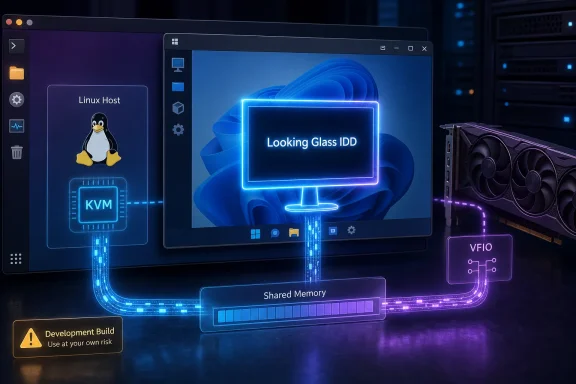 The feature is current, but it is not in stable B7
There is an important detail missing from the enthusiasm around this release: the IDD is not part of Looking Glass B7 stable. The project’s download page still lists B7, built on March 6, 2025, as the release recommended for normal use. The IDD is provided with automated B7-branch development builds, which the project explicitly labels as intended for testing and development and warns may not work.
As of August 26, 2026, the current download listing is build B7-822, built August 25 from commit 54ea580e. That timing explains why the feature may feel “new” even though Looking Glass itself is an established project. The project has now published a dedicated bleeding-edge documentation set for this build, with an installation guide, troubleshooting procedures, and a clear recommendation that new deployments use the IDD rather than the legacy Windows Host Application.
That is progress, but it should affect how sysadmins and home-lab users deploy it. A daily-use Windows guest that must be available for work should not be upgraded simply because the new display path eliminates a dongle. Test it on a VM snapshot or a cloned guest first, retain a working SPICE or virt-manager console path, and download all matching pieces before changing anything.
Looking Glass says the Linux client, Windows IDD, and optional OBS plugin must come from the same release. This is not a packaging preference. They share an evolving protocol, and mismatched versions will not connect. Upgrading only the Windows installer or only the Linux client is a straightforward way to leave a VM stuck at the client’s waiting screen.
What the IDD replaces—and what it does not
The IDD replaces the Windows-side capture model. The legacy Looking Glass Host Application captured frames from an already-active Windows output and then sent those frames through IVSHMEM, the QEMU shared-memory device. The IDD instead acts as a Windows virtual display driver: it creates the monitor, produces the frame stream, and includes direct input support.
It does not turn an ordinary software-rendered Windows VM into a GPU-accelerated workstation or gaming machine.
Looking Glass’ documentation is direct on this point. The IDD can fall back to software processing if a Windows guest lacks a suitable render GPU, which permits an SDR Windows display without PCIe GPU passthrough. But the project recommends a hardware render adapter for lower latency, higher frame rates, HDR, and better frame scheduling. In other words, a no-passthrough Windows VM can now have a cleaner local display experience, but it still does not gain Direct3D performance merely by installing Looking Glass.
That distinction is where the MakeUseOf framing needs qualification. The new IDD can remove the need for a guest GPU output and dummy display hardware. It does not eliminate the Linux host’s graphics requirements: the Looking Glass client still requires an EGL-capable Linux graphics driver. Nor does it eliminate the need to size CPU, memory bandwidth, and shared memory correctly.
A passed-through GPU remains the route for demanding 3D Windows workloads. SR-IOV and vendor vGPU products remain separate technologies with their own hardware, licensing, and platform restrictions. Looking Glass is the display-and-input layer around a VM; it is not a substitute for GPU virtualization.
Shared memory is still the foundation
The new driver makes the visible portion of the setup easier, but it does not make Looking Glass a one-click virtual display app. The Windows guest and Linux host still require an IVSHMEM device large enough for the maximum resolution and color format the VM will use.
The project recommends its KVMFR Linux kernel module rather than a conventional shared-memory file. KVMFR can allow direct GPU memory imports where the host graphics stack supports DMA-BUF, reducing CPU work and avoiding an extra system-memory copy. AMD and Intel Linux host GPUs commonly support that faster path; NVIDIA hosts may need driver support and configuration for DMA-BUF import. If direct import is unavailable, the client falls back to copying frames through system memory, which remains functional but consumes more CPU and bandwidth.
This means the old dummy-plug requirement has disappeared, while performance tuning has not. At 1080p desktop use, a modest system may feel very good. At high refresh rates or 4K, the shared-memory transport, guest rendering, Linux compositor, host GPU, and CPU scheduling all become visible limits.
Looking Glass advises leaving CPU resources for Linux rather than assigning every core to Windows. Its current guidance is to reserve at least two physical host cores, or four threads, for the Linux desktop, QEMU, the client, and audio services. That is useful advice for VM builders who have historically pinned every available thread to the guest and then blamed the display client for stutter.
Installation is simpler, but only after the VM is ready
Inside the Windows guest, the IDD installation itself is uncomplicated. The matching looking-glass-idd-setup.exe installer must be run as an administrator. It installs the virtual display driver, the helper application, the direct-input driver, and optionally the IVSHMEM driver needed by the guest.
If the legacy Looking Glass Host service exists, the project recommends disabling it during installation. Two Looking Glass server implementations cannot safely operate against the same shared-memory device. Windows may briefly remove and recreate displays while it loads the driver, and the guest should be restarted if the installer requests it.
After installation, Windows should show a display named “Looking Glass,” while the helper appears in the notification area and reports whether the driver has access to GPU acceleration or has fallen back to software processing. That status is more meaningful than a VM merely showing a picture: it tells the operator whether the new path is running in the configuration that can deliver low-latency, high-refresh behavior.
For managed environments, the installer supports silent installation, including an option to install the bundled IVSHMEM driver. That makes the IDD potentially useful beyond enthusiast passthrough rigs: internal test VMs, Windows application compatibility labs, and Linux-centric engineering desktops can deploy it consistently. But it is still development-channel software, so automated deployment should include a rollback plan.
SPICE becomes optional rather than obsolete
The IDD handles the primary display path and direct keyboard and mouse input. It does not erase SPICE from the picture. Looking Glass still uses SPICE for optional clipboard synchronization, audio, input fallback, and fallback video services.
That hybrid design is practical. It means an operator can retain the familiar SPICE console as an emergency path while allowing Looking Glass to carry the day-to-day display. It also means clipboard support requires the correct SPICE Guest Tools package in Windows; the Looking Glass troubleshooting guide specifically warns that QEMU Guest Tools are not the same thing.
Users should also remove assumptions carried over from older libvirt templates. Looking Glass says an additional virtual tablet, keyboard, or mouse is unnecessary with the IDD because its direct input driver provides its own absolute and relative devices. Leaving old input devices enabled may not always break a guest, but it adds variables when diagnosing cursor behavior.
The first checks for a blank Looking Glass window are now quite specific: confirm that the virtual Looking Glass monitor is active in Windows, verify that the Linux client and IDD releases match, ensure both sides point to the same KVMFR or IVSHMEM device, and confirm that the Linux user can read and write that device. If /dev/kvmfr0 is a regular file rather than a character device, Looking Glass says the VM was started before the KVMFR module loaded; stop the VM, remove the accidental file, load the module, and start again.
For Windows users inside KVM, the IDD’s real achievement is less dramatic than “Windows without a GPU” and more useful: a virtual monitor that behaves like a first-class display instead of a dummy-plug workaround. It gives ordinary desktop VMs a much cleaner path to local, low-latency use while preserving a better route for GPU-passthrough systems.
The immediate consequence is that new Looking Glass installations should be designed around the IDD rather than the legacy capture application. The cautious consequence is equally clear: until the driver reaches the stable release channel, production Windows VMs should treat the new build as a carefully tested upgrade—not as a reason to discard their fallback console or working legacy configuration.
