
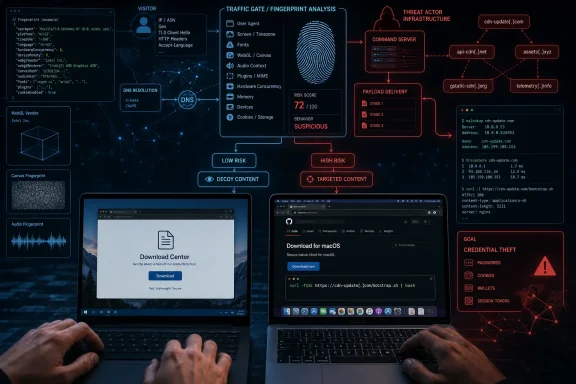
Microsoft Threat Intelligence says a macOS ClickFix operation has changed the part defenders most often rely on: the malicious landing page no longer reliably looks malicious. More than 250 front-end domains in the cluster now use server-side browser fingerprinting to reserve their fake “Download for macOS” page and poisoned Terminal command for visitors that resemble real Mac users, while crawlers, sandboxes, and Windows browsers can receive blank pages or benign-looking decoys instead.
That makes a clean scan result materially less reassuring. The campaign still depends on a victim copying and running an obfuscated command, but Microsoft’s August 5 research shows the operator has moved the selection decision off the visible page and onto its server. In practical terms, a URL that returns a fake VPN extension page, a logistics-company site, or nothing at all may still be an active infostealer delivery point.
Microsoft is presently the sole public source for this specific 250-plus-domain cluster and its before-and-after evolution. Independent research from Sophos and other security firms has documented the broader macOS ClickFix trend—fake GitHub- or Apple-themed download pages that convince users to run Terminal commands—but Microsoft’s report provides the clearest account so far of a campaign replacing openly exposed lures with a full traffic-distribution gate.
Earlier versions of the infrastructure made investigation easy by modern standards. Microsoft says the “complete your download in Terminal” instructions, clipboard logic, obfuscated shell command, and staging URL all appeared directly in the retrieved HTML. A basic URL scanner did not need to emulate macOS or execute JavaScript to identify the lure.
The current sites instead initially return a roughly 2.5 KB JavaScript profiling routine. It collects browser details, display characteristics, GPU information through WebGL, timezone offset, touch capability, frame status, and runtime attributes associated with developer tooling or automated analysis. The browser then silently posts those results back to the same server, which decides whether to provide the ClickFix page.
This is a conventional traffic distribution system technique applied to a social-engineering delivery chain. Browser fingerprinting and bot screening are common on legitimate sites as well as in ad fraud and exploit-kit operations. The consequential change here is the use of those checks to conceal an explicit instruction to run malware from the machines most likely to examine it.
Microsoft says a qualifying Mac browser receives a counterfeit GitHub-themed download page with a forged “Verified Publisher” marker and a copyable
The key finding is not that the attackers detect macOS. Mac-specific ClickFix pages have been observed for more than a year. The change is that the same URL can be benign-looking to a security product and malicious to the intended user at the same moment, because the decision happens on the server after the visitor has been profiled.
There is an important limit to the conclusion. A Windows device receiving a decoy does not mean it has been infected with Windows malware; Microsoft’s documented payload path targets macOS and leads to MacSync or Atomic Stealer, also called AMOS. But a Windows proxy, DNS, or browser-telemetry event involving one of these domains should not be dismissed as irrelevant simply because the page looked like an innocuous VPN offer. It can establish that a user or automated system reached infrastructure tied to an active credential-theft campaign.
That distinction matters especially for mixed Windows-and-Mac organizations. A Windows-based web gateway may record the first sign of an employee encountering the domain, while a corporate Mac later receives the actual lure through a different browsing session. Security operations teams should treat the domain interaction as a network investigation lead and correlate it with Mac browser history, DNS queries, outbound connections, and Terminal activity—not as proof of compromise on the Windows machine that saw the decoy.
The server-side model also weakens static indicators. Microsoft observed a repeated naming style built around dictionary words and the token “file,” including names such as
A public WHOIS record for one indicator,
Microsoft’s strongest hunting recommendation is to identify the gate itself rather than waiting for a malware hash or the final payload. The initial page contains a self-submitting fingerprint collection routine; useful correlated signals include hidden fingerprint fields, the
Those are not standalone indicators of malice. Legitimate anti-bot services gather many of the same characteristics. A security rule that treats every fingerprinting script or WebGL query as an incident will create noise quickly. The more defensible detection logic combines the page behavior with a newly registered or low-reputation domain, the observed dictionary-domain style, a silent form submission, and a subsequent response that changes based on the client environment.
At the endpoint, the relevant activity is much less ambiguous. Microsoft recommends alerting on Terminal or shell processes launched after web browsing that invoke combinations such as
The downstream payload is also why this should be treated as an identity incident, not merely a malware cleanup task. Microsoft says AMOS can collect browser credentials and data, cryptocurrency wallet data, authentication stores, and sensitive files. Earlier Microsoft research on MacSync documented collection of browser stores, macOS Keychain material, SSH keys, AWS credentials, Kubernetes configuration, and shell history. A confirmed execution should therefore trigger session revocation, credential rotation, review of developer and cloud access, and investigation from a separate trusted device.
That is a meaningful intervention against ClickFix because it interrupts the social-engineering moment on which the attack depends. But Apple also documents a “Paste Anyway” option for a user who believes the command is trusted. This is a warning and friction mechanism, not an execution prevention policy that security teams can assume will stop a determined or hurried employee.
Sophos independently reported earlier this year that macOS ClickFix operators had already shifted from standard Terminal copy-and-paste lures toward AppleScript-based execution flows, apparently responding to increased user awareness and platform protections. That broader pattern is the material caveat to relying on any one client-side prompt: this campaign currently uses Terminal, but the actors’ business model is to preserve the user-execution step while changing the wrapper around it.
More durable response work includes:
Microsoft is presently the sole public source for this specific 250-plus-domain cluster and its before-and-after evolution. Independent research from Sophos and other security firms has documented the broader macOS ClickFix trend—fake GitHub- or Apple-themed download pages that convince users to run Terminal commands—but Microsoft’s report provides the clearest account so far of a campaign replacing openly exposed lures with a full traffic-distribution gate.
 The page is now a test, not the payload
Earlier versions of the infrastructure made investigation easy by modern standards. Microsoft says the “complete your download in Terminal” instructions, clipboard logic, obfuscated shell command, and staging URL all appeared directly in the retrieved HTML. A basic URL scanner did not need to emulate macOS or execute JavaScript to identify the lure.The current sites instead initially return a roughly 2.5 KB JavaScript profiling routine. It collects browser details, display characteristics, GPU information through WebGL, timezone offset, touch capability, frame status, and runtime attributes associated with developer tooling or automated analysis. The browser then silently posts those results back to the same server, which decides whether to provide the ClickFix page.
This is a conventional traffic distribution system technique applied to a social-engineering delivery chain. Browser fingerprinting and bot screening are common on legitimate sites as well as in ad fraud and exploit-kit operations. The consequential change here is the use of those checks to conceal an explicit instruction to run malware from the machines most likely to examine it.
Microsoft says a qualifying Mac browser receives a counterfeit GitHub-themed download page with a forged “Verified Publisher” marker and a copyable
curl one-liner. A Windows browser, by contrast, may receive a fake Urban VPN Proxy extension page or an unrelated business impersonation. Simple crawlers can get an empty, parked-looking response.The key finding is not that the attackers detect macOS. Mac-specific ClickFix pages have been observed for more than a year. The change is that the same URL can be benign-looking to a security product and malicious to the intended user at the same moment, because the decision happens on the server after the visitor has been profiled.
A benign response is no longer a verdict
For IT teams, this undermines a familiar workflow: submit a suspicious URL, inspect the returned page, and close the case if it appears harmless. That workflow can still identify known bad content, but it cannot clear this infrastructure. Microsoft explicitly found that non-qualifying requests received decoys or no content even when the site was capable of delivering the macOS lure.There is an important limit to the conclusion. A Windows device receiving a decoy does not mean it has been infected with Windows malware; Microsoft’s documented payload path targets macOS and leads to MacSync or Atomic Stealer, also called AMOS. But a Windows proxy, DNS, or browser-telemetry event involving one of these domains should not be dismissed as irrelevant simply because the page looked like an innocuous VPN offer. It can establish that a user or automated system reached infrastructure tied to an active credential-theft campaign.
That distinction matters especially for mixed Windows-and-Mac organizations. A Windows-based web gateway may record the first sign of an employee encountering the domain, while a corporate Mac later receives the actual lure through a different browsing session. Security operations teams should treat the domain interaction as a network investigation lead and correlate it with Mac browser history, DNS queries, outbound connections, and Terminal activity—not as proof of compromise on the Windows machine that saw the decoy.
The server-side model also weakens static indicators. Microsoft observed a repeated naming style built around dictionary words and the token “file,” including names such as
filecopperbasket, filevelvettractor, and filemarblegarden, as well as variants such as applefilevault and orangesmartfile. Those patterns are useful for expanding a hunt, but they are not a safe blocking rule by themselves: the operator also used names without “file,” including cloudsendhub and syncdatavault.A public WHOIS record for one indicator,
apricotfilepoint.com, shows it was registered on June 8, 2026 through Dynadot and used Cloudflare nameservers when the record was retrieved in June. That supports Microsoft’s assessment that the front-end domains are disposable rather than long-lived brand impersonation assets. It does not, however, establish the ownership or hosting relationship of the full cluster; domain registration data rarely does.
The detection point has moved closer to the endpoint
The campaign’s cloaking does not make it invisible. It changes what defenders should look for.Microsoft’s strongest hunting recommendation is to identify the gate itself rather than waiting for a malware hash or the final payload. The initial page contains a self-submitting fingerprint collection routine; useful correlated signals include hidden fingerprint fields, the
mode: "php" marker Microsoft observed, browser and WebGL enumeration, and an immediate postback to the same server before any visible download content is returned.Those are not standalone indicators of malice. Legitimate anti-bot services gather many of the same characteristics. A security rule that treats every fingerprinting script or WebGL query as an incident will create noise quickly. The more defensible detection logic combines the page behavior with a newly registered or low-reputation domain, the observed dictionary-domain style, a silent form submission, and a subsequent response that changes based on the client environment.
At the endpoint, the relevant activity is much less ambiguous. Microsoft recommends alerting on Terminal or shell processes launched after web browsing that invoke combinations such as
curl, base64, gunzip, zsh, osascript, xattr -c, and chmod +x. A lone curl command is ordinary administration. A browser-led sequence that downloads an encoded or compressed script, decodes it, strips quarantine metadata, marks a file executable, and then starts it is not.The downstream payload is also why this should be treated as an identity incident, not merely a malware cleanup task. Microsoft says AMOS can collect browser credentials and data, cryptocurrency wallet data, authentication stores, and sensitive files. Earlier Microsoft research on MacSync documented collection of browser stores, macOS Keychain material, SSH keys, AWS credentials, Kubernetes configuration, and shell history. A confirmed execution should therefore trigger session revocation, credential rotation, review of developer and cloud access, and investigation from a separate trusted device.
Apple’s paste protection helps, but it is not a policy control
Microsoft says macOS 26.4 and later presents a warning when a user tries to paste a potentially malicious command into Terminal. Apple’s June 29 support guidance confirms the “Possible malware, Paste blocked” prompt is designed for commands copied from websites, chat tools, messages, or email, and says the Mac has not been harmed when the warning appears.That is a meaningful intervention against ClickFix because it interrupts the social-engineering moment on which the attack depends. But Apple also documents a “Paste Anyway” option for a user who believes the command is trusted. This is a warning and friction mechanism, not an execution prevention policy that security teams can assume will stop a determined or hurried employee.
Sophos independently reported earlier this year that macOS ClickFix operators had already shifted from standard Terminal copy-and-paste lures toward AppleScript-based execution flows, apparently responding to increased user awareness and platform protections. That broader pattern is the material caveat to relying on any one client-side prompt: this campaign currently uses Terminal, but the actors’ business model is to preserve the user-execution step while changing the wrapper around it.
What Windows and Mac administrators should do now
The immediate operational response should focus on telemetry rather than a one-time URL blocklist. Microsoft published named indicators includingapricotfilepoint.com, applefilevault.com, bananafastfile.com, filecopperbasket.sbs, filemarblegarden.sbs, fileoceanhammer.sbs, filevelvettractor.sbs, lemonfilewave.com, limefilescope.com, mangocloudfile.com, orangesmartfile.com, syncdatavault.com, and cloudsendhub.com. Block and search for those known domains, but expect the actor to rotate front ends.More durable response work includes:
- Hunt Mac endpoint telemetry for browser-adjacent Terminal launches followed by
curldownloading from/curl/<id>-style paths, encoded content, shell execution, AppleScript use, and suspicious archive creation or HTTP POST activity. - Correlate web-filter, DNS, and proxy events from Windows and macOS systems against the known domains, even where page inspection recorded a blank or apparently legitimate response.
- Review detections and policies for Microsoft Defender for Endpoint on macOS, including the behavioral coverage Microsoft lists for AMOS execution, suspicious downloads, AppleScript execution, Keychain copying, credential theft, and information exfiltration.
- Treat “paste this command into Terminal to finish downloading” as an incident-reporting trigger in user training and service-desk guidance. No legitimate CAPTCHA, publisher verification, or ordinary software download requires it.
References
- Primary source: Microsoft
Published: 2026-08-05T15:48:39+00:00
Loading…
www.microsoft.com - Related coverage: support.apple.com
Loading…
support.apple.com - Related coverage: support.apple.com
Loading…
support.apple.com - Related coverage: microsoft.com
Loading…
www.microsoft.com - Related coverage: malwarebytes.com
ClickFix finds a new way to infect Macs | Malwarebytes
ClickFix campaigns have found a way around macOS Tahoe's warnings against pasting commands in the Terminal. They're using Script Editor instead.www.malwarebytes.com - Related coverage: techcommunity.microsoft.com
- Related coverage: thehackernews.com
ClickFix Campaigns Spread MacSync macOS Infostealer via Fake AI Tool Installers
ClickFix campaigns spread MacSync macOS infostealer via malicious Terminal commands since Nov 2025, targeting AI tool users and developers.thehackernews.com
- Related coverage: matricedigitale.it
ClickFix arriva sugli annunci X e distribuisce Atomic Stealer su macOS - Matrice Digitale
Atomic Stealer si diffonde su macOS tramite annunci X verificati che usano ClickFix e una falsa app DynamicLake.www.matricedigitale.it - Related coverage: thehackernews.com
Microsoft Discloses DNS-Based ClickFix Attack Using Nslookup for Malware Staging
Microsoft details a new ClickFix variant abusing DNS nslookup commands to stage malware, enabling stealthy payload delivery and RAT deployment. - Related coverage: commercemarketplace.adobe.com