
Microsoft’s Message Center advisory, MC1462922, describes this as a retirement rather than a redesign. Neowin first reported the notice, and the advisory’s published text confirms a rollout beginning in mid-August and expected to finish by mid-October. The distinction matters for administrators because “October” is not a distant feature deprecation: organizations that still use the app have, at most, several weeks to identify what it was being used for and redirect staff.
The immediate effect is narrow. This is not the retirement of the Teams desktop client, Outlook for Windows, or the Microsoft 365 admin center. It is the removal of the embedded Admin app that let small-business administrators carry out a subset of common administrative work without leaving the collaboration and productivity interfaces where they already spent their day.
Still, a narrow app can create an outsized operational problem when it is the path that an owner-operator or part-time IT administrator actually knows how to use.
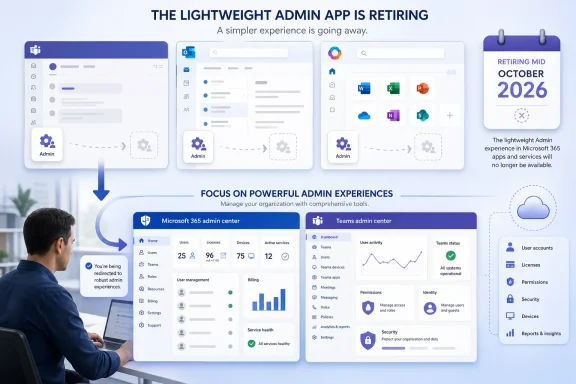 What disappears in October
The Admin app was intended for “very small businesses,” according to Microsoft’s advisory. It exposed basic Microsoft 365 administration within Teams, Outlook, and Microsoft365.com, reducing the need to open the full Microsoft 365 admin center or the specialized Teams admin center.
Microsoft is using a two-stage withdrawal:
- Beginning in August 2026, the app is no longer pre-pinned or pre-installed in Teams for new very-small-business administrators, although an already installed app can still be opened.
- From October 2026, the app will no longer be supported or available in Teams, Outlook, or Microsoft365.com, with rollout completion expected by mid-October.
That means an organization may see the app disappear at a different point during the rollout window rather than on a single universal cutoff date. Admins should treat mid-October 2026 as the practical hard deadline, not wait for a specific October day that Microsoft has not published.
The notice also does not describe any migration process, export of settings, preservation of shortcuts, or automatic redirection from an old Admin app task to its replacement. There is no indication that the retirement alters tenant configuration or deletes administrative data. What disappears is the simplified interface and its placement in the applications where smaller organizations may have relied on it.
Microsoft is steering work back to dedicated portals
Microsoft’s stated replacement is conventional administration through the Microsoft 365 admin center and Teams admin center. For basic tenant work, that is a return to the main portal Microsoft already documents for common tasks such as adding and restoring users, assigning licenses, resetting passwords, managing groups, checking service health, and reviewing reports.
The Teams admin center remains the appropriate place for service-specific controls. Microsoft’s current documentation places team management there, alongside tasks such as changing team settings, managing membership and channels, reviewing policies, and handling more granular Teams configuration. Teams PowerShell continues to be another administrative route for organizations that already use scripted management.
For a full-time Microsoft 365 administrator, this is likely an inconvenience rather than a disruption. The larger portals already contain more controls and better visibility than the simplified app could offer. The people most exposed are exactly the users Microsoft designed the app for: a business owner, office manager, or generalist who occasionally creates accounts, assigns a license, changes a Teams setting, or checks a service issue from within Teams or Outlook.
Microsoft’s choice is therefore less about eliminating administration and more about eliminating an embedded, low-friction entry point to it. An admin who previously handled a small task in the middle of an Outlook session now needs to move into the correct management portal, have the right role assigned, and understand which center owns the setting.
The Admin Agent is assistance, not a like-for-like replacement
Microsoft also points affected customers to the Microsoft 365 Admin agent, its Copilot-based administrative assistant. That recommendation deserves closer scrutiny than the retirement notice gives it.
Microsoft says the Admin agent is available to Microsoft 365 administrators without an additional Copilot or Agent 365 license, and it can be accessed through Microsoft Copilot Chat or from the Microsoft 365 admin center. It uses the administrator’s existing Microsoft Entra role-based permissions, and Microsoft says it records completed actions in the underlying Microsoft 365, Entra, or Teams audit logs.
Those are useful safeguards, particularly the requirement for explicit confirmation before the agent performs a write or execution action. But they also illustrate why the Admin agent is not simply the old Admin app with a different button. It is a conversational interface that proposes steps and actions based on a natural-language prompt; the dedicated admin centers remain the authoritative places for browsing settings, reviewing context, and completing more complex work.
For small organizations, the agent could reduce the learning curve for routine questions such as identifying unlicensed users or locating a setting. It can also be blocked or scoped by a Global Administrator or AI Administrator through agent-governance controls. That creates a practical complication that does not exist with a simple pre-pinned admin app: a company may retire the familiar interface only to discover that its governance policy prevents the suggested alternative from being used.
Administrators should not assume that enabling—or merely seeing—the Admin agent means every former Admin app task can be completed through it. Microsoft’s documentation makes clear that what the agent can view or change is constrained by the signed-in administrator’s role. The agent can guide work across Microsoft 365 services, but it does not erase the division of responsibility between Microsoft 365, Teams, Entra, Exchange, Security, Intune, and other specialized admin experiences.
What small-business admins should check now
The right response is an inventory of habits, not an emergency migration project. The Admin app did not host a separate workload, and Microsoft has not announced a data migration requirement. But organizations should identify the people who use it before it vanishes from the familiar surfaces.
Start by asking which routine activities are currently done from Teams, Outlook, or Microsoft365.com rather than directly in an admin center. This is especially important where an external managed service provider owns most tenant administration but an internal office manager handles onboarding, license assignment, password resets, or small Teams changes.
Then confirm that those people have the least-privileged Microsoft Entra administrative role required for their replacement workflow. A Teams Administrator role provides access to the Teams admin center; broader Microsoft 365 tasks may require other delegated roles. Giving a user Global Administrator access simply because the convenient app disappeared would replace a usability problem with a security problem.
Organizations that plan to use the Microsoft 365 Admin agent should test it with a limited set of real, non-destructive administrative requests before October. Verify three things: that the relevant users can launch it, that their role permits the intended action, and that the resulting activity appears in the expected audit trail. If the tenant has agent controls or restrictive Copilot policies, test those conditions explicitly rather than discovering the block during an account-provisioning or access incident.
The old app’s retirement leaves Microsoft 365 administration intact, but it removes the small-business-oriented route into it. By mid-October, basic tenant work will live in the full admin portals—or, where policy allows and the agent supports it, in Microsoft’s newer Copilot-based administrative workflow.