
The practical takeaway for Microsoft 365 administrators is straightforward: use Copilot to summarize, classify, draft and extract; use Power Automate to execute a defined sequence; keep a person in the approval loop wherever an incorrect action would create financial, legal or customer impact. The automation that holds up in production is usually narrower than the “AI will automate your workflow” pitch.
Analytics Insight frames the opportunity around Outlook, Teams, SharePoint, Planner, Microsoft Lists and Power Automate: summarize a mailbox, save attachments, post a Teams alert, create an approval, assign a task. Those are viable building blocks. What the article does not spell out is that a workflow must have a specific trigger, a defined data source, an account or connection that is allowed to act, an error path, and an owner responsible for keeping it working when a connector, mailbox, SharePoint site or policy changes.
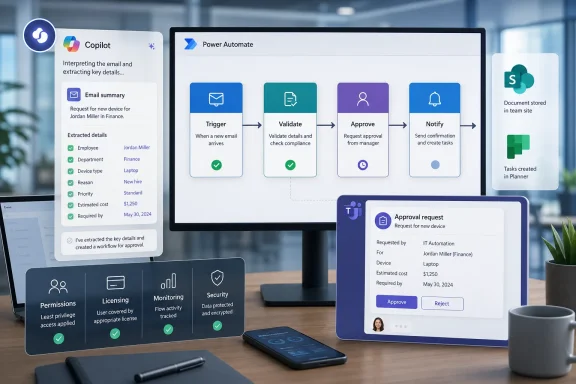 Copilot can propose the workflow; it does not remove the engineering
The guide says a natural-language request such as “save email attachments to SharePoint and notify my team” can generate a workflow without programming. Microsoft’s own Power Automate documentation supports the core claim: Copilot in cloud flows can build and edit cloud flows from a conversational description, configure connections, set parameters and explain the result.
That is a material improvement over starting from an empty flow designer. It is not the same thing as replacing workflow design. A prompt can get an administrator or power user to a first draft, but someone still needs to answer the awkward production questions:
- Which mailbox triggers the flow: one individual’s mailbox, a shared mailbox or a service account?
- Which attachments are allowed through, and which file types must be rejected or quarantined?
- What SharePoint library is the system of record, and what naming, metadata, retention and sensitivity-label rules apply?
- What happens when the destination is unavailable, an attachment exceeds limits, a sender is external, or the same message is processed twice?
- Who receives a failure alert, and how quickly can they correct the flow?
Those are not coding questions, but they are engineering and governance questions. They are also where many “no-code” workflows fail after their author leaves the department.
Microsoft’s newer Copilot Studio workflow experience makes the division clearer than Analytics Insight does. Microsoft describes workflows as deterministic: the same input should follow the same rule-based path and produce the same result. AI actions can generate text, process documents, run prompts or call an agent, but ordinary controls — branching, loops, data operations, connectors and human approvals — are what make the process auditable.
That is the architecture IT teams should preserve. Let AI turn a 20-message thread into a concise proposed summary; do not let the same model decide, without a rule or approval, that a supplier invoice should be paid, an employee should be onboarded, or a customer should receive a commitment.
Teams is the handoff surface, not the workflow engine
Analytics Insight is right to identify Teams as the natural place for many people-facing automations. Microsoft supports flows triggered from Teams messages, flows that use Adaptive Cards, and low-code workflows built with the Power Apps app in Teams. These are useful for turning a chat message into an actionable request rather than leaving it to disappear in a channel scrollback.
The effective pattern is simple: use Teams to collect the human decision, not as a dumping ground for every event a flow can detect. A request arrives by email or a SharePoint file is uploaded; Power Automate validates its basic conditions; an Adaptive Card is posted to a designated approver; the response writes an outcome to the system of record and notifies the requester. Every stage has a visible owner.
Teams notifications become counterproductive when they merely transfer inbox noise to a channel. If a workflow posts dozens of “FYI” cards a day, people learn to ignore the one card that contains a genuine exception. Alerts should be reserved for work requiring a decision, a missed service-level target, a failed run or a defined escalation.
The same caution applies to meeting automation. Copilot-generated notes, extracted actions and follow-up drafts can reduce the administrative burden after a meeting. They are not a substitute for confirming the owner, deadline and decision record. A sound meeting workflow might have Copilot draft action items, place them in a Teams review card, then create Planner tasks only after the meeting owner approves them. That extra step is often cheaper than chasing incorrect tasks across a project plan.
The missing cost and capacity details change the recommendation
The broad claim that Microsoft 365 AI automation is suitable for small businesses “without investing in complex IT infrastructure” is only partly true. Microsoft 365 Copilot itself is an add-on requiring an eligible base subscription, while web-based Copilot Chat and work-based Copilot have different entitlements. An organization cannot assume that having Microsoft 365 automatically grants every employee access to Copilot grounded in work data.
Power Automate has a similar split. Standard connectors and basic capabilities may be available through existing Microsoft 365 rights, and Microsoft says using Power Automate with Teams does not add a separate Teams-specific license requirement. But the moment a flow needs premium or custom connectors, AI Builder, managed environments, desktop automation, higher scale or unattended execution, the licensing picture changes. Power Automate Premium and Process licenses exist precisely because those scenarios are not included in the lightweight baseline.
Copilot Studio introduces a separate operational concern. Microsoft says each workflow action consumes capacity, and when prepaid capacity is exhausted, new flow runs can be blocked until capacity returns or a billing arrangement is in place. That does not make Copilot Studio unsuitable; it means teams should not treat an agent-driven workflow as a free extension of a Copilot seat.
Analytics Insight does not identify which of its suggested scenarios require which licenses, connectors or capacity model. That omission matters most for invoice processing, HR onboarding, customer support and integrations with line-of-business systems — the exact tasks the article promotes. These are the projects where a proof of concept often works using personal credentials and a limited test volume, then runs into cost, ownership and scale constraints once the business wants it always on.
Governance has to be designed before the first flow is shared
The source article advises role-based security and governance policies, but it does not describe the mechanism. In Power Platform, data loss prevention policies classify and control connectors. They can separate business and non-business services, block connectors outright and restrict specific actions. Microsoft also notes that a policy change can affect both a maker building a flow and an already-running flow.
That last point deserves attention. A security team that blocks a connector can stop a future bad integration, but it can also break an established business process at runtime. IT needs an inventory of flows, connections, owners, environments and dependencies before it starts changing policies broadly.
The same applies to AI agents. Microsoft’s current Microsoft 365 admin tooling lets administrators enable, disable, assign, block or remove agents, and requires organization-published agents to go through an approval process before users can access them. That is a meaningful control surface, but only if the organization uses it. Allowing every department to build and distribute an agent that can search internal knowledge, call connectors or invoke actions is a governance decision, not a productivity setting.
A workable minimum standard is to require four things before a workflow moves beyond a team pilot:
- A named business owner and a named technical owner must be accountable for the flow, its connections and its failure response.
- The workflow must run in an appropriate managed environment rather than being left as an employee’s personal experiment in the default environment.
- The flow must use least-privilege connections, preferably service-backed where the process cannot depend on one employee’s account remaining active.
- Every automated external communication, record update, payment-related action or access-changing task must have a documented validation or human approval point.
Measure the process, not Copilot clicks
Analytics Insight suggests using Microsoft 365 Copilot reporting to monitor engagement, retention and application use. Those are adoption metrics. They show whether people are opening a tool; they do not establish whether the business process improved.
A better scorecard starts before deployment. For an attachment-routing workflow, track the current time from receipt to filed document, percentage of misfiled items, number of manual touches and exception rate. For meeting follow-up, measure the time taken to publish confirmed actions and the percentage that must be corrected. For approvals, track elapsed time, reassignment rate, rejected submissions and instances where staff bypass the flow because it is slower than email.
There is evidence that regular Microsoft 365 Copilot users can save time on discrete knowledge-work tasks. A 2025 randomized study involving more than 6,000 workers across 56 firms found that regular users spent about 30 fewer minutes reading email per week and completed documents faster. The paper included Microsoft researchers and examined early deployment, so it is evidence of task-level gains rather than proof that any organization will achieve a company-wide productivity windfall.
That is why the most credible automation program begins with a small, measurable process rather than a large “AI transformation” mandate. Pick a rule-heavy task with stable inputs, a low-cost error path and an owner who is motivated to improve it. Use Copilot to accelerate authoring and summarize unstructured material; use deterministic Power Automate steps to govern the action; use Teams only where a real person needs to decide.
The productivity gain comes when the process stops requiring routine human coordination. In Microsoft 365, that is achievable now — but only when the workflow is treated as a production system with permissions, licensing, monitoring and accountability, rather than as a prompt that happened to work once.
References
- Primary source: Analytics Insight
Published: August 8, 2026 at 3:30 PM UTC
Microsoft 365 AI Automation Tips: Boost Productivity with Smarter Workflows in 2026
Discover the best Microsoft 365 AI automation tips for 2026. Learn how Copilot, Power Automate, and AI-powered workflows improve productivity, automate repetitive tasks, and streamline business operations.www.analyticsinsight.net - Related coverage: learn.microsoft.com
Use Power Automate flows in Microsoft Teams - Power Automate | Microsoft Learn
Learn how to use Power Automate flows within Microsoft Teams.learn.microsoft.com - Related coverage: learn.microsoft.com
FAQ for Copilot in cloud flows - Power Automate | Microsoft Learn
This FAQ discusses copilot in cloud flows and the key considerations for making use of this technology responsibly.learn.microsoft.com - Related coverage: microsoft.com
Insert Your Title Here
• Insert CCS text here • Insert CCS text here  • Insert CCS text herewww.microsoft.com
- Related coverage: adoption.microsoft.com
- Related coverage: marketingassets.microsoft.com
- Related coverage: techradar.com
Microsoft makes major AI U-turn following user revolt — will let Teams users turn off Copilot, Facilitator and Recap | TechRadar
Microsoft Teams AI backlash leads to major changeswww.techradar.com - Related coverage: techradar.com
'Every business leader knows the world is changing, but far fewer have a clear picture of what to do about it': Microsoft flags the changing world of AI at work, and why "Frontier Firms" are leading the way | TechRadar
Microsoft digs deep into how businesses are using AIwww.techradar.com - Related coverage: pcgamer.com
Using 'trillions of anonymised productivity signals', Microsoft thinks nearly half of people like AI in their work | PC Gamer
There's dozens of us who don't!www.pcgamer.com
