
EXCHANGE_STORAGE_50GB service plan raises the effective mailbox limit by another 50 GB.The practical result is simple for a normally configured licensed user: a 100 GB primary mailbox. The implementation is less simple. The storage boost depends on both service plans being enabled and provisioned, existing custom mailbox quotas are deliberately left untouched, and Microsoft’s own Exchange Online limits documentation still lists 50 GB primary mailboxes for the Business plans. That documentation mismatch is likely to cause unnecessary licensing changes and support tickets until Microsoft updates the public service description.
 The 100 GB limit applies to three Business suites
Microsoft says the increase is part of its June-to-September 2026 Microsoft 365 packaging updates. It covers commercial users assigned Microsoft 365 Business Basic, Microsoft 365 Business Standard, or Microsoft 365 Business Premium. The entitlement is for the primary mailbox; it does not automatically grant archive functionality or convert a Business subscription into Exchange Online Plan 2.
That distinction matters most for organizations that previously bought a higher-tier Exchange license solely to avoid a 50 GB inbox ceiling. A Business user who receives the new storage service plan has the same 100 GB primary-mailbox maximum as a user whose license already supplies that capacity. Adding Exchange Online Plan 2 or an E3/E5 license on top does not create a 150 GB or 200 GB mailbox.
Exchange Online applies the highest applicable mailbox entitlement under concurrent licensing rather than adding quotas across licenses. A Business Premium user with an Enterprise license that includes Exchange Online Plan 2 therefore remains at 100 GB. Similarly, assigning a lower-capability license such as Microsoft 365 F3 does not diminish the Business entitlement.
The exception is standalone Exchange Online Plan 1. Microsoft specifically says that license can remain capped at 50 GB, so admins should not extrapolate the Business-suite change to every account that happens to use Exchange Online.
The new service plan is the real deployment signal
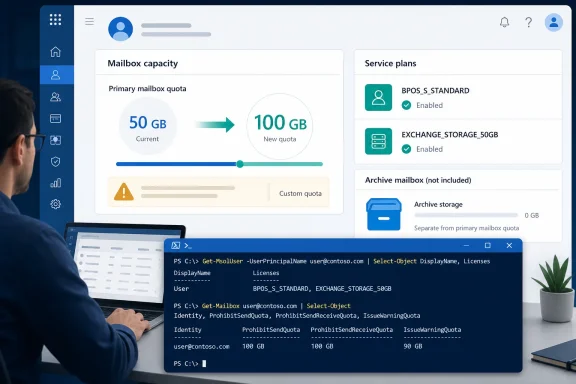
Microsoft’s Exchange Team identifies the two relevant service plans:
BPOS_S_STANDARDis the established Business-suite Exchange plan and supplies the base 50 GB mailbox capacity.EXCHANGE_STORAGE_50GBis the additional entitlement that raises the effective primary-mailbox ceiling to 100 GB.
Both must be enabled for the full quota to take effect. That is the detail that turns a packaging announcement into an operational task. A tenant can have the correct Business subscription assigned while an individual user has a disabled service plan, a delayed license backfill, or a group-based licensing configuration that has not yet propagated.
Microsoft says the additional plan is being assigned automatically for eligible users as the packaging rollout completes. During that process, however, admins can see users in the same tenant with different mailbox limits. The company advises against removing and reassigning Exchange licenses merely to force an update, because removing a product license cuts off access to its services and begins the relevant retention process.
In other words, a mailbox that still reports 50 GB is a condition to inspect, not an invitation to churn the license assignment. Confirm the service plan first, then give the directory and Exchange provisioning path time to converge. Escalation is sensible when the user is eligible, the add-on is present and enabled, and the mailbox still does not reflect the higher quota after normal provisioning has had time to complete.
Microsoft’s published limits page has not caught up
There is an important documentation contradiction in Microsoft’s own material. The August 19 Exchange Team post says eligible Business Basic, Standard, and Premium users can receive a 100 GB primary mailbox through the new add-on. But Microsoft Learn’s Exchange Online limits page still lists 50 GB for user mailboxes on Business Basic, Business Standard, and Business Premium, along with 49 GB warning, 49.5 GB prohibit-send, and 50 GB prohibit-send/receive thresholds.
The Exchange Team’s post is the newer and more specific primary record for the rollout, and it explicitly explains how Exchange computes the new quota. Still, the stale service-description table creates a real procurement and operations problem. Licensing teams may continue budgeting for Exchange Online Plan 2 upgrades that are no longer necessary for users whose only requirement is a 100 GB primary mailbox. Service-desk staff may also dismiss a correctly provisioned 100 GB Business mailbox as an anomaly because the broad limits page says otherwise.
Microsoft has not publicly explained the discrepancy or provided a date for updating the limits table. Until it does, the reliable way to settle an individual case is the mailbox’s assigned service plans and the quota Exchange itself reports—not a static comparison chart.
The discrepancy does not mean every 50 GB limit in Microsoft’s documentation is obsolete. Shared mailboxes, resource mailboxes, archive mailboxes, and standalone plans have separate rules. The new entitlement concerns licensed users of the three named Business suites and their base primary mailbox capacity.
Custom quotas override the automatic increase
The most consequential technical detail is Microsoft’s treatment of manually configured quotas. The new storage entitlement does not overwrite an administrator-defined value. If a Business mailbox was intentionally limited to 20 GB, it stays at 20 GB even after EXCHANGE_STORAGE_50GB arrives.
That behavior protects policies based on storage governance, delegated mailbox use, migration staging, or cost allocation. It also means a tenant can complete the licensing rollout and still have a substantial number of mailboxes below 100 GB by design. Admins should not mistake that outcome for a failed deployment.
The reverse is equally important. If an administrator later removes the 50 GB add-on from a mailbox that uses default plan quotas, Exchange returns the mailbox to the applicable default. But removing the add-on does not erase a separately configured custom quota. Microsoft is keeping licensing policy and administrator intent as separate controls.
For organizations that have historically enforced capacity limits, the upgrade should prompt an inventory rather than a mass quota reset. A custom limit may be valid. It may also be an old workaround created when 50 GB was the hard Business-plan maximum. The new entitlement gives admins a reason to distinguish deliberate restrictions from forgotten ones.
Verify the service plan and the effective quota separately
The Microsoft 365 admin center can show whether a user has an eligible suite and whether its included services are enabled. In Users > Active users, select the account and review Licenses and apps. The Billing > Licenses area can help establish whether the assignment is direct or group-based, which matters when correcting disabled service plans at scale.
For a more precise check, Microsoft recommends Microsoft Graph PowerShell to inspect the service plan returned for the user:
$licenses = Get-MgUserLicenseDetail -UserId [email][email protected][/email]
$licenses.ServicePlans |
  Where-Object ServicePlanName -eq "EXCHANGE_STORAGE_50GB" |
  Select-Object ServicePlanName, ProvisioningStatus
The result answers only the licensing half of the question. Administrators should then query Exchange Online to see the quota actually presented to the mailbox:
Get-Mailbox -Identity [email][email protected][/email] |
  Format-List IssueWarningQuota,ProhibitSendQuota,
  ProhibitSendReceiveQuota,UseDatabaseQuotaDefaults
For an eligible user with the new service plan enabled and no custom quota, ProhibitSendReceiveQuota should be 100 GB. The warning and prohibit-send thresholds should correspond to the higher capacity rather than the older 49 GB and 49.5 GB Business defaults.
Checking both layers prevents two common misdiagnoses. A license-only check can show the storage add-on while Exchange has not yet applied it. A mailbox-only check can show 20 GB or another lower figure that is actually an intentional custom limit, not a licensing failure.
Archive storage remains a separate licensing decision
The Business mailbox increase solves one specific problem: users who need more room in their active mailbox. It does not supply archive capability. That is a meaningful boundary for compliance teams and organizations with long retention periods, because a 100 GB primary mailbox is not a substitute for Exchange Online archiving, retention policies, eDiscovery requirements, or auto-expanding archive storage.
Business Premium already has different archive capabilities from Business Basic and Business Standard under Microsoft’s published service descriptions, while Enterprise plans and Exchange Online Plan 2 have their own archive rules. Administrators should therefore resist a simplistic “100 GB means equivalent licensing” conclusion. The primary-mailbox capacity may now match, but the plans do not become interchangeable for archive, compliance, security, or management features.
For Business customers, the immediate operational change is narrower and useful: users who previously approached a 50 GB primary mailbox ceiling can receive another 50 GB without a plan upgrade, provided the new EXCHANGE_STORAGE_50GB entitlement is assigned and no custom quota intentionally holds them below it.
