
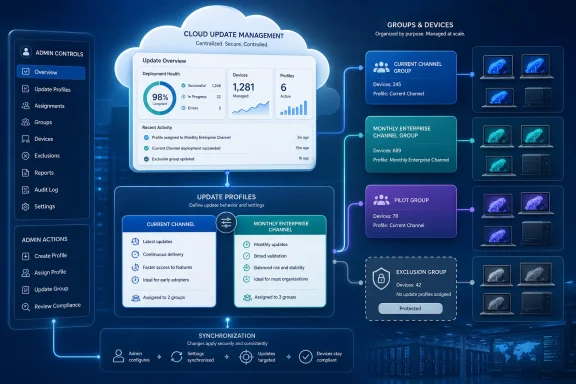
The new model replaces Cloud Update’s separate per-device channel-switch control with profile assignments. In Microsoft’s updated Cloud Update documentation, an eligible device assigned to a profile is moved automatically to that profile’s target channel if it is not already there. For IT teams, this collapses a two-step operational process—select devices, then switch their channel—into one group-based action.
Microsoft describes the feature as a way to streamline onboarding and preserve consistent update management. The real operational implication is that Microsoft Entra group design has become part of the Microsoft 365 Apps servicing policy. A group that once existed only to identify a pilot, department, or hardware cohort can now place members on Current Channel or Monthly Enterprise Channel through Cloud Update.
 Group assignment now carries channel authority
The redesigned experience centers on device selection criteria within each Cloud Update profile. Instead of manually enabling profiles or using the prior Inventory-based device-channel switch, admins attach either Microsoft Entra groups or Cloud Update’s built-in channel groups to a target profile.
Microsoft’s Learn documentation says the available profiles cover Current Channel and Monthly Enterprise Channel. A profile becomes active when at least one group is assigned, and Cloud Update evaluates membership at least once a day. Devices must already appear in the Microsoft 365 Apps inventory before the service can onboard them.
The channel movement is automatic. Assign a device or user group to the Monthly Enterprise profile, for example, and a qualifying device on Current Channel is directed to Monthly Enterprise Channel and remains managed by that destination profile. Assign the same group to Current Channel and the reverse applies.
That is a material change from a workflow that treated channel selection as a discrete action. The profile is now both the servicing configuration and the desired-state channel declaration. An Entra group change should therefore go through the same change-control scrutiny as an Intune policy assignment or a Configuration Manager collection change—not be treated as harmless directory housekeeping.
Microsoft says the group-based approach supersedes the previous Switch device update channel control in Cloud Update inventory. Administrators looking for that button after the new interface arrives will not find a renamed version of it; moving devices now means assigning a group to the profile for the destination channel.
Built-in channel groups reduce onboarding work, but can widen scope quickly
Cloud Update supplies built-in channel groups that dynamically represent devices it sees on a given update channel. Microsoft positions those groups as the bulk-onboarding tool: assign the Current Channel group to the Current Channel profile, or the Monthly Enterprise Channel group to the equivalent profile, and existing devices can be enrolled without changing their channel.
That is the low-risk migration route for an organization already divided between those two channels. New devices discovered in inventory on either assigned channel can also be brought under Cloud Update automatically, reducing the need to maintain a separate Entra group solely to capture every eligible Office installation.
The same mechanism can be used to move devices at scale. An admin can assign the built-in group for one channel to a destination profile, causing the devices that qualify to be changed to the target channel. Microsoft calls this continuous enforcement: after the move, the destination profile remains responsible for those devices.
The catch is that bulk enrollment and bulk movement have very different risk profiles. Assigning a Current Channel built-in group to the Current Channel profile preserves the existing channel. Assigning that same broad group to a Monthly Enterprise profile changes the servicing track for a potentially large estate. The interface may require only one selection and one save, but the transition is still a channel migration.
This makes the initial profile-to-group mapping worth documenting before anyone starts “simplifying” Cloud Update. A clean approach is to use built-in channel groups for like-for-like onboarding first, verify inventory and update health, then use narrowly scoped Entra pilot groups for deliberate channel changes. Microsoft’s own guidance recommends starting with a small Entra group before expanding Cloud Update more widely.
Assignment conflicts have a documented winner
Microsoft has published the conflict rules, and they are essential for organizations that use overlapping user and device groups. If a device is assigned to more than one profile, a Microsoft Entra group assignment takes precedence over a built-in channel-group assignment. If the device matches several profiles only through built-in channel groups, Cloud Update selects the faster update channel.
In practice, an Entra pilot group can deliberately override a broader channel-based population. A device caught in a general Current Channel built-in group but directly included in an Entra group assigned to Monthly Enterprise Channel should be managed under Monthly Enterprise. That is useful for testing, exceptions, and staged migrations—provided the overlap is intentional.
The risk is less obvious when assignments are based on users rather than devices. Microsoft permits both object types in Entra groups, including mixed groups, and Cloud Update evaluates the applicable membership. A user-oriented pilot group can therefore affect the Microsoft 365 Apps servicing behavior of a device used by that person. Admins should be explicit about whether their rollout logic is tied to a machine, an employee, or both.
Cloud Update also automatically offboards a device when it no longer matches any profile assignment. Microsoft says the device then returns to the next-highest-priority management source for Microsoft 365 Apps. That protects against leaving devices permanently attached to a retired pilot profile, but it also means removing a group assignment is not merely a pause action. It can hand channel and update control back to another configured source, such as policy or another management workflow.
Exclusion groups are the stronger safety valve. Microsoft’s documentation says tenant-level Cloud Update exclusions take highest priority and apply across every profile. Devices or users in an exclusion group are not managed by any Cloud Update profile until the exclusion is removed. That is the appropriate control for non-persistent virtual desktops, regulated devices, or machines whose Office updates are maintained through a separately tested image process.
Existing Cloud Update tenants should retain their configuration
Microsoft says existing Cloud Update customers are not required to rebuild their servicing setup. Existing active profiles remain active after the transition, with each migrated to its corresponding built-in channel group. Existing exclusions, release waves, pause controls, and rollback settings continue to apply, according to Microsoft’s Cloud Update enhancement documentation.
For new Cloud Update customers, the behavior differs: profiles remain inactive until an admin assigns an Entra group or built-in channel group. This is a sensible guardrail against automatically taking control of every discovered Office installation, but it also means that simply opening Cloud Update does not begin management. Scope begins with the first assignment.
The company’s published licensing and service requirements still matter. Cloud Update is designed for qualifying Microsoft 365 Apps subscriptions, and Microsoft’s documentation has historically excluded several sovereign offerings, including Microsoft 365 operated by 21Vianet, GCC, GCC High, and DoD. Roadmap item 558250 is listed for Worldwide Standard Multi-Tenant, so organizations outside that cloud should not infer availability from the new general-availability label.
There is also a timing wrinkle in Microsoft’s own public record. Roadmap 558250, last updated on August 10, 2026, lists the feature as Launched, with preview scheduled for May 2026 and general availability for June 2026. But the companion Microsoft Learn documentation says the new channel and profile-assignment experience rolls out gradually and may not yet be available in every tenant. The distinction is important: “Launched” means Microsoft considers the release complete enough to close the roadmap item; it does not guarantee that every administrator sees the replacement interface immediately.
Treat the first assignment as a servicing change
The safest first move is not a wholesale conversion. Inventory the existing update channels, attach each built-in channel group to its matching profile for a no-channel-change onboarding pass, and use a small Entra device group to prove a controlled migration between Current Channel and Monthly Enterprise Channel. Confirm the resulting devices, assigned profile, target channel, and update status before widening membership.
Administrators should also check for legacy policy sources before removing a device from Cloud Update assignments. Microsoft’s automatic offboarding behavior means a device can resume management from another source once it no longer matches a Cloud Update profile. A migration that appears orderly inside the Microsoft 365 Apps admin center can become inconsistent if Group Policy, Intune configuration, Configuration Manager, or Office Deployment Tool settings still define a different update channel.
Cloud Update’s redesign removes a manual control and makes fleet movement easier. It also moves the point of control into Entra group membership, where a routine directory edit can now alter the update channel of Microsoft 365 Apps across a department, pilot ring, or device class.