
Microsoft launched Microsoft 365 E7, branded the “Frontier Suite,” on May 1, 2026 as a bundle of Microsoft 365 E5, Microsoft 365 Copilot, Microsoft Agent 365, and Microsoft Entra Suite. Microsoft describes it as a way to put productivity AI, agent governance, identity controls, endpoint management, data protection, and security tooling under one commercial SKU. The pitch is coherent for companies standardizing on Microsoft’s stack. It is considerably less compelling for an organization still deciding which AI workloads it will actually run and for whom.
TechTarget reports that Gartner survey work conducted in May found 4% of IT and AI leaders were highly likely to move to E7 within a year, while another 16% were somewhat likely. Those figures are Gartner research relayed by TechTarget; no broader public adoption count or Microsoft customer total has been published. But the reported hesitation tracks with the product’s structure: E7 sells a firm-wide licensing commitment at a point when many enterprises still have departmental Copilot deployments, inconsistent data controls, and competing AI tools already embedded in engineering, finance, and marketing teams.
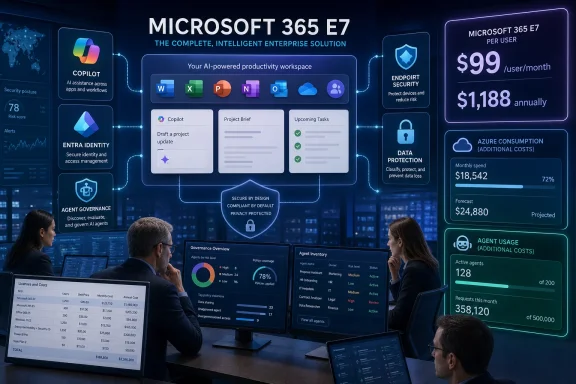 E7 Is an Add-On Bundle Above E5, Not Its Replacement
One point needs clearing up before any ROI model starts. Microsoft 365 E7 is not a functional replacement that makes Microsoft 365 E5 obsolete. E7 includes E5 and layers additional products on top of it. Existing E5 customers can remain on their current plan; E7 is Microsoft’s premium upsell for organizations that want broad Microsoft 365 Copilot licensing, Agent 365, and Entra Suite bundled into the same seat count.
That distinction matters in negotiations. An E5 customer is not choosing between an old package and its inevitable successor. It is choosing between preserving a mature collaboration-and-security estate and committing more users to Microsoft’s AI and identity products. For many organizations, those are separate budget, governance, and deployment decisions.
Microsoft’s public E7 listing also confirms a second commercial nuance that can be missed in a bundle comparison: the standard E7 price includes Teams, while a no-Teams version is separately listed at $90.45 per user per month on an annual commitment. European customers and multinational organizations already working through Teams licensing separation will need to model the relevant SKU rather than assume the headline price applies everywhere.
Microsoft says E7 is priced below buying the included capabilities individually. That may be true at list price for an organization that genuinely needs every included component for the same users. It does not establish savings for an enterprise with only a subset of employees who need Copilot, an existing Entra Suite deployment, or third-party AI systems that will remain in use. A bundle discount is only a saving when the bundled licenses displace planned spending.
The Real Question Is Seat Assignment, Not the Headline Discount
The useful way to assess E7 is to start with a user and workload inventory, not the advertised bundle. Identify which employees need Microsoft 365 Copilot in Word, Excel, Outlook, Teams, and other Microsoft 365 applications; which teams will administer or secure agents; and which existing identity, endpoint, and data-protection licenses overlap with E7’s inclusions.
This is where the skepticism reported by TechTarget becomes practical. Kush Patel of Microsoft partner Tusker told the publication that customers should conduct a gap analysis across their current E5 licenses and paid add-ons before moving. That advice is conventional, but it is especially important here because E7 combines tools with sharply different likely audiences. The knowledge workers who benefit from Copilot are not necessarily the employees who need advanced identity governance features, and neither group is necessarily the security operations staff who will use Security Copilot.
A company that assigns E7 broadly to avoid managing several license groups could turn a lower per-product price into a higher total bill through unused capacity. Conversely, an E5 customer already assigning Copilot, Entra Suite, and agent-management tools to a large, stable user population may find E7 simplifies both purchasing and administration.
The larger issue is that AI adoption is still use-case specific. Finance may see value in Excel-based analysis and document work. IT administrators may focus on Entra, Intune, Defender, and Purview integrations. Developers may use Microsoft tools alongside GitHub Copilot, Claude Code, or other model-specific services. A single enterprise SKU does not eliminate the need to decide which work is appropriate for which AI system, or whether a given user should have access at all.
Agent 365 Governs Agents; It Does Not Make Agent Costs Disappear
Microsoft markets Agent 365 as the control plane for discovering, governing, securing, and managing agents across Microsoft 365 and third-party services. That is a meaningful capability for administrators who are confronting a growing number of user-created, vendor-provided, and internally built agents. It should not be mistaken for a complete, prepaid agent-building and runtime platform.
Microsoft’s own E7 product page states that an Azure subscription is required to use agents and that agent use is priced on a metered basis. Microsoft Learn documentation is more explicit: pay-as-you-go use for Microsoft Copilot Chat agents and SharePoint agents is billed to an Azure subscription, while custom Copilot use is measured through Copilot Studio. Microsoft currently lists a billable Copilot Studio message at $0.01 under that meter.
There are important exclusions and included-use rules. Microsoft 365 Copilot-licensed users can invoke certain Copilot Studio agent-flow actions without consuming Copilot Credits, according to Microsoft’s current Copilot Studio guidance. Other scenarios—including usage by users without the relevant license, custom agents, certain external-data interactions, and services that rely on Azure-hosted components—can introduce consumption charges or separate infrastructure costs.
The point for IT buyers is not that every E7 customer will immediately incur a surprise bill. It is that the bundle and the runtime are different cost layers. Agent 365 can give an organization a governance surface for agents, while Copilot Studio, Azure services, Copilot Credits, and external APIs may still determine the cost of building, grounding, running, and integrating those agents.
That makes it risky to approve E7 based solely on a per-user price. A credible business case should include a controlled pilot with actual workload volumes, agent message counts, connector use, data sources, and the identity model under which agents act. Without that, an enterprise is estimating the most variable part of the deployment from a static seat price.
Security Copilot Has a More Nuanced Overage Story
TechTarget correctly flags Security Copilot capacity as an item procurement teams must understand, but Microsoft’s current licensing documentation adds an important qualification. Security Copilot is included with both Microsoft 365 E5 and E7—not E7 alone—and eligible tenants receive 400 Security Compute Units per month for every 1,000 paid user licenses, scaled proportionally for smaller organizations and capped at 10,000 SCUs monthly.
Those included SCUs are tenant-wide, reset monthly, and do not roll over. Security, identity, compliance, and endpoint teams share the same allocation across Security Copilot experiences in Defender, Entra, Intune, Purview, and, for qualifying customers, Microsoft Sentinel scenarios.
However, Microsoft does not presently say that exceeding the included allocation automatically creates an overage invoice. Its documentation says usage beyond the allocation will be throttled at a future date, with a pay-as-you-go option planned at $6 per SCU and 30 days’ advance notice before that option becomes available. Customers should still plan for potential consumption costs, but they should not negotiate around an assumption that a currently running meter automatically bills E7 tenants once the monthly allotment is exhausted.
There are still cost boundaries. Microsoft lists Sentinel data lake compute and storage, Azure Logic Apps usage, certain Purview experiences, and some partner-agent licenses as outside the core inclusion. Security teams should also verify the tenant’s default Security Copilot capacity, who inherits owner or contributor rights, and whether the included capacity is adequate for normal incident-response workloads before treating the feature as a free add-on.
E7 Requires a Governance Project Before It Becomes a Productivity Project
The operational risk is not limited to licensing. Microsoft 365 Copilot and agents work within the permissions and data boundaries already present in a tenant. If SharePoint sites, Teams channels, OneDrive folders, Exchange mailboxes, or HR and finance repositories have accumulated overly broad access over years of collaboration, AI can make that exposure easier to discover and use at speed.
Microsoft’s Security Copilot documentation says the service can process data from supported Microsoft 365 products, with access scoped by an organization’s configured products and permissions. That is not a warning against deploying Copilot; it is a reminder that an AI rollout amplifies the quality of existing identity and data governance.
Before expanding E7, administrators should establish a baseline for privileged access, guest access, sensitive-data labels, SharePoint and Teams permissions, agent publishing rights, and the approved path for connecting external data or tools. They should also define who owns consumption monitoring across Microsoft 365, Power Platform, and Azure. These are administrative controls that need to exist whether an organization buys E7 or assembles the services separately.
The immediate outcome is that E7 is likely to remain a selective buy rather than a universal license upgrade. It fits enterprises that have already standardized on E5, broadly deployed Microsoft 365 Copilot, and need a centralized way to govern agents at scale. Everyone else should price E7 as a $1,188-per-user annual commitment, pilot the specific AI workloads they expect to use, and keep the consumption ledger separate from the seat-license spreadsheet.