
For a Windows PC that is already current, uses Microsoft Edge or another well-maintained browser, and does not routinely install unknown software, Windows Security with Microsoft Defender Antivirus is still a sound resident protection baseline. Third-party software can add useful layers and different interfaces, but readers should not treat a neat six-product order as proof that one free antivirus has established a decisive technical lead over another.
The more important decision is whether a product gives you permanent real-time protection, whether its installer changes your browser or defaults, and whether the company’s claims match the edition you can download today.
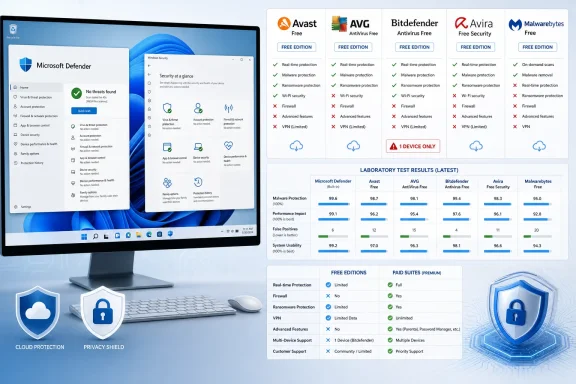 The lab results do not all test the free editions
Gizmodo relies heavily on AV-Comparatives’ March 2026 Malware Protection Test and AV-TEST’s May–June 2026 Windows 11 results. Both are legitimate independent testing programs, and the headline figures quoted for Avast, AVG, Microsoft Defender, Malwarebytes, and others correspond to the published reports.
But the product labels in those reports matter.
AV-Comparatives tested Avast Free Antivirus and AVG Antivirus Free in its March round. That makes its 99.97% online protection score and nine false alarms directly relevant to the free Avast and AVG products discussed in Gizmodo’s ranking. Microsoft Defender Antivirus was likewise tested as the built-in Windows product.
Bitdefender and Malwarebytes are different cases. AV-Comparatives’ published table identifies the tested products as Bitdefender Total Security and Malwarebytes Premium, not Bitdefender Antivirus Free and Malwarebytes Free. AV-TEST’s June Windows 11 home-user results make a similar distinction: it lists Bitdefender Total Security and Avira Internet Security, while specifically naming Avast Free Antivirus and AVG Antivirus Free.
That does not mean Bitdefender Free is weak or that Malwarebytes’ engine suddenly changes when a subscription ends. Antivirus vendors frequently share core detection technology across their product tiers. It does mean the lab figures cannot establish, on their own, that the free editions deliver the same protection configuration, web blocking, behavioral detection settings, ransomware controls, or remediation behavior as the licensed products that the labs actually tested.
This is most consequential for Malwarebytes. Gizmodo correctly notes that Malwarebytes Free becomes an on-demand scanner after its 14-day Premium trial ends. Yet its comparison table still places Malwarebytes’ AV-Comparatives protection score next to the free product, despite the lab having evaluated Malwarebytes Premium with its real-time protections enabled. A manual scanner should not be compared as a permanent resident antivirus simply because the vendor’s paid trial temporarily makes it one.
The ranking should therefore have separated three conclusions:
- Avast Free and AVG Free have directly attributable free-product lab results from both major test organizations.
- Microsoft Defender’s lab results apply to the Windows component users actually receive.
- Bitdefender Free, Avira Free Security, and Malwarebytes Free need edition-specific verification before paid-suite test results can be treated as free-tier results.
That distinction changes how much weight readers should give the numerical order from first through sixth.
Bitdefender’s current free offer says one device, not three
Gizmodo describes Bitdefender Antivirus Free as a Windows-only product for up to three devices. Bitdefender’s current U.S. Free Antivirus page says “Full protection for 1 device.” That is a material discrepancy, especially because Gizmodo presents the three-device limit as a reason to choose another option for a multi-PC household.
There may be regional variations, legacy entitlements, or account-specific offers behind that mismatch, but the ranking does not identify a country, a plan page, or a date for its three-device claim. Bitdefender’s public download page is the record a reader encounters when they try to install the product. On that evidence, prospective users should assume one protected Windows device unless Bitdefender Central shows them different terms before they commit.
The confusion also illustrates a broader weakness in consumer antivirus comparison work: product names and entitlements change more often than test methodologies. “Free” is not a stable SKU across every country and device platform. A feature may be present but require an account; it may be offered in the installer but limited by a trial; or it may appear only through a companion app.
Avira’s own material, for example, supports Gizmodo’s claim that Avira Free Security bundles antivirus, a password manager, tune-up tools, software updating, and a VPN limited to 500 MB a month. But those extras should not be treated as equivalent to standalone paid services. A 500 MB monthly VPN allocation is enough to use public Wi-Fi briefly, not enough for streaming, routine remote work, or always-on privacy protection.
Avast and AVG are two choices inside the same corporate family
Gizmodo accurately notes that Avast and AVG share the same detection engine. AV-Comparatives’ March test shows the two products producing identical figures: 96.3% offline detection, 98.7% online detection, 99.97% online protection, and nine false alarms. Calling them wholly independent competitors would overstate the consumer’s choice.
They are also both part of Gen Digital, whose portfolio includes Avast, AVG, Avira, and Norton. For users weighing privacy, upgrade pressure, and product strategy, that ownership is more useful context than a two-tenths-of-a-star difference in a ranking.
Gizmodo’s criticism of Avast’s persistent Driver Updater promotion and AVG’s more aggressive premium prompts is plausible as a product-experience finding, but it is based on one reported August 2026 test machine. Those observations may vary by region, installer channel, account state, campaign, and app version. They are useful warnings, not reproducible performance benchmarks in the way a published lab test is.
The privacy record deserves more than a passing mention. The Federal Trade Commission’s 2024 action required Avast to pay $16.5 million and barred it from selling or licensing web-browsing data for advertising purposes. The FTC alleged Avast and its Jumpshot subsidiary collected detailed browsing information from antivirus and browser-extension users, retained it, and sold it to more than 100 third parties between 2014 and 2020 without adequate notice and consent.
The FTC case does not show that Avast’s present antivirus protection is unsafe. It does establish that a recommendation based on Avast’s generous feature list needs a privacy warning proportionate to the software’s privileged access. Antivirus software sees files, downloads, URLs, processes, and often network activity. The vendor’s detection rate is only one part of the trust calculation.
Defender’s offline figure needs operational context
The sharpest argument in Gizmodo’s article is that Microsoft Defender’s 89.2% offline-detection result in AV-Comparatives’ March 2026 report is significantly below Avast’s and Bitdefender’s figures. The number is real, and it is relevant to systems that are disconnected for long periods or operate where cloud lookups are limited.
But it should not be read as a simple verdict that Defender is inadequate while connected. Microsoft’s own documentation makes clear that its standard protection combines local signatures, behavior monitoring, heuristics, reputation checks, and cloud-delivered protection. The product is designed around the assumption that a modern Windows machine can reach Microsoft’s protection services. AV-Comparatives’ offline test isolates the condition in which much of that cloud intelligence is unavailable.
For a desktop that remains online and receives Windows, browser, and security-intelligence updates, Defender has a different risk profile from a field laptop used without reliable connectivity. That is where the article’s general advice should become more specific:
- Keep Defender for an ordinary, patched Windows 11 installation if you want no account creation, no commercial prompts, and no bundled browser.
- Consider Avast, AVG, Avira, or Bitdefender only after checking exactly which current edition you are installing and declining optional software you do not want.
- Use Malwarebytes Free as an on-demand second opinion after its trial ends, rather than assuming it remains a continuously active antivirus.
- Treat long-term offline use as a separate security problem that requires current updates, hardened account practices, backups, and physical-device controls—not merely a different scanner.
Microsoft also supports limited periodic scanning when another antivirus is installed, but its current documentation says the feature uses only part of Defender’s capabilities and cannot detect most malware or unwanted software. It is a supplementary check for consumers, not a justification to stack two full real-time engines on a workstation. For managed business endpoints, Microsoft recommends selecting one antivirus product rather than running competing resident protections.
The best free choice depends on what must stay enabled
A free antivirus product is useful only if it remains protective after the first-install experience is over. On that standard, Malwarebytes Free is the easy exception: after the Premium trial expires, its permanent free role is manual scanning and cleanup. That can be valuable during an incident, but it is not a substitute for real-time endpoint protection.
The remaining products come down to product fit more than tiny differences in laboratory percentages. Bitdefender Free is attractive for a Windows-only machine if the current one-device restriction is acceptable and the user wants a quiet interface. Avast Free and AVG Free offer more consumer-facing tools, but the browser offers, upgrade surfaces, and Avast’s FTC history demand closer scrutiny. Avira Free Security is a bundle for people who value its ancillary tools, though the included VPN quota should not drive a buying decision.
For most WindowsForum readers, the concrete recommendation is simpler than Gizmodo’s elaborate ranking: start by confirming that Windows 11, Microsoft Defender, SmartScreen, browser updates, and backups are working. If that baseline does not meet your needs, install one third-party product from its official publisher, read every installer screen, and verify that the specific edition—not a paid suite with a similar name—includes permanent real-time protection.
The antivirus race is close at the top. The distinction between free edition tested and paid suite tested, however, is not close at all.