
Microsoft has pushed the preview and general-availability targets for its new Microsoft Purview Data Loss Prevention guided diagnostics experience, moving Roadmap ID 561032 from a previously listed May 2026 preview and August 2026 GA schedule to September 2026 for preview and October 2026 for general availability. The revised roadmap entry, updated August 4, says the web-based feature will explain why a DLP action was taken on a document: the policies triggered, their evaluation order, and the individual conditions that passed or failed.
For Purview administrators, that is a meaningful change in the troubleshooting model. Today, proving why a particular document was blocked, allowed, tipped, or otherwise acted upon can require reconstructing the result from policy configuration, Activity Explorer events, simulation results, alert details, and—in several cases—PowerShell reports or support diagnostics. Microsoft’s proposed experience promises a per-document explanation that joins those pieces into a single guided view.
The date change is the first operational fact to act on. An archived Microsoft 365 roadmap record captured the feature with a May 2026 preview target and August 2026 general availability. Microsoft’s current roadmap entry now places both milestones later, while retaining the status In development. In other words, organizations that planned to use the guided interface for August policy-tuning work should assume it will not arrive on that schedule and keep their existing test, audit, and support procedures in place.
Microsoft describes the feature as a diagnostic experience for cases where DLP policies “may not be behaving as expected.” It will show the action taken on a document, every policy triggered, the evaluation sequence, and detailed condition-level results showing whether each condition evaluated true or false.
That promise addresses a longstanding source of confusion in DLP administration: an end user sees one visible outcome, while the service may have evaluated multiple rules and policies underneath it. Microsoft’s Purview policy reference explains that rules are executed sequentially, beginning with the highest-priority rule inside a policy. For hosted services such as Exchange Online, SharePoint Online, and OneDrive, content can match multiple rules; the first evaluated rule with the most restrictive action is enforced, while matches for the other rules are retained in auditing and reports.
The behavior diverges further for endpoint DLP. On managed Windows endpoints, Purview can aggregate the most restrictive applicable actions across matching policies. A file that matches one policy blocking print and another blocking removable-media copying can receive both restrictions. The evaluation detail Microsoft is promising could be particularly useful here, because the final user-visible restriction does not necessarily reveal every matched policy or every factor that contributed to it.
Microsoft also documents that only the policy tip associated with the highest-priority, most restrictive rule is shown to the user. That is sensible from a user-experience standpoint—nobody needs a cascade of competing warning banners—but it leaves administrators with an incomplete explanation when policies overlap. The forthcoming view appears designed to expose the concealed evaluation record rather than merely restate the policy tip.
Those omissions matter because the current troubleshooting routes vary sharply by workload.
For SharePoint and OneDrive, Microsoft already provides the
Microsoft’s new description specifically promises condition-level true/false detail. If it supports complex rules, it could fill a real gap left by
Exchange policy-tip troubleshooting illustrates the same fragmentation. Microsoft’s current guidance directs administrators to an automated policy-tip diagnostic in the Microsoft 365 admin center, requiring a global administrator to supply a user identity, a DLP rule name or GUID, and the Outlook client type. If that does not solve the problem, the documented escalation can involve examining Fiddler traces for a
That is useful support guidance, but it is not a general explanation engine for an individual file or message. The proposed guided experience could make many of those investigations faster—provided Microsoft extends it beyond document-based DLP decisions and supplies enough raw detail to validate its conclusions.
Administrators should not equate that statement with a complete licensing answer. Microsoft’s currently documented Get insights with Copilot feature on the Purview DLP policy page remains in preview and has different stated prerequisites: an organization must be licensed for Microsoft Security Copilot, and the operator must hold the Information Protection Administrator role. That existing feature summarizes selected policies—where they look for sensitive data, what they detect, what triggers them, how users are affected, and how administrators are notified.
The new roadmap item describes a more granular workflow: it starts with an action on a specific document and promises recommendations tied to that evaluation. It may share underlying Copilot technology with the existing policy-level feature, but Microsoft has not published the precise entitlement, role, or Security Copilot requirements for Roadmap ID 561032. E5 customers should therefore treat the reference to Copilot-powered guidance as a feature promise, not as confirmation that no separate Security Copilot entitlement or administrator permission will be required.
There is also a governance consideration. A troubleshooting assistant that recommends policy changes based on a single file’s DLP result can be valuable, but a recommendation is not evidence that a rule should be loosened. DLP policies often encode regulatory, contractual, or internal-risk requirements; a false positive may be the result of a poorly tuned sensitive information type, an overly broad scope, an incorrect confidence threshold, a conflicting rule, or simply an intentionally conservative control. A useful AI recommendation should point an administrator to the specific condition, classification evidence, scope, and action that produced the decision—not encourage blind policy edits.
The guided experience, if it delivers its stated condition-by-condition trace, should improve the feedback loop after a problematic decision occurs. Instead of asking whether a rule “should” have matched, an administrator could inspect the factual path: which sensitive information type was detected, whether its count and confidence threshold met the condition, whether an exception failed, which rule had priority, and why the final action won.
That is more than convenience. Overlapping DLP rules are frequently difficult to reason about from the policy editor alone. Microsoft’s own guidance warns that duplicate rules detecting the same sensitive-data types with the same instance count and confidence level are unnecessary and problematic. A guided evaluation trace could make those overlaps visible in the moment they cause a confusing enforcement outcome.
It will not replace policy design. Administrators should continue to keep rules comprehensible, document exceptions, test in simulation, and avoid creating near-duplicate policies whose interaction depends on priority and restriction severity. The new tool can explain the engine’s answer; it cannot resolve a policy set that contains contradictory business intent.
Until the preview arrives, Purview teams should preserve a repeatable evidence-gathering workflow: export or retain relevant Activity Explorer data, record rule and policy GUIDs, use simulation results before enforcement changes, and use
The date change is the first operational fact to act on. An archived Microsoft 365 roadmap record captured the feature with a May 2026 preview target and August 2026 general availability. Microsoft’s current roadmap entry now places both milestones later, while retaining the status In development. In other words, organizations that planned to use the guided interface for August policy-tuning work should assume it will not arrive on that schedule and keep their existing test, audit, and support procedures in place.
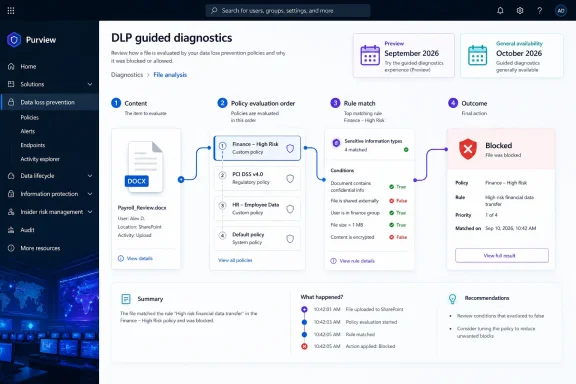 What Microsoft Says the New View Will Explain
Microsoft describes the feature as a diagnostic experience for cases where DLP policies “may not be behaving as expected.” It will show the action taken on a document, every policy triggered, the evaluation sequence, and detailed condition-level results showing whether each condition evaluated true or false.That promise addresses a longstanding source of confusion in DLP administration: an end user sees one visible outcome, while the service may have evaluated multiple rules and policies underneath it. Microsoft’s Purview policy reference explains that rules are executed sequentially, beginning with the highest-priority rule inside a policy. For hosted services such as Exchange Online, SharePoint Online, and OneDrive, content can match multiple rules; the first evaluated rule with the most restrictive action is enforced, while matches for the other rules are retained in auditing and reports.
The behavior diverges further for endpoint DLP. On managed Windows endpoints, Purview can aggregate the most restrictive applicable actions across matching policies. A file that matches one policy blocking print and another blocking removable-media copying can receive both restrictions. The evaluation detail Microsoft is promising could be particularly useful here, because the final user-visible restriction does not necessarily reveal every matched policy or every factor that contributed to it.
Microsoft also documents that only the policy tip associated with the highest-priority, most restrictive rule is shown to the user. That is sensible from a user-experience standpoint—nobody needs a cascade of competing warning banners—but it leaves administrators with an incomplete explanation when policies overlap. The forthcoming view appears designed to expose the concealed evaluation record rather than merely restate the policy tip.
The Missing Detail Is the Workload Scope
Microsoft has not said which Purview DLP locations will be supported at launch. The roadmap speaks of an action “taken on a document,” which suggests SharePoint and OneDrive are likely candidates, but it does not expressly include Exchange, Teams, Devices, unmanaged cloud apps, or Microsoft 365 Copilot interactions. It also does not identify where in the Purview portal the experience will appear, what roles can access it, whether it works for simulation-mode matches, or how long the diagnostic data will be retained.Those omissions matter because the current troubleshooting routes vary sharply by workload.
For SharePoint and OneDrive, Microsoft already provides the
Test-DlpPolicies PowerShell cmdlet. It can report the policy and rule evaluated, the sensitive-information classification, confidence and instance counts, predicate names, predicate match state, past actions, rule actions, rule-level match state, and policy-level match state. But it is constrained: it works only for SharePoint and OneDrive content, only with policies scoped to those locations, and only with simple conditions. It does not support complex, grouped, or nested conditions—the kinds of rules that create the most difficult investigations.Microsoft’s new description specifically promises condition-level true/false detail. If it supports complex rules, it could fill a real gap left by
Test-DlpPolicies. The company has not confirmed that scope, however, and admins should not assume the October release eliminates the cmdlet’s current workload or rule-complexity limitations.Exchange policy-tip troubleshooting illustrates the same fragmentation. Microsoft’s current guidance directs administrators to an automated policy-tip diagnostic in the Microsoft 365 admin center, requiring a global administrator to supply a user identity, a DLP rule name or GUID, and the Outlook client type. If that does not solve the problem, the documented escalation can involve examining Fiddler traces for a
GetDLPPolicyTip request and checking response fields such as detected classification IDs.That is useful support guidance, but it is not a general explanation engine for an individual file or message. The proposed guided experience could make many of those investigations faster—provided Microsoft extends it beyond document-based DLP decisions and supplies enough raw detail to validate its conclusions.
Copilot Assistance Is an E5 Differentiator, but Licensing Needs Watching
The roadmap says Microsoft 365 E5 customers will receive Copilot-powered insights and tailored recommendations to speed troubleshooting and policy optimization. That separates the core diagnostic explanation from the AI-assisted interpretation: the basic summary is announced for the broader feature, while the Copilot layer is explicitly positioned as an E5 capability.Administrators should not equate that statement with a complete licensing answer. Microsoft’s currently documented Get insights with Copilot feature on the Purview DLP policy page remains in preview and has different stated prerequisites: an organization must be licensed for Microsoft Security Copilot, and the operator must hold the Information Protection Administrator role. That existing feature summarizes selected policies—where they look for sensitive data, what they detect, what triggers them, how users are affected, and how administrators are notified.
The new roadmap item describes a more granular workflow: it starts with an action on a specific document and promises recommendations tied to that evaluation. It may share underlying Copilot technology with the existing policy-level feature, but Microsoft has not published the precise entitlement, role, or Security Copilot requirements for Roadmap ID 561032. E5 customers should therefore treat the reference to Copilot-powered guidance as a feature promise, not as confirmation that no separate Security Copilot entitlement or administrator permission will be required.
There is also a governance consideration. A troubleshooting assistant that recommends policy changes based on a single file’s DLP result can be valuable, but a recommendation is not evidence that a rule should be loosened. DLP policies often encode regulatory, contractual, or internal-risk requirements; a false positive may be the result of a poorly tuned sensitive information type, an overly broad scope, an incorrect confidence threshold, a conflicting rule, or simply an intentionally conservative control. A useful AI recommendation should point an administrator to the specific condition, classification evidence, scope, and action that produced the decision—not encourage blind policy edits.
The Practical Benefit Is Faster Policy Tuning, Not Automatic Remediation
Microsoft already recommends running DLP policies in simulation mode before enforcing them. Simulation records what a policy would match without applying its actions, allowing administrators to assess false positives and business impact. That remains the safer place to tune a new rule because it avoids learning about a bad condition only after a document share is blocked or a user’s workflow is interrupted.The guided experience, if it delivers its stated condition-by-condition trace, should improve the feedback loop after a problematic decision occurs. Instead of asking whether a rule “should” have matched, an administrator could inspect the factual path: which sensitive information type was detected, whether its count and confidence threshold met the condition, whether an exception failed, which rule had priority, and why the final action won.
That is more than convenience. Overlapping DLP rules are frequently difficult to reason about from the policy editor alone. Microsoft’s own guidance warns that duplicate rules detecting the same sensitive-data types with the same instance count and confidence level are unnecessary and problematic. A guided evaluation trace could make those overlaps visible in the moment they cause a confusing enforcement outcome.
It will not replace policy design. Administrators should continue to keep rules comprehensible, document exceptions, test in simulation, and avoid creating near-duplicate policies whose interaction depends on priority and restriction severity. The new tool can explain the engine’s answer; it cannot resolve a policy set that contains contradictory business intent.
September Preview Is the Earliest Validation Point
Roadmap ID 561032 is listed for the worldwide standard multi-tenant cloud and web platform, with preview expected in September 2026 and GA in October 2026. Microsoft’s roadmap itself warns that release dates are estimates and can change, and this item has already demonstrated that risk with its shift from the earlier May/August schedule.Until the preview arrives, Purview teams should preserve a repeatable evidence-gathering workflow: export or retain relevant Activity Explorer data, record rule and policy GUIDs, use simulation results before enforcement changes, and use
Test-DlpPolicies where its SharePoint and OneDrive limitations fit the incident. When the preview appears, the key test is whether the guided trace covers complex rules and the DLP workloads that currently require separate troubleshooting paths.
References
- Primary source: Microsoft 365 Roadmap
Published: 2026-08-04T22:45:42.5590566Z
Loading…
www.microsoft.com - Related coverage: learn.microsoft.com
Resolve issues that affect DLP policy tips - Microsoft 365 | Microsoft Learn
Provides diagnostic information and resolutions for issues that cause DLP policy tips to not work.learn.microsoft.com - Related coverage: learn.microsoft.com
Loading…
learn.microsoft.com - Related coverage: sharepointstuff.com
Loading…
sharepointstuff.com