
The practical change is larger than the terse Microsoft 365 Roadmap entry suggests. Today, Purview retention for SharePoint and OneDrive can generally calculate a file’s age from its creation date, last-modified date, labeling date, or an event. The new last accessed option is meant to let administrators distinguish between old files that remain in use and old files that have effectively been abandoned.
Microsoft positions the feature as a way to delete obsolete data and improve the relevance of Microsoft 365 Copilot responses. That is a plausible benefit, but the control itself is a Purview Data Lifecycle Management feature—not a Copilot permission control, an indexing exclusion, or a new data-loss prevention safeguard. It will not decide what Copilot may read, nor will it fix overly broad SharePoint permissions. It gives compliance teams another basis for retaining or deleting files after they have governed access correctly.
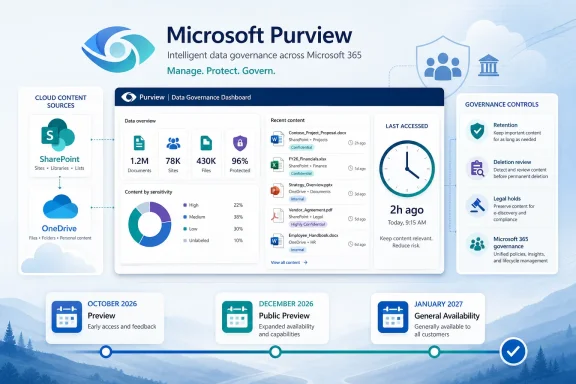 The roadmap date has moved again
Roadmap ID 472030 currently lists preview availability in October 2026 and general availability in December 2026. That wording can easily be read as a completed December launch. Microsoft’s more detailed Message Center notice adds the important rollout windows: preview is expected to run from late October through late November, while worldwide general availability is expected to begin in late December and finish by the end of January 2027.
The dates are a material delay from Microsoft’s prior plan. M365 Archive, which preserves Message Center history, shows that Microsoft previously targeted preview for late June 2026 and general availability for late July through mid-August 2026. The August 18 update pushed preview roughly four months later and moved the end of general rollout into January 2027.
For planning purposes, organizations should treat January 2027—not December 2026—as the safer date for assuming tenant-wide availability. A roadmap month identifies an estimated release period; it is not a promise that every tenant will have the feature on the first day of that month.
Microsoft still lists the item as “in development,” applies it to the worldwide standard multi-tenant cloud, and identifies both Microsoft Purview and Microsoft 365 Copilot as associated products. There is no announcement here for GCC, GCC High, DoD, or sovereign clouds, and no timeline for those environments has been supplied.
“Last accessed” changes the cleanup decision
A retention policy based on last modification answers a narrow question: when did someone last edit the file? That often works for active working documents, but it treats a final, frequently consulted policy manual the same as an untouched draft from years ago. A file can be highly relevant without changing.
The incoming control addresses that distinction. An employee handbook, engineering runbook, approved contract template, project reference deck, or frequently opened spreadsheet could stay in scope because people continue to use it. An old deliverable that nobody opens could advance toward deletion even if it was modified more recently than an actively used reference file.
Microsoft says administrators will be able to use “When items were last accessed” while configuring both retention labels and retention policies. The current message specifies files that have not been accessed by anyone in the organization for a defined time. It also limits the first release to Microsoft 365 file types; support for non-Microsoft 365 file formats is deferred to a later rollout.
That limitation deserves attention. A document library can hold PDFs, images, CAD files, archives, and line-of-business exports alongside Word, Excel, and PowerPoint documents. Microsoft has not yet published the final technical documentation defining exactly which file types qualify, how the service records access, or how it handles edge cases such as previewing, automated services, external guests, search-driven reads, synchronization clients, and application access. Administrators should not presume that every view-like event will reset a retention period until Microsoft documents the tracking rules.
This is particularly important in regulated environments. “Nobody accessed this recently” can be a useful operational signal, but it is not automatically a defensible records classification. Legal, finance, HR, security, and engineering records should continue to be governed by retention requirements tied to record category, event, or statutory schedule—not by user activity alone.
Available by default does not mean deletion begins by default
Microsoft says the capability will be available by default and that no action is required ahead of rollout. That language means the new option should appear in Purview without an administrator having to enable the service. It does not mean Microsoft will automatically delete files based on their last-accessed date.
A Purview administrator must still configure a retention policy or label, choose the retention duration, select what happens when that period ends, and scope it to SharePoint sites or OneDrive accounts. The feature adds a clock; it does not create a cleanup policy by itself.
This distinction matters because Microsoft’s general retention documentation warns that deletion timelines are calculated from the selected start point, rather than from the date a policy was assigned. In other words, administrators must evaluate the age of existing data before selecting an automated delete action. If the new last-accessed choice follows Purview’s established model—as Microsoft’s description indicates—it could identify a substantial backlog of long-unused files as already old enough to meet a chosen threshold once the policy applies.
Microsoft’s own guidance recommends reviewing the age of existing content, communicating the likely effects to users and the help desk, and assessing the policy before it is broadly applied. That is sound advice, particularly where a SharePoint policy is scoped to all sites or a OneDrive policy is scoped to all user accounts.
Purview’s configuration model also has a sharp edge worth rechecking before deployment: a retention policy location set to “On” defaults to “All.” Microsoft warns that if an administrator has included specific sites and then removes the final inclusion, the policy can revert to covering every SharePoint site for that location. For a delete-oriented policy, that is the sort of scope change that should be caught in change control, not discovered after a cleanup job runs.
Retention is not instant deletion
The operational result of a retention policy is more complicated than “unused file disappears.” Microsoft’s SharePoint and OneDrive retention documentation describes several stages that can preserve material after a user edits or deletes it.
When content subject to retention is changed or deleted, SharePoint and OneDrive can preserve a copy in the hidden Preservation Hold library. Microsoft says the service periodically evaluates content there; after the configured retention period ends, the timing can include a minimum 30-day period and a timer job that can take up to seven additional days. When a delete action applies, content then follows the Recycle Bin path, where the second-stage Recycle Bin can keep it for up to 93 days before permanent removal.
Other compliance requirements can override the cleanup outcome. Microsoft states that permanent deletion is suspended if the same item remains subject to another retention policy, a retention label, or an eDiscovery hold. A last-accessed cleanup policy therefore belongs in an overall retention design; it cannot safely be evaluated in isolation from legal holds, records labels, preservation policies, and existing data classifications.
The feature may nevertheless be useful for information-governance teams that have accumulated large volumes of stale collaborative content. It gives them a more precise trigger for low-risk operational cleanup than “last modified,” while allowing active reference material to remain available without requiring users to keep making meaningless edits.
What to review before October
The rollout does not require immediate action, but a pilot will require preparation. The most useful work can start before the preview reaches a tenant:
- Inventory existing Purview retention policies and labels that target OneDrive and SharePoint, especially any with automatic deletion actions.
- Identify document libraries whose files are business records, subject to contractual retention, or likely to become eDiscovery targets, and exclude them from activity-based deletion until their requirements are clear.
- Separate active reference repositories from true working areas. A policy handbook library and an abandoned project workspace may both contain old files, but they should not necessarily share a lifecycle policy.
- Establish a restoration and incident-response process that accounts for Preservation Hold libraries and both Recycle Bin stages, rather than assuming a deleted file is immediately unrecoverable.
- Test the access semantics once preview documentation arrives. The unanswered question is not whether a person opening a Word document counts as access; it is which less obvious interactions do.
Microsoft says it will update its Message Center post with documentation before rollout. That documentation needs to answer the mechanics that the roadmap entry omits: the precise supported file formats, the access events that reset the timer, the treatment of guest and automated access, licensing prerequisites, audit visibility, and whether existing content receives a retrospective last-accessed evaluation.
Until then, the main takeaway is straightforward: Purview is adding an activity-based retention trigger for OneDrive and SharePoint files, but the planned rollout has slipped. Organizations that want to use it for Copilot data hygiene or storage cleanup should prepare for a controlled preview in late October 2026 and plan production policy changes around broad availability completing in January 2027.