
Microsoft To Do is not being retired, and there is no Microsoft announcement, support notice, migration timetable, or service-health message indicating that the personal task app is headed for shutdown. Windows Central’s August 2 column raises a reasonable anxiety shared by longtime users of Microsoft’s smaller apps, but its two proposed futures—abandonment or absorption into Microsoft 365—miss the more consequential reality: To Do has already been folded into Microsoft’s wider work-management architecture while remaining a separate app.
That distinction is important for anyone whose daily workflow depends on To Do’s low-friction lists, reminders, recurring tasks, and cross-device sync. Microsoft’s own current support documentation continues to list dedicated To Do clients for Windows, Mac, iOS, and Android, plus the web app. Google Play also shows a May 31, 2026 update for the Android client, while German download publication CHIP reported a Windows version 2.176 update on July 2. Those are not signs of a product receiving ambitious feature investment, but they are evidence against the idea that it has been left to silently rot.
The real concern is more precise: Microsoft has shifted task-management investment toward Planner, Teams, Outlook, and Copilot. To Do remains supported, useful, and connected—but it is no longer where Microsoft is visibly trying to define the future of work.
Microsoft has spent the past several years describing Planner as a unified work-management layer that brings together the individual-task focus of To Do, Planner’s shared team plans, Project’s scheduling features, and Copilot’s AI capabilities. In May 2025, Microsoft announced the retirement path for Project for the web and explicitly said the new Planner experience integrates Project for the web, To Do, and Planner.
That wording can sound like a death notice for To Do if read too quickly. It is not one.
Microsoft’s current “To Do vs. Planner” support page still makes a firm product distinction. To Do is recommended for individual tasks, daily lists, and shared lists with friends or teammates; Planner is positioned around visual scheduling, charts, Microsoft 365 Groups, Teams, and organization-scale collaboration. Microsoft has not told personal users to move their private lists into Planner, has not published an export deadline, and has not announced that the standalone To Do apps will disappear.
The integration is already practical, too. Microsoft describes To Do as managing individual tasks across To Do, Outlook, and Planner. For Microsoft 365 work accounts, tasks assigned through Planner can surface alongside personal to-dos and flagged email. The app’s value is therefore not merely that it is a simple Wunderlist successor. It is also the personal task inbox at the edge of Microsoft 365’s more complicated project-management stack.
For Windows users, this is probably the strongest reason To Do is unlikely to vanish without a replacement plan. Remove the simple client and Microsoft would need to explain what happens to personal lists, Outlook Tasks, flagged mail, Android and iPhone users, and the familiar “My Day” workflow. Microsoft has done painful migrations before, but this one touches Exchange-backed task data and a broad set of consumer and business workflows.
But stale platform labeling is not proof that the Windows application itself has stopped working or stopped receiving updates. Microsoft’s general To Do support hub still offers a Windows download alongside Mac, iOS, and Android downloads, and it continues to document reminders, list sharing, Outlook integration, mobile setup, troubleshooting, and feedback channels. Microsoft has not published a lifecycle date for the app.
The gap between an actively maintained service and an actively promoted product is where To Do sits. Microsoft is maintaining the basics: synchronized task storage, mobile availability, Exchange and Outlook integration, and ongoing app updates. What it has not supplied is a clear public feature roadmap for the standalone app, a visible stream of release notes, or a modern Windows 11-facing product narrative.
That leaves users to infer the product’s health from incidental evidence: old support text, aging references to Cortana, sparse roadmap entries, and quiet Store updates. It is a poor way to run a product that millions of people rely on for daily reminders, especially when Microsoft is simultaneously launching new AI task and reminder experiences elsewhere.
The omission is Microsoft’s, not the user’s imagination.
Windows Central itself made this point in an earlier Windows Wrap piece about emerging Copilot Reminders. That report argued that Microsoft appeared to be reinventing functionality that To Do already handles: capturing reminders, presenting tasks, and keeping a person on track. Microsoft had not formally announced the Copilot feature at that point, which made the overlap harder to decode.
Microsoft’s subsequent Planner work reinforces the direction of travel. The company announced general availability for Planner Agent in Microsoft 365 Copilot in June 2026, emphasizing AI-assisted creation and management of plans and tasks. This is clearly aimed at paid Microsoft 365 Copilot customers and organizational work, not at someone checking off “buy batteries” from an Android widget. Still, it is where new product energy is going.
The risk for To Do users is less likely to be a sudden service shutdown than a slow fragmentation of Microsoft’s task features:
That is actually closer to To Do’s current position than the column suggests. Both are independent apps that gain enterprise value through Microsoft 365 integration. Whiteboard’s collaboration features make it more naturally tied to Teams meetings and tenant controls; To Do’s simpler personal workflow makes a dedicated app even more defensible.
Microsoft does have a history of combining overlapping products, though. Wunderlist is the obvious example: Microsoft acquired it, built To Do with the Wunderlist team, and ultimately shut Wunderlist down in 2020. But Microsoft did that with an announced replacement and a migration story. There is no equivalent announcement for To Do today.
If Microsoft intends to replace the app with a Planner-based or Copilot-based client, it has not said what becomes of personal accounts, free users, shared shopping lists, mobile widgets, and standalone Windows users. Those unanswered questions are exactly why declaring To Do doomed would be premature.
At the same time, Microsoft’s public investment is plainly concentrated elsewhere: Planner for structured work, Teams for collaboration, Outlook for communications, and Copilot for AI-assisted planning. To Do has become the durable, quiet personal layer beneath those products rather than the headline act.
For users, the practical advice is simple: keep using To Do if its speed and simplicity fit the job. There is no announced migration to make and no credible evidence that lists need to be urgently exported. But users who depend on it for business workflows should understand where their data lives—Exchange and Microsoft Tasks—and should watch Planner and Outlook changes more closely than cosmetic To Do updates.
Microsoft’s next meaningful obligation is not another background app build. It is a plain statement of whether To Do will remain the company’s dedicated personal task app as Planner and Copilot expand around it.
The real concern is more precise: Microsoft has shifted task-management investment toward Planner, Teams, Outlook, and Copilot. To Do remains supported, useful, and connected—but it is no longer where Microsoft is visibly trying to define the future of work.
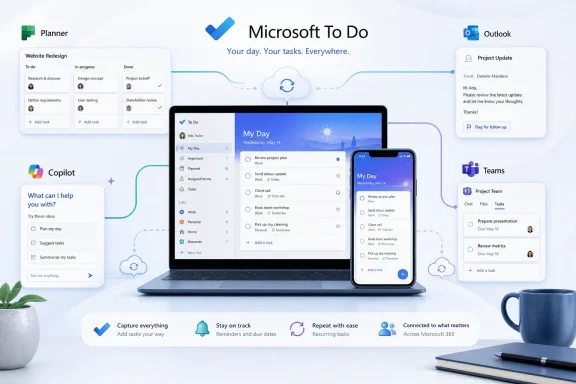 Microsoft has already put To Do inside its Planner strategy
Microsoft has spent the past several years describing Planner as a unified work-management layer that brings together the individual-task focus of To Do, Planner’s shared team plans, Project’s scheduling features, and Copilot’s AI capabilities. In May 2025, Microsoft announced the retirement path for Project for the web and explicitly said the new Planner experience integrates Project for the web, To Do, and Planner.That wording can sound like a death notice for To Do if read too quickly. It is not one.
Microsoft’s current “To Do vs. Planner” support page still makes a firm product distinction. To Do is recommended for individual tasks, daily lists, and shared lists with friends or teammates; Planner is positioned around visual scheduling, charts, Microsoft 365 Groups, Teams, and organization-scale collaboration. Microsoft has not told personal users to move their private lists into Planner, has not published an export deadline, and has not announced that the standalone To Do apps will disappear.
The integration is already practical, too. Microsoft describes To Do as managing individual tasks across To Do, Outlook, and Planner. For Microsoft 365 work accounts, tasks assigned through Planner can surface alongside personal to-dos and flagged email. The app’s value is therefore not merely that it is a simple Wunderlist successor. It is also the personal task inbox at the edge of Microsoft 365’s more complicated project-management stack.
For Windows users, this is probably the strongest reason To Do is unlikely to vanish without a replacement plan. Remove the simple client and Microsoft would need to explain what happens to personal lists, Outlook Tasks, flagged mail, Android and iPhone users, and the familiar “My Day” workflow. Microsoft has done painful migrations before, but this one touches Exchange-backed task data and a broad set of consumer and business workflows.
The stale Windows 10 branding is evidence of neglect, not retirement
Windows Central correctly noticed an embarrassing detail: Microsoft’s To Do materials still refer to Windows 10. The current support setup page says To Do has apps for Android, iOS, Mac, “Windows 10,” and the web. That language is old enough to raise eyebrows in 2026, particularly because Windows 10 reached end of support for most consumer editions in October 2025.But stale platform labeling is not proof that the Windows application itself has stopped working or stopped receiving updates. Microsoft’s general To Do support hub still offers a Windows download alongside Mac, iOS, and Android downloads, and it continues to document reminders, list sharing, Outlook integration, mobile setup, troubleshooting, and feedback channels. Microsoft has not published a lifecycle date for the app.
The gap between an actively maintained service and an actively promoted product is where To Do sits. Microsoft is maintaining the basics: synchronized task storage, mobile availability, Exchange and Outlook integration, and ongoing app updates. What it has not supplied is a clear public feature roadmap for the standalone app, a visible stream of release notes, or a modern Windows 11-facing product narrative.
That leaves users to infer the product’s health from incidental evidence: old support text, aging references to Cortana, sparse roadmap entries, and quiet Store updates. It is a poor way to run a product that millions of people rely on for daily reminders, especially when Microsoft is simultaneously launching new AI task and reminder experiences elsewhere.
The omission is Microsoft’s, not the user’s imagination.
Copilot is the more immediate source of confusion
The strongest case for concern is not that To Do lacks a fresh Windows logo. It is that Microsoft is now building task-oriented experiences around Copilot and Planner without always explaining how they relate to To Do.Windows Central itself made this point in an earlier Windows Wrap piece about emerging Copilot Reminders. That report argued that Microsoft appeared to be reinventing functionality that To Do already handles: capturing reminders, presenting tasks, and keeping a person on track. Microsoft had not formally announced the Copilot feature at that point, which made the overlap harder to decode.
Microsoft’s subsequent Planner work reinforces the direction of travel. The company announced general availability for Planner Agent in Microsoft 365 Copilot in June 2026, emphasizing AI-assisted creation and management of plans and tasks. This is clearly aimed at paid Microsoft 365 Copilot customers and organizational work, not at someone checking off “buy batteries” from an Android widget. Still, it is where new product energy is going.
The risk for To Do users is less likely to be a sudden service shutdown than a slow fragmentation of Microsoft’s task features:
- Personal users may keep a dependable but mostly unchanged To Do app while new AI-assisted task features appear in Copilot.
- Work users may find their task data increasingly organized through Planner, Teams, Outlook, and Copilot rather than through To Do’s own interface.
- Administrators may have to explain why similar tasks appear in different Microsoft experiences depending on license, account type, and where the task was created.
Whiteboard is the wrong precedent
Windows Central suggests that To Do could follow Microsoft Whiteboard into Microsoft 365, perhaps becoming a renamed feature inside another app. Whiteboard is not a clean precedent because Microsoft still distributes Whiteboard as a standalone Windows application and web service. It is integrated with Microsoft 365, Teams, and OneDrive, but it has not been replaced by a hidden panel inside a different product.That is actually closer to To Do’s current position than the column suggests. Both are independent apps that gain enterprise value through Microsoft 365 integration. Whiteboard’s collaboration features make it more naturally tied to Teams meetings and tenant controls; To Do’s simpler personal workflow makes a dedicated app even more defensible.
Microsoft does have a history of combining overlapping products, though. Wunderlist is the obvious example: Microsoft acquired it, built To Do with the Wunderlist team, and ultimately shut Wunderlist down in 2020. But Microsoft did that with an announced replacement and a migration story. There is no equivalent announcement for To Do today.
If Microsoft intends to replace the app with a Planner-based or Copilot-based client, it has not said what becomes of personal accounts, free users, shared shopping lists, mobile widgets, and standalone Windows users. Those unanswered questions are exactly why declaring To Do doomed would be premature.
To Do’s future is maintenance with strategic importance
The evidence supports a less dramatic conclusion than “Microsoft Graveyard,” but it is not an all-clear either. Microsoft To Do is alive, distributed across its supported platforms, and connected to the company’s core Exchange and Outlook task infrastructure. Its Android client has been updated this year, and its Windows application continues to receive releases. No retirement notice exists.At the same time, Microsoft’s public investment is plainly concentrated elsewhere: Planner for structured work, Teams for collaboration, Outlook for communications, and Copilot for AI-assisted planning. To Do has become the durable, quiet personal layer beneath those products rather than the headline act.
For users, the practical advice is simple: keep using To Do if its speed and simplicity fit the job. There is no announced migration to make and no credible evidence that lists need to be urgently exported. But users who depend on it for business workflows should understand where their data lives—Exchange and Microsoft Tasks—and should watch Planner and Outlook changes more closely than cosmetic To Do updates.
Microsoft’s next meaningful obligation is not another background app build. It is a plain statement of whether To Do will remain the company’s dedicated personal task app as Planner and Copilot expand around it.
References
- Primary source: Windows Central
Published: 2026-08-02T12:08:38+00:00
Loading…
www.windowscentral.com - Related coverage: windowscentral.com
Everything we know so far about Windows 11’s big 2026 (26H2) update arriving this fall, including changes for Start menu, Taskbar, and Search | Windows Central
Here are all the Start menu, Taskbar, and Windows Search improvements coming with version 26H2.www.windowscentral.com - Related coverage: support.microsoft.com
Loading…
support.microsoft.com - Related coverage: support.microsoft.com
Loading…
support.microsoft.com - Related coverage: apps.apple.com
Loading…
apps.apple.com - Related coverage: learn.microsoft.com
Loading…
learn.microsoft.com - Related coverage: microsoft.com
Microsoft 365 Roadmap | Microsoft 365
The Microsoft 365 Roadmap lists updates that are currently planned for applicable subscribers. Check here for more information on the status of new features and updates.www.microsoft.com
- Related coverage: learn.microsoft.com
Loading…
learn.microsoft.com - Related coverage: help.chi.ac.uk
Loading…
help.chi.ac.uk - Related coverage: releaseplans.microsoft.com
Microsoft Release Planner · Microsoft Release Planner
Find out what's new in Dynamics 365 (including Sales, Service, Marketing, Finance, Supply Chain Management, Human Resources, Business Central, and Commerce apps) and Power Platform (including Power BI, Power Apps, Power Automate, and Power Virtual Agents)releaseplans.microsoft.com - Related coverage: blogs.windows.com
Loading…
blogs.windows.com - Related coverage: devblogs.microsoft.com
SharePoint Framework (SPFx) roadmap update – July 2026 - Microsoft 365 Developer Blog
June celebrates the announcement of upcoming SharePoint Copilot Apps, ships the quality-focused SPFx 1.23.2 release, and shares the roadmap for the AI era - shaped by your feedback.devblogs.microsoft.com - Related coverage: techcommunity.microsoft.com
Loading…
techcommunity.microsoft.com - Related coverage: datero.fi
Loading…
www.datero.fi - Related coverage: cdn-dynmedia-1.microsoft.com
Loading…
cdn-dynmedia-1.microsoft.com - Related coverage: gettingthingsdone.com
Loading…
gettingthingsdone.com - Related coverage: tomsguide.com
Microsoft Build 2026 preview — all the big announcements to expect | Tom's Guide
Microsoft Build 2026 should be a showcase for the company's latest and upcoming AI efforts. Here are some of the big announcements we expect to see.www.tomsguide.com - Related coverage: tomsguide.com
Biggest Microsoft Build 2026 announcements — agentic AI, RTX Spark Dev Box, GitHub Copilot app, new MAI models, and more | Tom's Guide
All the big news from Microsoft's AI-focused eventwww.tomsguide.com - Related coverage: techradar.com
From Quantum to Containers - 4 big things you might have missed at Microsoft Build 2026 | TechRadar
We round up some of the other major news from Microsoft Build 2026www.techradar.com - Related coverage: play.google.com
Loading…
play.google.com - Related coverage: techcommunity.microsoft.com
Loading…
techcommunity.microsoft.com - Related coverage: play.google.com
Loading…
play.google.com - Related coverage: microsoft.com
Loading…
www.microsoft.com - Related coverage: cdn.techcommunity.microsoft.com
Loading…
cdn.techcommunity.microsoft.com - Related coverage: cdn.techcommunity.microsoft.com
Microsoft Planner FAQ
cdn.techcommunity.microsoft.com
- Related coverage: cdn-dynmedia-1.microsoft.com
- Related coverage: res.cdn.office.net
Loading…
res.cdn.office.net - Related coverage: blogs.windows.com
Loading…
blogs.windows.com - Related coverage: chip.de
Loading…
www.chip.de - Related coverage: download.microsoft.com