
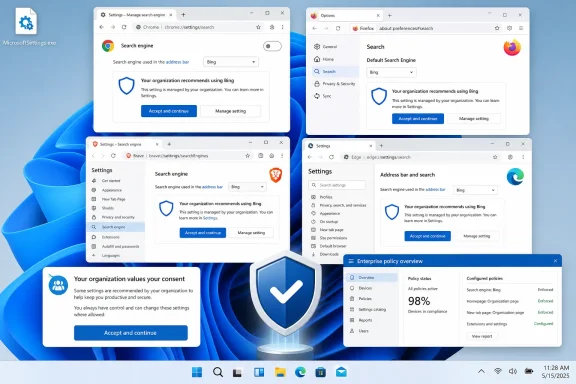
MicrosoftSettings.exe from a Microsoft download server, offers to deploy Microsoft’s Bing homepage-and-search extension into installed browsers, including Chrome, Firefox, and Chromium-based browsers such as Brave.The important correction to the headline is that “forces Bing everywhere” overstates what has been documented so far. According to Windows Latest’s hands-on test, the setup screen presents a preselected “Yes” option and requires the person running it to choose “Accept and continue.” Chrome and Brave then display their own extension-approval warnings, and Chrome presents an additional option to restore Google Search after the Bing extension changes the browser’s settings.
That does not make the design unobjectionable. A separate executable whose apparent purpose is to change browser search, homepage, and new-tab behavior across competing browsers is a more deliberate distribution mechanism than a typical web-store extension install. But it is materially different from a silent, policy-enforced installation or a Windows Update payload that changes browser settings without a user-facing approval flow.
No Microsoft announcement or support document describing MicrosoftSettings.exe was publicly indexed when this report emerged, and no second outlet has independently reported the program’s availability, rollout scope, or download path. The existence of Microsoft’s underlying extension is not in doubt: the Chrome Web Store lists “Microsoft Bing Homepage & Search for Chrome” as published by Microsoft Corporation. The question is whether this standalone wrapper is a limited campaign experiment, a broader consumer acquisition tool, or something that will be promoted through Windows surfaces later.
 The extension is older than the reported installer
The Chrome Web Store record adds an important piece of context missing from the initial report. Microsoft’s Bing extension is not new: the listing identifies version 1.0.0.27 and says it was last updated on July 25, 2024. It is presented as a tool to set Bing as the default homepage and search engine, with a stated user base in the millions.
In other words, Windows Latest has not uncovered a new Bing browser extension. It has reported a possible new installer and promotion path for an established extension. That distinction matters to administrators and technically minded users because it narrows the immediate risk: there is no evidence that Microsoft has introduced a previously unknown browser-control mechanism. The reported program appears to package an existing browser extension with a Windows-native onboarding flow and a Microsoft Rewards redirect.
That packaging is still notable. Browser extension marketplaces make the install source, permission request, and target browser explicit before installation. A standalone executable can create a different expectation, particularly when it uses a generic name such as MicrosoftSettings.exe and describes itself as “recommended search settings.” A user could reasonably mistake it for an operating-system configuration utility rather than a cross-browser promotional tool.
Windows Latest says the app’s initial screen identifies the affected products as Microsoft Edge, Mozilla Firefox, and Google Chrome. Yet its direct testing described the Chrome and Brave experience in detail, including the extension’s approval prompt and Chrome’s recovery option. The report did not document a corresponding Firefox installation sequence or publish technical evidence showing how the executable locates browsers, handles profiles, or installs into each browser family. Those are not minor implementation details: Chrome, Firefox, and Brave have distinct extension-management models and different enterprise controls.
Browser safeguards make this a consent fight, not a takeover
Chrome’s behavior in the Windows Latest test is the central practical finding. When the Bing extension attempts to alter default search, the homepage, and startup behavior, Chrome warns that the extension can read and change data on websites, show notifications, and modify those settings. Chrome also offers to reverse the new default-search selection after the change.
Microsoft’s prompt reportedly appears alongside that recovery warning and urges the user not to switch back. That is aggressive product marketing, but it is also evidence that the browser’s own protections remain in place. If users decline the extension, reject its permissions, remove it later, or choose Chrome’s “Change it back” option, Bing does not remain the default merely because the Windows executable was run.
There is a useful operational definition of forced here. In a managed-browser environment, an extension becomes effectively forced when an administrator deploys it through policy so that it installs silently and users cannot disable or remove it. Google’s Chrome Enterprise documentation describes its ExtensionInstallForcelist policy in precisely those terms. Microsoft’s reported consumer installer, by contrast, appears to require interaction at both the Windows-app and browser-extension stages.
That does not excuse the preselected Bing choice. Defaults are influential precisely because many users accept them without reading the surrounding text. Microsoft has a long record of using Windows prompts, Edge onboarding, Rewards offers, and search integrations to steer users toward Bing. The reported tool would extend that familiar approach beyond Edge, where Microsoft has direct product control, into browsers where it does not.
The Chrome Web Store listing also shows why the permission question deserves more attention than the Bing-versus-Google argument. Any extension authorized to change search and homepage settings needs broad integration with the browser. Users should read the browser’s permission dialog instead of treating a Microsoft-branded executable as inherently safe to approve. Authentic publisher identity does not remove the need to decide whether a homepage feed, search-provider change, and new-tab customization are wanted.
The enterprise issue is software control, not Bing preference
For IT departments, this is not primarily a search-engine dispute. It is an endpoint-management question: can users download and run a consumer installer that modifies browser configuration across the fleet, and does the organization have an approved-extension policy capable of stopping it?
Chrome administrators can block a specific extension through the ExtensionInstallBlocklist policy. Google’s documentation says a blocked extension that is already present is disabled and cannot be re-enabled until it is removed from the blocklist. The extension ID for Microsoft Bing Homepage & Search for Chrome is ddojnmkongaimkdddgmcccldlfhokcfb, according to the Chrome Web Store listing.
A disciplined response does not require an emergency block solely because Bing is involved. Administrators should first determine whether the extension is permitted under their existing browser-extension rules and whether its requested permissions align with policy. Organizations that already use a default-deny extension posture and explicit allowlists should be insulated from ad hoc consumer installers trying to add browser components.
Where that control is absent, this report is a useful prompt to audit it. Browser settings can be changed by extensions, device-management profiles, scripts, malware, vendor utilities, and well-meaning users responding to a pop-up. The common defense is not a custom rule for every search provider; it is clear ownership of browser configuration, monitoring for new extensions, and an approval process for software that touches authentication, search, new tabs, or web traffic.
Firefox administrators should likewise verify their enterprise policy configuration rather than assume Chrome controls apply across the estate. Mozilla supports enterprise policies through Active Directory and Local Group Policy, but extension rules must be set within Firefox’s own policy framework. Brave deployments need the same review because Brave is Chromium-based but has its own product configuration and distribution decisions.
Microsoft has not explained who is supposed to run it
The most conspicuous missing information is Microsoft’s intent. Windows Latest says the executable is neither offered through the Microsoft Store nor delivered through Windows Update. If that remains true, its discoverability will determine whether it is a niche download, a campaign landing-page offer, a partner-bundled component, or a program Microsoft eventually advertises through Windows notifications and Rewards promotions.
Microsoft has also not publicly stated whether the tool is restricted by Windows edition, geography, Microsoft account status, browser version, or device-management state. Nor is there a documented explanation of what happens if a browser has multiple profiles, a locked default search provider, an existing enterprise policy, or a competing extension that manages the same settings. Those omissions make it premature to describe the executable as a broad Windows 11 feature.
The reported Rewards redirect is revealing, though. It suggests that the tool’s function is less about repairing a browser configuration than improving Bing conversion and retention. If the program were simply a system utility for people who had chosen Bing, there would be little reason to end the flow at a rewards offer. The sequence described by Windows Latest—preselected Bing option, cross-browser extension prompts, then Rewards—looks like an acquisition funnel.
For ordinary users, the response is simple: do not run MicrosoftSettings.exe unless changing browser search, homepage, and new-tab settings to Bing is the specific outcome you want. For administrators, the immediate task is to confirm that Chrome, Firefox, Brave, and Edge extension policies are enforced consistently. Microsoft may be testing a new route into browsers it does not own, but browser permissions and enterprise policy—not the installer’s branding—still decide whether that route stays open.