
But the comparison also exposes a problem with this fast-moving market. Product names, defaults, and documentation are changing so quickly that even official records are briefly out of sync. Midjourney’s live creation interface says V8.2 is live, while its own version documentation, still visible this month, identifies V8.1 as the default model. GizmoTimes says V8.2 became the default on July 24, 2026, but Midjourney’s documentation has not been updated to independently confirm that exact date or default status.
That discrepancy is not a minor housekeeping issue. A team standardizing prompts, estimating GPU consumption, or troubleshooting changed output needs to know precisely which model generated an asset. “V8.2 is available” and “V8.2 is the default for every job” are operationally different claims.
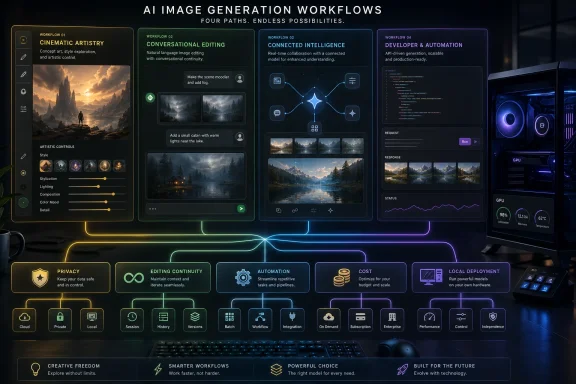
OpenAI, Google, Midjourney, and Black Forest Labs are all pushing image generation toward an in-context process: create an image, point to a defect, provide references, and continue working. The practical winner is therefore the product that creates the fewest handoffs in a given job.
 Midjourney V8.2 remains the art-direction tool, with a privacy price
Midjourney is still the most deliberately creative environment of the four. Its strength is not merely that it can produce polished, cinematic illustrations. It exposes a vocabulary for steering image output — stylization, aspect ratio, variation, personalization, style references, moodboards, and related controls — that gives an art director more leverage than a generic chat box alone.
For concept art, campaign explorations, album covers, game environments, character ideation, and visual moodboards, that matters. A user is not trying to get a single technically correct image; they are searching through an aesthetic space. Midjourney’s controls make it easier to ask for ten directions that are meaningfully different, then deepen one without writing a completely new creative brief each time.
The V8 family also brings native HD generation. Midjourney’s V8.1 documentation describes 2K HD generation, although it warns that inpainting and outpainting operations can return an image to standard definition. This is exactly the sort of implementation detail absent from broad “best generator” rankings: an apparently high-resolution source can lose that property in the edit stage, requiring another upscale before delivery.
GizmoTimes is right to flag Midjourney’s plan structure as a constraint, not a footnote. Midjourney’s official plan table lists monthly Basic, Standard, Pro, and Mega subscriptions at $10, $30, $60, and $120. Standard and above receive unlimited image generations in Relax Mode, but Stealth Mode is reserved for Pro and Mega subscribers.
For a hobbyist, that is an upsell. For a business preparing unreleased hardware, product packaging, client work, or internal mock-ups, it is a minimum entry price. Midjourney’s own plan page also says businesses with more than $1 million in annual gross revenue need Pro or Mega for commercial use. The subscription tier is therefore part of the licensing and confidentiality calculation, not just a measure of how many images a designer can make.
Midjourney is the best choice here when creative exploration is the bottleneck. It is a worse fit when the deliverable must stay private at a low monthly cost, when images need to enter an automated Windows-based production pipeline, or when an organization needs an API-first service level.
ChatGPT Images 2.0 wins when the brief keeps changing
OpenAI formally introduced ChatGPT Images 2.0 on April 21, 2026, and its developer-facing counterpart is GPT Image 2. The old shorthand — “use DALL-E” — is no longer a reliable description of OpenAI’s current image-generation offering, though DALL-E remains available through a separate GPT for eligible ChatGPT users.
The distinction matters because ChatGPT Images 2.0 is a product experience, while GPT Image 2 is a model developers can call through the API. A marketing coordinator working in ChatGPT and a Windows developer integrating image creation into an internal application may be using related technology, but they face different quotas, controls, billing, and operational risks.
OpenAI’s real advantage is the conversation. If the initial result needs a different crop, a corrected product color, a less cluttered background, updated wording, or a new visual hierarchy, the user can keep refining in natural language with the earlier context still present. That removes much of the prompt reconstruction that makes conventional image tools feel brittle.
The company’s documentation says ChatGPT Images 2.0 is available across ChatGPT tiers, though limits vary by plan. Its more computationally intensive “Images with thinking” mode is available to Plus, Pro, and Business users, with Enterprise and Edu access still pending according to OpenAI’s current help documentation. That makes it accessible, but it does not make it a guaranteed unlimited production service.
For API users, the per-image bill can be both clear and misleading. OpenAI’s published approximate pricing puts a 1024-by-1024 GPT Image 2 output at about $0.006 in Low quality, $0.053 in Medium, and $0.211 in High, before relevant input charges. That is inexpensive for isolated assets but substantial if a team is repeatedly generating high-quality variants at scale. One thousand high-quality square images is roughly $211 in output charges before edits, retries, input images, and text tokens.
Independent coverage from Tom’s Guide focused on improved text rendering, a central promise of the launch. OpenAI itself highlights dense text, stronger instruction following, and multilingual typography. Those improvements make ChatGPT a serious option for posters, social graphics, illustrated explainers, and slide artwork, but users should not mistake better typography for an error-free layout engine. Brand spellings, small-print copy, diagrams, tables, product specifications, and legal text still require human review before publication.
ChatGPT Images 2.0 is the strongest general-purpose option for people whose image work begins as a written brief and ends in revisions. Its limitation is that its controls are intentionally abstracted. That is convenient until a production team needs deterministic parameters, a fixed model endpoint, cost ceilings, or reusable automation outside the ChatGPT interface.
Nano Banana is Google’s replacement path, not one simple model
Google’s naming is the least friendly to people comparing tools from a distance. “Nano Banana” refers to a family rather than one static product, and the mapping between public nickname and formal model identifier is easy to lose in tutorials and code samples.
Google’s current developer documentation identifies Gemini 3.1 Flash Image as Nano Banana 2, Gemini 3.1 Flash Lite Image as Nano Banana 2 Lite, and Gemini 3 Pro Image as Nano Banana Pro. Nano Banana 2 is Google’s stated all-around choice for intelligence, cost, and latency; the Lite model is aimed at lower-latency, cost-sensitive generation and editing; Nano Banana Pro is positioned for complex instructions, search grounding, and image generation up to 4K.
The important deadline is August 17, 2026. Google says Imagen models are deprecated and will be shut down on that date, directing developers to migrate to Nano Banana endpoints and a different API method. That is a more consequential change than a branding refresh: integrations using the older Imagen API need code changes in model selection, request handling, and response parsing.
GizmoTimes accurately identifies the migration, but its broader suggestion that Google users should simply “choose Nano Banana” understates the compatibility work. An enterprise application using Imagen model names and
generate_imagescalls cannot assume a model-name swap will be enough. Google’s migration guidance says Nano Banana returns content parts through the Gemini
generate_contentworkflow rather than Imagen’s dedicated image-response structure.
Google’s pricing starts around $0.067 for a 1K image, $0.101 for 2K, and $0.151 for 4K on the listed paid rate for the relevant image model. Those figures look straightforward, yet developers also need to account for image-per-minute limits, tier qualification, preview status where applicable, and the difference between the Gemini consumer app and the Gemini API.
Android Central reported that Nano Banana 2 replaced Nano Banana Pro for most Gemini app users, with Pro retained for specialized regeneration. That makes Google’s consumer experience more streamlined than the developer nomenclature suggests. For a Gemini-centered organization, the family is a sensible fit. For everyone else, it is only compelling if Google Search grounding, Gemini integration, or the tiered performance options solve a real workload problem.
FLUX.2 offers the clearest route to controlled production
Black Forest Labs’ FLUX.2 family is the least casual product in this comparison and the most relevant to teams that need image generation to behave like infrastructure. Its lineup spans FLUX.2 klein, pro, flex, max, and dev, with different priorities around speed, quality, fine-grained controls, grounding, and local development.
The key advantage is reference-led work. Black Forest Labs documents multi-reference editing across the family, with higher-end offerings supporting up to eight references through the API and up to 10 in its Playground. That is particularly useful for product catalogs, consistent characters, retail variations, and visual systems where a brand object, person, or composition must remain recognizable across hundreds of outputs.
FLUX.2 max adds web-grounded generation, while flex is the version Black Forest Labs positions around fine control and typography. Pro targets production throughput; klein targets high-volume, real-time work. Its current pricing begins at $0.014 per image for klein 4B, $0.03 per megapixel for pro, $0.06 for flex, and $0.07 for max. Image edits can cost more than a straightforward generation on some variants.
There is a material Windows-specific implication here. FLUX.2 klein 4B has open weights and Black Forest Labs says it can run on consumer hardware with roughly 13GB of VRAM. That does not mean every PC can run it comfortably, nor does it eliminate the work of configuring drivers, Python environments, model files, and an inference workflow. It does create an option no fully hosted competitor offers: keeping a workflow within local infrastructure rather than submitting every prompt and reference image to a cloud service.
VentureBeat’s reporting on the klein release emphasized sub-second generation on high-end hardware. That benchmark should not be read as a promise for a desktop GeForce card, but the product direction is clear: FLUX.2 is designed for applications that need lots of images with controlled cost and fewer per-seat constraints.
The licensing caveat deserves the same attention as the hardware headline. “Open weights” is not a synonym for unrestricted commercial usage. Black Forest Labs’ own model overview distinguishes the Apache 2.0 license for klein 4B from its separate FLUX Non-Commercial License for klein 9B, while FLUX.2 dev is described as free for non-commercial local development. Procurement teams should read the license attached to the exact weight file and model variant they intend to deploy.
The practical winner depends on the handoff you eliminate
Midjourney V8.2 is the strongest starting point for art direction and deliberate visual experimentation, provided its privacy tier and subscription model fit the job. ChatGPT Images 2.0 is the most useful default for people who need to turn a written brief into an image, then revise it conversationally without moving between tools. Nano Banana is the natural choice for teams already committed to Gemini, especially as Google retires Imagen on August 17. FLUX.2 is the best fit for developers, catalog-scale production, multi-reference consistency, and local or API-controlled deployment.
The buyer mistake is choosing from a gallery of one-shot showcase images. Run the same real brief through each candidate, then require two edits, one reference-image change, a text-heavy variant, the necessary export sizes, and a review of where prompts and source images are stored. That test will expose the expense, latency, moderation, privacy, and control limits that no polished launch sample can show.