
Geeky Gadgets, citing ETA Prime’s hands-on coverage, presented the system as a buildable Windows 11 machine pairing Intel’s 14-core Core Ultra 5 235HX with an RTX 4060 or RTX 5060. Minisforum’s own product documentation confirms the core proposition: the MS-02 Ultra has a PCIe 5.0 x16 physical expansion slot, four DDR5 SO-DIMM sockets, a 350W internal power supply, and room for a dual-slot GPU.
But its documentation also corrects several assumptions in the promotional overview. GPU installation changes the CPU’s default power limits, consumes an adjacent expansion slot, and makes graphics-card dimensions, slot width, cooling, and power requirements the deciding factors. The MS-02 Ultra is small because it tightly manages those constraints—not because it has somehow eliminated them.
 The RTX 4060 claim needs a compatibility check
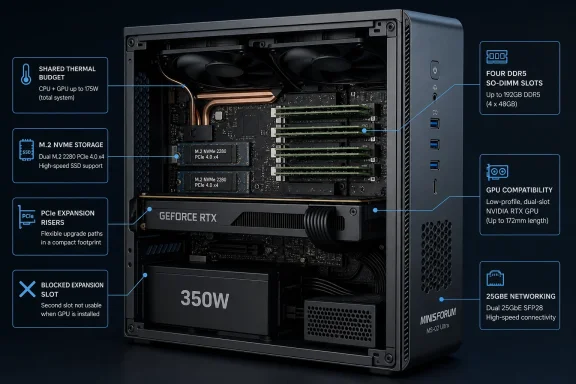
An RTX 4060 can physically fit only if it is a suitable low-profile, dual-slot design. That distinction excludes the overwhelming majority of retail RTX 4060 cards, which use full-height coolers and frequently take more than two slots. A reference to “a full desktop GPU” is therefore too broad for a buyer planning a build around a card already on hand.
Minisforum specifically lists the Gigabyte GeForce RTX 5060 OC Low Profile, Asus GeForce RTX 5060 LP, and Zotac Gaming GeForce RTX 5060 Low Profile as supported low-profile, dual-slot examples. Its guide also says half-height single-slot cards that do not require supplemental power are supported by default, citing Nvidia’s RTX 4000 Ada Low Profile as an example.
The company’s published compatibility material does not list a specific RTX 4060 model. That does not mean an RTX 4060 Low Profile cannot work—ETA Prime’s reported configuration is useful evidence that one can—but it means prospective buyers should treat that GPU choice as a component-level build decision rather than a blanket platform guarantee.
Before ordering, check four things: the card’s height, its exact slot thickness, whether its PCIe power connector can be accommodated inside the chassis, and whether installing it blocks the expansion hardware you intended to use. Minisforum’s own guidance says a dual-slot low-profile GPU blocks one PCIe x4 slot.
A PCIe x16 connector is not the whole bandwidth story
The submitted report says the PCIe Gen 5 x16 slot operates at x4 speed. Minisforum’s official product page instead describes the primary GPU-capable connection as a PCIe 5.0 x16 expansion slot and separately describes up to three PCIe slots. Its documentation makes clear that the machine’s other expansion resources include x4-class connectivity for storage and networking.
That discrepancy is important. A physical x16 connector can carry fewer electrical lanes, and the difference has direct consequences for GPU performance, storage expansion, and add-in-card choices. Yet Minisforum’s publicly available specifications do not substantiate the claim that the main GPU slot is electrically limited to x4.
Readers should not assume either a full Gen 5 x16 electrical link or an x4 limitation without checking the exact SKU, firmware documentation, and slot diagram that ship with the system. Minisforum has sold the MS-02 Ultra with Core Ultra 9 285HX, Core Ultra 9 275HX, and Core Ultra 5 235HX processors, and capabilities differ among those versions.
What is clear is that the chassis is designed around low-profile expansion. It gives a much neater internal-GPU option than a Thunderbolt or OCuLink eGPU dock, but it does not provide the component freedom of a Mini-ITX case.
The GPU lowers the CPU’s sustained power budget
This is the operational detail missing from most performance-focused coverage. Minisforum says the Core Ultra 9 285HX runs at a 100W PL1 sustained limit and 140W PL2 turbo limit without a discrete GPU. With a GPU installed, the factory limits fall to 90W PL1 and 110W PL2 because the CPU and GPU share the system’s thermal budget.
The reduction is more severe on the Core Ultra 5 235HX configuration cited by Geeky Gadgets. Minisforum specifies 80W PL1 and 100W PL2 without a discrete GPU, dropping to 60W PL1 and 100W PL2 with one installed.
In other words, the MS-02 Ultra can combine a competent HX-series mobile processor with discrete graphics, but a GPU-equipped build is not the same as a 140W CPU workstation plus a fully unconstrained graphics card. For gaming, the discrete GPU usually matters more. For CPU-heavy video encoding, compiling, simulation, virtual machines, or long render jobs, the lower sustained CPU target belongs in the purchase calculation.
Minisforum says the system uses six heat pipes, dual fans, phase-change thermal material, and a through-flow cooling layout. The company rates the setup for up to 140W turbo and 100W sustained CPU operation, but those are vendor specifications rather than independently standardized acoustic or thermal results. Users planning continuous high-load work should expect to tune fan behavior in the BIOS and validate temperatures and clock behavior after assembly.
Four RAM slots do not mean 6400 MT/s at 256GB
The MS-02 Ultra supports up to 256GB across four DDR5 SO-DIMM slots, which is unusually generous for a chassis of this size. For developers running several local test environments, administrators building a compact lab host, or creators working with memory-hungry assets, capacity may be a bigger differentiator than the GPU slot.
However, the claim of DDR5-6400 support overstates the normal configuration. Minisforum’s memory compatibility guide says factory defaults are 4,800 MHz for single-rank modules and 4,400 MHz for dual-rank modules. The company explains that its four-slot layout shares memory channels, increasing supported capacity while reducing the frequency the platform can reliably sustain.
Its official shipping list shows many 16GB, 32GB, and 48GB modules operating at 4,400 or 4,800 MHz despite carrying 5,600 MHz native ratings. The same guide says some combinations can reach higher speeds after testing, but recommends full memory testing and explicitly warns that overclocking can cause instability or data loss.
That is a sensible trade-off for the audience Minisforum is targeting. A 128GB or 256GB Windows 11 workstation with ECC capability on the 285HX model is potentially more valuable for VMs, containers, edge services, and media work than a small gain in memory bandwidth. But it also means buyers should purchase validated SO-DIMMs, populate the recommended slots, and avoid treating the maximum memory figure as a promise of maximum RAM speed.
Storage and networking depend on the processor SKU
The barebones format means the advertised price is only the starting point. Minisforum’s U.S. store lists the MS-02 Ultra barebone with a Core Ultra 9 285HX at $1,159, while its configurations with memory and storage cost substantially more. Add a low-profile GPU, DDR5 SO-DIMMs, NVMe storage, and Windows licensing if needed, and this can quickly become a far more expensive system than the compact exterior suggests.
Storage capacity also varies by configuration. The 275HX and 235HX versions have two onboard M.2 2280 NVMe slots. The 285HX version can reach four M.2 slots when equipped with Minisforum’s dedicated Intel E810 25GbE expansion card, which carries two additional M.2 sockets.
That card is useful for a fast NAS, editing workstation, or compact virtualization box, but Minisforum says its attached NVMe slots default to PCIe 3.0 x4 for compatibility. Users can switch them to PCIe 4.0 in firmware, though Minisforum recommends benchmarking afterwards and reverting if problems appear. This is a genuine workstation-style feature, but it is not equivalent to four identical motherboard-attached Gen 4 slots.
The 285HX is also the configuration that adds ECC memory support, Intel vPro support, and dual 25GbE SFP+ networking. Minisforum’s guide notes that the 25GbE controller adds considerable idle draw: it reports roughly 22W at Windows idle with the card installed, compared with roughly 10W to 13W without it. For an always-on home-lab or small-office system, that is a practical power and heat consideration.
A compact Windows workstation, not a console replacement
Windows 11 makes the MS-02 Ultra straightforward to use as either a desktop workstation or a living-room gaming PC, and Steam Big Picture Mode can make a controller-driven setup feel more appliance-like. Those software features are ordinary Windows capabilities, though; they do not solve the hardware planning required by this machine.
The MS-02 Ultra makes the strongest case for buyers who need an unusually dense mix of desktop-class expansion, high memory capacity, fast networking, and a serviceable chassis. Its slide-out internal design, optional ECC support, multiple PCIe positions, and 25GbE options are more distinctive than the gaming angle.
For a buyer focused solely on 1440p gaming, a larger small-form-factor PC may deliver less restrictive GPU selection and easier cooling. For a Windows 11 developer workstation, compact server, editing node, or desk-bound lab system that can also run a carefully chosen low-profile RTX card, the MS-02 Ultra offers a rare combination—provided the GPU and SKU are selected around the platform’s real power, slot, and memory limits.
