
The Minisforum N5 Max is one of the few NAS appliances that can credibly run a local language model while serving files at high speed, but IT Pro’s testing shows that buyers are purchasing a powerful hardware platform and volunteering to finish its software product. The $2,599 barebones system pairs AMD’s Ryzen AI Max+ 395 with five SATA bays, five M.2 slots, 64GB of unified LPDDR5X memory, dual 10GbE, and USB4 v2 ports—an unusually dense combination for a five-bay enclosure.
IT Pro’s review finds the N5 Max capable of exceptionally fast storage work and useful local inference, especially with mixture-of-experts models. Its conclusion is more important than the headline benchmark numbers, though: Minisforum’s preinstalled MinisCloud operating system is not yet mature enough to be the reason an administrator trusts this box with important data. For Windows users and small teams, the practical buying decision is therefore whether they are prepared to install and maintain TrueNAS, OpenMediaVault, Proxmox, or another operating system themselves.
Minisforum markets the N5 Max as an integrated “AI NAS,” complete with local semantic search, photo features, containers, ZFS snapshots, remote access, and its MinisOpenClaw agent tooling. The company’s own U.S. storefront, however, still labels MinisCloud as a beta version and says that one-click permission control and UPS protection are planned for an update by the end of the third quarter of 2026. That is a notable gap between the appliance pitch and the current product: permissions and power-failure handling are baseline operational concerns for a device intended to consolidate both files and AI workloads.
AMD’s Ryzen AI Max+ 395 is the N5 Max’s defining component. It has 16 Zen 5 CPU cores and 32 threads, a 40-compute-unit Radeon 8060S integrated GPU, and an XDNA 2 NPU rated at up to 50 TOPS. AMD lists up to 126 TOPS for the overall platform, a headline figure that includes multiple compute engines rather than a direct measure of LLM generation speed.
The more consequential characteristic is memory design. The processor uses a wide, 256-bit LPDDR5X memory interface, and Minisforum’s 64GB configuration lets the integrated GPU access a much larger pool than the VRAM available on many consumer graphics cards. That permits local models that would not fit entirely on a 12GB or 16GB GPU. It does not make this integrated GPU equivalent to a workstation-class discrete accelerator: unified system memory has far less bandwidth than dedicated GDDR6 or HBM VRAM, and dense models expose that deficit quickly.
IT Pro’s tests make the trade-off clear. The N5 Max produced around 72 tokens per second with Llama 3.2 3B, a respectable result for an always-on appliance. But its GeForce RTX 5070 comparison system reached 316 tokens per second on the same lightweight model. The Nvidia card’s small 6GB VRAM pool could not practically host the larger models without CPU offload, however, where the N5 Max’s shared 64GB pool gives it a real advantage.
The best fits are models designed to activate only part of their parameters on each token. IT Pro measured roughly 44 tokens per second on Gemma 4 26B, a mixture-of-experts model, while dense Gemma 4 31B fell to about 9 tokens per second. A separate hands-on assessment from Level1Techs reached the same broad conclusion under Proxmox and Linux containers: a Qwen 30B mixture-of-experts model generated at approximately 62 tokens per second, while denser model formats were dramatically slower.
That is the central technical reality of the N5 Max. It is a capable local AI server for carefully chosen, quantized models—not a general substitute for a high-VRAM Nvidia workstation.
Level1Techs documented the same default split in more detail: about 60GB is usable after platform reservations, with the out-of-box configuration assigning roughly half to CPU use and half to GPU-visible memory. Its testers reported that an AI-focused configuration can push GPU visibility higher, but at a sharp cost to RAM available for the host and storage services.
This is where the N5 Max’s two identities collide. ZFS benefits from memory for its Adaptive Replacement Cache, and a NAS serving several users, snapshots, containers, or virtual machines needs headroom. Allocating 48GB or more toward local inference turns the system into an AI appliance with storage attached; leaving the default split makes it a balanced but constrained NAS. Minisforum does not make that operational trade-off prominent in its sales material.
There is also a current specification inconsistency on Minisforum’s U.S. store. The product selector lists a 64GB model at $2,599 and a 128GB version at $3,999 marked out of stock, while the comparison specifications further down the same product page state that the N5 Max supports “up to 64GB.” The retail page therefore does not establish whether a 128GB configuration is truly shipping, forthcoming, or simply a placeholder SKU. Buyers who need 128GB for larger-model headroom should not treat it as available until Minisforum resolves that contradiction.
After moving to TrueNAS, the same hardware wrote the 11GB test data set to the disk array at 202MB/s, completing the transfer in less than a minute. IT Pro also reports no measurable storage slowdown during its AI testing. That is persuasive evidence that the 16-core processor has enough CPU capacity to avoid a simple file-server-versus-inference bottleneck.
It is not evidence that the N5 Max reaches 10GbE throughput. IT Pro explicitly states that its Windows test PC had a 5GbE interface, which capped the path before the NAS’s networking could be fully exercised. The 590MB/s peak is about 4.7Gbps before protocol overhead; it demonstrates that the machine can fill most of a 5GbE connection, but leaves the advertised 10GbE ceiling untested.
That distinction is worth making because 10GbE is a material part of a $2,599 NAS proposition. The N5 Max uses Realtek RTL8127 controllers. A Level1Techs report initially characterized those chips as 2.5GbE-capable, but that description is incorrect: the RTL8127 is a multirate 10GBASE-T controller supporting 1GbE, 2.5GbE, 5GbE, and 10GbE links. Still, Realtek’s new controller brings a software consideration that Intel-based NAS hardware does not: kernel and driver support needs to be verified on the chosen operating system release before committing to TrueNAS or another appliance distribution.
The result is straightforward. The N5 Max has the hardware for dual 10GbE, but prospective buyers should demand an
An independently published N5 Max review on the MiniPCs community reached a similar conclusion about the software, while being less negative about its basic usability. That reviewer confirmed MinisCloud is a Debian-based, app-managed system with ZFS, Docker support, mobile integration, and remote-access tunneling. The same review lists the absence of terminal or SSH access and the lack of a web interface as major limitations, while noting that the factory 128GB system SSD can be erased and replaced with another OS.
For an enthusiast homelab, that is a solution. For a small office looking for an appliance, it is an additional project. Migrating to TrueNAS or Proxmox gives the N5 Max a more mature administrative foundation, but it also moves responsibility for updates, driver support, backups, containers, GPU acceleration, security hardening, and recovery procedures to the buyer.
Minisforum’s own roadmap makes the issue difficult to dismiss. A company can reasonably ship a beta OS with an early-adopter product, but it cannot simultaneously ask customers to treat the bundled platform as a finished private-AI-and-data-security appliance. ZFS snapshots are valuable, yet snapshots do not replace an independently tested backup or solve a broken authentication design.
The price changes the standard. At $2,599 for the current 64GB U.S. configuration before disks and additional NVMe storage, the N5 Max is not an impulse replacement for a mainstream NAS. It is competing with a carefully assembled DIY server, a conventional NAS paired with a discrete-GPU AI machine, or a compact workstation plus separate storage.
For experienced administrators who specifically want one always-on box for Windows file shares, Docker services, ZFS storage, and moderately sized local AI models, the N5 Max is a credible—and unusually space-efficient—foundation. For anyone expecting Synology-like polish, reliable web administration, and an AI stack that works without platform tuning, the evidence says to wait. The hardware is ready now; MinisCloud is still catching up.
Minisforum markets the N5 Max as an integrated “AI NAS,” complete with local semantic search, photo features, containers, ZFS snapshots, remote access, and its MinisOpenClaw agent tooling. The company’s own U.S. storefront, however, still labels MinisCloud as a beta version and says that one-click permission control and UPS protection are planned for an update by the end of the third quarter of 2026. That is a notable gap between the appliance pitch and the current product: permissions and power-failure handling are baseline operational concerns for a device intended to consolidate both files and AI workloads.
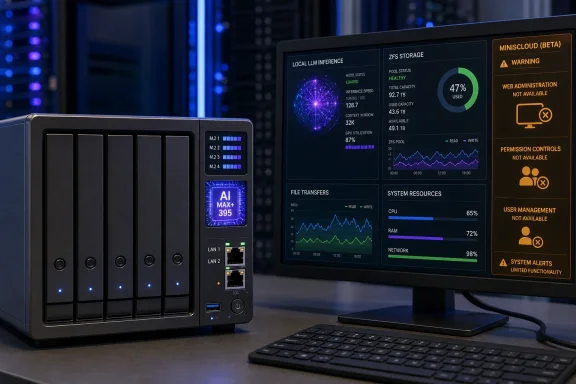 The Ryzen AI Max+ 395 makes this a server, not a conventional NAS
AMD’s Ryzen AI Max+ 395 is the N5 Max’s defining component. It has 16 Zen 5 CPU cores and 32 threads, a 40-compute-unit Radeon 8060S integrated GPU, and an XDNA 2 NPU rated at up to 50 TOPS. AMD lists up to 126 TOPS for the overall platform, a headline figure that includes multiple compute engines rather than a direct measure of LLM generation speed.The more consequential characteristic is memory design. The processor uses a wide, 256-bit LPDDR5X memory interface, and Minisforum’s 64GB configuration lets the integrated GPU access a much larger pool than the VRAM available on many consumer graphics cards. That permits local models that would not fit entirely on a 12GB or 16GB GPU. It does not make this integrated GPU equivalent to a workstation-class discrete accelerator: unified system memory has far less bandwidth than dedicated GDDR6 or HBM VRAM, and dense models expose that deficit quickly.
IT Pro’s tests make the trade-off clear. The N5 Max produced around 72 tokens per second with Llama 3.2 3B, a respectable result for an always-on appliance. But its GeForce RTX 5070 comparison system reached 316 tokens per second on the same lightweight model. The Nvidia card’s small 6GB VRAM pool could not practically host the larger models without CPU offload, however, where the N5 Max’s shared 64GB pool gives it a real advantage.
The best fits are models designed to activate only part of their parameters on each token. IT Pro measured roughly 44 tokens per second on Gemma 4 26B, a mixture-of-experts model, while dense Gemma 4 31B fell to about 9 tokens per second. A separate hands-on assessment from Level1Techs reached the same broad conclusion under Proxmox and Linux containers: a Qwen 30B mixture-of-experts model generated at approximately 62 tokens per second, while denser model formats were dramatically slower.
That is the central technical reality of the N5 Max. It is a capable local AI server for carefully chosen, quantized models—not a general substitute for a high-VRAM Nvidia workstation.
The memory ceiling narrows the “large local model” claim
The N5 Max’s largest limitation is not the installed 64GB of memory, but how much the firmware allows the GPU to claim. IT Pro found a default GPU allocation of roughly 30GB and a BIOS ceiling of 48GB. That makes large 4-bit model files possible in some cases, but not necessarily usable once context windows, runtime overhead, the operating system, ZFS cache, containers, and normal NAS activity are included.Level1Techs documented the same default split in more detail: about 60GB is usable after platform reservations, with the out-of-box configuration assigning roughly half to CPU use and half to GPU-visible memory. Its testers reported that an AI-focused configuration can push GPU visibility higher, but at a sharp cost to RAM available for the host and storage services.
This is where the N5 Max’s two identities collide. ZFS benefits from memory for its Adaptive Replacement Cache, and a NAS serving several users, snapshots, containers, or virtual machines needs headroom. Allocating 48GB or more toward local inference turns the system into an AI appliance with storage attached; leaving the default split makes it a balanced but constrained NAS. Minisforum does not make that operational trade-off prominent in its sales material.
There is also a current specification inconsistency on Minisforum’s U.S. store. The product selector lists a 64GB model at $2,599 and a 128GB version at $3,999 marked out of stock, while the comparison specifications further down the same product page state that the N5 Max supports “up to 64GB.” The retail page therefore does not establish whether a 128GB configuration is truly shipping, forthcoming, or simply a placeholder SKU. Buyers who need 128GB for larger-model headroom should not treat it as available until Minisforum resolves that contradiction.
Storage results are strong, but the 10GbE claim remains unproven by this review
IT Pro configured five 2TB WD Red Plus disks in RAID 5 and two SSDs in RAID 1, later testing an SSD cache arrangement. The N5 Max achieved an 843 score in PCMark 10’s Data Drive benchmark and sustained more than 590MB/s in ATTO transfers at 64KB operations and above under MinisCloud. Its real-world Windows copy test, involving roughly 11,000 small files alongside larger files, reached around 145MB/s from disk and 165MB/s with SSD cache.After moving to TrueNAS, the same hardware wrote the 11GB test data set to the disk array at 202MB/s, completing the transfer in less than a minute. IT Pro also reports no measurable storage slowdown during its AI testing. That is persuasive evidence that the 16-core processor has enough CPU capacity to avoid a simple file-server-versus-inference bottleneck.
It is not evidence that the N5 Max reaches 10GbE throughput. IT Pro explicitly states that its Windows test PC had a 5GbE interface, which capped the path before the NAS’s networking could be fully exercised. The 590MB/s peak is about 4.7Gbps before protocol overhead; it demonstrates that the machine can fill most of a 5GbE connection, but leaves the advertised 10GbE ceiling untested.
That distinction is worth making because 10GbE is a material part of a $2,599 NAS proposition. The N5 Max uses Realtek RTL8127 controllers. A Level1Techs report initially characterized those chips as 2.5GbE-capable, but that description is incorrect: the RTL8127 is a multirate 10GBASE-T controller supporting 1GbE, 2.5GbE, 5GbE, and 10GbE links. Still, Realtek’s new controller brings a software consideration that Intel-based NAS hardware does not: kernel and driver support needs to be verified on the chosen operating system release before committing to TrueNAS or another appliance distribution.
The result is straightforward. The N5 Max has the hardware for dual 10GbE, but prospective buyers should demand an
iperf3 test on their intended OS and switch rather than infer full 10GbE performance from a review limited by a 5GbE client.
MinisCloud is the weak link, and it changes who should buy the N5 Max
IT Pro’s sharpest criticism is aimed at MinisCloud. The reviewer found no browser-based management interface, requiring a dedicated Miniscloud application instead. It also found no app ecosystem, no configuration backup-and-restore facility, and separate user-account handling for SMB access and other remote services. One drive caddy’s release lever also reportedly broke with little force, a small mechanical failure that matters more on a system expected to be regularly expanded or serviced.An independently published N5 Max review on the MiniPCs community reached a similar conclusion about the software, while being less negative about its basic usability. That reviewer confirmed MinisCloud is a Debian-based, app-managed system with ZFS, Docker support, mobile integration, and remote-access tunneling. The same review lists the absence of terminal or SSH access and the lack of a web interface as major limitations, while noting that the factory 128GB system SSD can be erased and replaced with another OS.
For an enthusiast homelab, that is a solution. For a small office looking for an appliance, it is an additional project. Migrating to TrueNAS or Proxmox gives the N5 Max a more mature administrative foundation, but it also moves responsibility for updates, driver support, backups, containers, GPU acceleration, security hardening, and recovery procedures to the buyer.
Minisforum’s own roadmap makes the issue difficult to dismiss. A company can reasonably ship a beta OS with an early-adopter product, but it cannot simultaneously ask customers to treat the bundled platform as a finished private-AI-and-data-security appliance. ZFS snapshots are valuable, yet snapshots do not replace an independently tested backup or solve a broken authentication design.
A compelling build-your-own platform at an appliance price
The N5 Max earns attention because it combines five 3.5-inch SATA bays, five NVMe positions, a built-in 250W power supply, a slide-out compute module, dual 10GbE, and AMD’s most capable client APU in a compact chassis. That is a real hardware achievement. A normal five-bay NAS does not offer this level of CPU, GPU, storage expansion, or local-model capacity.The price changes the standard. At $2,599 for the current 64GB U.S. configuration before disks and additional NVMe storage, the N5 Max is not an impulse replacement for a mainstream NAS. It is competing with a carefully assembled DIY server, a conventional NAS paired with a discrete-GPU AI machine, or a compact workstation plus separate storage.
For experienced administrators who specifically want one always-on box for Windows file shares, Docker services, ZFS storage, and moderately sized local AI models, the N5 Max is a credible—and unusually space-efficient—foundation. For anyone expecting Synology-like polish, reliable web administration, and an AI stack that works without platform tuning, the evidence says to wait. The hardware is ready now; MinisCloud is still catching up.
References
- Primary source: IT Pro
Published: August 7, 2026 at 7:00 AM UTC
Loading…
www.itpro.com - Related coverage: ca.minisforum.com
Loading…
ca.minisforum.com - Related coverage: minisforum.jp
Loading…
www.minisforum.jp - Related coverage: minisforum.com
Loading…
www.minisforum.com - Related coverage: forum.level1techs.com
Loading…
forum.level1techs.com - Related coverage: store.minisforum.com
Loading…
store.minisforum.com - Related coverage: minisforum.ru
Loading…
minisforum.ru - Related coverage: minisforum.com
Loading…
www.minisforum.com - Related coverage: store.minisforum.com
Loading…
store.minisforum.com - Related coverage: servethehome.com
Loading…
www.servethehome.com - Related coverage: servethehome.com
Loading…
www.servethehome.com - Related coverage: tomshardware.com
Loading…
www.tomshardware.com